To avoid these ads, REGISTER NOW!

CNC Build & Questions

NWill

Well-known member
Joined
Oct 4, 2009
Messages
117
Location
Columbus, Ohio
I've been reading and reading and getting nowhere. I'm looking for some input as to what I am doing wrong. I have a SainSmart Breakout Board
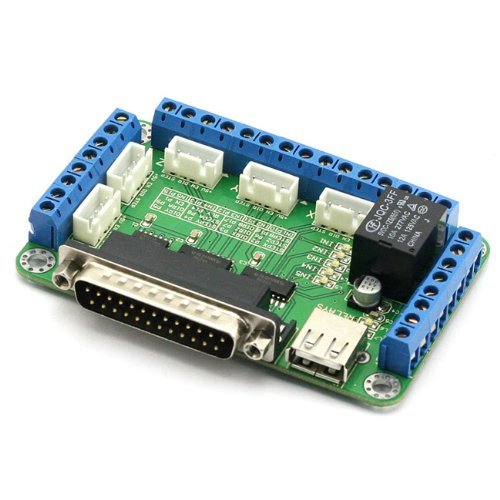
51GYTxmrvkL.jpg

http://www.amazon.com/SainSmart-Breakout-Board-Stepper-Driver/dp/B0093Y897A?ie=UTF8&psc=1&redirect=true&ref_=oh_aui_detailpage_o00_s00


This is my motor controller

http://www.applied-motion.com/sites/default/files/hardware-manuals/3535_QuickSetupGuide_920-0013.pdf


I have a few different stepper motors, all 8 wire. This is one of them.
http://www.nema17steppermotor.com/stepper-motor-425-oz-in-nema-23-kl23h286-20-8b/


I am running Mach3 and have been playing around with the ports and pins and not getting very far. I assume my wiring is wrong. Depending on how I switch it around, the motor either locks in place or moves freely. I can't get it to jog under power.

I'm sure I'll laugh eventually at the simplicity of the problem, but those days are far away. Which of the following wires between the controller and driver need moved, jumped, grounded, ignored, etc?


View media item 59549
There is nothing else hooked up. This is basically a bench test with the components and a PC sitting on my workbench (outfeed table currently)

No limit switches, no Estop, etc.
 
To avoid these ads, REGISTER NOW!
OP
N

NWill

Well-known member
Joined
Oct 4, 2009
Messages
117
Location
Columbus, Ohio
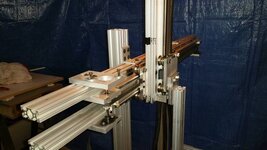
Router for now. Once I figure this stuff out I'll make a plasma table. I stumbled across everything pictured and tons more for $100. It was all part of some screen layering contraption. It put the signature screens on the credit card readers at Home Depot, etc. The company I bought it from told me they spent over $10k to build it. I wouldn't doubt it considering the amount of machined 1/2" aluminum plate this thing was cased it.

It had motors, linear actuators, pneumatics, conveyors, vac pumps, solenoids, etc. It was pretty nuts.
 

Kevin54

MEMBER EMERITUS
Joined
Jan 12, 2005
Messages
29,341
Location
Urbana, Ohio
Router for now. Once I figure this stuff out I'll make a plasma table. I stumbled across everything pictured and tons more for $100. It was all part of some screen layering contraption. It put the signature screens on the credit card readers at Home Depot, etc. The company I bought it from told me they spent over $10k to build it. I wouldn't doubt it considering the amount of machined 1/2" aluminum plate this thing was cased it.

It had motors, linear actuators, pneumatics, conveyors, vac pumps, solenoids, etc. It was pretty nuts.

Can't help you with building it, but that is a definite YOU **** for certain. I sure wish I could run across deals like that :(
 
OP
N

NWill

Well-known member
Joined
Oct 4, 2009
Messages
117
Location
Columbus, Ohio
I wish I could help but this is all still greek to me... Did you try asking at cnczone or plasmaspider?

Me too! I just posted over on CNCZONE

Can't help you with building it, but that is a definite YOU **** for certain. I sure wish I could run across deals like that :(

:lol: Thanks, Kevin. Here are some pics from the haul

All aluminum
View media item 59555
Some air lines, pneumatics, etc.
View media item 59556
More
View media item 59557
View media item 59558
View media item 59559
$400 DC Power Supply
View media item 59560
Misc. aluminum
View media item 59561
More lines and 8020
View media item 59562
$450 vac pump and a few $100 in misc.
View media item 59563
This company didn't spare any expense after looking up the prices on some of this stuff.
 

Ralphxj

Well-known member
Joined
Mar 25, 2008
Messages
413
Location
NE Ohio
I don't have Mach3 on my computer in the house but I can check in the shop for a few things. Do you have your motor acceleration set? I know if your curves aren't set you won't get any movement. Do the motors lock when you enable the system in mach3? All of my motors on my plasma table lock solid when I enable.

Are you running a fresh install of mach3 or using a computer that came with the system?? Check your system hot keys to make sure you have the arrow keys set to job the motors correctly fo lr your test if you are running their install. Also, try the system home button in mach3, that will bypass the job keys and let mach3 move the motors.
 
Last edited:
OP
N

NWill

Well-known member
Joined
Oct 4, 2009
Messages
117
Location
Columbus, Ohio
All I really did was set the x-axis pins in Mach3. It's a fresh version from Mach3 on a PC I completely reformatted with XP. I feel like I'm missing something simple. Aka a driver or something to get my breakout board to communicate with Mach3. The english/Chinese directions weren't too clear but they made no mention of a driver from what I can tell, at least it's not included on the CD they sent me.

Depending on the EN or +5 connections I make the motor is either locked or spins freely. With just the direction and step connected it is locked.
 

Ralphxj

Well-known member
Joined
Mar 25, 2008
Messages
413
Location
NE Ohio
Have you gone through the instructions for the breakout board to double check everything?

Looking at your first post and the PDF of the breakout board setup guide, it looks like you are missing power to the breakout board itself? You will need power to the breakout board as well as the motor controller.
 
Last edited:
To avoid these ads, REGISTER NOW!
OP
N

NWill

Well-known member
Joined
Oct 4, 2009
Messages
117
Location
Columbus, Ohio
Have you gone through the instructions for the breakout board to double check everything?

Looking at your first post and the PDF of the breakout board setup guide, it looks like you are missing power to the breakout board itself? You will need power to the breakout board as well as the motor controller.
The BB is powered by the USB
Lots of parts, drivers, steppers, etc..help on the Open Builds site:

http://www.openbuilds.com/builds/openbuilds-ox-cnc-machine.341/

I'll check them out. Thanks!
 

Ralphxj

Well-known member
Joined
Mar 25, 2008
Messages
413
Location
NE Ohio
To take things one piece at time, can you install a switch to the E-stop port and see if it will trip the e-stop in mach3? Or even just a wire jumper that you can plug in to trip the e-stop. That will test that breakout back is talking to mach3. That will tell you if you need any settings on the computer to see the breakout board. From there you can move to the motor controller. Double check all the motor settings and that all the ports and pins are set correct.
 
OP
N

NWill

Well-known member
Joined
Oct 4, 2009
Messages
117
Location
Columbus, Ohio
To put things into perspective, I don't even know how :lol: I figure that's a straight forward enough thing to google how to do. I was wondering about the estop thing on Mach3...whether or not to activate it, emulate it, etc.

All of this reading and getting nowhere has me overwhelmed. I need to slow it down and take it step at a time.

I'll get back at it in the AM, time for a few more drinks :beer:
 

Ralphxj

Well-known member
Joined
Mar 25, 2008
Messages
413
Location
NE Ohio
You will need to need to hit reset on mach3 to active the program. You will get a solid green light when it's active. If it's flashing red are not connected to control anything.

If you are active with a solid green light and jump the 2 ports for the e-stop button it will reset and start flashing again. That will tell you if you are connected to mach3 with your controller.
 
OP
N

NWill

Well-known member
Joined
Oct 4, 2009
Messages
117
Location
Columbus, Ohio
The motor moved! I got estop to trigger the RESET button. Check. As for thinking it was something really simple and stupid, check. I set the ports and pins check marks but never changed the pin value from 0 to 1,2,3,etc. After going through all that again I got the motor to move but doesn't seem like it's moving how it should. It makes tiny steps and doesn't seem smooth AT ALL. I know its a "stepper" motor but the steps seem really twitchy. I assume there is a value somewhere that changes that?

With the STEP and DIRECTION wires between the motor and driver it does nothing. When I connect the 5V wire it moves like described above. Does the EN connection need to be made as well? Every diagram I look at seem to show something different.

Man, that only took 3 days to get the motor do anything. It may not be moving how it should but the components are talking!
 
OP
N

NWill

Well-known member
Joined
Oct 4, 2009
Messages
117
Location
Columbus, Ohio
Well I cranked up the acceleration and velocity and it's moving faster now but still twitchy. Suggestions? Maybe motor isn't wired correctly? It there a setting to smooth out pulses? Thanks!
 

Ralphxj

Well-known member
Joined
Mar 25, 2008
Messages
413
Location
NE Ohio
There should be a spot to set the motor steps. Double check that the mach3 settings match the actual motor you are using.

Make sure you have the correct phase current selected with the dip switch on your motor controler. If the link above is for the motor you are testing with, it's 2.8a.

Setting the steps will probably be the place to start.
 
Last edited:

Hellhound007

New member
Joined
Apr 11, 2016
Messages
1
You need to increase your steps per inch.

In looking at your display, you are set way low. Your stepper is 200 steps per rev. On your controller you have a dip for half or full step. So depending on the setting, you will have 400 steps per rev, or 200.

So set your steps per inch in mach to like 1,000 and max velocity to 100ipm. Set accel to 5ipm. The. Hold down the arrow key. The motor should start out slow, but then ramp at a steady rate until you either run at full speed, or mach chokes and the motor becomes erratic. Because if you make it to 100ipm, mach is throwing 100,000 pulses per min at it. Somewhere along the way you should hear a steady electrical whine, and the motor should be smooth.

Under the diagnostic tab, you can see the current velocity. Monitor it and see when the motor smooths and when it becomes erratic. That will give you some targets.

Once you mount the motor, you will need to fine tune velocity and accel. Both will be limited by the power of the stepper, and the mass that you are trying to accelerate. You will also need to look at your ballscrew ratio to set your steps per inch for the final application.

I have a bridgeport boss, and the steps per inch for it are 1,000 for a full step. My drive micro steps at 10 micro per full step, so I have to set mach at 10,000 to move an inch.

My heavy Bridgeport table maxes out at about 80ipm with a 10ipm accel rate, but I am also slinging around a 100+ lb table and my number of steps per min has maxed out the parallel port capabilities. I am currently rebuilding it, and transitioning to a motion controller to try and get above 100ipm rapids.
 

Ralphxj

Well-known member
Joined
Mar 25, 2008
Messages
413
Location
NE Ohio
Great info! Also, on mine if I just use the arrow keys alone, it does slow movements, but if I hold down the shift key and use the arrows, it does rapid movements to change position. I don't remember where that setting is, but try that as well and see if the motor speeds up.
 
OP
N

NWill

Well-known member
Joined
Oct 4, 2009
Messages
117
Location
Columbus, Ohio
There should be a spot to set the motor steps. Double check that the mach3 settings match the actual motor you are using.

Make sure you have the correct phase current selected with the dip switch on your motor controler. If the link above is for the motor you are testing with, it's 2.8a.

Setting the steps will probably be the place to start.

Thank you, I was just reading about that yesterday

You need to increase your steps per inch.

In looking at your display, you are set way low. Your stepper is 200 steps per rev. On your controller you have a dip for half or full step. So depending on the setting, you will have 400 steps per rev, or 200.

So set your steps per inch in mach to like 1,000 and max velocity to 100ipm. Set accel to 5ipm. The. Hold down the arrow key. The motor should start out slow, but then ramp at a steady rate until you either run at full speed, or mach chokes and the motor becomes erratic. Because if you make it to 100ipm, mach is throwing 100,000 pulses per min at it. Somewhere along the way you should hear a steady electrical whine, and the motor should be smooth.

Under the diagnostic tab, you can see the current velocity. Monitor it and see when the motor smooths and when it becomes erratic. That will give you some targets.

Once you mount the motor, you will need to fine tune velocity and accel. Both will be limited by the power of the stepper, and the mass that you are trying to accelerate. You will also need to look at your ballscrew ratio to set your steps per inch for the final application.

I have a bridgeport boss, and the steps per inch for it are 1,000 for a full step. My drive micro steps at 10 micro per full step, so I have to set mach at 10,000 to move an inch.

My heavy Bridgeport table maxes out at about 80ipm with a 10ipm accel rate, but I am also slinging around a 100+ lb table and my number of steps per min has maxed out the parallel port capabilities. I am currently rebuilding it, and transitioning to a motion controller to try and get above 100ipm rapids.


Thank you as well, this gives me a good place to start! It will be a short work day
 
To avoid these ads, REGISTER NOW!
Top Bottom