To avoid these ads, REGISTER NOW!

compressor issue

blaze_125

Well-known member
Joined
Mar 4, 2008
Messages
260
I have issues with a compressor of mine.
It's a small 110v unit.

I'll plug the cord in the outlet, turn the switch ON, then the compressor starts working and building pressure in the tank.
Fine, that part works.
But all of a sudden, it stops working.
The pressure switch should stop the motor at 115psi, but the motor shuts off at random pressures. Sometimes above 70, sometimes lower... Every once in a while it will fill a whole tank at 115, but those are the days where I mark the calendar type thing...

At first I thought the pressure switch was the problem. So I changed it for a brand spanking new one! But I still have the same issue. Compressor turns on, build up little pressure, then turns off.

After the motor has turned off, I flip the switch to OFF, and the pressure releases from the switch, so the motor is not shutting off from the switch.
If I try to start it up right away, it does nothing. I can flip the switch back and forth for some time and the motor won't start running again. Sometimes it can take a few minutes before it starts working again, sometimes longer.

Anyone has a clue what the hell is going on with my little buddy?

It's very similar to this:
cambell%20hausfeld%20reconditioned%20air%20compressor%20HL410100RB.jpg
 
Last edited:
To avoid these ads, REGISTER NOW!
OP
B

blaze_125

Well-known member
Joined
Mar 4, 2008
Messages
260
Is there a start capacitor on the motor? It might be getting hot and not working? No expert here:(

I know about the flux capacitor in the Dolorean, but I have no idea about the compressor :headscrat
But my guess is some kind of excessive heat of some switch somewhere on the unit.

The intake manifold does get really hot.
 

930dreamer

Super Moderator
Staff member
Joined
Oct 7, 2009
Messages
22,958
Location
Amarillo,TX and Stinnett,TX
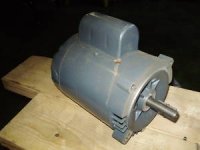
Remove the plastic end cover and see if there's a capacitor attached to the motor. It would be under the half circle cover in picture.
 

Attachments

  • !BtQln5wCWk~$(KGrHqEH-DsEvpZ7q4SvBL7KRhgt+!~~_35.jpg
    !BtQln5wCWk~$(KGrHqEH-DsEvpZ7q4SvBL7KRhgt+!~~_35.jpg
    8.2 KB · Views: 4
OP
B

blaze_125

Well-known member
Joined
Mar 4, 2008
Messages
260
Alright, so I had some time to take the cover off and I did find something that could be a capacitor.

How do I test it to know if it's bad?
 

930dreamer

Super Moderator
Staff member
Joined
Oct 7, 2009
Messages
22,958
Location
Amarillo,TX and Stinnett,TX
The best way to really test a capacitor is to substitute a known good one. If your going to remove the capacitor touch a plastic handled screwdriver to both wire connections to discharge it.
Remove the suspected faulty capacitor from the unit. If it's a high powered capacitor, it will still hold a high charge. Discharge the capacitor by using a metal screwdriver with a handle that's insulated. Touch the metal end of the screwdriver to both metal terminals at the same time to discharge any power left in them.

Step 2
Turn on the capacitor tester and make sure it's getting power. Plug in the tester probes according to the instructions on the meter. Set the selector to an OHM scale before testing the capacitor. Some meters will have an OHM setting pre-set for you.

Step 3
Touch the leads together so that the meter will zero out by adjusting the wheel on the meter.

Step 4
Note where the meter points to before touching the wires to the capacitor. Then touch the terminals of the capacitor with the red probe, which will go on the left, and the black probe which will go on the right.

Step 5
Watch the pointer on the meter. The needle should move away from the left side, or the infinity, and veer toward the right before returning to the infinity. It should move further to the right when the probes are reversed. This means the capacitor is good. If the needle goes all the way to the right side and doesn't return to the left, or infinity side, the capacitor is bad, or it has shorted out


Read more: How to Test a Capacitor | eHow.com http://www.ehow.com/how_2072923_test-capacitor.html#ixzz0wJ2MVeDp
 
Last edited:
To avoid these ads, REGISTER NOW!

larry_g

Well-known member
Joined
Apr 28, 2007
Messages
16,880
Location
oregon
A failed start cap will not randomly STOP the motor. If it starts good when cool I would not suspect the start cap as the root of your problem. I would more highly suspect a thermal overload in the motor. Is the motor clean with open air vents? Does the pump have oil in it? Is the motor fan cooled and is the fan still in good condition? Sometimes these cheap fans are a press fit to the shafe and will become disconnected.

lg
no neat sig line
 

larry_g

Well-known member
Joined
Apr 28, 2007
Messages
16,880
Location
oregon
I just found something...
http://www.wikihow.com/Check-a-Start-Capacitor

I guess that will be my evening project.
Now if it turns out bad, where can someone buy something like that?
I Googled it but I have yet to find something.

One good place to find start caps is at the well and pump shop. Also plumbing shops that do well pumps. Air conditioning repair shops also stock caps. Appliance repair shops. Should be a $10 item. But as I sain in my other post I wouldn't suspect the start cap first. If you also have a RUN cap then you might have this problem as described.

lg
no neat sig line
 
OP
B

blaze_125

Well-known member
Joined
Mar 4, 2008
Messages
260
A failed start cap will not randomly STOP the motor. If it starts good when cool I would not suspect the start cap as the root of your problem. I would more highly suspect a thermal overload in the motor. Is the motor clean with open air vents? Does the pump have oil in it? Is the motor fan cooled and is the fan still in good condition? Sometimes these cheap fans are a press fit to the shafe and will become disconnected.

lg
no neat sig line

Oil level is good
Motor seems clean
The intake does have a foam filter but the compressor acts the same even when the filter is off
The fan is in great condition and spins as I think it should

I'll have to test it again, but I think I remember it running longer with the pastic cover off. And although the oil level is good, I don't recall ever changing the oil in it. So maybe that should have been my first step, but when I pull the dip stick, the oil on it is clear.
 

Major Ramifications

Well-known member
Joined
Feb 28, 2005
Messages
4,673
Location
River Ridge, Louisiana
Guys, leave the capacitor alone. Those units have a thermal switch that will cause the symptoms you are describing. I have seen them go kooky and shut the thing off for no reason at random pressures.
Also, are you using an extension cord? That can cause it to draw too much current and trip the overload.
 
OP
B

blaze_125

Well-known member
Joined
Mar 4, 2008
Messages
260
Guys, leave the capacitor alone. Those units have a thermal switch that will cause the symptoms you are describing. I have seen them go kooky and shut the thing off for no reason at random pressures.
Also, are you using an extension cord? That can cause it to draw too much current and trip the overload.

No extension cord. Directly plugged in the wall outlet.
Can those thermal switch be changed?
 

yiranhu

Well-known member
Joined
Jan 29, 2010
Messages
62
Just because you are not using an extension cord, it doesn't mean what Ramifications described can't happen. Try running the compressor from a different wall outlet first before doing anything with the thermal switch. Make sure the outlet is very close to the electrical panel so that the wire length is minimum.
 
OP
B

blaze_125

Well-known member
Joined
Mar 4, 2008
Messages
260
Just because you are not using an extension cord, it doesn't mean what Ramifications described can't happen. Try running the compressor from a different wall outlet first before doing anything with the thermal switch. Make sure the outlet is very close to the electrical panel so that the wire length is minimum.

It was happening at my parents place, and it's now happening at my place to. So I can rule out the outlet.

My house and wireing is less than 3 years old.
 
To avoid these ads, REGISTER NOW!
Top Bottom