To avoid these ads, REGISTER NOW!

Computer problem

Rewind97

Well-known member
Joined
Feb 15, 2013
Messages
1,549
Location
Mississippi
My computer (I'm guessing) has done some type of automatic update. Now every morning when I pull up my pages I have to re-log into each one, even though I have checked the "keep me logged in" box.

Any ideas how to stop this?
 
To avoid these ads, REGISTER NOW!

Cruzan80

Well-known member
Joined
Jul 22, 2015
Messages
4,297
Location
Denver, CO
Probably a setting inside Firefox about when it dumps cookies. Those are the little bits of code which keep you logged in. Change it under Preferences. IIRC the manual shortcut is ctrl+shift+del.
 

Chaznsc

Well-known member
Joined
Apr 9, 2013
Messages
6,545
Location
SC
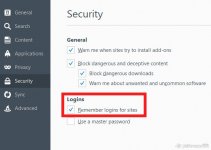
In Firefox go into your options, find security and make sure this is checked. I would also clear the cache.
 

Attachments

  • firefox.jpg
    firefox.jpg
    33.1 KB · Views: 69

jimreed2160

Well-known member
Joined
Aug 7, 2016
Messages
3,589
Location
Tallahassee FL
I am a former IT infrastructure manager and would recommend that you keep your personal computer settings for automatic updates. There are bad actors out there and Microsoft does a good job of keeping the bad guys at bay. The result is a little inconvenience on your part. Most update packages are released on Patch Tuesday but emergency out of band security updates can come anytime.

1. Automatic updates require only minor inconvenience.
2. Manual updates require checking daily.
3. Updates whenever you think about it exposes your pc to risk. I have seen many cases of compromised workstations and most of them brought a boatload of inconvenience.
 

cheechi

Well-known member
Joined
Feb 29, 2012
Messages
4,384
Location
Triad, NC
occasionally (this is going back to firebird 0.8 back in 2002, it's happened to me about 6 times over the years) firefox and other mozilla browsers will 'forget' the profile or it may become corrupted. Are your bookmarks gone? any saved form info? Sometimes you can go delete a new default profile created in this and it will 'find' yours again, other times you may be able to 'find' it by installing another browser and it looks for what to import, then you can import back to firefox through there.

if it's just cookies and cached info but your bookmarks are fine, run ccleaner and look to see if a recent update to the browser and any addons happened right around the time it started. sometimes it can be fixed by any browser or addons updates that are waiting also. you might just have to log into everything again, but once you do it should remember you as long as it's supposed to.
 

Milton Shaw

Well-known member
Joined
Feb 11, 2011
Messages
4,845
CCleaner and other utilities will erase your cookies and passwords if you run them without unchecking cookies and passwords. These programs are made to free up space on your hard drive and make your computer safer and more stable, but will play hell with passwords.
 

bushmechanic

Well-known member
Joined
Mar 17, 2014
Messages
4,820
CCleaner and other utilities will erase your cookies and passwords if you run them without unchecking cookies and passwords. These programs are made to free up space on your hard drive and make your computer safer and more stable, but will play hell with passwords.

True.

Importantly, however, Firefox itself will automatically update now unless you tell it not to. Can't remember where the setting is, as the browser got a bit bloated for my tastes a while back.

It's possible Firefox decided to update. If it was a Windows update that cleared all your passwords, it would have had to have been a big one. Most of the time when this happens, though, it comes down to someone seeing a "delete browsing history" selection for the first time...

...whether or not they want to admit it. :lol:
 
To avoid these ads, REGISTER NOW!
OP
R

Rewind97

Well-known member
Joined
Feb 15, 2013
Messages
1,549
Location
Mississippi
Is it only GJ that logs you off or is it several different sites?


It's all the sites I regularly visit.

My bookmarks are still there, but when I pull them up I have to log in again every time.


Sent from my iPhone using Tapatalk
 

58Yeoman

Well-known member
Joined
Oct 1, 2010
Messages
8,999
Location
Central IL
In Firefox, click on the 3 bars in upper right corner, then Options, then Security. Is the box for remembering passwords checked?
 

dogdog

Well-known member
Joined
Nov 15, 2011
Messages
12,711
It is checked. Anything else?

I agree, I'll be keeping the automatic updates.

What others say, do you have a cookie monster stealing all your saved cookies.?

Also this comment....
hello, firefox won't save your passwords when you've set it up to run in permanent private browsing mode ("never remember history" in the options > privacy panel).
 
Last edited:

cheechi

Well-known member
Joined
Feb 29, 2012
Messages
4,384
Location
Triad, NC
It's all the sites I regularly visit.

My bookmarks are still there, but when I pull them up I have to log in again every time.
I'm pretty sure something either a cookie or some cached data is corrupted. That's why I suggested
if it's just cookies and cached info but your bookmarks are fine, run ccleaner and look to see if a recent update to the browser and any addons happened right around the time it started.

CCleaner and other utilities will erase your cookies and passwords if you run them without unchecking cookies and passwords.
Since the cookies that keep you logged in and potentially saved passwords are already a problem as described above, that's why I suggested it.
 
OP
R

Rewind97

Well-known member
Joined
Feb 15, 2013
Messages
1,549
Location
Mississippi
Thanks for all the suggestions and feedback!!!! Nothing I did helped so I uninstalled Firefox and reinstalled it and that fixed it.
 

Whitworth

Well-known member
Joined
Dec 26, 2011
Messages
2,097
Avoid automatic updates if at all possible. Much of it (Windows updates) are not vital and tend to slow down your system. That's the best case scenario. Other times automatic updates can leave you with the blue screen of Death.

Instead, go to the computer manufacturer's website and check for critical updates there for your computer's model and OS. Check for updates every few months or so. These will be tested to be compatible with your system.
 

TK-421

Well-known member
Joined
Dec 29, 2015
Messages
1,398
Location
Pflugerville, TX
Avoid automatic updates if at all possible. Much of it (Windows updates) are not vital and tend to slow down your system. That's the best case scenario. Other times automatic updates can leave you with the blue screen of Death.

Instead, go to the computer manufacturer's website and check for critical updates there for your computer's model and OS. Check for updates every few months or so. These will be tested to be compatible with your system.

Don't know which updates you've been getting, but I've been using Windows for almost 26 years, and in that time I've never turned off automatic updates, and I've never had them ever give me a problem. You can tell it to not install the non-vital updates.

And it's a little difficult to go to the manufacturer's website and get updates for your computer's model when you built it yourself. ;)
 

Whitworth

Well-known member
Joined
Dec 26, 2011
Messages
2,097
Don't know which updates you've been getting, but I've been using Windows for almost 26 years, and in that time I've never turned off automatic updates, and I've never had them ever give me a problem. You can tell it to not install the non-vital updates.

And it's a little difficult to go to the manufacturer's website and get updates for your computer's model when you built it yourself. ;)

Microsoft itself has acknowledged defective updates that have crashed systems in the past, on many occasions.

MS updates are a one-size-fits-all solution to a myriad of brands and models, many with proprietary firmware.

Your home-made computer system(s), while I'm sure are nice builds, probably use the most generic chip sets and bios and are less likely to have problems with MS updates.
 
To avoid these ads, REGISTER NOW!
Top Bottom