To avoid these ads, REGISTER NOW!

Concept for simple "what's in that box" inventory tracker

truckin-on

Active member
Joined
Oct 25, 2018
Messages
39
Location
NJ
I have a ton of parts all over the place - from various projects and cars current and past. Although I’ve not been doing too bad trying to remember what I have, it’s a PITA to sort through a bunch of boxes to find something that I KNOW I have - somewhere.

I considered an inventory system, but I don’t have the patience or need for an individual part-by-part inventory. It is really more than what I need. I just want some help to remember what the heck I have and where it is, and I want to be able easily look-up “what box is that Corvair carb in” and “where did I stuff it”?

A simple spreadsheet with location (storage area or cabinet number) / sub-location (shelf number) / type (parts, tools, books, other) / box # (I’m using the first letter for the manufacturer in the box, so box C-1 is Corvair, box L-3 is Lotus, etc.) / contents (some brief description) / picture (a snap of the contents of the box before it’s closed-up). I wanted to be able to easily capture all this from my phone while working in the garage/barn/shop, otherwise I’m certain I’d never do it. I’m using the first letter of the manufacturer in the box #, so box C-1 is Corvair, box L-3 is Lotus, etc.

Turns out Google Forms does a pretty decent job of providing a simple interface to capture inventory. It also has an automated link to populate an associated Google sheet. This makes it really simple to construct a “form” you can fill from your phone, using drop-downs or check-boxes, which will automatically populate an associated Google Sheet (excel spreadsheet like) with each entry. It also works to allow you to easily and automatically upload a snapped picture of the box when you fill out the entry. I thought the picture would be very helpful as a reminder along with the brief description, of what was actually in the box.

A bit of time constructing the form, and I was off and running! I then put a link to the google web-form on the top menu of my phone so it’s easy to access. If you want to play with it, here is a link to the google form:
https://docs.google.com/forms/d/19lgvjhuW2ymJsGC3ClUYkdN7CaWFZe-DnoRbWM4Znz4/edit?usp=sharing

You will need to make a copy in your own google drive – click on the three vertical dots in the upper-right corner, then click on “save a copy” to save your own version.

I’d be interested in thoughts on this approach, and what else you would capture, either optional or required, to make it more useful. After things are loaded in, I can easily sort the list any way I want and can click on the picture to see what’s in the box if the description isn’t enough. Looks pretty handy and I think it will meet my needs.
 
To avoid these ads, REGISTER NOW!

finn

Well-known member
Joined
Mar 27, 2005
Messages
16,227
Location
The UP, God's country
I am moving towards clear or semi clear storage bins.

If I can see at least some of what’s in the bin, I have a fighting chance.

Not so much if the bin is opaque.

Hard to find sturdy clear bins, though.
 

bri_man57

Well-known member
Joined
Mar 6, 2013
Messages
189
Location
Windsor Colorado
That's a great idea, I like that. I was doing plastic bins, calling them like "parts a, parts b" etc, and just listing the contents in google sheets. Working well for me. I would do a bin here or there until I am done. Got 3 to go or so. Also, as I am doing this, trying to get rid of **** I don't need.

Sent from my SM-N920T using Tapatalk
 
OP
T

truckin-on

Active member
Joined
Oct 25, 2018
Messages
39
Location
NJ
In my purge & inventory effort, I've thought a bit about the “categories of stuff” that I accumulate and store, and have mentally compartmentalized it into these buckets:

  • Things (parts) I probably will need for a current or planned project
  • Things I probably won’t need – until the day after I get rid of them (which probably means they fall into the following category). Example: 5 air cleaner housings, when I have two engines to build.
  • Things I don't think I will need that “have value” and that should be dealt with at some time, but now is not that time.
  • Things I removed from a car I have that I don’t intend to ever use, but should be kept to go with the car if it’s ever sold (original bits).
  • Things that are just plain cool to have or look at, which have no possible use anywhere other than a display shelf.
  • Tools that I use “frequently” that don’t fit in any tool box.
  • Tools that I hardly ever use, but when you need it, you REALLY need it.
  • Books, Manuals, Magazines, etc.
  • Raw materials I may need at some point (metal, paint, etc.)
 
OP
T

truckin-on

Active member
Joined
Oct 25, 2018
Messages
39
Location
NJ
I am moving towards clear or semi clear storage bins.

If I can see at least some of what’s in the bin, I have a fighting chance.

Not so much if the bin is opaque.

Hard to find sturdy clear bins, though.

Agree on all of the above.

https://www.uline.com/ is a great source for storage bins, boxes, and related stuff.

My problem is things that don't fit into whatever the storage bin size is or are too heavy. For the most part, I gave up trying to standardize on a storage bin size, and just use whatever I have.
 

Renegade1LI

Well-known member
Joined
Mar 11, 2018
Messages
4,946
Location
long island ny
I try to mark all boxes with a sharpie and tape, try and keep like with like. I like to open a cabinet and read what's in the box or see it, tool cases I write on them what the tool is.
 

klxrcr

Member
Joined
Oct 28, 2012
Messages
14
Location
Missouri
My work uses a similar google doc form to keep track of spare part inventory. They have a cheap android tablet where you enter part information/shelf location then add or subtract it from inventory.
 

Angelfire

Well-known member
Joined
Mar 22, 2012
Messages
1,367
Location
New Mexico and Ireland
I’m using Totescan. It’s an app that uses QR codes that you affix to the box. Can then input all your items in that box, photos, etc. I like it as it has a search feature so you can find exactly which box that lost doohickey is in
Cheers
 

e015475

Well-known member
Joined
Jul 24, 2012
Messages
643
Location
Show Low and Mesa Arizona
My inventory tracking is quite a bit less sophisticated. I need to have a visual of what's in the box without having to open the box

I usually have a couple of car restoration projects going on, so I take an image out of a catalog and import it into power point. If it is a numbered bubble diagram, I highlight the items that are in the box, print the image and paste/tape it on the box.

View media item 110241

When I don't have some sort of illustrated catalog to steal an image from, I just spread the box contents out on the floor and take a photo with my cell phone, print it, and stick it on the box.

All the boxes fit into a storage rack in the shop with the image facing outwards so I can quickly scan the contents for what I need for my project.

For boxes, I just bought double wall cardboard boxes that fit the storage rack well. They're mostly of uniform size, but there's larger and smaller ones too
 

Git

Well-known member
Joined
May 18, 2008
Messages
6,894
Location
S Cal
If you use a Windows computer there is a free app/program called OneNote from Microsoft

Basically it is an electronic notebook that is stored in the cloud at your Microsoft Account. So basically you can make 'sections' for different things and then individual pages in each section. Any text that you type in can be searched. You can also paste in pictures, excel spreadsheet links, internet links, etc etc. Lastly you can password protect sections if you want.

So if you wanted to you could title a page 'front suspension' and just take some pics of the box and contents along with where it is located and you could easily find that page from a search

It is my most used program and I rely on it heavily.

Take a look:
https://www.microsoft.com/en-us/mic...gital-note-taking-app?ms.url=onenotecom&rtc=1

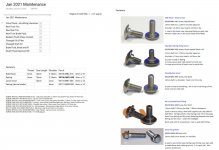
I just finished up some annual maintenance on my motorcycle - this is what the page looks like from my notebook
 

Attachments

  • Tri -  1071.jpg
    Tri - 1071.jpg
    145.3 KB · Views: 49

e015475

Well-known member
Joined
Jul 24, 2012
Messages
643
Location
Show Low and Mesa Arizona
This is another part of my 'low tech' inventory system.

I bought about 25 of these totes on CL - they're used at drug stores to resupply inventory and are about 22" long, 11" wide and 8" tall. I paid $4 each for them and can buy new ones for about $11. I imagine you can get something similar from Uline
View media item 110242
The advantage to these totes is that they can open and close without a separate lid or taping it back shut like a cardboard box. The size is very easy to handle and they are pretty durable.

They are stackable, but they work best in a rack where you can access them without the 'tetris' problem. (I recently moved and it took all of five minutes to move my shop inventory with a hand truck - still need to build the storage rack in the new shop)

I'd marked a lot of them with masking tape and a sharpie, but the tape tends to come off so I just started marking the boxes with a sharpie. To repurpose the box I just wipe it with a little acetone and remark it.

I tend to store stuff that is in the nature of stuff I'll use in a project like "120V Electrical", "Drywall Tools", "PVC Irrigation", "Toilet Parts", "Ratchet Straps" - you get the idea. If I have a general clue as to what's in the box, I can generally remember the contents.
 
To avoid these ads, REGISTER NOW!

Hem1TP

Member
Joined
Jan 22, 2021
Messages
7
Location
TX
I’m using Totescan. It’s an app that uses QR codes that you affix to the box. Can then input all your items in that box, photos, etc. I like it as it has a search feature so you can find exactly which box that lost doohickey is in
Cheers

Thanks for this Angel, now I have a new project for when I return home! I plan on inventorying my totes and indexing their locations so we can search fro anything from anywhere and know its precise location; ie: shop, garage, attic etc... I think elephanttrax is another one but it seems this app looks fairly all-inclusive and user friendly. I think duck tape brand has an app as well...

What is your experience with Totescan? Do you recommend? Thanks, Tim
 

ford33

Well-known member
Joined
Feb 26, 2011
Messages
2,118
Location
Chicago, IL. USA
I use clear plastic totes with a clear lid that has four locks to secure the lid to the bottom. They are made by Sterilite 54 quart I believe.

I label the tote with the type of products inside such as electrical items, plumbing, wood finishing, carpentry, etc. All my totes are the same size and same manufacturer so I can move them from one shelf to the next and organize them as needed. I can easily see inside them. It's saved me a ton of time and I can find parts and even tools quickly by going through a few totes to find the tool or parts I need.
 

Angelfire

Well-known member
Joined
Mar 22, 2012
Messages
1,367
Location
New Mexico and Ireland
Thanks for this Angel, now I have a new project for when I return home! I plan on inventorying my totes and indexing their locations so we can search fro anything from anywhere and know its precise location; ie: shop, garage, attic etc... I think elephanttrax is another one but it seems this app looks fairly all-inclusive and user friendly. I think duck tape brand has an app as well...

What is your experience with Totescan? Do you recommend? Thanks, Tim

I’ve only been using it for a few months but so far, it has worked well.
 
OP
T

truckin-on

Active member
Joined
Oct 25, 2018
Messages
39
Location
NJ
Git - Good suggestion! OneNote is a good tool for this, especially if you are detailed enough to be able to list everything! I considered that as a possibility, but I liked the google forms input structure from my phone a bit better.

My conundrum was to find a solution that didn't need me to have anything with me other than my phone and a sharpie marker. Inventory stickers, or having to type on a windows laptop would be a bit more of a hassle - and I would probably not keep it up.
 

Firebrick43

Well-known member
Joined
May 12, 2015
Messages
14,025
Location
West central Indiana
Git - Good suggestion! OneNote is a good tool for this, especially if you are detailed enough to be able to list everything! I considered that as a possibility, but I liked the google forms input structure from my phone a bit better.

My conundrum was to find a solution that didn't need me to have anything with me other than my phone and a sharpie marker. Inventory stickers, or having to type on a windows laptop would be a bit more of a hassle - and I would probably not keep it up.

If you keep up on it its worth it. Give a number to everything and use the data matrix and spreadsheet to keep an accurate inventory. A spread sheet can easily tell you when the quantity falls below a given level and then generate a list. If you use a source like Mc Master Carr you can import the output of the excel spread sheet directly into their website and order with hardly any input or searching(beyond the initial search for entering into inventory)
 

slow

Well-known member
Joined
Feb 26, 2006
Messages
2,596
Location
near Orlando
This is another part of my 'low tech' inventory system.

I bought about 25 of these totes on CL - they're used at drug stores to resupply inventory and are about 22" long, 11" wide and 8" tall. I paid $4 each for them and can buy new ones for about $11. I imagine you can get something similar from Uline
View media item 110242
The advantage to these totes is that they can open and close without a separate lid or taping it back shut like a cardboard box. The size is very easy to handle and they are pretty durable.

They are stackable, but they work best in a rack where you can access them without the 'tetris' problem. (I recently moved and it took all of five minutes to move my shop inventory with a hand truck - still need to build the storage rack in the new shop)

I'd marked a lot of them with masking tape and a sharpie, but the tape tends to come off so I just started marking the boxes with a sharpie. To repurpose the box I just wipe it with a little acetone and remark it.

I tend to store stuff that is in the nature of stuff I'll use in a project like "120V Electrical", "Drywall Tools", "PVC Irrigation", "Toilet Parts", "Ratchet Straps" - you get the idea. If I have a general clue as to what's in the box, I can generally remember the contents.

I just "salvaged" about 50 of these exact totes, they work well, but I need to get new shelving, to get around the tetris problem you described.
 

Angelfire

Well-known member
Joined
Mar 22, 2012
Messages
1,367
Location
New Mexico and Ireland
If you use a Windows computer there is a free app/program called OneNote from Microsoft

Basically it is an electronic notebook that is stored in the cloud at your Microsoft Account. So basically you can make 'sections' for different things and then individual pages in each section. Any text that you type in can be searched. You can also paste in pictures, excel spreadsheet links, internet links, etc etc. Lastly you can password protect sections if you want.

So if you wanted to you could title a page 'front suspension' and just take some pics of the box and contents along with where it is located and you could easily find that page from a search

It is my most used program and I rely on it heavily.

Take a look:
https://www.microsoft.com/en-us/mic...gital-note-taking-app?ms.url=onenotecom&rtc=1

I just finished up some annual maintenance on my motorcycle - this is what the page looks like from my notebook

My only gripe with Onenote, and I too use it extensively although not for inventory, is that MS keeps "updating" it and removing features I really like :(
 

Git

Well-known member
Joined
May 18, 2008
Messages
6,894
Location
S Cal
My only gripe with Onenote, and I too use it extensively although not for inventory, is that MS keeps "updating" it and removing features I really like :(

That's why I buy the 2016 version. It still runs and saves from a local computer but also uses the cloud. A key can be found on eBay for about $6. If you go that route, only buy from someone where you go to setup.office.com, type in they key they sold you and then you are then able to download the software directly from Microsoft
 

Angelfire

Well-known member
Joined
Mar 22, 2012
Messages
1,367
Location
New Mexico and Ireland
That's why I buy the 2016 version. It still runs and saves from a local computer but also uses the cloud. A key can be found on eBay for about $6. If you go that route, only buy from someone where you go to setup.office.com, type in they key they sold you and then you are then able to download the software directly from Microsoft

I too am using the 2016 version. I do use it extensively for making my "to do" lists weekly, tracking auto maintenance, home maintenance, projects etc...just decided to go a different route with the storage.
Cheers.
 
To avoid these ads, REGISTER NOW!
Top Bottom