To avoid these ads, REGISTER NOW!

design software

GSRinmyCRX

Well-known member
Joined
Jun 10, 2014
Messages
201
Location
Western, NY
what do you guys use for layout out floor plans, making construction details, etc. i know there are a number of free softwares out there but wasn't sure if they were worth it or is it better to spend some money and get something better.

Thanks.

Levi
 
To avoid these ads, REGISTER NOW!

Onewolf

Well-known member
Joined
Mar 15, 2012
Messages
371
Location
East Central Florida
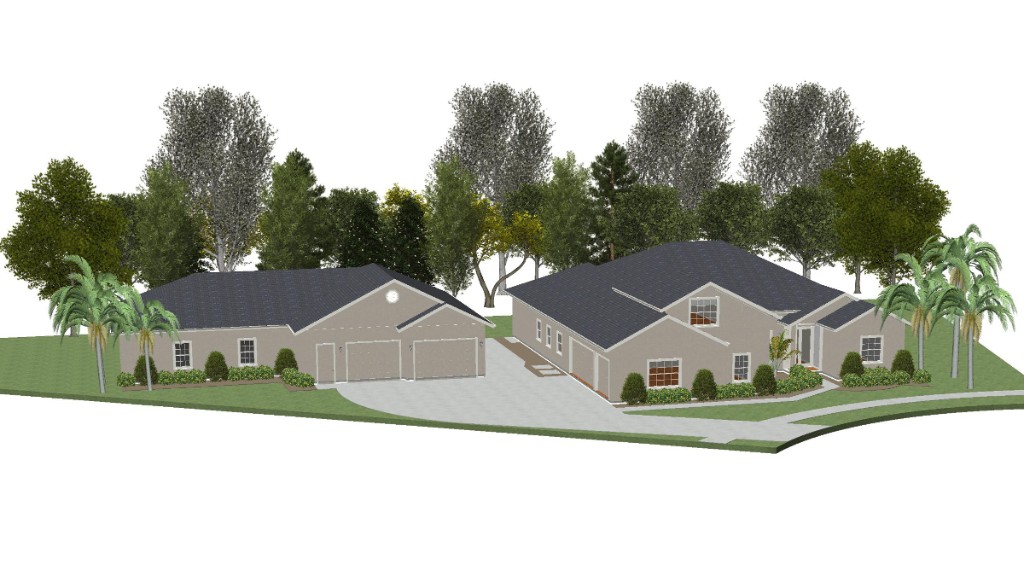
I used Chief Architect Home Designer Essentials to design our detached garage/workshop.

It does floorplans

DG_E3b_floorplanOverlay.jpg


and 3D renderings

DG_E3_front3.jpg


As with most CAD programs the learning curve is steep.
 

theoldwizard1

Well-known member
Joined
Feb 22, 2011
Messages
43,076
Location
SE MI
I use SketchUp, which is a 3D CAD program. I does have a learning curve and is really NOT the quickest, easiest thing to use for floor plans. Lot's of online training. If you master it you can make cool 3D building/homes that you can "fly" through !
 

DC73

Well-known member
Joined
Dec 27, 2014
Messages
1,627
Location
Lubbock TX
I also use Sketchup - no longer Google, they sold it to Trimble but a very robust free version is still available called Sketchup Make.

If you go with Sketchup, there are tons of tutorials online. Use them and it will shorten your learning curve.

First, learn how to create groups, then learn to use levels.

It's too easy to merge lines from one item into another which creates difficulties. For example, if you draw a wall with an opening for a door and then draw the door without first creating a group of all of the lines that it took to draw the wall, your wall and door will end up merged and it will be harder to move the door later or copy it for use in another location. The software will think the door and wall are all one item. Once you create a group, you can also lock the group to prevent accidental changes.

Learning to use levels allows you to turn off things you don't want to see. For example, I created a site plan for my house and workshop and put various things like electric lines, gas lines, plumbing, driveways, fences, notes, etc all on their own levels. That way I can choose what I want to see.

Another thing to do when starting is to get the actual GPS coordinates for any structure you are going to draw. Sketchup has a cool feature that will show the correct orientation of the sun and shadows based on longitude and latitude. Starting your drawing as close as possible to the correct coordinates makes this feature more accurate. I think you can get GPS coordinates from Google Maps.

All in all, you have to be disciplined in your drawing efforts with any CAD software to make it easier to make changes down the road.

Good luck,

DC
 
OP
G

GSRinmyCRX

Well-known member
Joined
Jun 10, 2014
Messages
201
Location
Western, NY
i have used autocad and microstation for years at work so i am familiar with drafting but from an engineers point of view not an architect. i would like to be able to produce plans that i can build from. i will give Chief Architect Home Designer Essentials a look.

Thanks.

Levi
 

Onewolf

Well-known member
Joined
Mar 15, 2012
Messages
371
Location
East Central Florida
i have used autocad and microstation for years at work so i am familiar with drafting but from an engineers point of view not an architect. i would like to be able to produce plans that i can build from. i will give Chief Architect Home Designer Essentials a look.

Thanks.

Levi

You can produce "plans to build from" with Home Designer Essentials, however do your local authorities require stamped engineering plans for permitting? Luckily the engineer that produced our stamped engineering blueprints uses the professional version of Chief Architect and he was able to import my data file so the stamped engineering blueprints were _exactly_ what I had designed (for better or worse).
 

ckprax

Active member
Joined
Aug 4, 2014
Messages
36
Location
NY
At home I use SketchUp for 3D and Draftsight for 2D, both are free.

At work I use SolidWorks and AutoCad.
 

zkling

Well-known member
Joined
Jan 23, 2007
Messages
16,939
Depending on what all you want to do. Mechanical parts, floor plans for floor layout.

Draftsight is nice for 2D
Sketchup is more for architectural
Fusion 360 by auto desk is really nice for all around part modeling
 
To avoid these ads, REGISTER NOW!

DC73

Well-known member
Joined
Dec 27, 2014
Messages
1,627
Location
Lubbock TX
Does Sketchup have an exportable file format that could be imported into other tools?

The free version (Sketchup Make) allows 3D exports into something called Collada file format (*.dae). It also allows exports into Google Earth format (*.kmz). 2D exports are limited to graphic file formats such as *.jpg, *.bmp, *.png, & *.tif.

The website says this about the Pro (paid) version: "With importers for DXF, DWG, 3DS, DAE, KMZ, TIF, JPG, PNG and a few more, you can bring in drawings, models and images to your heart’s content. SketchUp Pro also exports all of those formats, plus PDF, OBJ, FBX, XSI, VRML, MP4, WEBM and AVI."

I think there are some aftermarket paid programs that will convert Sketchup files into certain CAD formats.

DC
 

Hpozzuoli

Well-known member
Joined
Dec 11, 2013
Messages
3,428
Location
Rhode Island
I use 2020... Actually the designers do and I just review and direct changes. I do a lot of custom kitchens for a design shops clients. It's a really great package and does 3D. Seems extremely user friendly.
 

JettaGetUpandGo

Well-known member
Joined
Jun 3, 2015
Messages
685
Location
Pewaukee, WI
I use AutoCAD 2005 at work every day to design homes professionally and create construction documents. There's no need for overcomplicated software, especially for simple projects.

I've used Revit, Sketchup, Microstation, and a few others. They all have their benefits, but AutoCAD is the easiest to create working drawings.
 

jimgood

Well-known member
Joined
Aug 4, 2014
Messages
2,394
Location
Marshall, VA
Hi first post and hope I can help, below is a link to autocad360 free picker it up in a modal engineering forum, I have download and started to look but never used cad before could take some time and can't comment on ease of use

http://www.autodesk.com/products/fusion-360/overview

Hope it is of some use
I did the same based on another thread here. It is resource intensive and it's a "cloud service" so it requires a very high speed connection to the internet. If you can run internet games, it will probably work well. Read the system requirements before you bother downloading it: http://knowledge.autodesk.com/suppo...tem-requirements-for-Autodesk-Fusion-360.html
 
OP
G

GSRinmyCRX

Well-known member
Joined
Jun 10, 2014
Messages
201
Location
Western, NY
I use AutoCAD 2005 at work every day to design homes professionally and create construction documents. There's no need for overcomplicated software, especially for simple projects.

I've used Revit, Sketchup, Microstation, and a few others. They all have their benefits, but AutoCAD is the easiest to create working drawings.

this was my original thought, get an older version of autocad. where have use guys purchased older versions? ebay?

Levi
 

fartymarty

Well-known member
Joined
Nov 9, 2012
Messages
1,348
Location
Fort Worth
Is there any very easy to use software that has almost no learning curve (I can give it a day or two but that's it) that works well for structural remodeling drawings. What would be ideal is something that has a lot of predrawn objects used in home construction like cement blocks 2 x 4s 2x6s etc that I can just drag and drop on a grid rather have to draw each line of each fricken object. I don't really need 3D but of course that would be great. Free would be great too, but I'll pay a fee if I get to try it first to see if I want it or if it has a certain return time after I buy it. I've tried sketchup and blender and deleted both, I could do the whole project faster than I could learn and draw plans with either.

Probably going to have to get out my T square and start drawing but I thought I'd ask here first.
 

Innovate1

Well-known member
Joined
Jul 28, 2014
Messages
4,272
Location
Illinois near St. Louis, Missouri
I use Fusion 360 for 3d cad. Powerful and free for home and small business. Also includes CAM to generate gcode to cnc mill parts which is very nice. For simple drawings I use free LibreCAD. Seems quite capable for floor plans and building construction.
 

ed_v

Well-known member
Joined
Sep 15, 2007
Messages
1,418
Location
Kentucky
I used Chief Architect Home Designer Essentials to design our detached garage/workshop.

It does floorplans

DG_E3b_floorplanOverlay.jpg


and 3D renderings

DG_E3_front3.jpg


As with most CAD programs the learning curve is steep.

I have followed your work on the MR and MRH forums. Nice to see a fellow model railroader here.

Ed
 
To avoid these ads, REGISTER NOW!
Top Bottom