To avoid these ads, REGISTER NOW!

Desk with a PC built in

NWill

Well-known member
Joined
Oct 4, 2009
Messages
117
Location
Columbus, Ohio
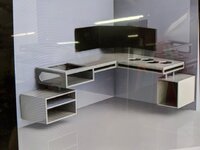
I started to design a new desk a few months ago. My original plan was to build a few quick white cabinets with a slab on top. Somehow I came across PCs in desks and it snowballed from there. Here is the initial sketch:
IMG-20200626-153714.jpg

A quick render:
IMG-20200628-172416.jpg

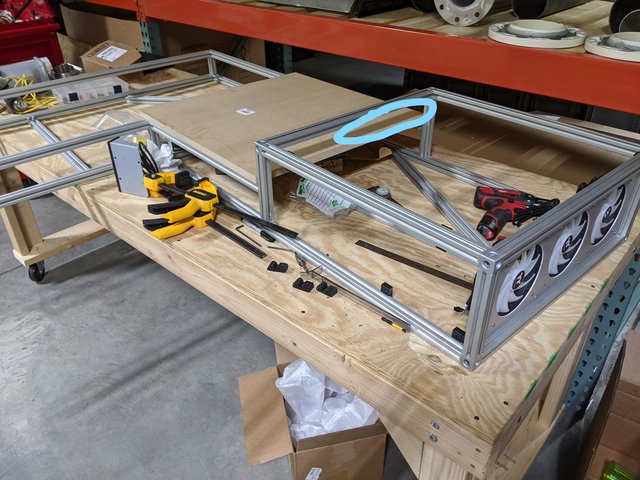
Laying out 8020 extrusion:
IMG-20200721-154015.jpg

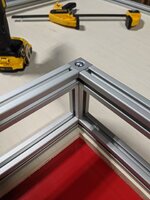
Corners:
IMG-20200731-093642.jpg

Printing panel brackets. The closest thing I found to a panel mount was $7. These cost me $.07.
IMG-20200805-204103.jpg

IMG-20200805-082701.jpg

IMG-20200805-082652.jpg

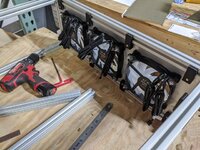
Fan mount burnt out:
IMG-20200716-134231.jpg
IMG-20200716-134723.jpg
IMG-20200716-134731.jpg
IMG-20200721-154018.jpg

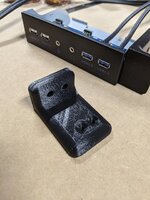
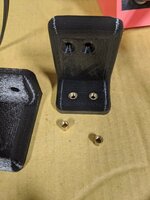
USB Hub mount 3D print test:
IMG-20200813-094043.jpg

Brass inserts in:
IMG-20200813-094352.jpg

IMG-20200813-094049.jpg

Aluminum panels:
IMG-20200813-113523.jpg

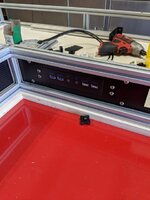
Hub mounted:
IMG-20200813-134531.jpg

Carbon wrapped:
IMG-20200805-101546.jpg
IMG-20200813-134527.jpg

Smoke break:
IMG-20200802-163623.jpg
IMG-20200802-175602.jpg

Misc top fitting:
IMG-20200803-104517.jpg
IMG-20200804-081626.jpg
IMG-20200803-104520.jpg
IMG-20200803-104906.jpg
IMG-20200731-093618.jpg

This will be used mainly for Solidworks and probably MS Flight Sim 2020. Any tips, criticism, etc. welcome.
 
To avoid these ads, REGISTER NOW!

softailgarage

Well-known member
Joined
Apr 20, 2011
Messages
5,153
Location
Bullhead City, Az.
I love the idea, have always wanted to make a desktop with a monitor recessed at an angle into the top. Just one question....where you putting the wings? :confused::lol::lol:
 

mc4life27

Well-known member
Joined
Jul 2, 2014
Messages
404
Dang that’s a lot of chicken. Any left overs? Lol


Sent from my iPhone using Garage Journal
 

CrocBox

Member
Joined
Nov 10, 2019
Messages
11
Location
FL
Very creative! I look forward to seeing the rest of the build progress.
PS I like your version of a "smoke break ".

Sent from my SM-N910V using Tapatalk
 

mv213

Well-known member
Joined
Sep 29, 2014
Messages
660
Location
Dallas, OR (the OTHER "Big D")
As a PC guy I’m impressed. I always like custom installations. One thing I would do is put a power button, reset button, power LED and hard drive LED on the front panel somewhere. You probably already have ideas about that. But I always hate having to open up a cabinet for that kind of thing.
 
  • Like
Reactions: 555
OP
N

NWill

Well-known member
Joined
Oct 4, 2009
Messages
117
Location
Columbus, Ohio
As a PC guy I’m impressed. I always like custom installations. One thing I would do is put a power button, reset button, power LED and hard drive LED on the front panel somewhere. You probably already have ideas about that. But I always hate having to open up a cabinet for that kind of thing.

Yeah definitely a power/reset button on one of the front panels. I know nothing about PCs so I am just winging it :dunno:
 
  • Like
Reactions: 555
To avoid these ads, REGISTER NOW!

Gotcha640

Well-known member
Joined
Jan 27, 2015
Messages
948
Location
Houston TX
Looks awesome!

Not sure where the fans and motherboard are in relation to the USB panel and the chair. Close enough for easy thumb drive access without poking the user.

It looks like the back of the motherboard (where the power/video/network ports are) is against a wooden part of the frame? Maybe there's more space than appears.

Where are you putting hard drives? Between mobo and fans?

Is that opening on the top to access for plugs/setup?

It looks like fans are hard mounted to aluminum hard mounted to 8020 with a great big sounding board (desk top). That could cause vibration noise, rubber mounts or slow fans or both could help.

Same vibration thought for hard drives.

If those fans are pushing in, a filter might be a good idea. Maybe being off the floor helps, depending on how clean the room is. Some kind of guard against fingers seems necessary, unless it's going against a wall, and then you need to leave room for it to move air.

Those fans pushing out with a big slow fan hidden somewhere else, maybe under a hdd rack, with a big filter could be helpful.

If you're doing a wireless mouse/keyboard, my logitech unifying receiver doesn't like being under my 1.5in thick wood desktop. Bluetooth for headphones suffers less, but if you can get those dongles in line of site to the device it helps. Again with the extension cables.

If there's room in there for a network switch, I love having one drop to my desk in the wall, and then ports available for server/desktop/laptop/printer. Yes wifi is great, but that computer isn't moving, and wired will be more reliable, especially in a metal box.

While you're printing panels, you might also fit a temperature display somewhere. I imagine you'll hear the fans spool up, but flight sim and solid works can be intense.

Maybe build in a wireless charger pad?

Build in speakers?

Ram mounts for tablet/phone, headphone racks, tray to store keyboard and mouse if you do paper drafting at the same desk?

I'm looking forward to seeing the final setup!
 

Kaizen

Well-known member
Joined
Jan 9, 2015
Messages
6,946
Location
New England
Also curious about holes in top?
Keyboard tray for a corner setup. If you can have it come out of the right desk like a corner kitchen cabinet that would be cool. Always liked this idea but many are built with wood or mdf and looks crappy. Yours is nice. Make a provision for a gaming system and start selling them


Sent from my iPhone using Tapatalk
 
OP
N

NWill

Well-known member
Joined
Oct 4, 2009
Messages
117
Location
Columbus, Ohio
Looks awesome!

Not sure where the fans and motherboard are in relation to the USB panel and the chair. Close enough for easy thumb drive access without poking the user.

It looks like the back of the motherboard (where the power/video/network ports are) is against a wooden part of the frame? Maybe there's more space than appears.
You might be looking at the workbench? It will be an aluminum panel similar to the rest.
Where are you putting hard drives? Between mobo and fans?
:dunno:
Is that opening on the top to access for plugs/setup?
That will be a hidden-ish compartment for whatever
It looks like fans are hard mounted to aluminum hard mounted to 8020 with a great big sounding board (desk top). That could cause vibration noise, rubber mounts or slow fans or both could help.
The fans are rubber mounted
Same vibration thought for hard drives.
Good call, i will need to isolate those as well
If those fans are pushing in, a filter might be a good idea. Maybe being off the floor helps, depending on how clean the room is. Some kind of guard against fingers seems necessary, unless it's going against a wall, and then you need to leave room for it to move air.
I plan on having a slide out filter somewhere. The idea is to make a slide out cartridge and cut up HVAC filters to use.
Those fans pushing out with a big slow fan hidden somewhere else, maybe under a hdd rack, with a big filter could be helpful.

If you're doing a wireless mouse/keyboard, my logitech unifying receiver doesn't like being under my 1.5in thick wood desktop. Bluetooth for headphones suffers less, but if you can get those dongles in line of site to the device it helps. Again with the extension cables.
Good to know. I will keep this in mind!
If there's room in there for a network switch, I love having one drop to my desk in the wall, and then ports available for server/desktop/laptop/printer. Yes wifi is great, but that computer isn't moving, and wired will be more reliable, especially in a metal box.
On the checklist
While you're printing panels, you might also fit a temperature display somewhere. I imagine you'll hear the fans spool up, but flight sim and solid works can be intense.
I have a fan controller with probe getting mounted in the second cutout by USB hub
Maybe build in a wireless charger pad?
I completely forgot to order this. Thanks!
Build in speakers?
Those will be wall mounted.
Ram mounts for tablet/phone, headphone racks, tray to store keyboard and mouse if you do paper drafting at the same desk?
I am debating a swing out tray from one of the panels.
I'm looking forward to seeing the final setup!

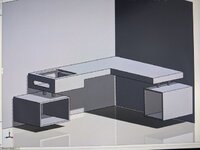
Thanks for all the tips! Very much appreciate your time.

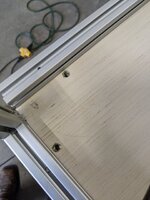
The mobo will exit somewhere around here: (desk is upside down here)

This will allow connections to run inside the desk to monitor, etc via 3D printed grommets or cable track. I am way past any part of a plan haha. Winging it from here..

Oh and the PSU will probably not be mounted inside the "case" and most likely go under it. The other PC components will go wherever they land based on wire routing and cooling. Suggestions welcome!
 
OP
N

NWill

Well-known member
Joined
Oct 4, 2009
Messages
117
Location
Columbus, Ohio
Also curious about holes in top?
Keyboard tray for a corner setup. If you can have it come out of the right desk like a corner kitchen cabinet that would be cool. Always liked this idea but many are built with wood or mdf and looks crappy. Yours is nice. Make a provision for a gaming system and start selling them


Sent from my iPhone using Tapatalk

The hexagons? Those were just me screwing around. They might actually happen and be little LED lit/glass covered showcases for who knows what.

I like the tray idea. There should be plenty of room on the top for a keyboard...at least when I taped it out :dunno:

I'll have to think about that.
 

Kaizen

Well-known member
Joined
Jan 9, 2015
Messages
6,946
Location
New England
The hexagons? Those were just me screwing around. They might actually happen and be little LED lit/glass covered showcases for who knows what.

I like the tray idea. There should be plenty of room on the top for a keyboard...at least when I taped it out :dunno:

I'll have to think about that.


Problem happens with the arms on the office chair. They hit the desk so not a perfect ergonomic situation.


Sent from my iPhone using Tapatalk
 

Gotcha640

Well-known member
Joined
Jan 27, 2015
Messages
948
Location
Houston TX
If you can keep the psu in the ventilated/filtered envelope it could keep it cleaner.

Also, since it looks like you have a lot of space, compared to even an extended super-sized atx tower, I would want to keep the io shield/back plate inside and out of knee or vacuum or kids or dogs range. Route cables inside desk to strategic exit, rather than all out in one rats nest. Move mobo another 3 inches toward the fans and you can make fancy guides for all the cables.
 
Last edited:
OP
N

NWill

Well-known member
Joined
Oct 4, 2009
Messages
117
Location
Columbus, Ohio
If you can keep the psu in the ventilated/filtered envelope it could keep it cleaner.

Also, since it looks like you have a lot of space, compared to even an extended super-sized atx tower, I would want to keep the io shield/back plate inside and out of knee or vacuum or kids or dogs range. Route cables inside desk to strategic exit, rather than all out in one rats nest. Move mobo another 3 inches toward the fans and you can make fancy guides for all the cables.


I still need to learn about all the new fancy cable tricks like sleeving, etc. My plan is to have zero wires visible but I know you will still have some showing. Here is a rough idea of components. I already have the MOBO obviously, which I just realized is micro? It seemed like a normal size when I unboxed it. I should have read more :lol: I also have the SSD. Parts will be purchased at local Microcenter.
PCPartPicker Part List

CPU: AMD Ryzen 7 3700X 3.6 GHz 8-Core Processor ($283.55 @ Amazon)
CPU Cooler: Thermaltake Water 3.0 240 ARGB Sync 56.45 CFM Liquid CPU Cooler ($139.99 @ Amazon)
Motherboard: Asus TUF GAMING B550M-PLUS Micro ATX AM4 Motherboard ($159.99 @ Amazon)
Memory: G.Skill Trident Z RGB 32 GB (2 x 16 GB) DDR4-3600 CL16 Memory ($169.99 @ Newegg)
Storage: Samsung 970 Evo 500 GB M.2-2280 NVME Solid State Drive ($89.95 @ Amazon)
Storage: Samsung 860 QVO 1 TB 2.5" Solid State Drive ($109.99 @ Amazon)
Video Card: PowerColor Radeon RX 5700 XT 8 GB Red Devil Video Card ($439.99 @ Amazon)
Total: $1393.45
Prices include shipping, taxes, and discounts when available
Generated by PCPartPicker 2020-08-15 20:22 EDT-0400
 
  • Like
Reactions: 555

mv213

Well-known member
Joined
Sep 29, 2014
Messages
660
Location
Dallas, OR (the OTHER "Big D")
You can buy extended pre-wired LED’s and power switches, they will just plug into the motherboard. I like being able to tell at a glance if the machine is on, asleep (blinking power LED) or off. The hard drive/SSD LED is useful also.
 

Eggman

Well-known member
Joined
Dec 29, 2010
Messages
82
Location
St. Louis
A little late to the party. We use a lot of the 8020 channels for safety screens for our factory equipment.

We place the 10 gauge screen in the slots in the center of the channels. That way we don't have any need for panel clips the way you did.

I've not heard of putting the computer inside the desk. Your's is looking pretty good.

Any final pics?
 
To avoid these ads, REGISTER NOW!
Top Bottom