To avoid these ads, REGISTER NOW!

Detached Garage Internet/Fiber Help

Yookdew

Well-known member
Joined
Mar 30, 2011
Messages
57
I'm looking for some advice on running fiber to my detached garage. I have done lots of reading on this site and I think I have a decent plan but I still have some questions. I only have a very basic tech knowledge with this stuff.

My home internet is running off an AT&T FirstNet cellular hotspot which is connected to an ASUS wifi router with a network cable. Download speeds with this setup are usually 60-100 mbps. This speed is plenty to handle the streaming, wifi cameras and internet access for our family.

All I am looking to do for the garage is have internet access for basic browsing/occasional streaming and a few wifi cameras. I may add a few IP cameras in the future but I want to keep this as basic as possible and keep the expense as low as possible while still having a correct setup. I will connect a wifi access point to the fiber for wifi access in the garage.

I will be trenching in conduit to run both electrical and fiber from the house to the detached garage in the near future. I have a buddy that is an electrician that has the electrical side covered but I want to make sure I get the correct equipment for the fiber. The length of the run will be approximately 175-200 feet but I will get a better measurement soon.

I am planning to run 1 inch PVC conduit for the fiber. Is 1 inch big enough for an easy pull?

When I look at different types of fiber optic cable, I see there are numerous different types of cable and cable ends. I know I need cable rated for burial with pulling hooks on it but I'm not sure what all the other options are or where a good place to buy cable is. Can somebody let me know the other details I need to get the correct cable?

I believe I need a media converter on both ends. Would 2 of these TP-Link media converters be decent or would you recommend something else? These appear to be basic plug and play which is what I am looking for. Do I also need transceivers to go in the media converters?


I think the last question I have right now is how much of a bend can the fiber cable have in it? I have ready that if it bends too much it will affect the signal. Is a 90 degree sweeping bend in conduit too much? If so, how do i deal with that issue? Most of this run will be fairly straight but there are 2 or 3 areas where the conduit will have to turn.

Thanks for any help!
 
To avoid these ads, REGISTER NOW!

wyliesdiesels

Well-known member
Joined
Aug 14, 2012
Messages
20,021
Location
Modesto, CA
i would go with small fiber switches at each end instead of media converters. this will give you extra LAN ports if needed especially in the shop

you will want LC connectors.

you will need SFPs that match the type of fiber you get. for example if you go with single mode fiber you will need single mode SFPs.
 

Innovate1

Well-known member
Joined
Jul 28, 2014
Messages
4,289
Location
Illinois near St. Louis, Missouri

Max

ALLIANCE MEMBER
Joined
Jun 16, 2018
Messages
3,334
Location
Georgia
Fiber is over kill for the defined requirements. A Cat 6 or 6E run will easily serve the need. Good to 300 feet and 1GB speed. (Way more than your Internet speed) Direct bury versions are also available.
For performance reasons you are 100% correct.

But fiber gives immunity to lightning and voltage differentials that wire won’t. The OP doesn’t say where he lives, but in six years here in N GA I lost a cable modem to lightning, and when it went it killed a port on my expensive router as well. Lightning doesn’t need to hit his place, it just needs to hit something nearby…
 
OP
Y

Yookdew

Well-known member
Joined
Mar 30, 2011
Messages
57
For performance reasons you are 100% correct.

But fiber gives immunity to lightning and voltage differentials that wire won’t. The OP doesn’t say where he lives, but in six years here in N GA I lost a cable modem to lightning, and when it went it killed a port on my expensive router as well. Lightning doesn’t need to hit his place, it just needs to hit something nearby…
I live in E Tennessee, Knoxville area. After reading the issues with regular network cable and lighting, that's why I was looking at fiber. I would like to be able to don the install and not have to worry about anything in the future. Although fiber would definitely be more expensive, it still looks like it would be fairly cheap for a simple setup like I need. If I could get away with network cable and not have issues with lightning, I would be fine going that route from a performance standpoint.
 
  • Like
Reactions: Max

Max

ALLIANCE MEMBER
Joined
Jun 16, 2018
Messages
3,334
Location
Georgia
I live in E Tennessee, Knoxville area. After reading the issues with regular network cable and lighting, that's why I was looking at fiber. I would like to be able to don the install and not have to worry about anything in the future. Although fiber would definitely be more expensive, it still looks like it would be fairly cheap for a simple setup like I need. If I could get away with network cable and not have issues with lightning, I would be fine going that route from a performance standpoint.
You’re on the right track. Fiber isn’t much more and it’s much safer from lightning.

While I had my cable modem (I’ve since switched to 5G cellular) I ran the output of my cable modem into a sacrificial switch before my expensive router - just in case.

If I still lived in the SF Bay Area I’d use Cat6 and never worry. But here, and I expect in TN, we get a lot of lightning.
 
OP
Y

Yookdew

Well-known member
Joined
Mar 30, 2011
Messages
57
i would go with small fiber switches at each end instead of media converters. this will give you extra LAN ports if needed especially in the shop

you will want LC connectors.

you will need SFPs that match the type of fiber you get. for example if you go with single mode fiber you will need single mode SFPs.
Would there be any issue using a separate media converter and switch? Looking at pricing of the fiber switches, it would be significantly cheaper to buy the 2 pieces of equipment separately.
 
OP
Y

Yookdew

Well-known member
Joined
Mar 30, 2011
Messages
57
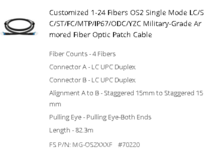
Does this look like the correct type of fiber I would need?
 

Attachments

  • Fiber.PNG
    Fiber.PNG
    71.5 KB · Views: 23

BillK

Well-known member
Joined
Aug 24, 2006
Messages
9,324
Location
Beautiful Southern Maryland
Fiber is over kill for the defined requirements. A Cat 6 or 6E run will easily serve the need. Good to 300 feet and 1GB speed. (Way more than your Internet speed) Direct bury versions are also available.
I was thinking the same thing. The run at my business is about 200 ft and up until last October it was Cat 6. Verizon ran fiber in the building and converted everything over and to be honest with you I dont see any difference and I am doing about the same usage as you plan. With the fiber you have to have the "converters" or whatever they call them, one more thing to go wrong in my opinion.
 

wyliesdiesels

Well-known member
Joined
Aug 14, 2012
Messages
20,021
Location
Modesto, CA
Would there be any issue using a separate media converter and switch? Looking at pricing of the fiber switches, it would be significantly cheaper to buy the 2 pieces of equipment separately.
no, other than adding another point of failure. the cost difference really isnt that much in the grand scheme of things
 

Innovate1

Well-known member
Joined
Jul 28, 2014
Messages
4,289
Location
Illinois near St. Louis, Missouri
Does this look like the correct type of fiber I would need?
Looks like the same as I got so should be fine. Surprised others haven't jumped in with comments on that. You don't actually need pulling eyes on both ends - I did but the pull was so easy I think I would drop to just one if I was doing the same thing again.

I went with separate converters for the ends as I already had switches. I converted to CAT cable as soon as I got inside the house as the network closet was some distance from the entry and I already had the cable in place and saved a little on the fiber. Just make sure you aren't short on the fiber - I fed a rope through and marked it for length and pulled it out for measurement just to be sure.
 

reader2580

Well-known member
Joined
Dec 31, 2014
Messages
14,545
Location
Minneapolis, MN
I was thinking the same thing. The run at my business is about 200 ft and up until last October it was Cat 6. Verizon ran fiber in the building and converted everything over and to be honest with you I dont see any difference and I am doing about the same usage as you plan. With the fiber you have to have the "converters" or whatever they call them, one more thing to go wrong in my opinion.
The reason to do fiber here is to electrically isolate the two buildings. There are plenty of cases of lightning strikes traveling through the Ethernet cable and frying the components at one, or both, ends.
 
OP
Y

Yookdew

Well-known member
Joined
Mar 30, 2011
Messages
57
I should be running my conduit soon so I have some follow up questions about running the fiber.

What is the best way/place to transition from the fiber to ethernet in the house? I could run the fiber through the crawlspace and into the wall to a wall plate in the office where the modem is but I'm not sure if it would bend the fiber too tightly and cause issues.

Alternately, I could have a media converter in the crawlspace and just run ethernet cable from the media converter the the floor/wall and into the office. I'm not sure if temperature and moisture in the crawlspace would affect the media converter though.

What's the most common way to get this done?
 

jpcjguy

Well-known member
Joined
Jan 6, 2014
Messages
1,477
Location
Richmond, VA
This is what I bought for my 235 ft run to detached garage:
https://fibercablesdirect.com/om3-m...imode-dx-fiber-cable.html#/76-length-75_meter

and then 2 of these for the ends:
https://www.amazon.com/gp/product/B0716XT1QT/?tag=atomicindus08-20

Works great! I ran the fiber up into the house and then into the converter and to the router. On the garage side - fiber to converter to a Wifi Extender.
I would avoid having anything in the crawlspace except the actual cable. Run the fiber up into the wall and out to the converter.
 
Last edited:
OP
Y

Yookdew

Well-known member
Joined
Mar 30, 2011
Messages
57
What did you use to come through the drywall into the living space? Is there some type of a wall plate for the fiber?

For ethernet, they make a wall plate that the cable plugs into the back of the wall plate and then you use a patch cable between the wall plate and the router/switch.

Is there something similar for fiber?
 

dcg9381

Well-known member
Joined
Jun 20, 2018
Messages
11,766
Location
Austin, TX
What is the best way/place to transition from the fiber to ethernet in the house? I could run the fiber through the crawlspace and into the wall to a wall plate in the office where the modem is but I'm not sure if it would bend the fiber too tightly and cause issues.
Just to be clear, your modem takes a fiber input?

Fiber is super flexible. More flexible than ethernet and smaller diameter. I'd just run it to standard box and drop it out of one of these wall plates to your modem.

 
OP
Y

Yookdew

Well-known member
Joined
Mar 30, 2011
Messages
57
Just to be clear, your modem takes a fiber input?

Fiber is super flexible. More flexible than ethernet and smaller diameter. I'd just run it to standard box and drop it out of one of these wall plates to your modem.

No, my modem does not take a fiber input. There would be a media converter between the fiber and the modem.

The main point I was trying to learn was the best/cleanest way way to come through the drywall with the fiber.
 
To avoid these ads, REGISTER NOW!

u2slow

Well-known member
Joined
Nov 20, 2011
Messages
3,590
Location
BC
I would bring the fiber into a data distribution box or similar; preferably via conduit.

Cat5E to my shop has been good enough for me.

Lightning hazard/mitigation seems to be really hyped-up in the USA. Not so much in Canada, despite a common continental weather system.
 
OP
Y

Yookdew

Well-known member
Joined
Mar 30, 2011
Messages
57
I would bring the fiber into a data distribution box or similar; preferably via conduit.

Cat5E to my shop has been good enough for me.

Lightning hazard/mitigation seems to be really hyped-up in the USA. Not so much in Canada, despite a common continental weather system.
Yeah cat 5 or 6 would be more than enough for what I need. The only reason I was looking at fiber was because of all the posts about lightening related power surges.

I'm not sure which way I will go with it. How long have you had yours run with ethernet cable? Any issues?
 

u2slow

Well-known member
Joined
Nov 20, 2011
Messages
3,590
Location
BC
I'm not sure which way I will go with it. How long have you had yours run with ethernet cable? Any issues?
About 5-6 years now. It is outdoor rated 5E with gel 'filler'. No issues.... I even neglected burying it.

No ground rods at my shop either because it's not required by CEC.
 

Innovate1

Well-known member
Joined
Jul 28, 2014
Messages
4,289
Location
Illinois near St. Louis, Missouri
It's fine until it isn't. I also had some trouble with my ethernet cable not working even though it was gel filled and well within the distance that should have been fine. Maybe it was cheap consumer grade switches on the ends. Never figured it out but went to fiber and haven't had any lightening or speed issues since. Go fiber and you won't have to worry about it. I wouldn't put the converter in the crawl space. Bring the fiber into conditioned space. I don't have any great ideas on how to do that though. I put the media converter in the ceiling of the basement and in the shop it comes out of the wall high up with the media converter on a shelf.
 
  • Like
Reactions: Max

wyliesdiesels

Well-known member
Joined
Aug 14, 2012
Messages
20,021
Location
Modesto, CA
About 5-6 years now. It is outdoor rated 5E with gel 'filler'. No issues.... I even neglected burying it.

No ground rods at my shop either because it's not required by CEC.
Ground rods are the number 1 thing needed to shunt lightning. Which is why it makes no sense that the CEC doesnt require them

You know how many ground rods ive CAD welded at tower sites? Doezens
 

wyliesdiesels

Well-known member
Joined
Aug 14, 2012
Messages
20,021
Location
Modesto, CA
I would use managed switches with SFP slots, at both ends. If you need to power cameras or access points you can get POE switches w/ SFP slots

They do not cost much more than media converters, depending on the brand.
 
Last edited:

pembol

Well-known member
Joined
Feb 13, 2014
Messages
270
I have a similar set up - fiber to my detached garage as there was only one conduit for both power and internet. I have a media converter on the house end (Ubiquiti Active Ethernet) and a POE switch on the garage end with an SFP port (UniFi POE 150W). I already had the switching all set up on the house end, so no need for a switch there, just a media converter. On the garage end I now have 8 POE ethernet ports with a very reliable 1 Gb connection.
 

5mall5nail5

Well-known member
Joined
May 23, 2010
Messages
1,174
Location
Bucks County, PA
I recently did this to my shed. I was trenching to pull power and figured I'd run data too. I am a bit cautious about running copper data because lightning can turn a nice morning into a bad one. So, since I do have 10 Gbps networking for my servers and some parts of the house, I ended up picking up:

I had my electrician run a 1/2" or 3/4" grey conduit and we pulled the fiber through that just because it was easy - so the "armored" aspect of the fiber went basically unused. Honestly, its not too armored compared to standard OM3/OM4 - it has a jacket over the cable so that does make it more durable, but I would probably avoid direct burial even though it says you can. I used single mode fiber because my run was borderline longer than multimode would do and so I got 100M and I never have to worry about it.

I went with the MokerLink because although the WebUI is terrible, it DOES support VLANs. So I trunk all necessary VLANs out to the shed where I have two PoE cameras (one inside, one outside) along with a Unifi 7 Outdoor access point for added wifi in the backyard. I used Finisar Single Mode 10 Gbps transceivers (you could use 1 Gbps, etc.) because I have 2.5 GbE everything for wireless, etc. The fiber lands in the shed on the MokerLink with Finisar optics, and then in the server rack it lands on one of the 10 Gbps LC ports using (I think) also Finisar Single Mode optics. I am using a Unifi USW-Pro-Max-24-PoE to handle this portion of my home network.

I did throw a couple 120mm fans on the network box in the shed w/ fabric filters just to get air moving through it - it doesn't seem to need it, but I have a raspberry pi temp/humidity sensor in there and the box does get to like 100 - 104F ambient over the summer here outside of Philadelphia, PA.

1730646584506.png

1730646274427.png
 

teknikfrog

Well-known member
Joined
Apr 29, 2023
Messages
216
Careful with SFP read the specs. Lots of tech standards that sound alike but are incompatible.

I recently ran singlemode fiber to my garage. It went well, although I have managed to fry two transceivers during lightning storms. During the first one I was in the garage and the strike was DIRECTLY overhead. For the second I pulled up a surveillance camera and could see the strike at the time I lost connectivity. The units were physically hot the next day. Like hot enough to not be able to handle.

Otherwise no issues. Okay one more issue. Ants are attracted to the AC hum of a switch so put down diatomaceous earth around your garage equipment.
 

manwithtools

ALLIANCE MEMBER
Joined
Aug 24, 2015
Messages
13,889
Location
Lebanon, TN
Careful with SFP read the specs. Lots of tech standards that sound alike but are incompatible
Yep, you have to be very careful with transceiver and media selection. I should have mentioned that. Your frying of transceivers is interesting, in theory the use of fiber between buildings should be the best insurance against lightning damage to IT equipment :dunno:
 

u2slow

Well-known member
Joined
Nov 20, 2011
Messages
3,590
Location
BC
Ground rods are the number 1 thing needed to shunt lightning. Which is why it makes no sense that the CEC doesnt require them

You know how many ground rods ive CAD welded at tower sites? Doezens

The lack of towers at most residences is likely a factor.
 
OP
Y

Yookdew

Well-known member
Joined
Mar 30, 2011
Messages
57
What kind of fiber do I need? Multi-mode or single mode?

I'm trying to keep this as simple as possible. All I need to do is get internet from my house to the detached garage (approximately 200 feet) to connect an access point.
 

Innovate1

Well-known member
Joined
Jul 28, 2014
Messages
4,289
Location
Illinois near St. Louis, Missouri
What kind of fiber do I need? Multi-mode or single mode?

I'm trying to keep this as simple as possible. All I need to do is get internet from my house to the detached garage (approximately 200 feet) to connect an access point.
It IS confusing with all the variations. I already provided a link to what I did and what I used in post 5. It's working fine. I was advised to get extra pairs in case of damage so you have a backup. Turned out I used the other pair too and think that's a good idea and worth the small extra cost.

For what you are doing single or multimode doesn't matter IMHO but you do need to make sure you end equipment can work with the fiber you get. I had people tell me I should get better/faster material but it's faster than my main internet connection so I don't see the point.
 

teknikfrog

Well-known member
Joined
Apr 29, 2023
Messages
216
Your frying of transceivers is interesting, in theory the use of fiber between buildings should be the best insurance against lightning damage to IT equipment :dunno:
Well the cable is armored so theoretically there is still some conductivity there. I actually suspect the strike went through the building and into the switch rather than coming through on the fiber line itself. Oh well, transceivers are cheap so it's not that big of a deal. Interestingly enough I have a cat5 run 400 feet to the entrance of my driveway just dropped along the ground and it's been fine the entire time! I did use surge protectors at each end though..

What kind of fiber do I need? Multi-mode or single mode?

Just get whatever is cheapest. The world is moving to singlemode but both technologies are fine for home use.
 
To avoid these ads, REGISTER NOW!
Top Bottom