e015475
Well-known member
I started this project in a thread called "Tap and die storage ideas", but since it has application to most kinds of tool drawers, I'll continue it here with the hope that somebody will be able to use it.
This is a tool drawer organizer made from Harbor Freight anti-fatigue mats and cut on a CO2 laser at my neighborhood print shop. The photo is fresh off the laser and the foam needs to be sealed with a heat gun yet and a bottom layer of red foam added. My taps & dies are all 'cats and dogs' so I'm still missing a few pieces.

Each organizer costs $2.50 in material - there's enough in a four-pack of fatigue mats ($9.99 ea) to do four 22x16" drawers in a HF 44" tool box.
Each organizer was $12 to cut on the CO2 laser, with a $25 setup fee regardless of how many files he processes - one or a hundred. The next trip I'll have 7-8 more drawers and that should bring my unit cost to less than $20 a drawer. This drawer took about 7 minutes to cut on the Yeti Laser.
If you'd like to know how it was done, read on.
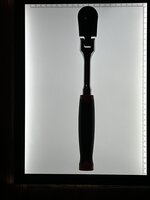
It starts with a photo of the tool taken with an phone. I set the phone up on a tripod so there was about a three-foot focal length between the camera and the floor. My wife has a selfie stick that has a blue-tooth trip button for the shutter, and this helped keep things steady for a crisp image.
I bought a cheap light box on Amazon for $15, but you could just use some white paper.
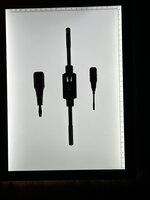
At a 3' focal length, some of the die handles are long enough to have some perspective error. Here's the long tap handle on some paper because it wouldn't fit on the light box. It took a little fiddling with the software to get this to the right size, but merging two photo images is probably the way to go.

The next step is to upload the images to your desktop/laptop and store them somewhere you can get to them.
If you have Adobe Illustrator, that's a great program to create the file you're going to need to drive the laser.
I don't.
Instead I use Inkscape 1.2 which is free to download off their site. It is very Illustrator-like and the learning curve isn't very steep if you've every used any kind of graphics program.
There's lots of YouTube tutorials on line. I traced this foam organizer with one monitor on Inkscape and the other on YouTube for when I got stuck. I can do a single unique tool in 3-5 minutes and I'm down the learning curve enough I could do another one like this in 60-90 minutes.
(My son is bringing over a AutoCad and I'm going to try that too and see how it goes)
With either Illustrator or Inkscape, the general process is to import the tool drawings into the program and trace them. There's an auto-trace function in both programs, but I found it easier to use the bezier tool and trace it with the mouse.
Scaling is an issue. As I traced each tool with the bezier tool, I had the tool and a dial-calipers at my desk to measure a key feature. After I traced the tool I scaled it to the correct dimensions.
After I had all the tools traced/scaled I drew a 22x16" box around them to represent the drawer and started to organize. I found the easiest way to do this was to increase the line thickness of each tool/object stroke to .250". That ensured there was at least a quarter inch between tools. Inkscape 1.2 has a bunch of alignment tools that help speed-up the drawer organization. Check for Youtube tutorials.
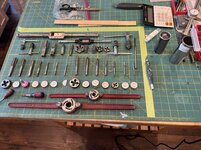
I'd laid it out on my healing mat first to get a rough idea of how it might lay out. I did this in my wife's kitchen and quickly wore out my welcome. It was cold in the shop.
When I was done, I saved the image as a .pdf and had it printed full size to check that I'd gotten the scaling right. I probably won't do this for the other drawers now that I know my process works. Here's the check print with black fill and no line
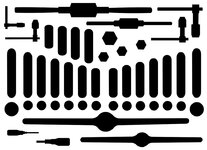
I attempted to tack this drawing on a piece of foam and cut it with a #11 Exacto blade. This is about 4 hours of effort gnawing and sanding on the foam with an inferior work product as a result. This foam is very hard on blades and I had to re-sharpen and strop the blade after only a few cuts. One slip on a cut and you're screwed - start over.
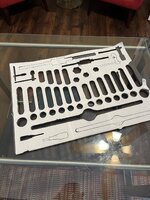
Here's the best way I've found - the drawer organizer fresh off the laser. The Yeti laser used a .pdf file with the objects having a .002" line and no fill. The lines in the pdf file needed to be R255 (red) for the Yeti.
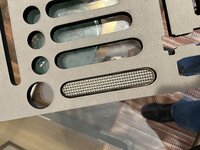
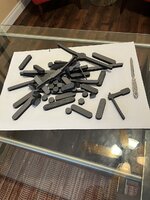
The anti-fatigue mat is 10-11mm thick, so some tools sink too far into the foam. I saved all the cutouts so I can make risers to bring the taps/dies/handles to a height where I don't need any finger relief cuts to get the tools out of the organizer. The kerf of the CO2 laser is just perfect for relief to get the tool in and out with ease.
Some final notes.
Anti-fatigue mats from Harbor Freight are the go-to material for the cosplay folks to make some really wild costumes. They say the foam is EVA but the HF packaging says it is neoprene rubber. Whatever the foam material is, the cosplay folks have lots of videos on Youtube on how to work with it.
One of the things that they suggest is to 'temper' the foam with a heat gun. This seals the foam's surface, melts all the fuzzy foam remnants and puts a pillow-like radius on all the corners. I tried it on some scrap and it looked great.
My local Michaels craft store has red EVA sheets that are about an 1/8" thick. I might experiment a little with gluing that on to the bottom of the foam for a visual indicator or missing taps/dies/handles.
Finally, there's a few videos out there on how to put text on foam. I'm going to try that on the next drawers where appropriate. If I'd have thought about it for this drawer it would have been nice to mark fine, course and pipe taps and dies.
In closing, these foam organizers are not for pro mechanics that work out of their box all day every day. I made them because it seems like the best way for a home-gamer to know where everything is when he doesn't use them every day - a memory aide, if you will. We'll that, and I'm slightly OCD.
New 26" HF box in the garage that I need to organize. Gotta go. Constructive comments always appreciated.
This is a tool drawer organizer made from Harbor Freight anti-fatigue mats and cut on a CO2 laser at my neighborhood print shop. The photo is fresh off the laser and the foam needs to be sealed with a heat gun yet and a bottom layer of red foam added. My taps & dies are all 'cats and dogs' so I'm still missing a few pieces.
Each organizer costs $2.50 in material - there's enough in a four-pack of fatigue mats ($9.99 ea) to do four 22x16" drawers in a HF 44" tool box.
Each organizer was $12 to cut on the CO2 laser, with a $25 setup fee regardless of how many files he processes - one or a hundred. The next trip I'll have 7-8 more drawers and that should bring my unit cost to less than $20 a drawer. This drawer took about 7 minutes to cut on the Yeti Laser.
If you'd like to know how it was done, read on.
It starts with a photo of the tool taken with an phone. I set the phone up on a tripod so there was about a three-foot focal length between the camera and the floor. My wife has a selfie stick that has a blue-tooth trip button for the shutter, and this helped keep things steady for a crisp image.
I bought a cheap light box on Amazon for $15, but you could just use some white paper.
At a 3' focal length, some of the die handles are long enough to have some perspective error. Here's the long tap handle on some paper because it wouldn't fit on the light box. It took a little fiddling with the software to get this to the right size, but merging two photo images is probably the way to go.
The next step is to upload the images to your desktop/laptop and store them somewhere you can get to them.
If you have Adobe Illustrator, that's a great program to create the file you're going to need to drive the laser.
I don't.
Instead I use Inkscape 1.2 which is free to download off their site. It is very Illustrator-like and the learning curve isn't very steep if you've every used any kind of graphics program.
There's lots of YouTube tutorials on line. I traced this foam organizer with one monitor on Inkscape and the other on YouTube for when I got stuck. I can do a single unique tool in 3-5 minutes and I'm down the learning curve enough I could do another one like this in 60-90 minutes.
(My son is bringing over a AutoCad and I'm going to try that too and see how it goes)
With either Illustrator or Inkscape, the general process is to import the tool drawings into the program and trace them. There's an auto-trace function in both programs, but I found it easier to use the bezier tool and trace it with the mouse.
Scaling is an issue. As I traced each tool with the bezier tool, I had the tool and a dial-calipers at my desk to measure a key feature. After I traced the tool I scaled it to the correct dimensions.
After I had all the tools traced/scaled I drew a 22x16" box around them to represent the drawer and started to organize. I found the easiest way to do this was to increase the line thickness of each tool/object stroke to .250". That ensured there was at least a quarter inch between tools. Inkscape 1.2 has a bunch of alignment tools that help speed-up the drawer organization. Check for Youtube tutorials.
I'd laid it out on my healing mat first to get a rough idea of how it might lay out. I did this in my wife's kitchen and quickly wore out my welcome. It was cold in the shop.
When I was done, I saved the image as a .pdf and had it printed full size to check that I'd gotten the scaling right. I probably won't do this for the other drawers now that I know my process works. Here's the check print with black fill and no line
I attempted to tack this drawing on a piece of foam and cut it with a #11 Exacto blade. This is about 4 hours of effort gnawing and sanding on the foam with an inferior work product as a result. This foam is very hard on blades and I had to re-sharpen and strop the blade after only a few cuts. One slip on a cut and you're screwed - start over.
Here's the best way I've found - the drawer organizer fresh off the laser. The Yeti laser used a .pdf file with the objects having a .002" line and no fill. The lines in the pdf file needed to be R255 (red) for the Yeti.
The anti-fatigue mat is 10-11mm thick, so some tools sink too far into the foam. I saved all the cutouts so I can make risers to bring the taps/dies/handles to a height where I don't need any finger relief cuts to get the tools out of the organizer. The kerf of the CO2 laser is just perfect for relief to get the tool in and out with ease.
Some final notes.
Anti-fatigue mats from Harbor Freight are the go-to material for the cosplay folks to make some really wild costumes. They say the foam is EVA but the HF packaging says it is neoprene rubber. Whatever the foam material is, the cosplay folks have lots of videos on Youtube on how to work with it.
One of the things that they suggest is to 'temper' the foam with a heat gun. This seals the foam's surface, melts all the fuzzy foam remnants and puts a pillow-like radius on all the corners. I tried it on some scrap and it looked great.
My local Michaels craft store has red EVA sheets that are about an 1/8" thick. I might experiment a little with gluing that on to the bottom of the foam for a visual indicator or missing taps/dies/handles.
Finally, there's a few videos out there on how to put text on foam. I'm going to try that on the next drawers where appropriate. If I'd have thought about it for this drawer it would have been nice to mark fine, course and pipe taps and dies.
In closing, these foam organizers are not for pro mechanics that work out of their box all day every day. I made them because it seems like the best way for a home-gamer to know where everything is when he doesn't use them every day - a memory aide, if you will. We'll that, and I'm slightly OCD.
New 26" HF box in the garage that I need to organize. Gotta go. Constructive comments always appreciated.