To avoid these ads, REGISTER NOW!

DVR Security Camera Systems?

ducktapeguy

Well-known member
Joined
Jan 27, 2009
Messages
534
I'm not a professional by any means, so my advice is coming from a budget point of view, i.e. I'm cheap and can't afford to spend thousands of dollars high end stuff. So keep that in mind when reading.

I've installed about 3-4 of the cheap Costco/Samsclub type systems. These are the ones that are about <$900 for 16 channels, maybe around $300 for a 4 channel system. I think most of the systems you find in that price range are all going to be about the same quality, and from my experience some of them will just be rebranded but all from the same manufacturer. While they're not great, I think they are sufficient in most cases for the average homeowner who isn't a high risk for professional thieves. If you were protecting millions of dollars worth of stuff, then these aren't the right systems for you. But if all you want to do is see what's happening around your house when you're gone, they do an adequate job. Just don't expect Vegas style surveillance for less than $1k. A few of the things I've learned:

1) Check recording resolution. A lot of DVR's would advertise 720x480 viewing resolution, but record at 320x240. So while the live picture was pretty decent, when you played back the recording it looked like ****. Some of them will actually record at the full D1 resolution. Frame rate is not really that important IMO, I would sacrifice frame rate for higher resolution, even if it meant only having 4 fps in each camera.

2) IR led's attract spiders, so place cameras in an position where you can brush them off every few months. I didn't have to worry about vandals, so I just had them mounted to the soffits where I can reach them with a broom. I did have a lot of high school aged kids hanging around everyday, but either nobody noticed the cameras, or nobody bothered to mess with them.

3) Some brands motion detection algorithms work better than others. It's nice just to record only when motion, but I'd rather have too much video than miss anything. On the last sytem I couldn't get the motion to work reliably, either passing cars headlights would set it off, or sometimes things would get by and not record. I lived on a corner house so the headlight thing really screwed with the motion detection. So I just set it to record 24/7. I found that after the excitement(?) of owning them wears off in the first few months, you really don't review the video too often unless something is wrong. And if something is wrong, you want as much video as possible without wondering if the cameras missed something.

4) Also, unless you are using them for a remote cabin location or similar, you really don't need a huge hard drive to record a years worth of video of your house. The last one I setup recorded 10-12 cameras all day, and probably stored only 2 weeks worth. I figured if someone broke in, I'd probably notice it within a day or two at the most. If I didnt' realize it within a week, then I probably wouldn't realize it a year from now.

5) The cameras are fairly low quality, but you can compensate for that by using more of them placed in various locations. The wide angles are nice for an overall view, but not so great for identifying people at normal distances. Expect the usable range to be about half of what's advertised, and at night assume anything past 10 feet is going to be a moving blob. You can make out a person moving well past 50 ft, you might be able to recognize someone you know up to about 20-30, but for identification of a stranger, the closer the camera is the better.

6) The most often used cameras was the micro camera I had placed in the upper corner of the front door frame. It was fairly low quality (about 380TVL), but since it only needed to cover the front porch area (about 5 feet) it worked great. This was meant to record anyone who came to the door, but in reality it's main use was to check to see if the delivery guy dropped off any packages while I'm at work. This camera was probably 95% of what I looked at most of the time. The second most useful camera was the one pointed at the garage just to make sure it was closed. Sometimes I'll forget or I worry that the obstruction sensor tripped while I was driving away and I didn't notice it, so this was just for peace of mind.

7) I never tried the Lorex systems that I see at Costco because I didn't like how some of the DVR's were integrated into monitors. I prefer the DVR be separate so I could have it hidden in a closet. I just connect a monitor to use for setup, but once everything was setup online and I was able to view it through a laptop or phone, there was very little reason to have a monitor connected to the system, it just takes up space and isn't needed.

8) Upgrading to a system that can be viewed through a smart phone was one of the best things I ever did. I think almost all of them do it now, but for a while I was too lazy to actually set it up. Now when I setup my new system, the first thing I'm going to do is connect it to the network. It's much easier to setup the cameras when you can view the live picture through a phone, instead of having someone sitting there by the DVR telling you which direction to move.

I am about to install a system on my new house, overall I was satisfied enough with these cheap systems that I will probably not upgrade it until the network cams come down in price. I will be running CAT6 cables while I run the camera cables just so I have the opportunity in the future.

When finances or the need arises you will really appreciate a PTZ camera in a general location to allow you to see more of the property.
Teken . . .

I thought about getting a PTZ camera, but the only thing holding me back is I'm not sure how useful it will be for me. 99% of the time the cameras are not being monitored, so the PTZ really becomes a fixed camera unless you are actively view it. I know there are some motion activated cams that can follow any activity, but the ones I've seen cost more than my whole system. Is there another alternative?
 
Last edited:
To avoid these ads, REGISTER NOW!

gatchel

Well-known member
Joined
Dec 12, 2009
Messages
672
Location
West of King of Prussia, PA
If you are not actively monitoring the system a PTZ will always be looking the other direction when something occurs. Buy 2 or 3 cameras instead. Motion Tracking PTZ's are easily defeated with two people. PTZ's are more of a toy in a residential environment unless you really need one for some specific reason.
 

Teken

Well-known member
Joined
Jan 2, 2010
Messages
8,214
Location
The Bad Lands
I'm not a professional by any means, so my advice is coming from a budget point of view, i.e. I'm cheap and can't afford to spend thousands of dollars high end stuff. So keep that in mind when reading.

I've installed about 3-4 of the cheap Costco/Samsclub type systems. These are the ones that are about <$900 for 16 channels, maybe around $300 for a 4 channel system. I think most of the systems you find in that price range are all going to be about the same quality, and from my experience some of them will just be rebranded but all from the same manufacturer. While they're not great, I think they are sufficient in most cases for the average homeowner who isn't a high risk for professional thieves. If you were protecting millions of dollars worth of stuff, then these aren't the right systems for you. But if all you want to do is see what's happening around your house when you're gone, they do an adequate job. Just don't expect Vegas style surveillance for less than $1k. A few of the things I've learned:

1) Check recording resolution. A lot of DVR's would advertise 720x480 viewing resolution, but record at 320x240. So while the live picture was pretty decent, when you played back the recording it looked like ****. Some of them will actually record at the full D1 resolution. Frame rate is not really that important IMO, I would sacrifice frame rate for higher resolution, even if it meant only having 4 fps in each camera.

2) IR led's attract spiders, so place cameras in an position where you can brush them off every few months. I didn't have to worry about vandals, so I just had them mounted to the soffits where I can reach them with a broom. I did have a lot of high school aged kids hanging around everyday, but either nobody noticed the cameras, or nobody bothered to mess with them.

3) Some brands motion detection algorithms work better than others. It's nice just to record only when motion, but I'd rather have too much video than miss anything. On the last sytem I couldn't get the motion to work reliably, either passing cars headlights would set it off, or sometimes things would get by and not record. I lived on a corner house so the headlight thing really screwed with the motion detection. So I just set it to record 24/7. I found that after the excitement(?) of owning them wears off in the first few months, you really don't review the video too often unless something is wrong. And if something is wrong, you want as much video as possible without wondering if the cameras missed something.

4) Also, unless you are using them for a remote cabin location or similar, you really don't need a huge hard drive to record a years worth of video of your house. The last one I setup recorded 10-12 cameras all day, and probably stored only 2 weeks worth. I figured if someone broke in, I'd probably notice it within a day or two at the most. If I didnt' realize it within a week, then I probably wouldn't realize it a year from now.

5) The cameras are fairly low quality, but you can compensate for that by using more of them placed in various locations. The wide angles are nice for an overall view, but not so great for identifying people at normal distances. Expect the usable range to be about half of what's advertised, and at night assume anything past 10 feet is going to be a moving blob. You can make out a person moving well past 50 ft, you might be able to recognize someone you know up to about 20-30, but for identification of a stranger, the closer the camera is the better.

6) The most often used cameras was the micro camera I had placed in the upper corner of the front door frame. It was fairly low quality (about 380TVL), but since it only needed to cover the front porch area (about 5 feet) it worked great. This was meant to record anyone who came to the door, but in reality it's main use was to check to see if the delivery guy dropped off any packages while I'm at work. This camera was probably 95% of what I looked at most of the time. The second most useful camera was the one pointed at the garage just to make sure it was closed. Sometimes I'll forget or I worry that the obstruction sensor tripped while I was driving away and I didn't notice it, so this was just for peace of mind.

7) I never tried the Lorex systems that I see at Costco because I didn't like how some of the DVR's were integrated into monitors. I prefer the DVR be separate so I could have it hidden in a closet. I just connect a monitor to use for setup, but once everything was setup online and I was able to view it through a laptop or phone, there was very little reason to have a monitor connected to the system, it just takes up space and isn't needed.

8) Upgrading to a system that can be viewed through a smart phone was one of the best things I ever did. I think almost all of them do it now, but for a while I was too lazy to actually set it up. Now when I setup my new system, the first thing I'm going to do is connect it to the network. It's much easier to setup the cameras when you can view the live picture through a phone, instead of having someone sitting there by the DVR telling you which direction to move.

I am about to install a system on my new house, overall I was satisfied enough with these cheap systems that I will probably not upgrade it until the network cams come down in price. I will be running CAT6 cables while I run the camera cables just so I have the opportunity in the future.


I thought about getting a PTZ camera, but the only thing holding me back is I'm not sure how useful it will be for me. 99% of the time the cameras are not being monitored, so the PTZ really becomes a fixed camera unless you are actively view it. I know there are some motion activated cams that can follow any activity, but the ones I've seen cost more than my whole system. Is there another alternative?

Many of the named brand PTZ camera's allow you to have a guard position, sweeping perimeter, and motion activated. Some allow you to hook them up to a secondary sensor which activates the PTZ.

While most folks don't use analytics in a residential area. If given the opportunity having such a system is an excellent feature for specific instances.

One mode I have is called museum mode. This detects an object like a picture hanging. If the image changes ***** its gone* the alarm will sound. Another is traffic flow: This mode can detect like in a hall way when people are all supposed to walk in one direction. Should anyone turn around and walk in the opposite direction, the alarm will trip.

So, it depends on your needs and how important the area you have requires monitoring. Another great feature is having the ability to define a zone with in the monitored FOV and trip gradual alarms etc.

This is important for those wanting to know how far a person has entered into a secured area.

1. On the street - Do nothing, but it is noted and a signal is sent.

2. On the grass - Siren chirp, secondary signal is sent, you watch.

3. Breached a defined threshold - Siren sounds, automated voice is heard alerting the person his presence is known, security is on its way. Owner is sent sms, e-mail, voice mail, and a call from the monitoring station is placed.

It comes down to how much you can afford, or how much value you place on your possessions and your family.

Teken . . .
 
OP
M

mpire

Well-known member
Joined
Nov 21, 2008
Messages
1,837
Location
Florida
Something tells me that Teken's **** is much more expensive than mine.

All I got worth stealing are my watch, my gun, and my car.

I always take those with me.
 

rodm1

Well-known member
Joined
Feb 17, 2008
Messages
2,270
I have a question about hiding the DVR. As I mentioned above, I have one of the cheaper DVR/camera setups and want to hide it better than it is now, as it is currently "disguised" but not hidden. How much do I need to worry about ventilation? Would I be able to put this in a closed box (say 12" x 12" x 20") if it isn't sealed up tight? Without it being inside of something, I really don't know a good way to hide it and still be able to check in on it from time to time.

You have to remember these people don't give a $hit and will go threw every room tarring it apart like a mob on a city street. You could install it in a high quality safe bolted to the floor in a very tight out of the way place.

I've heard about DVR's that have a USB port that can record the last several minute of camera use that could be hidden with a very long cord run threw the walls and secured sow a pull wont dislodge it. You could also store it in a key vault.
 

ducktapeguy

Well-known member
Joined
Jan 27, 2009
Messages
534
Many of the named brand PTZ camera's allow you to have a guard position, sweeping perimeter, and motion activated. Some allow you to hook them up to a secondary sensor which activates the PTZ.

While most folks don't use analytics in a residential area. If given the opportunity having such a system is an excellent feature for specific instances.

One mode I have is called museum mode. This detects an object like a picture hanging. If the image changes ***** its gone* the alarm will sound. Another is traffic flow: This mode can detect like in a hall way when people are all supposed to walk in one direction. Should anyone turn around and walk in the opposite direction, the alarm will trip.

So, it depends on your needs and how important the area you have requires monitoring. Another great feature is having the ability to define a zone with in the monitored FOV and trip gradual alarms etc.

This is important for those wanting to know how far a person has entered into a secured area.

1. On the street - Do nothing, but it is noted and a signal is sent.

2. On the grass - Siren chirp, secondary signal is sent, you watch.

3. Breached a defined threshold - Siren sounds, automated voice is heard alerting the person his presence is known, security is on its way. Owner is sent sms, e-mail, voice mail, and a call from the monitoring station is placed.

It comes down to how much you can afford, or how much value you place on your possessions and your family.

Teken . . .

I guess my question, is how much do these features cost? Last time I looked into upgrading from a cheap analog to an equivalent IP based system, the price of admission was nearing five figures. Thats not counting some of the cool PTZ cameras which start at 1k+, just for the camera. When you start factoring in lenses, enclosures, illuminators, etc, you're talking some serious money. There's a lot of good information here, but probably more than most people want to spend
 

ducktapeguy

Well-known member
Joined
Jan 27, 2009
Messages
534
Motion detection is a must, because I don't want to have to watch these things forever to find the clip where the guy is stealing stuff out of my yard.

I also was going to mention that since you live on a corner house, you might run into the same problem that I did, namely at night cars turning the corner are really gonna confuse your motion detection. Any change in the light is going to set it off. You can mess around with the settings to try and eliminate this, but in my experience it did not work out to well. One thing that you can try, and I assume your system probably has this feature, is you can have one camera trigger off the motion of another camera. For instance, a wide view of the front yard and driveway also included parts of the street and sidewalk, even with selective masking it wasn't perfect because late afternoon shadows would trigger the area that wasn't masked. What I did was set it to trigger off the narrow view of the driveway camera, which was more reliable, so both would record. I found this feature useful for certain areas to eliminate false alarms.

Also, if you are looking for something specific missing, it's very easy to quickly run through a weeks worth of video in a few minutes. I had to do that when something from the corner of our yard disappeared and I didn't notice it for a week. You just go back a few days, check a couple of seconds of video. If its still there you move forward a day or two. By cutting the remaining time in halves, you can quickly pinpoint an exact time in a few minutes. What will be a problem is looking for an event that doesn't leave a change, for example, seeing when your mailman dropped off the mail. Then you'll just have to fast forward through all your video.
 

Teken

Well-known member
Joined
Jan 2, 2010
Messages
8,214
Location
The Bad Lands
I guess my question, is how much do these features cost? Last time I looked into upgrading from a cheap analog to an equivalent IP based system, the price of admission was nearing five figures. Thats not counting some of the cool PTZ cameras which start at 1k+, just for the camera. When you start factoring in lenses, enclosures, illuminators, etc, you're talking some serious money. There's a lot of good information here, but probably more than most people want to spend

Some of the features are incorporated into the DVR. While some are incorporated into the camera itself. Different manufactures bundle different software with their camera.

So, it is always suggested and advantages to play with the system(s) prior to making a decision.

As you clearly stated the cost for admission is more than the average Costco iteration. Keep in mind buying used equipment or last years models often times saves you 10-15% off of the regular price.

It goes with out saying that if name brands don't matter to you then purchasing 2nd tier products is also a good balance of performance, reliability, and value.

When you go to 3rd tier products it is often times a gamble with what you may get in terms of long term use. I have often seen 3rd tier products provide amazing image quality. The only problem is sometimes camera's die just after the standard one year warranty.

But, at the price of a 3rd tier product you can afford to purchase 4-8 back up camera's and replace them! :lol_hitti

These are things people will have to weigh out themselves. :willy_nil Speaking for myself only; I have gone down all three paths and some of the products continue to operate just fine. While others have died with in the first 90 days of operations. :(

Regardless of the tech, I am a firm believer that the best bang to buck ratio continues to be the analog camera. :) As you stated earlier the price for IP based camera's are still very high. But, rest assured the price will start to go down in the next 5 years.

On a random note: The security industry is one of the slowest areas for development and embracing new technologies. I have no clue why that is given the level of importance in this area?? :confused: :headscrat

Teken . . .
 

redman333

Well-known member
Joined
Oct 26, 2011
Messages
175
Well I ended up going with the Samsung system. It's this one.

http://www.samsungsv.com/Model/Detail/25/Samsung-SDE-3004N-4-Channel-DVR-Security-System

I found it at Walmart actually. My girlfriends little brother works at Walmart and he got us 30% off and ended up being a total after taxes of $325.00. I just trust the samsung name a little more and I was able to see it work on YouTube before purchasing.

I have only plugged it in and made sure I had everything needed and will finish setting everything up this friday and Saturday. So far as far as I can tell it will be just right. I set one cam inside and that was the only one I set up so far. When I get the others set I will try and take some video and pics of the system and post them up here.

Oh according to the website it's a sde-3004N but on the box it says it's a sde-3004 but has no mention of the tvl. Online the 3004N says 480tvl. So I assume that's what this is. My question is this system upgradable. All the cams except maybe one will be fine. The house has some light around it that lets the cams work great in the dark and can see the whole yard except one corner that is very dark. My hope is that I can either upgrade that one cam or find a way to enhance the one I have there. Like add an external or beam or something. I know in the military we had an ir spot light that when you had the NVGs on would make things look like daylight. I don't know if there is a such thing for civilian use or not but it'd be nice to just inhance that one area.
 

Teken

Well-known member
Joined
Jan 2, 2010
Messages
8,214
Location
The Bad Lands
Well I ended up going with the Samsung system. It's this one.

http://www.samsungsv.com/Model/Detail/25/Samsung-SDE-3004N-4-Channel-DVR-Security-System

I found it at Walmart actually. My girlfriends little brother works at Walmart and he got us 30% off and ended up being a total after taxes of $325.00. I just trust the samsung name a little more and I was able to see it work on YouTube before purchasing.

I have only plugged it in and made sure I had everything needed and will finish setting everything up this friday and Saturday. So far as far as I can tell it will be just right. I set one cam inside and that was the only one I set up so far. When I get the others set I will try and take some video and pics of the system and post them up here.

Oh according to the website it's a sde-3004N but on the box it says it's a sde-3004 but has no mention of the tvl. Online the 3004N says 480tvl. So I assume that's what this is. My question is this system upgradable. All the cams except maybe one will be fine. The house has some light around it that lets the cams work great in the dark and can see the whole yard except one corner that is very dark. My hope is that I can either upgrade that one cam or find a way to enhance the one I have there. Like add an external or beam or something. I know in the military we had an ir spot light that when you had the NVGs on would make things look like daylight. I don't know if there is a such thing for civilian use or not but it'd be nice to just inhance that one area.

You can one of these IR illuminators: http://www.ebay.com/itm/48-LED-illu...144?pt=LH_DefaultDomain_0&hash=item3f15a7a1e8

This one has a photo sensor, so it will only turn on when its dark. I have never used this device so I can't speak to the long term durability or performance.

But, you get the idea . . . Keep in mind, at 480 TVL, your expectations of video quality should not be very high.

With that said, there is nothing stopping you from upgrading the camera's when finances are more abundant. :thumbup:

Regards

Teken . . .
 
OP
M

mpire

Well-known member
Joined
Nov 21, 2008
Messages
1,837
Location
Florida
Well I ended up going with the Samsung system. It's this one.

http://www.samsungsv.com/Model/Detail/25/Samsung-SDE-3004N-4-Channel-DVR-Security-System

I found it at Walmart actually. My girlfriends little brother works at Walmart and he got us 30% off and ended up being a total after taxes of $325.00. I just trust the samsung name a little more and I was able to see it work on YouTube before purchasing.

I have only plugged it in and made sure I had everything needed and will finish setting everything up this friday and Saturday. So far as far as I can tell it will be just right. I set one cam inside and that was the only one I set up so far. When I get the others set I will try and take some video and pics of the system and post them up here.

Oh according to the website it's a sde-3004N but on the box it says it's a sde-3004 but has no mention of the tvl. Online the 3004N says 480tvl. So I assume that's what this is. My question is this system upgradable. All the cams except maybe one will be fine. The house has some light around it that lets the cams work great in the dark and can see the whole yard except one corner that is very dark. My hope is that I can either upgrade that one cam or find a way to enhance the one I have there. Like add an external or beam or something. I know in the military we had an ir spot light that when you had the NVGs on would make things look like daylight. I don't know if there is a such thing for civilian use or not but it'd be nice to just inhance that one area.

Well, I am not sure what the difference between the 3004N and the 3003N, but it appears to be that the one you picked up uses regular old RG57 connections and the 3003 uses the RJ45 connections.

The N just means network, so thats nothing new or exciting. My camera box didn't have an N on it either and its the SDE-4001N.

I would recommend you run modern RG6 (cable TV wire) and then use coax adapters if you aren't going with the included cables. I got the best results with that vs trying to use RG57. Thats just my 2 cents if you don't want to custom order cables.

That being said, it appears to have the same interface and features of my system, so you can use the same phone app, web viewer, etc.

I don't know how you would upgrade except to install higher resolution cameras. If you did that, I would expect any camera to just plug in and work, but you would have to figure out if the power was enough or too much, etc.

I had a bear of a time getting the cell phone viewer up the first time, so if you need any assistance, let me know. I am happy to help.
 
Last edited:

redman333

Well-known member
Joined
Oct 26, 2011
Messages
175
You can one of these IR illuminators: http://www.ebay.com/itm/48-LED-illu...144?pt=LH_DefaultDomain_0&hash=item3f15a7a1e8

This one has a photo sensor, so it will only turn on when its dark. I have never used this device so I can't speak to the long term durability or performance.

But, you get the idea . . . Keep in mind, at 480 TVL, your expectations of video quality should not be very high.

With that said, there is nothing stopping you from upgrading the camera's when finances are more abundant. :thumbup:

Regards

Teken . . .

Well its not so much lack of funds and more so lack of knowledge. I didn't want to go out and buy a multi thousand dollar system not knowing what I was buying. I am using this system as my learning experience. I took a look at that IR camera and it looks like it might work for me. I do understand what your saying about the resolution and I still may just upgrade that camera but when I finish with my install I will see what it looks like.
 

redman333

Well-known member
Joined
Oct 26, 2011
Messages
175
Well, I am not sure what the difference between the 3004N and the 3003N, but it appears to be that the one you picked up uses regular old RG57 connections and the 3003 uses the RJ45 connections.

The N just means network, so thats nothing new or exciting. My camera box didn't have an N on it either and its the SDE-4001N.

I would recommend you run modern RG6 (cable TV wire) and then use coax adapters if you aren't going with the included cables. I got the best results with that vs trying to use RG57. Thats just my 2 cents if you don't want to custom order cables.

That being said, it appears to have the same interface and features of my system, so you can use the same phone app, web viewer, etc.

I don't know how you would upgrade except to install higher resolution cameras. If you did that, I would expect any camera to just plug in and work, but you would have to figure out if the power was enough or too much, etc.

I had a bear of a time getting the cell phone viewer up the first time, so if you need any assistance, let me know. I am happy to help.

I have a question now and this may sound like a dumb question but where can I find the coax adapters. Is it something I can pick up at radio shack? Also, I like the idea of using RG6 for the cameras but my cameras have both power and video as one cable and then it splits off at the end. If I run RG6 as video how do I get power? Also I am okay with using my current cables for 3 of the cameras but I'm almost positive that one camera will be out of range and will need to be extended. can I use what your talking about with the RG6 cable to extend that, and again how do I manage the power cable?
 
OP
M

mpire

Well-known member
Joined
Nov 21, 2008
Messages
1,837
Location
Florida
I have a question now and this may sound like a dumb question but where can I find the coax adapters. Is it something I can pick up at radio shack? Also, I like the idea of using RG6 for the cameras but my cameras have both power and video as one cable and then it splits off at the end. If I run RG6 as video how do I get power? Also I am okay with using my current cables for 3 of the cameras but I'm almost positive that one camera will be out of range and will need to be extended. can I use what your talking about with the RG6 cable to extend that, and again how do I manage the power cable?
I put in several systems years ago that required RG57.

Yes, go to radio shack and get the adapters. That lets you use the thicker RG6 and the compression ends that you can get at home depot or whatever. They were much easier to deal with.

I ran inexpensive lamp wire along with the RG6. It was cheaper and easier to do that than deal with the multi conductor cable.
 

ducktapeguy

Well-known member
Joined
Jan 27, 2009
Messages
534
Personally, I like the standard siamese cable (RG-56 + 2 conductor power in one cable), which sounds like what you got. Running the cables is the hardest part of setting up the whole system, so trying to minimize the number of cables I have to run through the attic is a plus. Usually the packages come with 50-60 feet for each camera, but you can buy 100 ft extentions at any decent electronics store or online.

http://www.walmart.com/ip/Swann-BNC-to-BNC-Cable-Siamese-100/8807370?findingMethod=rr

If it's only one camera you have to worry about, I would probably get the pre-made cable and be done with it. Also, if you decide to change cameras I think most of them are plug and play. You may want to change from wide angle to normal view or telephoto or vice-versa, depending on the positioning, that part of the reason I bought a second system, because it was cheaper to buy a complete system with a mix of cameras than to buy each camera individually.

Teken,

You seem to be pretty knowledgeable on the higher end systems, can you give me a rough idea of how they compare in price to the equivalent analog systems? As I mentioned, when I priced out a system a few years ago (I think I still have the spreadsheet), when all was said and done I was looking at a 8-10 cameras system for roughly $7-$10K. This is the cost of starting from scratch and buying everything to make a turnkey system. Is that still the case or have prices dropped dramatically? What would the equivalent IP systems cost assuming similar specs (no PTZ or megapixel cams) for a 1st, 2nd, and 3rd tier? It seems analog systems have leveled off in price in the last few years. A 4 channel system ~ $300, 8 channels ~ $600, and 16 channels ~ $900, give or take a few dollars. What it looks like is there are more features and better resolution, but the price has stayed relatively constant.
 
Last edited:

Teken

Well-known member
Joined
Jan 2, 2010
Messages
8,214
Location
The Bad Lands
Personally, I like the standard siamese cable (RG-56 + 2 conductor power in one cable), which sounds like what you got. Running the cables is the hardest part of setting up the whole system, so trying to minimize the number of cables I have to run through the attic is a plus. Usually the packages come with 50-60 feet for each camera, but you can buy 100 ft extentions at any decent electronics store or online.

http://www.walmart.com/ip/Swann-BNC-to-BNC-Cable-Siamese-100/8807370?findingMethod=rr

If it's only one camera you have to worry about, I would probably get the pre-made cable and be done with it. Also, if you decide to change cameras I think most of them are plug and play. You may want to change from wide angle to normal view or telephoto or vice-versa, depending on the positioning, that part of the reason I bought a second system, because it was cheaper to buy a complete system with a mix of cameras than to buy each camera individually.

Teken,

You seem to be pretty knowledgeable on the higher end systems, can you give me a rough idea of how they compare in price to the equivalent analog systems? As I mentioned, when I priced out a system a few years ago (I think I still have the spreadsheet), when all was said and done I was looking at a 8-10 cameras system for roughly $7-$10K. This is the cost of starting from scratch and buying everything to make a turnkey system. Is that still the case or have prices dropped dramatically? What would the equivalent IP systems cost assuming similar specs (no PTZ or megapixel cams) for a 1st, 2nd, and 3rd tier? It seems analog systems have leveled off in price in the last few years. A 4 channel system ~ $300, 8 channels ~ $600, and 16 channels ~ $900, give or take a few dollars. What it looks like is there are more features and better resolution, but the price has stayed relatively constant.

I believe your stated price points are pretty accurate for a mid tier system. The key thing I like to stress about the analog systems is that it provides the end user the most value and the balance of performance and true video security.

Having the ability to purchase different analog camera's with different lens's, housings, and TVL specifications is one of the major reasons they continue to dominate the entire market bar none.

Now, if you don't mind using 2nd and 3rd tier IP / Mega Pixel companies. There are quite a few companies that fit that bill, with out breaking the bank.

Teken . . .
 
OP
M

mpire

Well-known member
Joined
Nov 21, 2008
Messages
1,837
Location
Florida
Personally, I like the standard siamese cable (RG-56 + 2 conductor power in one cable), which sounds like what you got

I don't think the cable matters that much, I always had a bear of a time putting ends on the RG56. Its thinner cable, and was more trouble than its worth.:willy_nil

For the same money, you can get RG6 and some 2 conductor wire and use the compression ends for the RG6 that I already had the special tools for.:dunno:

RG6 is regular cable TV wire, in case it isn't obvious.

Also, most of the crazys in this forum will probably need RG6 tools at one point or another, I doubt that they will ever need RG56/57/58 tools again.

The BNC to RG6 adapters at radio shack were only a couple bucks each.

pRS1C-2266832w345.jpg


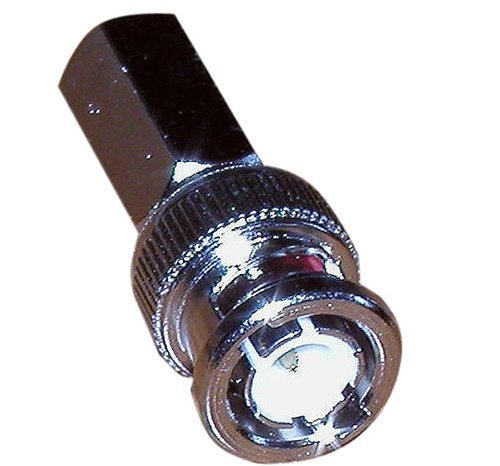
Or you can get BNC compression connectors for the RG6.

41122b.jpg
 
Last edited:

jeffmoss26

Well-known member
Joined
May 25, 2011
Messages
12,851
Location
Cleveland, Ohio
Regular RG-6 will work for security cameras, but proper CCTV cable is RG-59, solid copper and copper braid. I use the siamese cable wherever possible, or cat 5e and baluns.
I got some nice compression connectors made by Ideal that seem to fit most cable, including plenum.
 
OP
M

mpire

Well-known member
Joined
Nov 21, 2008
Messages
1,837
Location
Florida
Regular RG-6 will work for security cameras, but proper CCTV cable is RG-59, solid copper and copper braid. I use the siamese cable wherever possible, or cat 5e and baluns.
I got some nice compression connectors made by Ideal that seem to fit most cable, including plenum.

So what would be the negatives of running RG6?

Its thicker, has more insulation, and I mean the stuff you get on a spool and not the 25 foot connectors that you get at wally world that are just wrapped in foil with no wires.
 
To avoid these ads, REGISTER NOW!

KyleQ

Well-known member
Joined
Jul 6, 2011
Messages
147
Location
Twin Cities, MN
First off, great thread!

Someone posted this earlier - what do you guys think about this system?
http://www.cctvsecuritypros.com/esecohideh4c1.html

This system looks VERY similar, with 600 lines instead of 700, but a 6mm lens instead of a 4mm. What does this mean? Are the lines a measure of video quality and the lens size a measure of viewing distance?
http://www.cctvsecuritypros.com/4cam600lisos.html

I've got a house on top of a hill, nothing around to conceal anyone coming up to the property, so viewing distance is a must. In conjunction to this system I plan on installing motion sensing flood lights with nasty bright lights (I've got some high pressure sodium lights I could use). I want to put a camera on the left side of the garage in the soffit, another camera pointing toward the barn and possibly another one pointing into the back yard - leaving one camera I could put on the barn facing toward where the picture was taken (the road).


What is the max run distance for the RG-59 cabling? I might want to add additional cameras, which would put me in the 8 channel DVR box and ~$1600... Kinda ouch - but I like the features this unit has, especially the remote phone and web viewing.
 
Last edited:
OP
M

mpire

Well-known member
Joined
Nov 21, 2008
Messages
1,837
Location
Florida
Well, I will be the first to say that I am no camera system expert. I have installed maybe 10 systems over the last 15 years, and its always a price compromise. My dad was a sears store manager and I used to go to the security room and play with the security systems zooming in and watching people and stuff like that. My dad had a beta-max cassette with a woman picking up a TV, putting it BETWEEN HER LEGS and walking out the door.

Of course, Sears no longer has security people on staff to monitor the cameras, I don't even think they are turned on, if not removed all together and sold.

PTZ cameras are useless if no one is manning them.

Anyways, that being said, I am argueing the benefits of buying all the tools to do the RG56 for one run over just using the RG6.

Do not use cheap RG6. I buy decent stuff with the wire braid. Granted the RG56 had copper braid, but it was never a full jacket like the RG6 pictured, but just a few wires as compared to a full jacket. I have had excellent results with the RG6.

photobucket-9449-1333466441202.jpg


These are my cable tools, they do the job, and are a million times easier and better than trying to do RG56 with the screw on connectors.

photobucket-2653-1333466451444.jpg
 
Last edited:

Teken

Well-known member
Joined
Jan 2, 2010
Messages
8,214
Location
The Bad Lands
So what would be the negatives of running RG6?

Its thicker, has more insulation, and I mean the stuff you get on a spool and not the 25 foot connectors that you get at wally world that are just wrapped in foil with no wires.

There is no negative in running RG6 at all. That is however, is not the same of the reverse. If you intend to run high bandwidth HD content than that will play a factor.

With anything, regardless of what you perceive what you can see. The most important factor is proper termination of the ends.

Teken . . .
 

ddawg16

Well-known member
Joined
Jul 11, 2008
Messages
21,005
Location
S. California
RG6 is fine.

Don't get hung up on copper vs something else. Your talking high freq, not high power. The characteristic impeadance of the coax (RLC) is more of a function of the physical design than using copper....in other words, there are much greater 'potential' losses due to cable design and quality of termination vs using copper.
 
OP
M

mpire

Well-known member
Joined
Nov 21, 2008
Messages
1,837
Location
Florida
Well, whatever you do, don't use these screw on end connectors. They are an absolute nightmare and will end up stabbing your fingers with the wires over and over again. Its like mid-evil torture!

51Ew67hV-9L.jpg
 

ddawg16

Well-known member
Joined
Jul 11, 2008
Messages
21,005
Location
S. California
Well, whatever you do, don't use these screw on end connectors. They are an absolute nightmare and will end up stabbing your fingers with the wires over and over again. Its like mid-evil torture!

51Ew67hV-9L.jpg

Then your doing it wrong....I've had good success with them....but then again, you have to make sure you get the right one....designed for the cable....you can't use one for RG58 on RG6 cable....and RG6 connector on RG58 will be too loose....

Almost forgot....you need to make sure of the impeadance for you camera....if it's a 50 ohm system....you 'should' use RG58. If it's 75 ohm...RG6
 
OP
M

mpire

Well-known member
Joined
Nov 21, 2008
Messages
1,837
Location
Florida
No, I had the right ends and all that ****. Ordered it special with the camera system.

It was probably **** cable, but it was the right size and all.

I have special tools for the RG6 for stripping it and installing the ends, I did not have that for the RG56. My argument was that having the right tools for RG6 makes RG6 dramatically easier than doing the RG56/7/8 screw on connectors manually with no tools but a pocket knife and some wire cutters.
 

jeffmoss26

Well-known member
Joined
May 25, 2011
Messages
12,851
Location
Cleveland, Ohio
it's RG59...not RG56. GRRR!!! RG58 is even smaller, the old thinnet coax. It is 50 ohms where RG59 and RG6 are 75.
I guess nobody read the links I posted, there IS a reason to use proper CCTV cable.
Sure RG6 may work, but I would not do it for a customer. I run RG6 copper coated steel with F-connectors for cable TV, and RG59 solid copper/copper braid with BNCs for CCTV.
I hate those twist on connectors also. 3 piece crimp connectors take too long and you have to get different size tools and connectors for different cable.
Disclaimer: not trying to be a pain in the ***, I just feel strongly about this industry and the way I was trained.
 
Last edited:

ducktapeguy

Well-known member
Joined
Jan 27, 2009
Messages
534
I'll have to defer to the experts on cable, I don't know much about the different types but I'm not sure if it would be noticable in the distances I was using (<100ft). I've tried a couple different brands and they all performed the same even though some seemed better built than others.

It seems that people prefer the crimp on connectors instead of screw on? Is it just ease of installation or do they also have better reliability?


First off, great thread!

Someone posted this earlier - what do you guys think about this system?
http://www.cctvsecuritypros.com/esecohideh4c1.html

This system looks VERY similar, with 600 lines instead of 700, but a 6mm lens instead of a 4mm. What does this mean? Are the lines a measure of video quality and the lens size a measure of viewing distance?
http://www.cctvsecuritypros.com/4cam600lisos.html

I've got a house on top of a hill, nothing around to conceal anyone coming up to the property, so viewing distance is a must. In conjunction to this system I plan on installing motion sensing flood lights with nasty bright lights (I've got some high pressure sodium lights I could use). I want to put a camera on the left side of the garage in the soffit, another camera pointing toward the barn and possibly another one pointing into the back yard - leaving one camera I could put on the barn facing toward where the picture was taken (the road).


What is the max run distance for the RG-59 cabling? I might want to add additional cameras, which would put me in the 8 channel DVR box and ~$1600... Kinda ouch - but I like the features this unit has, especially the remote phone and web viewing.

Lens is basically the Field of View. There are charts out there than can illustrate the difference in lenses, but basically 4mm is wider angle than 6mm. There is a very good CCTV thread in another forum, (I'm not sure if it's bad etiquette to link to other forums here), with actual pictures from different cameras, different lens combinations, and basically any combination of factors. One of the things that really stuck in my mind was the the importance of the right lens for the application. That is probably the most important factor in getting a usable image. If you are trying to view objects at a distance and are using a megapixel IP camera with a wide angle lens, a cheap analog camera with telephoto lens can either match or exceed the image quality. If anyone is familiar with digital cameras, it's the equivalent of optical zoom vs. digital zoom, it's always better to use optical zoom. Other people can explain it better, but it basically comes down to pixel density on the object you're viewing. Of course the tradeoff is you will be giving up the wide angle coverage, so there is a downside.

Also, I did a quick glance at one of those systems, and while it's advertising HD and "Extreme" everything, look at the recording resolution. In a lot of systems I've seen, they advertise the viewing resolution, not recording resolution. There's a big difference.
 
Last edited:

jeffmoss26

Well-known member
Joined
May 25, 2011
Messages
12,851
Location
Cleveland, Ohio
The screw on connectors have never impressed me. A properly terminated crimp connector or compression connector is the way to go.
 

ducktapeguy

Well-known member
Joined
Jan 27, 2009
Messages
534
I believe your stated price points are pretty accurate for a mid tier system. The key thing I like to stress about the analog systems is that it provides the end user the most value and the balance of performance and true video security.

Having the ability to purchase different analog camera's with different lens's, housings, and TVL specifications is one of the major reasons they continue to dominate the entire market bar none.

Now, if you don't mind using 2nd and 3rd tier IP / Mega Pixel companies. There are quite a few companies that fit that bill, with out breaking the bank.

Teken . . .

So prices haven't come down much, I was kinda hoping it'd be like computers and TV where the price drops every year and maybe I'd be able to pick up an older system for cheap. How much cheaper do you think a third tier system will be?

If the price would come down to within 3-4X the cost of an analog system, I might start looking at it again, but if they're still 10X the cost I doubt I'll ever be able to justify the expense. I think it would be ironic that the most expensive item in my house would be a security system, it would **** if thieves were to come and steal it.
 
Last edited:

Teken

Well-known member
Joined
Jan 2, 2010
Messages
8,214
Location
The Bad Lands
I'll have to defer to the experts on cable, I don't know much about the different types but I'm not sure if it would be noticable in the distances I was using (<100ft). I've tried a couple different brands and they all performed the same even though some seemed better built than others. I meant to say I use the siamese RG-59 (damn 6 and 9 or too close on the number pad) + power cable and if I only needed one long cable, I'd just buy a pre-made one and not deal the issues of making custom length.

It seems that people prefer the crimp on connectors instead of screw on? Is it just ease of installation or do they also have better reliability?


Lens is basically the Field of View. There are charts out there than can illustrate the difference in lenses, but basically 4mm is wider angle than 6mm. There is a very good CCTV thread in another forum, (I'm not sure if it's bad etiquette to link to other forums here), with actual pictures from different cameras, different lens combinations, and basically any combination of factors. One of the things that really stuck in my mind was the the importance of the right lens for the application. That is probably the most important factor in getting a usable image. If you are trying to view objects at a distance and are using a megapixel IP camera with a wide angle lens, a cheap analog camera with telephoto lens can either match or exceed the image quality. If anyone is familiar with digital cameras, it's the equivalent of optical zoom vs. digital zoom, it's always better to use optical zoom. Other people can explain it better, but it basically comes down to pixel density or pixels/inch on the object you're viewing. Of course the tradeoff is you will be giving up the wide angle coverage, so there is a downside.

Also, I did a quick glance at one of those systems, and while it's advertising HD and "Extreme" everything, look at the recording resolution. In a lot of systems I've seen, they advertise the viewing resolution, not recording resolution. There's a big difference.

Spot on . . . When people chirp about mega pixel this, mega pixel that. When the end user(s) see a demo I have set up for the them.

Almost all of them call bull **** on the quality of the image and rendering. There is a place for digital zoom in the market, no questions there. How ever it can not replace good optics in a video security system.

Anyone who tells you different is a complete ***** and has been brain washed by all of the IP / Mega Pixel Kool Aid marketers.

Now, regardless of what many people think . . . A PTZ camera is the most effective tool and method to capture images that are outside of a fixed camera system.

All of the latest PTZ camera's can be programmed to zoom in and record pre set zones / areas of concern. This does not require any human intervention on the part of the user. Many people continue to chirp on about

*This needs a person to operate*

No, it does not . . .

Now, keep in mind this (PTZ) is NOT a solve all . . . Its stated goal is compliment and enhance the existing 360 degree perimeter or area of concern! It does not mean you will simply replace 5, 6, 12 cameras with a PTZ! :eek:

That will be asinine, and retarded in the same fashion. The stated goal is to allow *YOU* to have the ability to Pan, Tilt, Zoom, into a area of concern and really make out what the hell you're looking at. You can NOT do this with a stationary camera, or those objects out of the FOV of the camera.

The highest quality camera, and you can name any brand will not provide a user any tangible or meaningful data at 300 feet, 1/4 mile, what ever distance you choose. This is the limitation of a fixed camera, regardless of the size of lens etc.

Its like a tool, do you have one tool? Or many that can perform a specific task that is required?? :rocker:

At the end of the day once a client has all of the basics in place and the system is tested and proven to be rock solid in terms of perimeter image capture. The next logical step is to deploy a PTZ camera to compliment and enhance what you have now, and address the limitations that currently exists.

Teken . . .
 
Last edited:
OP
M

mpire

Well-known member
Joined
Nov 21, 2008
Messages
1,837
Location
Florida
I think Teken needs to give us the web address of his PTZ cameras so we can play with them a little bit.
 

KyleQ

Well-known member
Joined
Jul 6, 2011
Messages
147
Location
Twin Cities, MN
Also, I did a quick glance at one of those systems, and while it's advertising HD and "Extreme" everything, look at the recording resolution. In a lot of systems I've seen, they advertise the viewing resolution, not recording resolution. There's a big difference.

I asked the dealer and they said it records in the same resolution that the camera outputs. IE a 600 line camera records in that same resolution - so this setup seems decent.
 

Teken

Well-known member
Joined
Jan 2, 2010
Messages
8,214
Location
The Bad Lands
I think Teken needs to give us the web address of his PTZ cameras so we can play with them a little bit.

The last time I did that I caught huge flack from the neighbor(s) :sad: Imagine if you will, a twenty something girl getting changed in their bedrooms.

Only to have the same images posted all over the Internet . . . :eek: So, will I allow anyone access to my camera system? :headscrat

No freaking way . . . :willy_nil

Teken . . .
 

mdbeck1

Well-known member
Joined
Mar 7, 2010
Messages
2,297
Location
Norman, OK
The last time I did that I caught huge flack from the neighbor(s) :sad: Imagine if you will, a twenty something girl getting changed in their bedrooms.

Only to have the same images posted all over the Internet . . . :eek: So, will I allow anyone access to my camera system? :headscrat

No freaking way . . . :willy_nil

Teken . . .

Gotta agree with that logic.

Do you have a link to someone selling them that will let us look at the output?

I'd like to have some security cameras around my place but don't want to spend a fortune.
 

ducktapeguy

Well-known member
Joined
Jan 27, 2009
Messages
534
I asked the dealer and they said it records in the same resolution that the camera outputs. IE a 600 line camera records in that same resolution - so this setup seems decent.

I don't think that completely true, but I haven't used this system so I can't say for sure. Maybe someone else with more experience can chime in. If that were true you should be able to hook up an HDMI camera to it and it should record in HD resolution, but a quick check on the specs on the system in the second link says

Preview Resolution - NTSC: HDMI/VGA 1280x1024, 1280x720, 1024x768
Composite 800x600
Compression Resolutions - NTSC: 704 x 480 (4CIF), NTSC: 352 x 240(CIF)

I've gotten fooled by this before when I bought my first system. I believe what this means is when you're looking at live view of the cameras in real time, you will see 1280x1024 (HDMI) resolution, assuming the camera is capable of it. But when you playback the video, it's going to be recorded at 704x480 (4CIF) resolution, That's about 1/4 of the viewing resolution. So what you see on the screen is NOT what you get when you play it back. I didn't even see the specs listed on the other system, so who knows what you are actually getting. It's not that 4CIF is bad, it's still decent enough for what I need, just don't be disappointed when it's not as clear as the live view.
 
Last edited:

1991Syclone

Well-known member
Joined
Jul 19, 2007
Messages
278
Location
Englewood, FL
While on the subject of cables & connectors, I do have a question about crimping connectors. I need to run some RG6 and CAT5e in the house, so I've purchased 1000ft rolls of both. I have all the crimping tools that I need and some connectors.

Looking at the crimp on RG6 connectors there's a "tube inside a tube" deal where the inner core of the wire slides into the inner tube and the rubber sheath fits into the gap between the inner and outer tube on the connector.

The question is what to do about the wire strand that's shown in the photo below? Should it be cut off, or bent back, or stuffed into the connector? Typically I cut them off. Is that correct?

 
To avoid these ads, REGISTER NOW!
Top Bottom