m32825
Well-known member
I probably clicked on something inadvertently, all of my editor options are grayed out. I would post a picture... but that's grayed out, too. Suggestions?
-- Carl
-- Carl

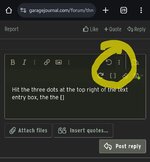
Hit the three dots at the top right of the text entry box, then the [ ] icon
Man that is intuitive! These programmer's are geniuses!That did the trick. Thank you. I would never have found that on my own!
I had the same problem a year or so ago and only found it by chanceThat did the trick. Thank you. I would never have found that on my own!


You need to hit the three dots all the way on the right (second pic), and then hit the [ ] button. It is very slightly colored differently.All my formatting and advanced editing options went grey a while back and haven't been able to get them back... Hitting the three dots does open up a second row of editing options, but those are all greyed out as well. I know this used to work, but can't find the way to get my editing options back.
