
HoosierBuddy
Well-known member
Hi Guys,
I just wanted to report in on my Meister Digital Read Out installation for my older Millrite 8X30 knee mill.
As some may recall, I originally posted about whether this would be a good upgrade for my old mill or not. I received a lot of "DUH...Of course it's a good upgrade" type responses, so a 3 axis kit from drostore.com was added to my Christmas list.
Again, as I reported here, there was a shipping snafu, getting the equipment here from China that took a couple of weeks for them to sort out to get the unit through customs...but eventually the boxes showed up at my door.
What I found out after that was, although everything is fairly straight forward on attaching the scales and encoders to the mill...every mill and every situation is different, so a lot of thought, time, and trips to the hardware store are necessary to get the scales and encoders attached to the machine. The x-axis or long axis of the milling machine was the easiest. I just had to drill and tap some holes in the table to bolt the scale to and the saddle to bolt the encoder to, so that as you adjust the table left and right the scale slides across the top of the encoder.
It was the same sort of thing for the y-axis, except I had to fabricate some brackets and an aluminum back plate to mount everything with...but still pretty straight forward. It would have been easier to do this with the encoder straight up, but the directions with the kit indicate that due to the worry of getting chips or coolant inside the scale housing, the scale should never be mounted with the open slot for the encoder facing up. I should note here that the Meister kit included some aluminum extrusions to be used as chip-guards...so mounting them also involved some planning, thinking, drilling, tapping and additional trips to the hardware store.
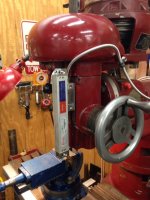
The z-axis or quill travel was a little more of a head scratcher. On most milling machines, I think you'd be able to utilize the quill stop assembly somehow to mount the encoder to, and fix the scale along the quill. My Millrite (essentially a U.S. Burke made 2/3 scale non-authorized copy of a Bridgeport in many respects) doesn't have any provision for a quill stop. It did have a quill travel indicator on the front of the machine though, and a little fabrication allowed me to replace the quill travel indicator with a steel bracket that holds the encoder and actuates it up and down as the quill traverses. The scale was mounted in a fixed position to the quill housing. I did have to grind mounting block on the top end of the quill encoder to (mostly) clear my belt guard. It has to be pivoted to allow for pulley adjustments. I'm quite sure that violated the warranty on that bad boy.
Another aside here...I found out after some problems that the scale to encoder gap is fairly critical if you want the encoder to be able to read the scale. So, I ended up using a lot of slots rather than holes to make my brackets and mounting plates and such so I could adjust everything square and straight and parallel and gap everything using the included shims before locking it all down tight.
Last night I got out the handbook that came with the DRO and started learning functionality. The thing has more capabilities built into it than I'll ever use (automatic shrinkage factor for making molds from finished part prints, etc.) My first trial run was cutting equal space slots in aluminum bar stock. Punching the commands in took maybe 60 seconds and then I'm milling the first slot. When it was done, I pushed the down arrow and the DRO switched over and showed me how far I needed to move the table to get to the start point for slot 2. Once the DRO read 0.0000 I cut the second slot. Then you down arrow and it brings up point 3, etc. The Meister DRO lets you program up to 99 coordinate sets to store for any job you care to make. Again...lots more capability than I'll need.
Anyway...it's really cool having it working. I just need to come up with a few good projects to get some hours with it and figure out more useful capabilities. It's nice just having the readouts, but once you see all the functions any of these DRO's have (even the cheap Chinese ones) it does expand the capabilities of an older manual milling machine.
Phil
I just wanted to report in on my Meister Digital Read Out installation for my older Millrite 8X30 knee mill.
As some may recall, I originally posted about whether this would be a good upgrade for my old mill or not. I received a lot of "DUH...Of course it's a good upgrade" type responses, so a 3 axis kit from drostore.com was added to my Christmas list.
Again, as I reported here, there was a shipping snafu, getting the equipment here from China that took a couple of weeks for them to sort out to get the unit through customs...but eventually the boxes showed up at my door.
What I found out after that was, although everything is fairly straight forward on attaching the scales and encoders to the mill...every mill and every situation is different, so a lot of thought, time, and trips to the hardware store are necessary to get the scales and encoders attached to the machine. The x-axis or long axis of the milling machine was the easiest. I just had to drill and tap some holes in the table to bolt the scale to and the saddle to bolt the encoder to, so that as you adjust the table left and right the scale slides across the top of the encoder.
It was the same sort of thing for the y-axis, except I had to fabricate some brackets and an aluminum back plate to mount everything with...but still pretty straight forward. It would have been easier to do this with the encoder straight up, but the directions with the kit indicate that due to the worry of getting chips or coolant inside the scale housing, the scale should never be mounted with the open slot for the encoder facing up. I should note here that the Meister kit included some aluminum extrusions to be used as chip-guards...so mounting them also involved some planning, thinking, drilling, tapping and additional trips to the hardware store.
The z-axis or quill travel was a little more of a head scratcher. On most milling machines, I think you'd be able to utilize the quill stop assembly somehow to mount the encoder to, and fix the scale along the quill. My Millrite (essentially a U.S. Burke made 2/3 scale non-authorized copy of a Bridgeport in many respects) doesn't have any provision for a quill stop. It did have a quill travel indicator on the front of the machine though, and a little fabrication allowed me to replace the quill travel indicator with a steel bracket that holds the encoder and actuates it up and down as the quill traverses. The scale was mounted in a fixed position to the quill housing. I did have to grind mounting block on the top end of the quill encoder to (mostly) clear my belt guard. It has to be pivoted to allow for pulley adjustments. I'm quite sure that violated the warranty on that bad boy.
Another aside here...I found out after some problems that the scale to encoder gap is fairly critical if you want the encoder to be able to read the scale. So, I ended up using a lot of slots rather than holes to make my brackets and mounting plates and such so I could adjust everything square and straight and parallel and gap everything using the included shims before locking it all down tight.
Last night I got out the handbook that came with the DRO and started learning functionality. The thing has more capabilities built into it than I'll ever use (automatic shrinkage factor for making molds from finished part prints, etc.) My first trial run was cutting equal space slots in aluminum bar stock. Punching the commands in took maybe 60 seconds and then I'm milling the first slot. When it was done, I pushed the down arrow and the DRO switched over and showed me how far I needed to move the table to get to the start point for slot 2. Once the DRO read 0.0000 I cut the second slot. Then you down arrow and it brings up point 3, etc. The Meister DRO lets you program up to 99 coordinate sets to store for any job you care to make. Again...lots more capability than I'll need.
Anyway...it's really cool having it working. I just need to come up with a few good projects to get some hours with it and figure out more useful capabilities. It's nice just having the readouts, but once you see all the functions any of these DRO's have (even the cheap Chinese ones) it does expand the capabilities of an older manual milling machine.
Phil
Attachments




Last edited: