To avoid these ads, REGISTER NOW!

Floor plan software for a metal shop?

smackdab

Member
Joined
Dec 4, 2020
Messages
8
Location
Michigan
Maybe been discussed, but I couldn't find anything that really fit my current dilemma. I have the walls, door placement, windows, and the rest of the "big" stuff sorted out in a proposed new shop I'm building. What I can't find is software that has a library of common tools that would be in a shop. For example: Welders, presses, drill press, tool boxes, table saw. That sort of thing.

I've downloaded Sketchup 2017, and just downloaded Sweet home 3d. I haven't used either yet, but a quick look at the add on stuff didn't show any shop tool stuff. It sounds like Grizzly had a real good program, but thats currently not available.

So, my question is: is there other free or low cost, simple to use, software out there I haven't found to accomplish what I'd like, or is there add ons to the software I already downloaded? Or, is there a different solution I haven't considered? I know paper and pencil always works- except I currently have some physical limitations that prevent that from working real well.

TIA!
 
To avoid these ads, REGISTER NOW!

BillK

Well-known member
Joined
Aug 24, 2006
Messages
9,300
Location
Beautiful Southern Maryland
Smack,
When I moved my business to my present location 20 years ago here is what I did. I tried a home plan software first but decided it was more trouble than it was worth.

So I went to Staples and bought a big pad of graph paper. Then I layed out the shop walls etc on it. After that I made little card stock cutouts of all of my equipment, tool boxes, benches etc. Then I played with all of them on the graph paper till I liked the set up. It was so fast and easy to move stuff around and try different layouts that way.

I helped a friend of mine do the same thing with his auto repair shop except we bought a larger sheet of poster board which made it even easier.

As much as I love doing things on the computer sometimes going back to the old fashioned way works a lot better and faster.
 

markhm

Well-known member
Joined
Mar 4, 2017
Messages
264
Location
NY
You can find everything you need @ https://3dwarehouse.sketchup.com
Just use the search box. Download the models as collada files.
Sweet Home 3D has a furniture editor. Use it to import the models you downloaded and they will then be available to you in SH3D. SH3D is a great program. I use it and enjoy using it. It can do what you want to do.
 
Joined
Nov 8, 2017
Messages
13
I’m actually at the same point. I just relocated, there is a brand new shop building at the new house that just needs finishing. Concrete floor, more lights/wiring, insulation, HVAC, etc, etc.m2.JPG

i measured it up last weekend so I could accurately estimate for insulation and drywall, and will use the same model to figure out framing to the upper room and the layout for where all the machinery will go.

I am using Solidworks, but only because I have it and am familiar with it. The last time I did this I just used graph paper and a ruler to lay out the floor plan, then cut out scale “footprints” for the tools that had to go there. Honestly, the graph paper was probably the fastest way to do it.
 

CraigStu

Well-known member
Joined
May 22, 2014
Messages
4,013
Location
Blacksburg, Va
I know they may not be exact but I used a home design product from HGTV. They had a large selection of furniture but the key was that you could grab something that was close and then go into it and change dimensions and color. I used them to make copies of all our existing furniture. Style was often wrong but the correct size and color worked out fine. Maybe you can find something similar.
 

MadeByMiller

Well-known member
Joined
Dec 29, 2018
Messages
1,230
Location
Rapid City, SD
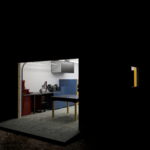
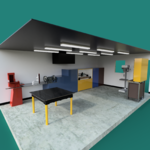
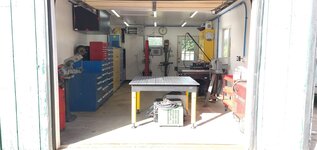
Much like @mcglynnonmaking I've used my chosen flavor of 3D CAD software (Fusion360) to model my shop and most of the contents. As far as 3D models for the tools and equipment, I've used a few pieces from GrabCAD.com that were similar enough to my existing tools for the shop layout model or could be modified to more accurately reflect the real pieces without modeling the entire thing from scratch. Several objects I have modeled from scratch, and I would encourage you to do so as it is a great exercise to learn 3D CAD software and increase your skillset. Another resource may be the tool manufacturer themselves. Although rare, some manufacturers go the extra mile to include 3D models of their products (such as Strong Hand tools in the case of my fixture table shown). One last thing of note, although I prefer to take the time to make my shop model and the contents as accurate to reality as makes sense to do, you can easily just "block out" your equipment using critical dimensions such as footprint and overall height - the extreme LxWxH (think if the piece was in a crate). This would pretty quickly and easily give you an idea of where the pieces would best fit.

Hope this helps!Shop 010.PNGShop 006.pngShop 005.pngShop 004.PNGShop 002.PNGIMG_20210715_175822957.jpg
 

nadogail

Well-known member
Joined
Jan 23, 2009
Messages
31,908
Location
Coronado, CA
About 40 years ago, when we moved into a new house I did the paper cutouts and graph paper drill; I had not bought my first computer. That saved me from moving the furniture countless times so my new bride could visualize what her decorating ideas would look like. I have done it twice since.
Much easier to shuffle cutouts than machines.
 
To avoid these ads, REGISTER NOW!
Joined
Nov 8, 2017
Messages
13
Wow, really nice renderings @MadeByMiller! it’s fun but way too easy for Me to get caught up in playing with the cad version.

After I had the shape of the building I did a 2D layout to subdivide the space by the kind of work that I plan to do — woodworking vs metal fab vs machining and so forth. Then I drew boxes for the footprints of all of my stationary tools. After staring at it I realized that I needed to swap things around so that for both metal and wood I had my storage racks for the materials and the tools to break down stock positioned bead the roll up doors. I don’t want to drag a 20’ piece of metal tubing or rough sawn wood through the whole shop to be able to store it or rough cut it for a particular project.

from that layout I could map where I needed outlets. 220/20 for things like be;t sanders and the disc grinder and buffer. 220/30 for single phase stationary tools. Dedicated drops for the phase converter, compressor, dust collector. An isolated 3phase circuit the I feed with my phase converter, etc, etc.

that’s all in now, just need to rough in two more circuits for the hvac. Hopefully insulation in the next week or two.

or I can just keep getting distracted with the virtual version of my shop. Graph paper and scaled “paper dolls” for the tools works well too and is probably more efficient honestly if you just want to figure out where stuff goes. I also needed to figure out surface area for insulation;action, drywall, how to frame steps so they don’t block the windows or take up floor space.
 

Attachments

  • m14.JPG
    m14.JPG
    176.5 KB · Views: 27

MadeByMiller

Well-known member
Joined
Dec 29, 2018
Messages
1,230
Location
Rapid City, SD
Wow, really nice renderings @MadeByMiller! it’s fun but way too easy for Me to get caught up in playing with the cad version.

After I had the shape of the building I did a 2D layout to subdivide the space by the kind of work that I plan to do — woodworking vs metal fab vs machining and so forth. Then I drew boxes for the footprints of all of my stationary tools. After staring at it I realized that I needed to swap things around so that for both metal and wood I had my storage racks for the materials and the tools to break down stock positioned bead the roll up doors. I don’t want to drag a 20’ piece of metal tubing or rough sawn wood through the whole shop to be able to store it or rough cut it for a particular project.

from that layout I could map where I needed outlets. 220/20 for things like be;t sanders and the disc grinder and buffer. 220/30 for single phase stationary tools. Dedicated drops for the phase converter, compressor, dust collector. An isolated 3phase circuit the I feed with my phase converter, etc, etc.

that’s all in now, just need to rough in two more circuits for the hvac. Hopefully insulation in the next week or two.

or I can just keep getting distracted with the virtual version of my shop. Graph paper and scaled “paper dolls” for the tools works well too and is probably more efficient honestly if you just want to figure out where stuff goes. I also needed to figure out surface area for insulation;action, drywall, how to frame steps so they don’t block the windows or take up floor space.

I love the detail @mcglynnonmaking ! The DoAll bandsaw and of course the massive power hammer are particularly cool to see modeled up! It's definitely time consuming to add so much detail to your virtual shop, but I think it's worth it. Moving all that big heavy equipment in reality is a whole lot harder than a few mouse clicks in CAD. Having your utilities modeled is something I have yet to add, but I could see being extremely valuable as well. My shop model includes all of the framing behind the drywall that I measured prior to finishing the interior, so any future structure changes or simply mounting something to a stud can be easily measured and found in the model and with a fair amount of accuracy be translated to the existing shop framing. I used my model to help measure surface area for materials as well, super useful and gives you confidence that you wont be running back to the store because you misjudged/miscalculated.
 

472scout

Well-known member
Joined
Sep 18, 2010
Messages
1,276
Location
back 40
Much like @mcglynnonmaking I've used my chosen flavor of 3D CAD software (Fusion360) to model my shop and most of the contents. As far as 3D models for the tools and equipment, I've used a few pieces from GrabCAD.com that were similar enough to my existing tools for the shop layout model or could be modified to more accurately reflect the real pieces without modeling the entire thing from scratch. Several objects I have modeled from scratch, and I would encourage you to do so as it is a great exercise to learn 3D CAD software and increase your skillset. Another resource may be the tool manufacturer themselves. Although rare, some manufacturers go the extra mile to include 3D models of their products (such as Strong Hand tools in the case of my fixture table shown). One last thing of note, although I prefer to take the time to make my shop model and the contents as accurate to reality as makes sense to do, you can easily just "block out" your equipment using critical dimensions such as footprint and overall height - the extreme LxWxH (think if the piece was in a crate). This would pretty quickly and easily give you an idea of where the pieces would best fit.

Hope this helps!Shop 010.PNGShop 006.pngShop 005.pngShop 004.PNGShop 002.PNGIMG_20210715_175822957.jpg
How many hours modeling did that take?
 

4 FN 27

ALLIANCE MEMBER
Joined
Oct 19, 2015
Messages
4,635
Location
Minnesnowta
How many hours modeling did that take?
When it comes to detail...I like it!!!

Back in the day when I headed up Facilities and Maintenance we put everything in Cad 2D. Property, Building, Electrical, Air, Desks and I mean everything.

Saved lots of dollars when it came time to add equipment. Knew where everything needed to go and where we were going to pull it from. Machinery installs went from weeks to days because locations for everything could be spec'ed ahead of time and X's drawn on the floor and pre run before the equipment was put in place.

Our new Facilities Manager lacks the skill set for Cad thus to get my Models up to speed would be a very time consuming task at this point. It now takes longer to do an install of a new piece of equipment which is OK as we are replacing older machines with new more so than all new equipment.

The Plant.jpg
 

MadeByMiller

Well-known member
Joined
Dec 29, 2018
Messages
1,230
Location
Rapid City, SD
How many hours modeling did that take?

I could only guess, a project like that I have added to over 3 years here and there as I've added equipment or refined/updated existing models throughout that time. I'm sure a couple hundred hours minimum. Keep in mind that over that time I've gained experience and knowledge of the program, so if I had to start from scratch now it could be done much faster and more efficiently. I also thoroughly enjoy the process of creating a detailed and realistic 3D model, so I've sunk a lot more time into the virtual shop than needed to just establish shop layout, simply for the enjoyment of it and the practice. While my operation is nowhere near the scope or scale of 4 FN 27's and therefore not as critical financially, the benefits still exist and long term, my models will outlast my current shop setup and can easily be transferred into my next virtual shop model; what I'm saying is, the hard work is done once the equipment has been modeled and it can be utilized for however long you own that piece of equipment.
 
Joined
Nov 8, 2017
Messages
13
In terms of hours I probably spent less than an hour modeling the building itself - I didn’t include the wall construction details like studs, just accurate thickness and interior dimensions. I did three different sets of steps trying out different ideas, that was a couple of hours because I was modeling the framing details as I still have to build them and want to be able to have the compressor and rotary phase converter in the space below the steps. Maybe another hour mapping out tool positions and outlets. Call it half a day to answer the questions about how much insulation and drywall, where the tools go, what electrical circuits I need to rough in, and how to frame the steps.

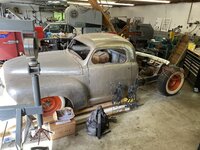
I easily spent another 4 hours fiddling with details for ”fun” and tweaking things to get the lighting right to have a decent render. Some of the tools I downloaded from grabcad.com which are close to what I have to put there. The power hammer and hot rod are my own design for future projects once I get settled. I’d kind of filled up my 1,200 sq foot shop at our last house and am looking forward to getting the new space set up. Getting my custom Studebaker on the road is a high priority, but that’s another story.

616FF727-6D18-44A6-8FFF-2BEE13F761FE.jpeg
 

matt_i

Well-known member
Joined
Mar 14, 2008
Messages
10,723
Location
SE Michigan
I use a wireframe CAD program but don't do a lot with modeling, just simple "grouped" boxes are fine for my uses that fit in the overall envelope used in overhead layouts. Valuable when trying to cram X lbs of "stuff" into a Y lb bag :D

I did a few things with layers to visualize wiring, outlets, fans, retractable staircase, etc but that's about as fancy as it gets.
 
To avoid these ads, REGISTER NOW!
Top Bottom