To avoid these ads, REGISTER NOW!

Fusion 360 help

Ingram306

Well-known member
Joined
Mar 6, 2011
Messages
140
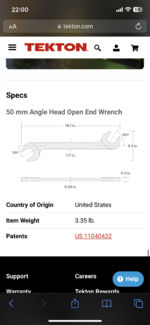
So I recently picked up a 3d printer and have had luck making a few small things that I have designed in fusion 360. (Drawer dividers/trays/tig tube dividers etc. I have the full set of tekton angle wrenches which I would like to design a tray for so that that all sit vertically, I found a pic of another design in the “Everything 3d printer” thread that I really like , however, with the full set I need it to hold 27 wrenches so it’s not going to be something I can just download and print (6mm-27mm)

My question for you guys is what would be the most efficient method for designing this? I’m not a pro but have a decent grasp of the concepts in F360. Should I model each wrench individually and then use the model to cut an impression of a larger body? Or make a large body and cut the dimensions of each wrench out individually? Thanks in advance for any help.
 

Attachments

  • IMG_1130.png
    IMG_1130.png
    1 MB · Views: 21
  • IMG_1139.png
    IMG_1139.png
    380.6 KB · Views: 21
  • IMG_1140.png
    IMG_1140.png
    669.4 KB · Views: 21
To avoid these ads, REGISTER NOW!

MadeByMiller

Well-known member
Joined
Dec 29, 2018
Messages
1,230
Location
Rapid City, SD
This would be a fun opportunity to create a parametric model whereby you alter the driving parameters and all other geometry will update appropriately for each wrench size, but that's a bit more advanced CAD. This could work for modeling either the wrenches or the tray features. I know that if I were modeling this, I would model each individual wrench, lay them out as I wanted them organized, then create the organizer around the wrenches. I think there is too much variation between each wrench size (with it not being a linear change as size increases either) to not model at least a basic "dummy" form of the wrench.

If you want to challenge yourself and further your CAD skills, I would encourage you to look into the parametric approach for the wrenches. HERE is a YouTube video that hopefully explains what I'm talking about (full disclosure, I haven't actually watched this video, but it looks right and Prusa is great).
 

Firebrick43

Well-known member
Joined
May 12, 2015
Messages
14,060
Location
West central Indiana
So I recently picked up a 3d printer and have had luck making a few small things that I have designed in fusion 360. (Drawer dividers/trays/tig tube dividers etc. I have the full set of tekton angle wrenches which I would like to design a tray for so that that all sit vertically, I found a pic of another design in the “Everything 3d printer” thread that I really like , however, with the full set I need it to hold 27 wrenches so it’s not going to be something I can just download and print (6mm-27mm)

My question for you guys is what would be the most efficient method for designing this? I’m not a pro but have a decent grasp of the concepts in F360. Should I model each wrench individually and then use the model to cut an impression of a larger body? Or make a large body and cut the dimensions of each wrench out individually? Thanks in advance for any help.
In fusion 360 can take a picture of the wrench, use a known dimension on the wrench to size it, and then draw a simple profile on top of the pic. Then extrude it. It takes just a few min per wrench to model them. Then make a solid tray, place your wrenches as you want them and cut/delete where the wrenches are.
 
To avoid these ads, REGISTER NOW!

AffableCurmudgeon

Well-known member
Joined
Jan 26, 2009
Messages
1,906
Location
Triad Area NC
Here is how I would do it:

1. Draw a rectangle the desired size of the footprint of the tray.
2. In the rectangle, draw the cutouts for each wrench.
3. Extrude the cutouts to the desired thickness of the bottom of the tray; not the desired height of the tray. These would be the bottoms of the cutouts in the finished tray. You may have to do each cutout separately to achive a slope.
4. Extrude the remaining parts (rectangle minus the cutouts) of the box to a height more that desired thickness of the tray. You will discard the extra extrusion in step 6 below.
5. On the side of the extruded tray, draw a line at the desired angle to achieve the slope you want the tray to have from the back to front.
6. Split the body along the sloped line.
7. The bottom portion of the split body is your tray. Chamfer/fillet/round over the edges, clean up and emboss sizes, etc.
 
To avoid these ads, REGISTER NOW!
Top Bottom