G Code question - New CNC router project ruined by return to home command?

macgyver37

Well-known member
Joined
Mar 7, 2013
Messages
609
Location
Pittsburg, Kansas
I personally baby sit my machines until I am confident in the process. That means everything from being confident in the hardware of the machine, my programming, the cutting tools, the dust collection etc. Once I feel confident in the system, I don't worry about it, it's a robot and it's going to do it's thing whether I am there or not. I just finished up a recurring job with this batch at 952 parts. The cycle is 11 min. I'm not actively watching it the whole time. I am Very aware of what it is doing anywhere in the shop and I am very confident in my system. Full disclosure, I have had and ran my machine fulltime for 14 yrs now with the same hardware, software, RS232 cables and more. I also ran one just like it for 7 years prior to mine, so I'm in tune to the setup.

I have a friend that makes fiberglass molds for buses and boats etc so they are huge. I know for a fact that he has had many molds where the machine has ran for 2 weeks nonstop. He put a camera on it and such, but it's running unattended 2/3rds of the time.

There is always risk, but you have to mitigate it as much as possible then let it go. If the risk it too much to bear, then you have to babysit it fulltime.

That being said, this particular situation is all new, so I'd try to prove it out with short run time cycles before I'd feel good about it. I will also say that the machines I have and my customer machines are a commercial grade machine and with that is more reliability and trust. Figuring out all the quirks of this machine will make you think you are cheating if you ever get a big machine with a toolchanger and vac table and a MTB with customer service.

To address your question with different tools. I'd run a rougher tool as large as makes sense, then switch to a finish tool. If you have more than one part to make, I'd make a fixture so you can swap parts out to run the roughing pass, then switch tools and run the finish pass on all of them.
 
To avoid these ads, REGISTER NOW!

niget2002

Well-known member
Joined
Oct 2, 2012
Messages
11,123
Location
Josephine, TX
Bigger, stronger machines can make bigger cuts so you spend less time sitting and waiting.

Once you've verified the machine can make it through the process reliably, then you can start increasing speeds. On something that's complicated, a small speed increase can turn into a lot of time saved over the entire project.

Also, on some less rigid machines, it's faster to make faster/lighter cuts than it is to make slower full-depth cuts.
 
OP
H

HoosierBuddy

Well-known member
Joined
May 9, 2006
Messages
2,919
Location
Southern Indiana
APPARENTLY FIXED:

Follow up and close out to this post in case anyone searches for a similar problem in the future.

1. The standalone controller included with my router was ****. When using the controller I was never able to make complex parts as eventually the machine would mess up and ruin the part. Likely culprit is electrical noise in the cheap ribbon cable that connects the controller to the machine....but additional testing would have to be done to verify.

2. Instead: I used my wife's laptop long enough to determine that it worked a lot better than the handheld controller. Eventually that failed because she told me to quit getting sawdust all over her laptop. I went on Amazon and found a pretty decent refurbished HP laptop for $180.

3. Regardless of whose laptop you use, if windows based you should:
  • Go to Control Panel > Hardware and Sound > Power Options
  • Find "Change plan settings"
  • Navigate to Change advanced power settings > USB Settings > USB selective suspend setting > Disable it
4. I like easel as it makes it super easy to design 2.5D parts and get cutting in a hurry, but it seems to be unreliable when used to control my CNC Router. Instead, what has worked better is to design in easel, use it to generate the g code and save it to my hard drive, then close easel, open Universal G Code Sender (free software), open the Roughing G code file, make sure I remember what tool easel says needs to be loaded for that cut and set up my router properly. Zero the machine. Hit start.

So....problem was never the GCode. Problems were using the standalone controller (which scrapped everything), or using easel directly (which scrapped about 25% of my work). The changes to power control will keep your laptop from shutting off your cut after a couple of hours. However....using G Code Sender, you can restart your program from where it quit if you want to...so not a huge deal...more of an annoyance.
 
To avoid these ads, REGISTER NOW!
OP
H

HoosierBuddy

Well-known member
Joined
May 9, 2006
Messages
2,919
Location
Southern Indiana
And....I actually finished the project I was trying to start when I started this thread.

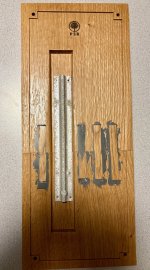
It's not perfect. The project was complicated by the fact it is too big to fit on my router, so I had to make it in two pieces. Also, as you'll see I had to carve out the back for a pocket to mount a thermometer I salvaged from on old reproduction "FORD" thermometer I hung outside the door to my workshop 30 years ago. And, I cut out pockets for some...I suppose you'd call them floating tenons or maybe just "Scab" pieces I wood glued in to support the joint.

The back looks rougher than it should because my "scab" pieces had gaps around them that I filled with epoxy after the wood glue dried. I didn't want to leave extra spots for water to collect or whatnot.

This is 7" wide by about 18" tall. The first pic also shows some of the frame I made for a rookwood tile I gave my wife for Christmas. Anyway...6 weeks into using this machine, I know a lot more than I did. The lettering is some black acrylic indoor/outdoor craft paint I picked up at The Walmart.


Ready to take out and mount next to my workshop door.
thermometer2026-1.jpg


Salvaged Thermometer from old reproduction stamped steel thermometer. 50 Degrees has
a dot of Sharpie (later wiped off with alcohol) marked at 50-degrees before I removed it from
the old stamped steel reproduction piece.

thermometer2026-2.jpg


OK. Back is pretty rough. This side gets hidden when screwed to the side of my shop.
thermometer2026-3.jpg
 
Last edited:

Cruzan80

Well-known member
Joined
Jul 22, 2015
Messages
4,192
Location
Denver, CO
Hint/tip: If you are using a sacrificial table, use the mounting holes in the corners to plunge deeper than the material, giving you the ability to mount dowel pins you can insert, so on the flip operation it aligns to keep everything even (plunge the pins, mount, then profile to match dimensions). If they are symmetric both X and Y, you then have the same ability to cut parallel slots on both top and bottom (in this case, the two outside "tenons"), to help line up easier.

Instead of doing [] cutous, either fillet (radius) the tops of the cuts by the size of your end-mill, or make "dogbones" (P shaped cuts at the top on both sides) where the diameter of the half-O or I) is ever slightly larger than the endmill and tanget to the horizontal. This way the cutter travels "past" the invisible corner, allowing you to connect 90deg corners easier (really helpful when connecting perpendicular pieces like tabletops/legs). If you need pics of what this looks like afterwards, I can grab examples from my students next week.
 
To avoid these ads, REGISTER NOW!
Top Bottom