To avoid these ads, REGISTER NOW!

Garage computer program???

Moosefire66

Well-known member
Joined
Dec 13, 2016
Messages
104
Location
Detroit
I've noticed a lot of you have very detailed, and to scale computer renderings of your garages, how in the blue F do you do that?

Hell, even cabinets, lifts, cars, etc are scaled appropriately. I've dove a search but I must've missed it, or its not in there...

Thanks!

Sent from my SAMSUNG-SM-G890A using Tapatalk
 
To avoid these ads, REGISTER NOW!

chrisBTSC

Well-known member
Joined
Jan 13, 2015
Messages
132
Location
Folsom, CA
Any layouts or 3d models I have done for my garage is done with SolidWorks. It's a really great program but pretty expensive.
 
OP
M

Moosefire66

Well-known member
Joined
Dec 13, 2016
Messages
104
Location
Detroit
Damn it all... any decent free programs out there?

Sent from my SAMSUNG-SM-G890A using Tapatalk
 
OP
M

Moosefire66

Well-known member
Joined
Dec 13, 2016
Messages
104
Location
Detroit
I have sketch up on my computer at home, I can't get it to do anything besides basic boxes, and there's no detail to anything.... it probably doesn't help that I'm computer illiterate in most cases.. but cabinet details, cars, etc seems impossible with sketch up

Sent from my SAMSUNG-SM-G890A using Tapatalk
 

fergus

Well-known member
Joined
Oct 4, 2009
Messages
1,620
Location
Yolo County CA
The secret to sketch up is to use objects from the library - things that have already been drawn by somebody else and have been put up for public use. If you see the sketch I did toward the beginning of the Derelict Ranch thread, you'll see that's exactly what I did. The other thing is to rotate the sketch to get the view you want. I found myself spending most of my time doing that, then rearranging things to the the alignment and orientation correct.
 

ChaseDE

Well-known member
Joined
Aug 25, 2016
Messages
2,178
Location
Delaware
if you are building out a garage sketchup will do. there is a "3d warehouse" with 10000's of free models you can download and add into your model.

It might take a bit to learn the tools but its a pretty steep learning curve, there are not that many tools, and you get the hang of it.

so lets take a look at my garage sketchup file

garage.jpg

the fridge, car, garage door, totes, toolboxes, cabinets, compressor, and vacuum are all just downloaded models, literally 1 click and they showup.

you can scale things you download, so that car was a bit bigger then my wifes actual car, so i scaled it down some, same with the toolboxes and some of the cabinets.

the 22' x 22' footprint, floor, walls, door openings, workbench, shelves, etc are all just basic shapes. this level of detail is good enough to plan out your space.
 

dypen

Well-known member
Joined
Aug 18, 2011
Messages
97
Location
Oslo, Norway
if you are building out a garage sketchup will do. there is a "3d warehouse" with 10000's of free models you can download and add into your model.

It might take a bit to learn the tools but its a pretty steep learning curve, there are not that many tools, and you get the hang of it.


This looks very nice!
 
OP
M

Moosefire66

Well-known member
Joined
Dec 13, 2016
Messages
104
Location
Detroit
Damn! I didn't know you could do that. I'll have to try it again and see what I can come up with!

Sent from my SAMSUNG-SM-G890A using Tapatalk
 

skulldrinker

Well-known member
Joined
Dec 25, 2011
Messages
1,171
Location
Bolingbrook, IL
You turn key garage people crack me up. Took me 30 years to get my garage looking the way it is and everything fits or it wouldn't be in there.

edit- and it is always evolving stuff comes and stuff goes.
 

ChaseDE

Well-known member
Joined
Aug 25, 2016
Messages
2,178
Location
Delaware
Thanks guys, I actually work with a very very expensive 3D program every day for my real job, Aveva PDMS, but sketchup is outstanding for a free program for the average home user.

I use "MySketchup Online" (also free) here, you can login to your google account and save all your models in the cloud for access anywhere on any computer with is SUPER handy. It is a great time waster for me when I get bored and get ideas.

https://www.sketchup.com/products/my-sketchup

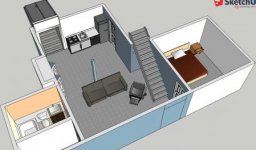
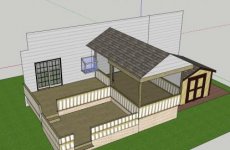
My side business is building websites, I also offer home remodeling plans, ideas, etc, using sketchup.

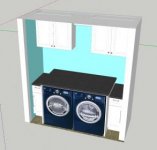
panel.jpg

basement.jpg

bathroom.jpg

deck.jpg

laundry.jpg
 
OP
M

Moosefire66

Well-known member
Joined
Dec 13, 2016
Messages
104
Location
Detroit
You turn key garage people crack me up. Took me 30 years to get my garage looking the way it is and everything fits or it wouldn't be in there.

edit- and it is always evolving stuff comes and stuff goes.
I'm not looking for a turn key garage, I'm wanting to make sure I have enough space to do the things I want/need. Drawing is far from being accurate. This will give me a visual as to how big it will be, and how I can use it efficiently. Also, the more you plan, the more you can save. I don't want to redo something in a year because I didn't think about it or plan it out ahead of time. I work long and hard for my money, I want to spend it wisely

Sent from my SAMSUNG-SM-G890A using Tapatalk
 

Maddog10

Well-known member
Joined
Nov 16, 2016
Messages
151
Location
Paducah, Kentucky
Google Sketchup is what you want. Free, basic, and will do what you need to do. As others mentioned, if you want your model to look nice you can download most things from online... I use AutoCAD and it's undoubtedly a better program for custom modeling but it's not free and definitely requires a steeper learning curve. It's what I use for my job.
 
To avoid these ads, REGISTER NOW!

racestatus

Well-known member
Joined
May 25, 2016
Messages
300
Location
Danbury, CT
You turn key garage people crack me up. Took me 30 years to get my garage looking the way it is and everything fits or it wouldn't be in there.

edit- and it is always evolving stuff comes and stuff goes.

30 years, jesus what did you do move one piece a year?
 

bushmechanic

Well-known member
Joined
Mar 17, 2014
Messages
4,820
There are lots of free CAD programs if that's what you want to learn, and great deals to be had on older versions on Ebay.

Some home design software is free or cheap, and works well for basic structure if you don't want anything crazy.

Honestly, though... My favorite (and easiest to use) construction toy is The Sims; a computer game. You'd be shocked what you can create in that program with no experience in CAD or anything similar. Just cheat for more money, and build whatever you want.

The design tools are quite flexible, and the modding community offers plenty of odd-ball custom content. It's a lot of fun.

Sims 3 is the most expansive and detailed, but Sims 4 has more odd-ball angles and options available; though it's limited in other ways. You won't have everything down to the last foot, but you can sure enough get it close enough to visualize whatever you want.
 

wendlwacker

Well-known member
Joined
Mar 4, 2013
Messages
86
Location
West Des Moines, Iowa
The EAA allows you to download solid works for free if you are a member. Join then go to Oshkosh one year enjoy the planes and design your garage. (Experimental aircraft association)
 

bottom feeder

Well-known member
Joined
Dec 10, 2012
Messages
331
Location
Utah
Get Sketchup. But before you try to draw anything very serious spend a little time watching their orientation videos on YouTube & practicing what they show you. You'll be very glad you did. There's a few basic drawing skills you need to wrap your head around before you can be very productive with it.
 

ndm

Well-known member
Joined
Jun 12, 2013
Messages
242
Get Sketchup. But before you try to draw anything very serious spend a little time watching their orientation videos on YouTube & practicing what they show you. You'll be very glad you did. There's a few basic drawing skills you need to wrap your head around before you can be very productive with it.

Reiterating this!

Watch the videos!
 

ndm

Well-known member
Joined
Jun 12, 2013
Messages
242
The EAA allows you to download solid works for free if you are a member. Join then go to Oshkosh one year enjoy the planes and design your garage. (Experimental aircraft association)

So this basically ends up costing $40 for the individual membership?

I wonder whats the catch?
 

PCMusicGuy

Well-known member
Joined
Feb 15, 2009
Messages
851
Location
Houston, TX
Fusion 360 (autodesk) is free.

Sent from my SM-G930V using Tapatalk

This right here. If you want a good free cad software, this is the ticket.

Sent from my SM-G920W8 using Tapatalk

If you will be doing more part modeling, rather than layout, parametric modeling really is the way to go. I've just started using Fusion 360 and it is pretty dang impressive for free.

That said, Sketchup is a great tool for quick layouts. This was the first thing I built in sketchup: a nearly to scale ever eternal full rise scissor lift. I estimated everything from their dimensions and did the drawing the brute force way.
https://3dwarehouse.sketchup.com/model.html?id=779a6673a69783e79d76a4db784a1753
 

Jim Johnstone

Well-known member
Joined
Apr 11, 2011
Messages
1,841
Location
Brantford, Ontario
If you will be doing more part modeling, rather than layout, parametric modeling really is the way to go. I've just started using Fusion 360 and it is pretty dang impressive for free.

That said, Sketchup is a great tool for quick layouts. This was the first thing I built in sketchup: a nearly to scale ever eternal full rise scissor lift. I estimated everything from their dimensions and did the drawing the brute force way.
https://3dwarehouse.sketchup.com/model.html?id=779a6673a69783e79d76a4db784a1753
I've used solidworks for the last 10 years and a bit of unigraphics nx, fusion 360 is surprisingly good.

I haven't used sketch up at all, but it looks like a handy program.

Sent from my SM-G920W8 using Tapatalk
 
To avoid these ads, REGISTER NOW!
Top Bottom