To avoid these ads, REGISTER NOW!

Garage Computer Tips and Tricks

slimpickins

Well-known member
Joined
Mar 27, 2011
Messages
2,404
Location
Canada
I have a bit of computer background - In the 80's I learned programming in COBOL on an IBM mainframe and later went on to learn Assembly, Visual Basic, and a few others. I had a business as a computer consultant in the early days of PC's until around 2000 and then switched to another profession, however I have maintained an ongoing interest in PC's and still do all of the maintenance and networking on my office systems.

I regularly use a computer in my garage for entertainment and looking up how-to videos on a regular basis, so I thought I would start a thread where we can share tips and tricks about using a computer in our garages and any other tips to keep the computers running in good order.

I will start with a list of useful software for the garage that I use:

1. Vehicle maintenance: The best software I have found is FleetVIP by Alembx Solutions LLC. Their website is https://alembx.com/ You can use the software free for 2 vehicles and very reasonable for different numbers of vehicles. Pricing is all a one time fee for lifetime licence. No subscriptions! (I am not affiliated with Alembx in any way).

2. Email and Internet: I generally use Thunderbird for email, Firefox as my browser and DuckDuckGo as my search engine.

3. Calculations and lists: I use Excel for general calculations and list maintenance. Over the years I have become quite an expert with Excel and have found it to be extremely useful for many different applications.

4. Remembering things: I use Evernote for collecting everything on the internet that I want to keep. I find it's organizing and simple interface to be extremely useful. i.e. if I find several videos on how to make a certain repair, I can save the bookmark for them and tag it with the car or project they apply to. I can collect all the receipts for parts using my phone camera. Store pics of projects etc. Everything in one place. (One note is similar of course but I've never used it.)

5. Cloud Storage: Dropbox is useful for shuffling files between my garage computer, office computer, home computer and laptop. Things are also available on my phone.

6. Plans and Designs: I've used Home Designer Pro for drawing plans over the years. I have an old version that is still useable, but it's getting tired and I'm sure there are better ones out there. I've also used Sketchup a bit but find it to be limiting. I also have a really old version of Generic CADD 6.0 for DOS that I have to run in DOSBOX, but it was a great program until Autocad bought it and killed it because they were losing too much market share. What's great about any CADD program is the ability to draw in actual size (in the virtual world) and then take accurate measurements from the drawing

7. Entertainment: For entertainment I use Winamp for music and VLC for videos, plus I have access to my movie collection via my PLEX server.

When I get my shop set up (someday) :lol_hitti I will want to get software for laying out cut patterns for woodworking. I know there are packages out there for this but I haven't really looked yet so if anyone has some suggestions, please post up a review and some information.

Next post I'm going to discuss a bit about general computer security and maintenance.

Let me know if there's any software you really like for your garage and share what you like. If you're looking for something computer-wise to solve a garage problem, post up your questions and we'll try to solve it.

Cheers!
 
To avoid these ads, REGISTER NOW!

theoldwizard1

Well-known member
Joined
Feb 22, 2011
Messages
43,076
Location
SE MI
Simple way to do this is to get a HOSTS file.
I have been doing this for YEARS !! It works great !

It is "beyond" the average person's ability and because it does block so much advertising that a lot of news web site won't let you read their articles. Really cuts down the BS advertising while surfing !

I am "old school". Fortran, Algol, COBOL, assembler on about 5 different machines.

Thunderbird (love it), Chrome, Google, LibreOffice (Not that I do anything extreme with spreadsheets or word processing documents, I have never had an issue with getting the job at hand done. If you are a big EXCEL macro/VB user, then stick with EXCEL.)
 
Last edited:

Chevy-SS

Well-known member
Joined
Feb 11, 2010
Messages
1,484
Location
Rhode Island
NOTE: This is a technical subject and should only be attempted if you have a good understanding of the subject.

How to stop a significant amount of advertising and malware for free and speed up your internet at the same time!!!

Simple way to do this is to get a HOSTS file.............


I have been using Firefox and Thunderbird for years, love them both to death. What's wrong with just using "AdBlock" or some version thereof, as one of Firefox's "Add-ons"???? It seems to block ads wonderfully. Additionally, a recent Firefox update added a new feature that disables tracking..... is that a good thing? These seem to accomplish what you are recommending. Please elucidate a little bit. I am interested, as I'm sure many others here are too.

Thanks................................... :thumbup::thumbup::thumbup::thumbup::thumbup:
 

theoldwizard1

Well-known member
Joined
Feb 22, 2011
Messages
43,076
Location
SE MI
The HOSTS trick is the biggest hammer you can use. Very little if any over head.

NO WAY AROUND IT !
 

theoldwizard1

Well-known member
Joined
Feb 22, 2011
Messages
43,076
Location
SE MI
The best advice I have for someone buying a new computer or upgrading an old one is, re-install Windows that has been downloaded directly from Microsoft !

This is not for the "faint of heart".

Steps for a brand new computer. (Yes, I mean before doing anything else.)


  • If you want to "get back" to the OEM version of Windows make sure to leave their recovery partitions on your disk.
  • If you don't care about the OEM version, put your download version of Windows on to a thumb drive (a separate machines works well for this).
  • Change the boot order to look for a USB device first.
  • Boot and install Windows. It will tell you that there is a version installed. Just tell it to install over that and NOT save any data.

Steps for installing a "fresh" version of Windows on an existing machine.


  • Do a FULL BACKUP ! Know how to use you backup/recovery software to do a PARTIAL restore (typically only C:\Users\username). If you screw this up, your dead ! If you have any special drivers, make sure you know where they are stored.
  • Put your download version of Windows on to a thumb drive.
  • Change the boot order to look for a USB device first.
  • Boot and install Windows. It will tell you that there is a version installed. Just tell it to install over that and NOT save any data.
 

2Fast

Well-known member
Joined
Mar 20, 2020
Messages
248
Location
Southwest
You don't need to edit your host file. It is easier to set your dns in your network adapter settings or better yet, on your router. Plus Quad 9 is constantly updating their block list so you don't have to go back and screw around with the host file

QUAD 9 is one of the better DNS providers (9.9.9.9)

They have videos on how to do it on their web site for both Mac and Windows
https://www.quad9.net/
 

gilr

Well-known member
Joined
Jul 26, 2008
Messages
296
Location
Richmond, VA
X2 on the recommendation to upgrade to a SSD, I did this on a Dell laptop and it went from taking 5+ minutes to boot and become usable to around 10 to 15 seconds and everything was faster loading. I also installed one on my Dell Inspiron desktop and what a difference! boots in about 10 seconds and ready to go. Also look at how much installed memory you have. The desktop had 4 Gigs of RAM, upped it to 8 and programs execute much faster due to not having to scroll on and off the disk to maintain execution space in RAM. I used Crucial for the SSD, and their kits make upgrading to a Solid State Drive extremely easy! While it take a long time to transfer data from a large Hard Drive to the SSD, just start the procedure and let it run. You download a program that Crucial provides to handle the transfer from the hard drive to the new SSD. Believe me it makes a huge difference! I was really at the point of buying a new desktop machine until I tried the SSD, it is now amazingly fast. I also did this for a friend's laptop that he was ready to toss, and now he is very happy with it. This is by far the best upgrade anyone could make to a laptop / desktop that is running slow.
 

2Fast

Well-known member
Joined
Mar 20, 2020
Messages
248
Location
Southwest
That is a great find 2Fast. Never heard of this before. I wonder if their list is as thorough as MVPS? And yes it is a pain to update the HOSTS file every month or so with the newest updates.

Thats all they do - DNS. Their list is updated several times a day!

From their website:

"How does Quad9 ensure that it has the latest threat intelligence?
Quad9 gathers threat intelligence from all its providers and public sources and updates the Quad9 infrastructure with this information. This update happens regularly (several times a day) or in near-real-time depending on the ability of the vendor to supply threat data.

Also, most people never change their DNS and are probably using a DNS server designated by their internet provider. When you go to a website, if you are using a modified host file or not, your computer still has to contact your designated DNS server - so what difference does it make if the block list is on the DNS server or your computer?

They actually rank DNS servers by speed. A faster DNS server is going to get you faster website loading when you go to a new website

If you have been around for a while, you have probably heard of Gibson Research Corporation - "Shields Up" . Well, they also have a free DNS Benchmark utility that you can download and run to find the fastest DNS server for you

Download the program, it's very small, click on the nameserver tab and then run the benchmark.

https://www.grc.com/dns/benchmark.htm

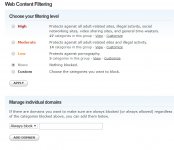
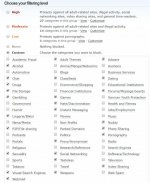
Another great DNS provider is OpenDNS especially if you have kids. You can create a free account (actually with Cisco) and then they have a dashboard where you can select which things you want to block and then you can go in and customize the list. Again, all free, updated daily, etc

https://support.opendns.com/hc/en-u...amilyShield-Router-Configuration-Instructions
 

Attachments

  • open2.jpg
    open2.jpg
    131.2 KB · Views: 20
  • open3.jpg
    open3.jpg
    86.6 KB · Views: 20
To avoid these ads, REGISTER NOW!

74Ken

Active member
Joined
Nov 11, 2015
Messages
27
Location
Bowmanville, ON, Canada
I moved to a new house with a bigger 3 car garage then my last one. This one I am expecting to actually work in, unlike the last one. I am in IT as well, and a Canadian like the OP (I actually have been working for a company in Texas for the last 14 years from my home here in Ontario).

When I got to my new house (built in 1989) there was no CAT-5 running in the walls, barely coax either so I called Rogers (cable company here in Canada) and had them come in with some EERO boxes to beef up the wifi. I had them install one in the garage as well, so I am ready to access the home computers from their also. It's fast wifi all over the house now. Still not as good as Cat-5 but it will do.

I built myself a home server with 6 tb of storage where I keep movies, tv shows, pictures and music. Looking forward to accessing them from the garage too this summer.

In my garage is a 6' tall cabinet filled with computer parts for me to refurbish computers. it's gonna take me a year or two to get this house finished with all the honey-do lists to be able to actually touch one of those computers.

Love this post. Please add more tricks.
 

theoldwizard1

Well-known member
Joined
Feb 22, 2011
Messages
43,076
Location
SE MI
Another quick speedup for an older system is to replace your older spinning hard drive with an SSD. This could improve your performance anywhere from 100% to 300% and possibly more.
Highly recommended, BUT Buyer Beware !

Before you go out and buy an SSD (either SATA or M.2) watch these two videos :

SSD Life Expectancy and QLC vs TLC SSDs

Personal recommendation, Samsung EVO Pro.
 

theoldwizard1

Well-known member
Joined
Feb 22, 2011
Messages
43,076
Location
SE MI
In my garage is a 6' tall cabinet filled with computer parts for me to refurbish computers.
I used to have some quality Computer Museum parts stashed away.

Genuine Bell 212A
RS232 cables (plus wire and crimper to make more)
Parallel cables
Firewire cables
S-Video cables

At the moment is have an over supply of USB Type A charging cables, iPhone charging cables, SATA cables and Cat 5E patch cables (including a couple hundred feet of cable and crimpers and RJ45 plugs)

Also have about 500' of RG6 (black and white) plus Snap-N-Seal connectors.
 

MattT

Well-known member
Joined
Feb 20, 2010
Messages
3,201
I wish there was a similar thing for cell phones.

Looks like you can run alternative DNS services on phones. I've just switched my iphones wifi DNS to manual using Adguard DNS. Seems to be working with both Weather Channel App and a couple websites I tried with Safari. iOS requires an app to change cellular DNS though.

https://www.dnsoverride.com/

Newer Android it looks like there's a global DNS setting that'll change wifi and cellular.

https://www.androidpolice.com/2020/03/26/make-android-use-dns-server-choice/
 
OP
S

slimpickins

Well-known member
Joined
Mar 27, 2011
Messages
2,404
Location
Canada
Highly recommended, BUT Buyer Beware !

Before you go out and buy an SSD (either SATA or M.2) watch these two videos :

SSD Life Expectancy and QLC vs TLC SSDs

Personal recommendation, Samsung EVO Pro.

I agree with you to a point. New SSD's have much greater life expectancy. Check out this article which is now 5 years old (Almost ANCIENT HISTORY by computer standards):

https://techreport.com/review/27909/the-ssd-endurance-experiment-theyre-all-dead/

I haven't seen any more recent torture tests like this, but most SSDs will surpass the useful life of almost any computer in terms of total amount of data written to the disk. SSD's generally are now considered more reliable than spinning drives but they are more expensive per MB.

Another useful source of drive statistics (for spinning drives) is the data that is collected and published by BackBlaze. It it really interesting data for sure, and particularly the stats by manufacturer with HGST drives generally having the lowest failure rate among many brands. They update the data quarterly. Check it out:
https://www.backblaze.com/b2/hard-drive-test-data.html

BackBlaze also publishes design and build plans for their Storage Pods with their newest pod holding 60 drives. And they are now using 12TB drives, which means their new storage pods have a whopping capacity of 720TB!!

Cheers!
 
OP
S

slimpickins

Well-known member
Joined
Mar 27, 2011
Messages
2,404
Location
Canada
I used to have some quality Computer Museum parts stashed away.

Genuine Bell 212A
RS232 cables (plus wire and crimper to make more)
Parallel cables
Firewire cables
S-Video cables

At the moment is have an over supply of USB Type A charging cables, iPhone charging cables, SATA cables and Cat 5E patch cables (including a couple hundred feet of cable and crimpers and RJ45 plugs)

Also have about 500' of RG6 (black and white) plus Snap-N-Seal connectors.

Holy ****! I thought I was bad for saving old computer parts! I have numerous bins of stuff like that including parallel cable switch boxes, RG59 network cables (yep COAX!!! :shocking:) I probably still have some coax network cards too! :lol_hitti

I also still have a working 486 DX2/66 DOS computer with Windows for Workgroups! and a 5 1/4 1.2MB floppy drive!!! :wtf:

I used to have a 256 bit (yes bit, not byte) magnetic core memory card but sadly I let that one go quite a few years ago. (no I never had a computer myself that was that old :lol_hitti)

I really need to clear some of this stuff out! :headshake:headshake:headshake

I bet we could have some interesting conversations OldWizard!


A final thought: My first hard drive was a 20MB Seagate 5.25" half height drive. I once figured out how many of those drives it would take to equal the storage of a current (I forget what capacity I used but I'll say 8 TB) drive. Turns out that the number of 20MB drives it would take to equal that amount of storage would fill my 42 x 42 x 14' Pole building 1 & 1/2 times over - wall to wall, floor to ceiling.

It is hard to fathom how far we have come.

Cheers!!!
 
OP
S

slimpickins

Well-known member
Joined
Mar 27, 2011
Messages
2,404
Location
Canada
Looks like you can run alternative DNS services on phones. I've just switched my iphones wifi DNS to manual using Adguard DNS. Seems to be working with both Weather Channel App and a couple websites I tried with Safari. iOS requires an app to change cellular DNS though.

https://www.dnsoverride.com/

Newer Android it looks like there's a global DNS setting that'll change wifi and cellular.

https://www.androidpolice.com/2020/03/26/make-android-use-dns-server-choice/

Hi Matt,
Thanks for this info, I will check it out!

Cheers! :beer:
 
OP
S

slimpickins

Well-known member
Joined
Mar 27, 2011
Messages
2,404
Location
Canada
I moved to a new house with a bigger 3 car garage then my last one. This one I am expecting to actually work in, unlike the last one. I am in IT as well, and a Canadian like the OP (I actually have been working for a company in Texas for the last 14 years from my home here in Ontario).

When I got to my new house (built in 1989) there was no CAT-5 running in the walls, barely coax either so I called Rogers (cable company here in Canada) and had them come in with some EERO boxes to beef up the wifi. I had them install one in the garage as well, so I am ready to access the home computers from their also. It's fast wifi all over the house now. Still not as good as Cat-5 but it will do.

I built myself a home server with 6 tb of storage where I keep movies, tv shows, pictures and music. Looking forward to accessing them from the garage too this summer.

In my garage is a 6' tall cabinet filled with computer parts for me to refurbish computers. it's gonna take me a year or two to get this house finished with all the honey-do lists to be able to actually touch one of those computers.

Love this post. Please add more tricks.

Ken,
Thanks for dropping in! What are you using for your media server. If you haven't checked out PLEX, I highly recommend you do so. It provides a gorgeous interface! My media server currently has 14TB with my entire photo collection, home movies, scanned photos, scanned slides and converted 8mm films and home movie video tapes. All backed up onto a 32TB Freenas server.

I'm not in IT anymore, but I do look after my office computers.

Thanks for the support on the thread and I do have some more tips and tricks coming. Not sure which one I'll start with next. Any suggestions???

How about file organization? How do you organize photos? I really don't like the idea of giving all my photos to Google so I haven't jumped on that bandwagon yet. But Google photos does have a lot of cool features.

Cheers!
 
OP
S

slimpickins

Well-known member
Joined
Mar 27, 2011
Messages
2,404
Location
Canada
I have been using Firefox and Thunderbird for years, love them both to death. What's wrong with just using "AdBlock" or some version thereof, as one of Firefox's "Add-ons"???? It seems to block ads wonderfully. Additionally, a recent Firefox update added a new feature that disables tracking..... is that a good thing? These seem to accomplish what you are recommending. Please elucidate a little bit. I am interested, as I'm sure many others here are too.

Thanks................................... :thumbup::thumbup::thumbup::thumbup::thumbup:

Chevy,
I just realized I didn't really address your questions.

In a nutshell I am very much against any form of tracking by websites, ads, Google, Amazon, etc. It is tough to get away from all the tracking. It is also VERY EVIDENT that Google is listening to us on our phones. We have experimented with this at my office several times where we will deliberately talk about a completely new subject or product. And then within a few minutes we will start seeing ads for the product we were just talking about on our phones. It is really creepy! I have all access by Google turned off on my phone, and I don't see this kind of tracking but you still can't turn it off completely. If I use the "Okay Google" phrase it still comes up and asks if I want to turn the feature on. I will usually say "F^$K off Google", but it doesn't seem to get the point.

I am starting to use VPN all the time despite the slowdown on the internet speeds.

If you are not aware, you can log into your google account and download all the data Google has collected about you. Here's a news article about this:
https://www.cnbc.com/2018/03/29/how-to-download-a-copy-of-everything-google-knows-about-you.html

And here's the google account support page on how to download your data:
https://support.google.com/accounts/answer/3024190?hl=en

If you do not actively resist the tracking Google does, you WILL be surprised about the data they have.

Note: this is just the data, not the massaging and conclusions they may draw about you.

Cheers! and always remember: Google is watching and listening and tracking everything they can about you!!!
 
To avoid these ads, REGISTER NOW!
Top Bottom