

You are using an out of date browser. It may not display this or other websites correctly.
You should upgrade or use an alternative browser.
You should upgrade or use an alternative browser.
Garage design software
- Thread starter pxmurray
- Start date
black00lightning
Well-known member
If you want layout design, the Grizzly website has a basic layout program you can use online.
75gmck25
Well-known member
I would also be interested in hearing comments on good home/garage design software that is either free, or offered at a reasonable price
My input on one commercial product (it costs about $100) -
I purchased Home Designer Architect a couple of years ago. However, even with the latest updates it is still missing features I would like to have. For example, I can place a heating system or plumbing object (e.g., toilet) but there is no feature to use when planning the duct runs for forced air or water pipes for hydronic or plumbing. I also found it relatively hard to learn the interface. I've used a lot of software over the years; however, there was still a significant learning curve before I got the hang of properly placing objects and getting it to figure out dimensions. I also found that unless you start at one corner of the building/room and draw the room out from that point it is hard to get it to re-dimension properly as you add new walls and objects.
Bruce
My input on one commercial product (it costs about $100) -
I purchased Home Designer Architect a couple of years ago. However, even with the latest updates it is still missing features I would like to have. For example, I can place a heating system or plumbing object (e.g., toilet) but there is no feature to use when planning the duct runs for forced air or water pipes for hydronic or plumbing. I also found it relatively hard to learn the interface. I've used a lot of software over the years; however, there was still a significant learning curve before I got the hang of properly placing objects and getting it to figure out dimensions. I also found that unless you start at one corner of the building/room and draw the room out from that point it is hard to get it to re-dimension properly as you add new walls and objects.
Bruce
Chevy-SS
Well-known member
IMHO, if you want the simplest and easiest solution, with absolute minimal learning curve, then use Microsoft Excel.
Here's an article from PC Magazine entitled "Use Excel as an Architectural Design Tool", which explains the process. I used Excel for my recent garage/addition project and it worked wonderfully for my needs.
Of course, it has its limitations, but if you want to have an easily modified, basic plan in short amount of time, then Excel works.
Good luck
Here's an article from PC Magazine entitled "Use Excel as an Architectural Design Tool", which explains the process. I used Excel for my recent garage/addition project and it worked wonderfully for my needs.
Of course, it has its limitations, but if you want to have an easily modified, basic plan in short amount of time, then Excel works.
Good luck
Draftsight is a full feature 2D CAD program that rivals AutoCAD and is free. I used to teach CAD to college students and would tell them all to get this to work with off campus. It will save in native .dwg and .dxf file formats for use in other programs as well.
http://www.3ds.com/products-services/draftsight-cad-software/
http://www.3ds.com/products-services/draftsight-cad-software/
chris_1001
Well-known member
Draftsight is a full feature 2D CAD program that rivals AutoCAD and is free. I used to teach CAD to college students and would tell them all to get this to work with off campus. It will save in native .dwg and .dxf file formats for use in other programs as well.
http://www.3ds.com/products-services/draftsight-cad-software/
Not a fan of 2D programs at all, been using Solidworks 3D since 1998. That said I use Draftsite whenever I need to work with Autocad and DXF files.
Ive been lazy, I keep meaning to CAD up my basement and garage. Started both about a year ago.
I'd say try sketchup for the price and that its 3D
BearsFan315
Well-known member
Why not use Google Sketch-Up it is free, easy and TONS of SUPPORT !!
Tons of stuff to download and add in . . . Tutorials and Support out the YING
Tons of stuff to download and add in . . . Tutorials and Support out the YING
Onefastgsx
Well-known member
I have used smartdraw for everything from Floorplan to wiring diagrams. they have Clipart of just about everything you can think of, and it is all customizable. there are 30 day free trials online, but I used a workaround I found online that let's you run trial software for as long as you want.
I agree with the 3D. I have used just about every flavor out there. Pro-E, SW, Solid Edge, Catia, and some Autodesk variants, and they are far superior. For something simple like this though, Sketchup might work if you want to go the 3D route. I just downloaded so I can learn it too.
Not a fan of 2D programs at all, been using Solidworks 3D since 1998. That said I use Draftsite whenever I need to work with Autocad and DXF files.
Ive been lazy, I keep meaning to CAD up my basement and garage. Started both about a year ago.
I'd say try sketchup for the price and that its 3D
bczygan
Well-known member
What is your aim?
If it is to design a garage, unless you already know a particular design program, the easiest way is paper, pencil and thinking.
If it is to design a garage, unless you already know a particular design program, the easiest way is paper, pencil and thinking.
nolimits76
Well-known member
What is your aim?
If it is to design a garage, unless you already know a particular design program, the easiest way is paper, pencil and thinking.
This is a very valid point.
I have worked a bunch w/ AutoCAD in my career and very strong at plan reading so I tend to sketch things out on paper and clean them up in CAD. Of course I'm very much a visual guy, so having a marker board and the ability to draw something on the fly is priceless for me.
That being said, I have tried several of the suggestions previously listed and will share my thoughts:
1. Pencil & paper - Truly the basic where it all starts. Limitations can be having to re-draw and/or problems scaling objects. Some of this can be eliminated by using graphing paper.
2. Excel - More or less electronic graph paper and good for basic stuff. Revisions can be easy or hard, depending on what you are doing. The problem of getting items positioned in your garage to scale is still a problem.
3. Grizzly Site - Pretty cool actually with a decent library of some commonly used shop/garage items. Easier to scale and make changes. For me, the biggest downfall is it's an online program and doesn't allow me features that make the process go faster.
4. Sketchup - Lots of guys have used this with good success. I admit the 3D aspect is very cool. Myself I find it tedious to be precise, and for most projects, doing something in 3D isn't really needed. You can spend a lot of time designing and then finding the model objects and getting them to the proper scale/dimension. But for the price of free, it does a great job.
5. DraftSight - As someone mentioned, it rivals AutoCAD LT and is a very good basic CAD program. It offers tons of flexibility and customization, and things can easily be scaled as needed. Also, I like drawing in layers, so I can quickly toggle on/off a line to easily show/highlight electrical, plumbing, etc. If working with outside engineers/designers, they will normally give you a DWG or DXF file that can be opened in this program. The downside would be that it has a steep learning curve upfront if you've never operated a CAD program.
6. Solidworks, etc. - True 3D modeling software that is excellent in its own right. Complete overkill for the common DIY guy that doesn't already work with this software. Plus it's expensive and has a steep learning curve as well. Arguably one of the best programs out there in this category.
BearsFan315
Well-known member
I am an autodesk GURU, been doing it since 1994, 2d, 3d, and in between. use it at work all the time, have my house done up in 2d & 3d as well. we did an addition a few years back, and the contractor asked what I wanted to do and I gave him a set of prints. even sent his designer dxf files of my drawings for her to use.
also have sketch up on my lap top, and it kicks my ****, just in the logic of how it works. I need to take the time to LEARN it !!
also have sketch up on my lap top, and it kicks my ****, just in the logic of how it works. I need to take the time to LEARN it !!
DC73
Well-known member
Google sold sketchup not free anymore, but does have a free trial.
No, it's still free. The free version is now called Sketchup Make. The Pro version costs $$$.
I also recommend Sketchup (Make). Plenty powerful.
DC
Denwood
Well-known member
From my garage thread...easiest 3D design software I've ever used:
I usually use Microsoft Visio for 2D planning. 3D, particularly in a garage is very useful, but comes with a learning curve, and/or price tag. The easiest 3D tool I've used to date is free, and works using Chrome, Firefox, or IE. Ikea's planner might have you thinking that kitchens are the only thing you can visualize, but you can see here that my shop planning actually works very nicely too. I'm not necessarily using Ikea cabinets..the tool though makes setting up in 2D/3D with a learning curve near zero. The hoist columns are modeled adding "obstruction-wall column", garage door using a "resizable wall opening" benches added using wall mount tables, etc. A very useful tool, and deserves awards for how crazy easy it is to use. I tried at lease one dedicated garage planner but quickly ran into Internet Explorer issues with their setup. The Ikea software works nicely on Firefox, Chrome, and IE 11, both MAC and PC.
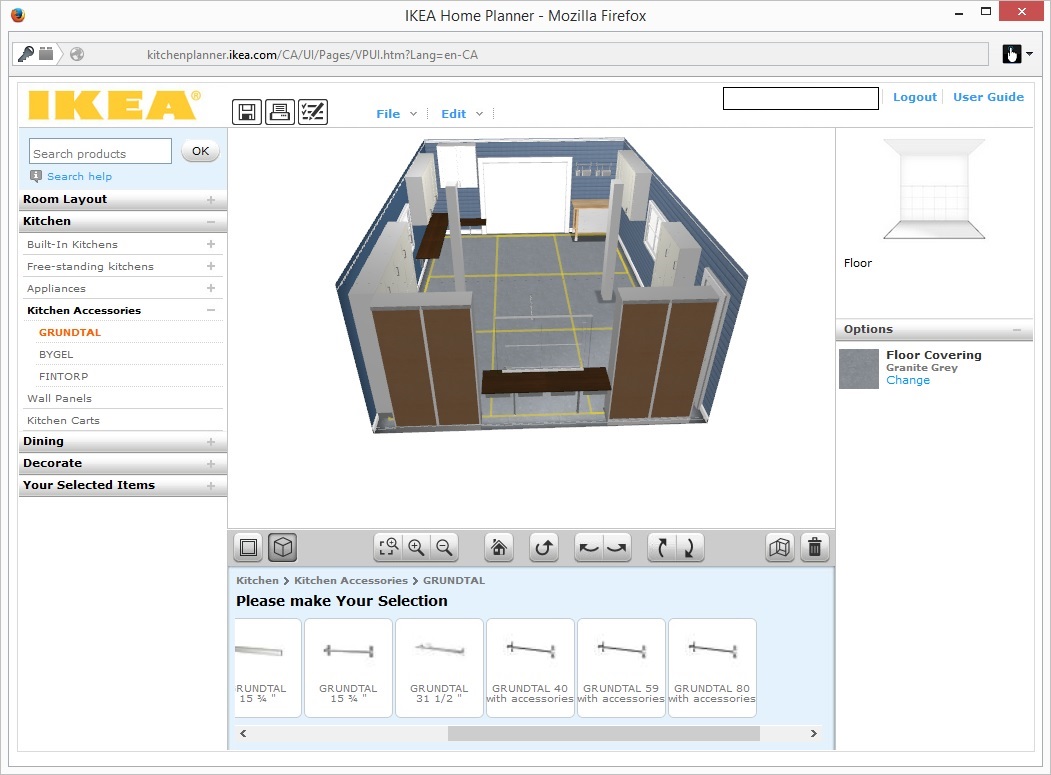
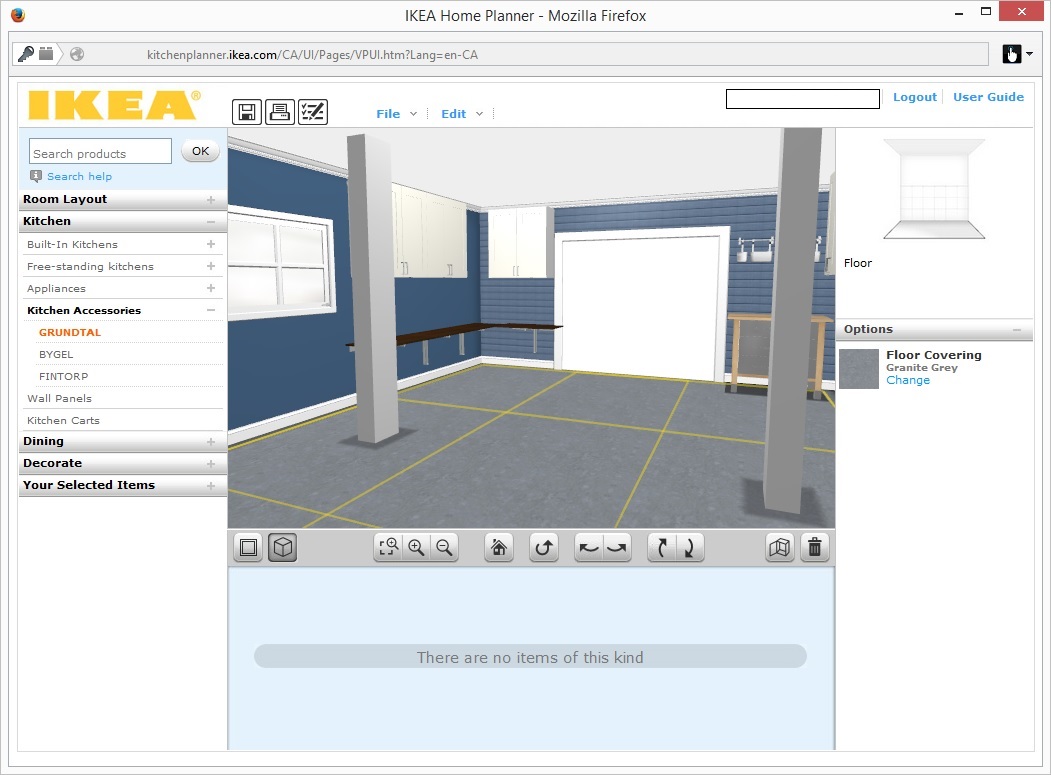
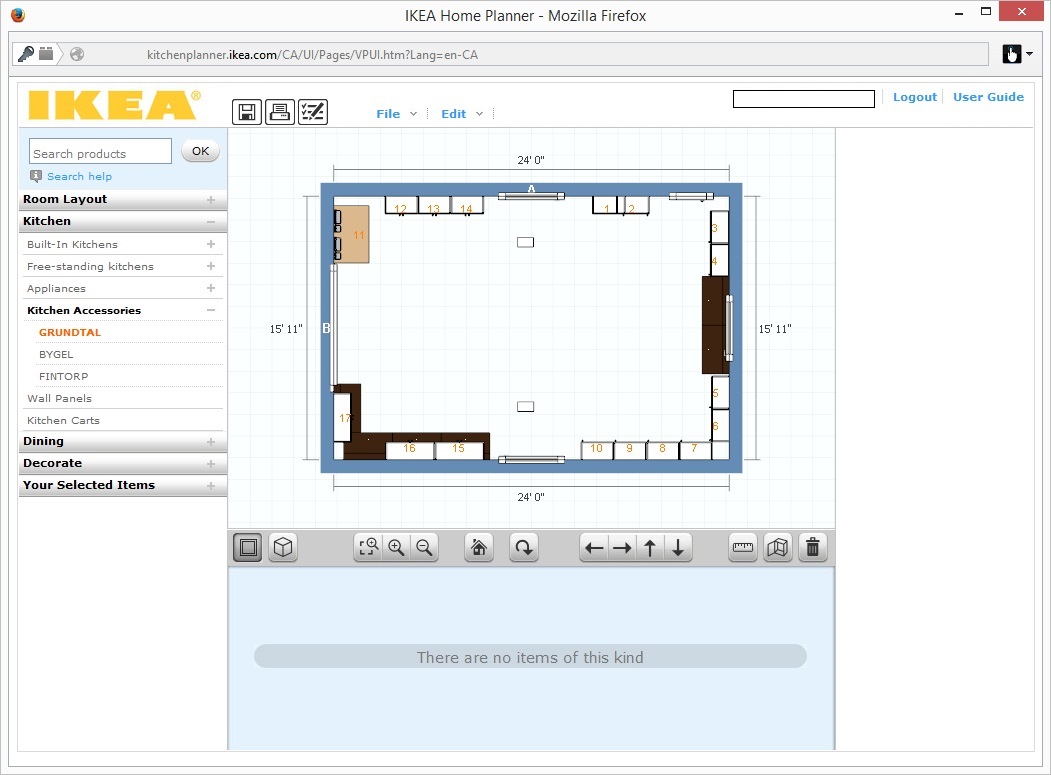
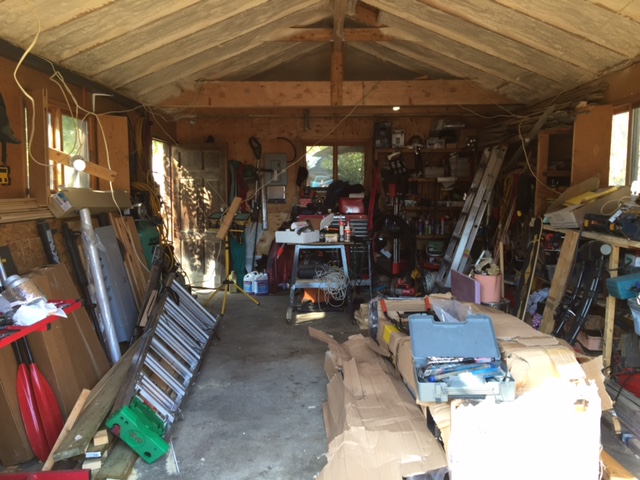
My garage ended up a bit different, but the tool was part of the path to "enlightenment"
Before
After
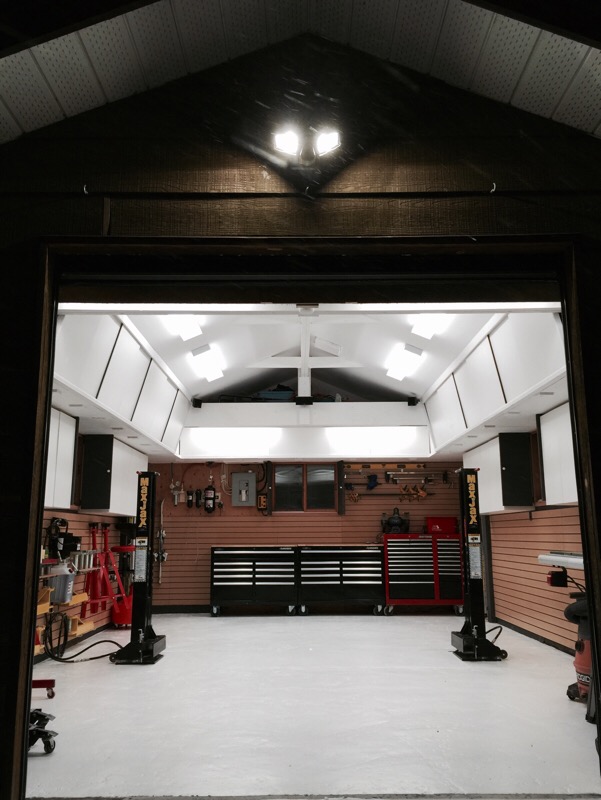
I usually use Microsoft Visio for 2D planning. 3D, particularly in a garage is very useful, but comes with a learning curve, and/or price tag. The easiest 3D tool I've used to date is free, and works using Chrome, Firefox, or IE. Ikea's planner might have you thinking that kitchens are the only thing you can visualize, but you can see here that my shop planning actually works very nicely too. I'm not necessarily using Ikea cabinets..the tool though makes setting up in 2D/3D with a learning curve near zero. The hoist columns are modeled adding "obstruction-wall column", garage door using a "resizable wall opening" benches added using wall mount tables, etc. A very useful tool, and deserves awards for how crazy easy it is to use. I tried at lease one dedicated garage planner but quickly ran into Internet Explorer issues with their setup. The Ikea software works nicely on Firefox, Chrome, and IE 11, both MAC and PC.
My garage ended up a bit different, but the tool was part of the path to "enlightenment"
Before
After
Last edited:
Scott V
Well-known member
I have to agree that the Ikea kitchen planner is pretty easy to use but it has it's limits. I've used Solidworks for 13 years so I'm used to a more powerful CAD platform so I have to say the Ikea interface is fairly easy and the fact that it will breakdown to a material list is also pretty handy if you want to buy their cabinets and components. I wish they would give you more mouse control for navigation in the virtual environment other than clicking buttons.
I guess I would ask the same question as others; what do you want to use 3D software for?; Mocking up a simple plan to get a feel for spacing and dimensions? Rendering realistic looking images? Or do you need to supply accurate drawings to a contractor?
I guess I would ask the same question as others; what do you want to use 3D software for?; Mocking up a simple plan to get a feel for spacing and dimensions? Rendering realistic looking images? Or do you need to supply accurate drawings to a contractor?
info2x
Well-known member
I like SolidWorks for a lot of things, but I prefer AutoCAD when doing layouts.
Yeah I'm weird.
Yeah I'm weird.
Kaizen
Well-known member
No, it's still free. The free version is now called Sketchup Make. The Pro version costs $$$.
I also recommend Sketchup (Make). Plenty powerful.
DC
nope loaded sketchup make last night says its a 90day trial.
Beemer533
Well-known member
nope loaded sketchup make last night says its a 90day trial.
Not sure what you downloaded, but Make 2015 is most definitely free.. I just installed it a few weeks ago.
You can install the Pro version for free that comes with a limit (I thought it was 8 hours), maybe that is what you tried?
Did you download from here? http://www.sketchup.com/download/all
Beemer533
Well-known member
Just to test, I just reinstalled 2015 and it only says that my "Pro" (you always get the Pro version free to try) trial expires in 30 days.
Can you share a screen shot?
Can you share a screen shot?
Jlbc212
Well-known member
I've used Datacad Lite for many years. It is a software program designed specifically for architectural work.
DC73
Well-known member
nope loaded sketchup make last night says its a 90day trial.
From the Sketchup website: "Sketchup Make is the easiest, most fun, entirely free 3D drawing tool in the world."
You activated the 90 day trial of the Pro version. This use to be optional but it may now be automatic. I think at the end of trial, it will revert to Make if you don't pay.
I don't get the 90 day trial option when I download a new version because I already have a previous version installed.
There are a couple of download pages on their website. I use this one: http://www.sketchup.com/download/al...os_bits=64&suhl=en-US&hl=en-US&os=win&osv=6.1
From the terms and conditions for Sketchup Make: "Trimble Navigation Limited and/or its affiliates ("Trimble") gives you a personal, worldwide, royalty-free, non-assignable and non-exclusive license to use the executable version of the Software for non-commercial use only. Non-commercial use means: you may not sell, rent, lease or lend the output of the Software or the Services. If you are a for-profit organization of any kind, or an employee of a for-profit organization using the Software or Services in that capacity, you are engaged in commercial activity; therefore, in order to use the Software and Services, you must purchase a SketchUp Pro license. If you are a qualified instructor at an educational institution, or you are an enrolled student at an educational institution and use the Software in your classwork, you may use the Software for classroom teaching purposes, and classwork purposes. This includes installation and use of the Software in teaching labs at an educational institution, provided that use of the Software is by enrolled students who are engaged in classroom learning activities at the educational institution. However, if you are an employee of an educational institution and your job responsibilities are not those of a qualified instructor, you must purchase a SketchUp Pro license. For example, but not as a limitation, if you are employed as a member of the professional staff of an educational institution such as the facilities management team, you are considered to be engaged in for-profit activity and you must purchase a SketchUp Pro license. Government agencies are considered to be commercial users and must purchase a SketchUp Pro license."
DC