To avoid these ads, REGISTER NOW!

Garage Design Software

KPSquared

Well-known member
Joined
Aug 18, 2010
Messages
2,750
Location
Wetaskiwin, Alberta, Canada
I know this question has been asked a few (thousand) times on here, but I'm not sure that people are looking for what I'm looking for.

I would like to know if anyone has good experience with Home Design Software or Garage Design Software that I can use to do drawings for my garage.

My permit company wants drawings, they don't have to have an engineers stamp, and the architectural draftsman I talked to wants over $500 for drawings.

I'm sure I can find a decent software package that would allow me to draw up some plans, print them, and submit them to the permit company.

I would like something that can do footings, grade beam, floor, walls, trusses, etc. I don't know if software like this exists for a reasonable price or not, but I'd love to find it.

I have tried a super basic home design software, but it was slightly limited. I would like to be able to draw walls, and then the software adds the studs, plates, etc.

Anyone know if this exists?

I'm looking at "Home Designer" from Chief Architect, it looks like it should work, but I don't know. I would like some a little more point and shoot that the average CAD software as I have no idea how to run CAD...
 
To avoid these ads, REGISTER NOW!

Holedgr

Well-known member
Joined
Jun 21, 2006
Messages
358
Honestly...good mechanical pencil, some 18x24" paper, a scale (drafting ruler with 1/4" a scale on it), a couple of triangles, a 30" t-square and your ready to draw. By the time you purchase the software and learn it enough to have print ready drawings, you could have developed a new skill and a set a prints you'll probably frame by the time the build is complete.

-T
 
OP
K

KPSquared

Well-known member
Joined
Aug 18, 2010
Messages
2,750
Location
Wetaskiwin, Alberta, Canada
I don't wanna use paper... that's why I bought a computer in the first place. I don't want something I'll be proud of, I want something I can hand to the permit company so they will issue the permits I need.

I would love to learn another skill, but I REALLY don't need another hobby, and most of these design software programs are retard simple... Way easier than measuring and drawing on paper.

I want to be able to piss around with this at work on my spare time, I don't want to have to haul a bunch of rulers and paper around... just my laptop.

I'm gonna give this Chief Architect stuff a rip and see how it works. The demo is free, so at least I can try it.
 

Karnage

Well-known member
Joined
Nov 2, 2009
Messages
88
Location
Brisbane, Australia
Google Sketchup, The 3d library has quite a lot of scalable items like lathes, mills, toolboxes etc that will help you plan your layout also.

My Workshop mid moving
009.jpg


The Drawing
workshop.jpg


Planning to enclose a bay of the Awning for a machine room
workshopnoroof.jpg


Including Water Tank and compressor House
workshoproof.jpg


Again
Machineroom.jpg
 
OP
K

KPSquared

Well-known member
Joined
Aug 18, 2010
Messages
2,750
Location
Wetaskiwin, Alberta, Canada
Can I do working drawings with Sketchup? I've played with it a bit, but it ran out of steam trying to design bumpers for my truck. It doesn't do curves that well. I can try, but I wonder if they'll accept my drawings from sketchup for permit purposes?
 

Holedgr

Well-known member
Joined
Jun 21, 2006
Messages
358
Sorry, Kpsquared..I see your take on it and can appreciate that. I kinda assumed you had it designed, just needed drawings. Doing layout on paper *****. Changes can be painful as well. I am old school when it comes to prints. Well, whatever happens, we all need updates on this project as it looks cool.

-T
 
OP
K

KPSquared

Well-known member
Joined
Aug 18, 2010
Messages
2,750
Location
Wetaskiwin, Alberta, Canada
Ya, I honestly would love to learn to do drawings on paper. I think I can figure it out with what's available online, but it seems pretty overwhelming compared to doing a few clicks on a computer. Then again, drawing a cross section with sketchup may be complex for me... Probably easier to envision on paper.

The more I thought about your post Holedgr, the more it intrigued me. I may stop by the local supply shop and see what a set of drafting supplies would cost me...
 

PAToyota

Well-known member
Joined
Jan 20, 2006
Messages
4,366
Location
South Central Pennsylvania, USA
As an architect, I use SketchUp Pro for everything from preliminary sketches through to construction documents. LayOut is part of SketchUp Pro and it would be difficult to do working drawings without it.

The question is how much you know about the construction process. None of these programs are going to "automatically" design grade beams, footings, trusses, and such for you. It may put generic components in there, but you have to have some idea of what you are doing to make sure that it meets the proper requirements.
 
OP
K

KPSquared

Well-known member
Joined
Aug 18, 2010
Messages
2,750
Location
Wetaskiwin, Alberta, Canada
I know quite a bit about the process. I have all the design my head, I have chatted with the local inspector. I just have to submit drawings to get my permits. Footing, 4' grade beam (ICF), walls, trusses (truss company designs to snow loads for the area), roof... It's really just a box... I've built garages before, I just never had to get permits, but now I'm less rural than I ever have been, so I gotta jump through the hoops, but I'm cheap...
 

bczygan

Well-known member
Joined
Nov 4, 2009
Messages
22,002
Location
DETROIT! Arsenal of Scrappers
There is a learning process to learning to draw on paper. There is a learning process involved in learning to draw on a computer. There is a learning process involved in learning how to design and engineer a structure. With dedication and an abundance of time, the rudiments of either drawing method can be learned. The design and engineering of structures and electrical, mechanical and plumbing systems take years to learn. What is your background? Do you know construction of the type you want to do? What is this "Permit Company" you speak of?
 
OP
K

KPSquared

Well-known member
Joined
Aug 18, 2010
Messages
2,750
Location
Wetaskiwin, Alberta, Canada
I do have construction experience. I'm no journeyman, but I'm not an idiot with a hammer. The labour on this job will pretty much be my dad and I, right from forming to framing to finishing...

A garage is such a simple design. I spent some time as a framer, I've been involved in various aspects of the construction industry since I was a kid. My dad is a handy man and also has a great deal of experience in construction and plans to spend the month of May here at my place to get this sucker done.

As far as design, a 4', 6" thick grade beam on a footing (maybe 18" x 8", not sure yet). Have to step it down once in the front for the garage doors to maintain my 4' (required for frost here) 2x6 walls, 10 feet tall. 2 10x10 garage doors, 1 smaller door for my lawnmower on the side, 1 (or 2) man doors, and some windows. Like I said, it's pretty much a box...

The county I live in does not have a building inspector on staff so we have to use a private permit company to obtain our building permits.

Here's a link to what they require for basic building permits:

http://www.superiorsafetycodes.com/pdf/requirements/permit_requirements-building.pdf

So, that's what I'm dealing with... I mean, I know I should just **** it up and get someone to draw these up for me, but I wanted to check all the other options before I go down that road. If I find a suitable software, I can learn it, and then use it down the road for other projects.
 

bczygan

Well-known member
Joined
Nov 4, 2009
Messages
22,002
Location
DETROIT! Arsenal of Scrappers
$500 is a reasonable price for what they are asking for. It is what I would charge. I would ask you for a mortgage survey and I would show your building on that for the plot plan. I would draw a section through the building or just a wall section if I could get away with just that. I would draw a floor plan and show electrical, HVAC and plumbing on that. Elevations would complete the drawings. Call out materials and dimensions as required on each appropriate portion of the drawings. For that cheap I would let you do any specifications and it would not include door and window schedules, hardware schedules, finish schedules or any landscape design.
If you wanted to do it just for the fun of it you could put together a few drafting tools, rig up a board and draw these yourself, but you would need a good example drawing and know exactly what you want. And it will take time.
Learning a program is a far more difficult task. Save it for a future hobby.
 

bczygan

Well-known member
Joined
Nov 4, 2009
Messages
22,002
Location
DETROIT! Arsenal of Scrappers
Here's what you need for hand drawing:
A roll of sketch paper or some 11x17 copy paper
A small drawing board with a parallel mounted to it and a Borco mat or a squared up piece of plywood with some smooth mat board or construction board pinned or tapedto it and a T Square.
An adjustable triangle
An electric eraser and eraser sticks or some kneaded hand erasers.
An metal eraser shield
A small circles, triangles and squares template (To indicate electrical fixtures).
Plumbing template.
Larger circle template to indicate door swings.
A architectural scale (Maybe metric for Canada)?
An engineers scale for the plot plan
Some HB, B and 2B pencils and a sharpener
Drafting tape

There should be drawing standards.
Find out the preferred scales they like or require for each drawing. Here it is 1"=10' or 20' for the plot plan, 1/4"=1' for the plans and elevations and 3/4"=1' for the section.
Put a title block on each drawing and number the pages 1 of, 2 of etc.

Do you know your zoning designation, zoning restrictions (Height, area, coverage,setbacks etc.), easements, association rules and any deed restrictions?

Do you know the building and electrical code requirements? Do you know the snow and wind load requirements for engineering? Do you know the energy efficiency requirements?

You can use your computer to draft a list of typical, general and specific notes for each trade. You can also make door, window and hardware schedules and show any engineering calcs. that may be required. You can also write minimal specifications and call out specific products you want to use.

Copies can be made by scanning and printing.

A couple of design questions:
Why a footing? Unless the soil is really bad we just use the grade beam. No one will be able to dig you a 6" one. They will use a back hoe and it will be 12" wide by 4'6" deep. No footer required. Pour to grade and add a row of block and ready for slab or form and pour slab right on top and integral with the foundation.

Bill
 
Last edited:
To avoid these ads, REGISTER NOW!

Holedgr

Well-known member
Joined
Jun 21, 2006
Messages
358
I know quite a bit about the process. I have all the design my head, I have chatted with the local inspector. I just have to submit drawings to get my permits. Footing, 4' grade beam (ICF), walls, trusses (truss company designs to snow loads for the area), roof... It's really just a box... I've built garages before, I just never had to get permits, but now I'm less rural than I ever have been, so I gotta jump through the hoops, but I'm cheap...

Well, cheap isn't gonna get you some decent software. I am with your line of thinking, though. Even though, $500 seems expensive, you would still need a large plotter/printer to print off large 1/4" scale prints. As others have said, learning a program would consume much time. You stated you want plates and studs and all that on said drawings...Sounds to me as if you want what I call "instruction prints". I don't mean to be offensive with that, but most people expect those details on prints, when they commonly aren't.

You said you have building experience, which is good and will help you to build this as you draw it. You will find drawing/ designing it on paper, actually drawing it to scale will help you to realize minute details, I GUARANTEE you would not as easily noticed on a cad program or paid for the drawings.

I don't mean to beat a dead horse, but if If you do this on paper I think you'll end up really enjoying it and finding it a rewarding experience. After all, aren't you putting a machine shop on the back of the structure?? Should you guys be intimately familiar with "detailed/scale" drawings anyways?:D

-Tony
 

FJ 432

Well-known member
Joined
Aug 2, 2010
Messages
3,724
Location
Littleton Colorado
I would suggest looking through Craigslist to find someone whose skilled at AutoCAD that may be looking for side work. I believe with your knowledge of construction you could communicate to someone what to draw for less than $500.00.

I explored this option and found that if you have a simple drawing you can always find someone to do side work. The difficulty that I ran into was I needed my lot to be surveyed and that costs a lot of money.
 

PAToyota

Well-known member
Joined
Jan 20, 2006
Messages
4,366
Location
South Central Pennsylvania, USA
Sounds like you have the experience to know what you are drawing - more than can be said for quite a number of the "drafters" out there.

So the next question is whether you plan to do more of this. I turn to the computer to do nearly all of my sketching and drafting anymore - simply because I know how to do it. I started off with pen and ink on mylar back in the day, so I can do manual drafting as well. But once it is on the computer I can quickly alter it, use pieces from other projects I've already done, and with SketchUp I can figure out 3D stuff that would take me longer drawing different views of it.

But if you're learning from scratch and don't really plan to do it regularly, you're probably ahead to draw things out by hand rather than spend the time to learn the computer end of it. Particularly because if you don't do it much, you're going to forget parts of it by the next time you go to use it.

An alternative would be to talk to the local high school if they have a CAD class. Put you together with a student. He could learn some construction info from you as he drew up the set of plans to your specifications. Make a donation to the program for some equipment they might need. Both parties benefit.
 

bczygan

Well-known member
Joined
Nov 4, 2009
Messages
22,002
Location
DETROIT! Arsenal of Scrappers
Well, cheap isn't gonna get you some decent software. I am with your line of thinking, though. Even though, $500 seems expensive, you would still need a large plotter/printer to print off large 1/4" scale prints. As others have said, learning a program would consume much time. You stated you want plates and studs and all that on said drawings...Sounds to me as if you want what I call "instruction prints". I don't mean to be offensive with that, but most people expect those details on prints, when they commonly aren't.

You said you have building experience, which is good and will help you to build this as you draw it. You will find drawing/ designing it on paper, actually drawing it to scale will help you to realize minute details, I GUARANTEE you would not as easily noticed on a cad program or paid for the drawings.

I don't mean to beat a dead horse, but if If you do this on paper I think you'll end up really enjoying it and finding it a rewarding experience. After all, aren't you putting a machine shop on the back of the structure?? Should you guys be intimately familiar with "detailed/scale" drawings anyways?:D

-Tony

Tony makes a good point. Working (Or construction or permit) drawings are a different animal than the 3D views that are produced by some of the programs like Home Architect. They (Working drawings) don't convey the 3D realistic view with materials, colors and light and shadows.
They don't typically give you a materials list either, unless you are using a CAD program that does that.
Bottom line is that there are no shortcuts in doing the drawings for permits, then doing a good materials takeoff and pricing it. These are 3 different skill sets.
Being in the business, you may have the ability to think in 3 dimensions. Most lay people don't, so they need 3D programs to visualize what their project will look like.
 
OP
K

KPSquared

Well-known member
Joined
Aug 18, 2010
Messages
2,750
Location
Wetaskiwin, Alberta, Canada
After all, aren't you putting a machine shop on the back of the structure?? Should you guys be intimately familiar with "detailed/scale" drawings anyways?:D

-Tony

Those pics from Sketchup in this thread aren't mine... someone else posted those of their project... mines just a 30x36 shop.


I am very tempted now to give drawing it by hand a try, but my time is getting thin... I work a lot, am very busy on my time off, and don't know if I'd get stuff together in time. I'm starting to think that I may have to just **** it up and pay the piper.

I don't really care about the 3D rendering... I can see that in my head already. I just need the working drawings for the permits. I'm sure I could learn to draw them, and I have drawn quite a bit of stuff just on graph paper with a ruler. The permit company is pretty relaxed I think when it comes to what they actually need... If you guys think $500 is reasonable, then maybe I'll just do that. My parents paid $1400 for their whole house WITH engineering stamps... $500 seems out of proportion with no stamps...

bczygan - As far as the footing thing goes mentioned above, I don't really know what code says for this area, but anything over 760 sq. ft. has to have 48" grade beam on a wide footing. Something to do with 4 feet of frost we get in the winter... And as far as the blocks go, no one uses blocks here. Every foundation is poured. I have never even seen block foundations until I got on this forum. The grade beam will be 6" using ICF. My buddy will dig the stuff with his hoe... He just got a shiny new 160 Komatsu (looks like a baby next to his 300) We have to swing a few rig blocks around for a retaining wall so the 160 will be perfect... his mini-hoe won't cut it.
 

bczygan

Well-known member
Joined
Nov 4, 2009
Messages
22,002
Location
DETROIT! Arsenal of Scrappers
Well, cheap isn't gonna get you some decent software. I am with your line of thinking, though. Even though, $500 seems expensive, you would still need a large plotter/printer to print off large 1/4" scale prints. As others have said, learning a program would consume much time. You stated you want plates and studs and all that on said drawings...Sounds to me as if you want what I call "instruction prints". I don't mean to be offensive with that, but most people expect those details on prints, when they commonly aren't.

You said you have building experience, which is good and will help you to build this as you draw it. You will find drawing/ designing it on paper, actually drawing it to scale will help you to realize minute details, I GUARANTEE you would not as easily noticed on a cad program or paid for the drawings.

I don't mean to beat a dead horse, but if If you do this on paper I think you'll end up really enjoying it and finding it a rewarding experience. After all, aren't you putting a machine shop on the back of the structure?? Should you guys be intimately familiar with "detailed/scale" drawings anyways?:D

-Tony

Another good reason to do a hand drawing yourself is you can explore all the "What if's". Start by making a list of all the uses you need or want to make of these spaces. These are the functions. Form follows function. Draw each machine or article of storage to scale and cut it out. Include machines and storage you want to have. Office space? Computer, TV, lounge? Cooking facilities and food and drink storage? Think of the processes you will have going on from the arrival of materials to the finish work and delivery of any finished product out the door. Your building is a machine for the production of things and accomplishment of tasks. Think about where waste materials go and how they are disposed of. Think about heat and light (Natural and artificial). Think about water and waste water. Think about air conditioning (Cooling, heating and filtering). Think about flammables storage. Think about how you want to enjoy not just the interior space, but also any outside spaces. What views are there to enjoy while you work? What are the prevailing winds to help with ventilation. Think about translucent panels for natural day lighting through walls and roofs. Do you want to separate yard storage from garage or shop space? How about noise? Separate compressor noise from work areas. Separate painting and finishing areas. Use rolling and folding tables and machine bases to rearrange space for multiple uses. Create outside hard scape (Paving) as an extension of inside space by installing additional doors and outside lighting. Add a lean to shed roof for covered outside storage. Rearrange everything on paper to try out all the possibilities. These are just some ideas. It's as important to rule an item out as it is to include it. It all helps define the scope of the project. Once all your uses and functions are defined, the spaces required to accommodate them will then help define the structure. At this point you are ready to start engineering the structure. That is what you will then draw and populate with heating and lighting and electrical systems. You will locate and size doors and windows, design beams and headers and figure out roof structure and cladding materials.

The more you define and decide on, prior to meeting with the designer, the easier it will be for him to draw up and the better chance you will have explored all the options and decided on just what is best for you. Might be able to knock him down on price a little too.
 
Last edited:

Karnage

Well-known member
Joined
Nov 2, 2009
Messages
88
Location
Brisbane, Australia
So why can't you do this with CAD?

Perhaps things are quite different here in Australia. Local Councils no longer do building certification. This is now done by private contracters who work on the Council's behalf.

We are in the process of designing/building a pergola that continues an existing bullnose verandah. I spoke to the certifier and he is happy to sign off on my plans, provided they meet the building code. I used sketchup to design the structure, sent a copy to my timber supplier, who then specified the beam sizes and prefered fixing methods. The certifier gave me the minimum footing standards and off we went.


PERGOLAPLANS_5.jpg


PERGOLAPLANS_4.jpg


PERGOLAPLANS_3.jpg


PERGOLAPLANS_2.jpg


PERGOLAPLANS_1.jpg


Using Cad made it a lot easier to visualise the construction and how the final product would look.

oURhOUSE.jpg
 
Last edited:
OP
K

KPSquared

Well-known member
Joined
Aug 18, 2010
Messages
2,750
Location
Wetaskiwin, Alberta, Canada
You can do this with CAD... I've just never used it, don't really understand it, and find it easier to just sketch it out on paper.


I just talked to the inspector today and sounds like they will let me get away with a lot less than I thought. All he needs is a site plan, a cross section, and a floor plan. They don't need to be professional and they don't need to be stamped. Looks like I'm gonna grab a pencil and get at it. I needed a good excuse to buy a t-square anyway...

Thanks for all the input guys. I'll scan what I come up with as soon as I get it all drawn up.
 

Karnage

Well-known member
Joined
Nov 2, 2009
Messages
88
Location
Brisbane, Australia
Good to hear KPS.

Re Sketchup. Its so Simple to learn its not funny. The Pics I have posted in here are within my first 3 hrs of using the program and my fist experience with CAD.

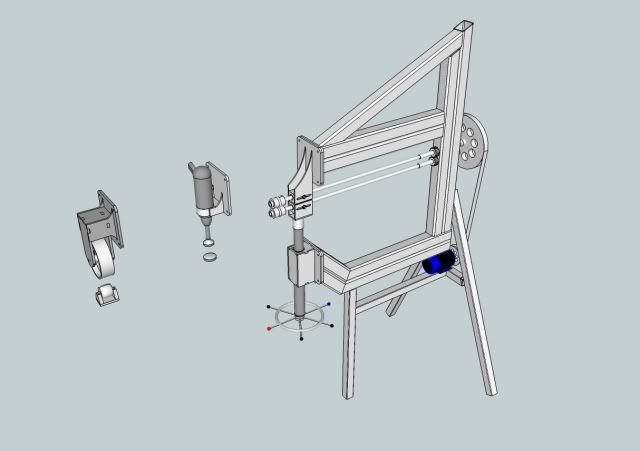
I since then Knocked this design up for a multi-purpose E-Wheel, Bead roller, Planishing hammer Took probably about 4 hrs, but a lot of this was learning curve, Having said that it is also a quite complex drawing, with full detail.
ComboMachine1.jpg


englishwheel3.jpg
 
Last edited:
OP
K

KPSquared

Well-known member
Joined
Aug 18, 2010
Messages
2,750
Location
Wetaskiwin, Alberta, Canada
Karnage - You seriously have no CAD experience? That is VERY impressive considering what I've seen other guys come up with. On another note, that multi-purpose fab tool would be a sweet addition to my shop...


I don't know how useful Sketchup will be for me to do 2D drawings though. The inspector doesn't need any 3D renderings so it will all 2 dimensional line drawings. I have Sketchup Pro now so I'll guess I'll have some fun with that and see how it works.

I do have to design bumpers for my off road rig still, so it may come in handy. I just don't quite understand how to get measurements laid out on drawings. How to make sure bolt holes are in the right place and the right size. Maybe I need to watch more tutorial videos. My main plan is to get my Engineering buddy with Solidworks to draw it up, then send it to the local water jet guys to cut the steel... but if I can figure it out with Sketchup, and send them that file, that'll be sweet.
 

Karnage

Well-known member
Joined
Nov 2, 2009
Messages
88
Location
Brisbane, Australia
Sorry for hi-jacking your thread.

I didn't post these up to boast, but more to encourage others to give it a go. I did a little technical drawing in high school, and apart from sketching things on paper, the workbench, etc I have no prior experience. thing like the measure tool and even just drawing construction lines help in setting up what you want and where. Granted it doesn't handle curves all that well, but you can cheat a little. when you draw a circle or an arc, you can click on the line properties and change the number of "sides". Also if you get the pro version (im not endorsing downloading the keygen) you can export to DXF, which can be used in solid works etc.

Down the bottom corner there is a little text box, when you draw a line, before you let go of the mouse button, you can type a measurement in there and the line will be the length you specify.

When i designed the multi machine I also considered how it would be constructed, for instance the interchangeable heads are made from plates that will be laser/water-jet cut, and have been keyed so it will just be assembled and welded off.

If you have an analytic mind, and you consider how something will be made, its easy to draw it up and then you can see how the various parts intersect/work together, i think when I get around to building it it will have saved me countless hours in "on the fly" R&D compared to working with a 2d drawing of it.
 
To avoid these ads, REGISTER NOW!
Top Bottom