
You are using an out of date browser. It may not display this or other websites correctly.
You should upgrade or use an alternative browser.
You should upgrade or use an alternative browser.
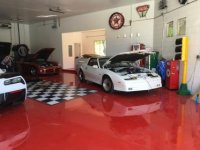
Garage Test
- Thread starter MDB-TX
- Start date
Revelations
Well-known member
- Joined
- Jul 8, 2015
- Messages
- 274
Love the fire chicken
Ole Slewfoot
Well-known member
In your phtobucket page look to the right of the picture...
where it says 'IMG' click the box [URL=http://s1262.photobucket.com/user/MDB-AZ/media/image_zpsx949nety.jpeg.html][/URL![/IMG! [COLOR="Red"]*[/COLOR]
and the link will be copied to your computers 'clipboard'
On the garage Journal page, right click (ctrl click if apple) and paste, the picture will appear in your post.
I might like the cars better than the garage.
[COLOR="Red"]*[/COLOR] I replaced the last ]'s with !'s so the link wold not work and you are able to read them as text.
where it says 'IMG' click the box [URL=http://s1262.photobucket.com/user/MDB-AZ/media/image_zpsx949nety.jpeg.html][/URL![/IMG! [COLOR="Red"]*[/COLOR]
and the link will be copied to your computers 'clipboard'
On the garage Journal page, right click (ctrl click if apple) and paste, the picture will appear in your post.
I might like the cars better than the garage.
[COLOR="Red"]*[/COLOR] I replaced the last ]'s with !'s so the link wold not work and you are able to read them as text.
Last edited:
bczygan
Well-known member


Helluva floor. Details?
Last edited: