To avoid these ads, REGISTER NOW!

Getting a midtronics tester fixed

scott37300

Well-known member
Joined
May 5, 2010
Messages
3,450
Location
Wisconsin
I bought a midtronics micro500 from ebay last week. I got a pretty good deal on it, was missing the battery cover but seller said in working condition. Hooked it up and 4 spots on the LCD are burnt out or not working, instead of saying "GOOD BATTERY" it says "GOOD B____RY". Which is also where it displays the voltage. So tester will test batteries right now but can't see voltage or some of the other things.

I would like to keep this tester if there is a way to fix it. I'm going to contact midtronics about getting a new screen but don't know if they will sell me just the screen or if they will say I have to send it in. I don't think I want to send it in because it's going to end up costing more money than it's worth probably. If that is the case I will just file a paypal claim and return it.

Do any of you guys know if there is a way to fix the LCD or where I can find a new one? I know fluke had some problems with LCDs and there are some youtube vids of cleaning the contacts to fix it.

I was really looking forward to having a nice tester but just my luck I end up getting a bum deal! Thanks for any help with this.
 
To avoid these ads, REGISTER NOW!
OP
S

scott37300

Well-known member
Joined
May 5, 2010
Messages
3,450
Location
Wisconsin
Midtronics got back to my email within two hours, pretty good customer service. But the bad news is that they only do flat rate repairs for 250 dollars plus shipping. He said they will fix the screen, install new leads, software update and anything else it needs. Probably a decent deal but 350 dollars after original purchase and shipping costs to midtronics is more than I am willing to stick into it. I sent the seller a message asking for a refund and return shipping costs since he stated it was working and it isn't. ***** because I was really looking forward to using a nice tester!
 

oldtools

Well-known member
Joined
Sep 15, 2008
Messages
2,706
That **** since you got it for a really good deal. $350 for repair is way too much. There are more out there, but you have to be patience.
 
OP
S

scott37300

Well-known member
Joined
May 5, 2010
Messages
3,450
Location
Wisconsin
That **** since you got it for a really good deal. $350 for repair is way too much. There are more out there, but you have to be patience.

I'm more upset that the seller lied in the listing. Now I'll probably end up having to pay 11 dollars to ship it back.

Midronics said 250 flat rate plus shipping so the 350 figure was for original price plus repair.

Guess 65 bucks was to good of a deal!
 

Danglerb

Well-known member
Joined
Sep 6, 2007
Messages
9,736
Location
SoCal
Removing the battery door is something I've seen a repair depot do when they junk an item, so that could be the origin.

Return and refund sound like the best options, but if that has some issues then repairing my increase in appeal.

Maybe some other electronic device uses the same LCD and you could swap it yourself?
 
OP
S

scott37300

Well-known member
Joined
May 5, 2010
Messages
3,450
Location
Wisconsin
Removing the battery door is something I've seen a repair depot do when they junk an item, so that could be the origin.

Return and refund sound like the best options, but if that has some issues then repairing my increase in appeal.

Maybe some other electronic device uses the same LCD and you could swap it yourself?

That was my hope that I could just get an LCD, the lcd board just snaps in place. I'm not even sure where to look to find a replacement screen. Still haven't heard from the seller so will wait until tomorrow and just file a paypal claim. Just ***** that I lose out 11 bucks for shipping it back because the seller sold a broken item. I've had this happen a few times now, a stant pressure tester, tiff gas sniffer, now this. What upsets me is everytime this happens the listing states the item is in good working order and everytime the item was clearly not ever even tested. Lazy azz sellers piss me off. The stant was corrodid all the way through the cylinder and couldn't build any pressure at all, obviously hadn't been used in a long time and no way the seller even tested it. The Tiff wouldn't even turn on so that wasn't tested either. I just get fed up with sellers throwing stuff on ebay and writing **** to make it sell to make a quick buck and then I get screwed having to pay to ship it back to these lazy sellers. When I sell something I try to describe it perfectly so that I don't have any headaches, even if that means I don't get top dollar for it.
 
OP
S

scott37300

Well-known member
Joined
May 5, 2010
Messages
3,450
Location
Wisconsin
we had a midtronics from ac delco that was cheap ...worked awful , I still use my snappy carbon pile tester and any doubts , I just sell a battery

I wasn't really looking for a capacitance style battery tester, was going to get a carbon pile based on recomendations from others on this forum. But this deal came along and for 65 bucks it would make a pretty nice quick first test for batteries and charging systems. That is if it worked!
 
OP
S

scott37300

Well-known member
Joined
May 5, 2010
Messages
3,450
Location
Wisconsin
Well the seller refunded all my money and told my just to keep the tester. I still don't think I will fix it but we'll see. I think for now I am going to pick up a carbon pile tester and use that for now and if the time ever comes again I will either get this micro500 fixed or find a deal on a different one.

At least the seller was stand up and didn't argue, they said the person that gave it to them to sell told them it worked.
 

oldtools

Well-known member
Joined
Sep 15, 2008
Messages
2,706
That turn out not that bad. You got your money back plus a tester that work, but can't see that well. You still can guess what it is saying. Also good as a loaner tool.
 

djb2

Well-known member
Joined
Apr 3, 2010
Messages
639
Location
Redwood forests
Are the pixels "burnt out", or just not displaying?

You can fix some LCD displays by disassembling them and cleaning the "zebra strips" with alcohol. This is delicate work, requires a clean environment, and careful studying the assembly to figure out how it is clamped together.

If the display has cracked glass or black splotches, it's beyond recovery. But you can sometimes source of a surplus replacement for little money.

If you disassemble, post a picture with a ruler next to the display. This looks like a 2 line 16 character display, which is a pretty common part.

http://www.halted.com/ccp25549-lcd-module-16-x-2-chr--w-backlight-gtc-1602-bv3-22687.htm
 
Last edited:
OP
S

scott37300

Well-known member
Joined
May 5, 2010
Messages
3,450
Location
Wisconsin
Are the pixels "burnt out", or just not displaying?

You can fix some LCD displays by disassembling them and cleaning the "zebra strips" with alcohol. This is delicate work, requires a clean environment, and careful studying the assembly to figure out how it is clamped together.

If the display has cracked glass or black splotches, it's beyond recovery. But you can sometimes source of a surplus replacement for little money.

If you disassemble, post a picture with a ruler next to the display. This looks like a 2 line 16 character display, which is a pretty common part.

http://www.halted.com/ccp25549-lcd-module-16-x-2-chr--w-backlight-gtc-1602-bv3-22687.htm

There is no cracks or anything, just doesn't display on those 4 characters. I've read about cleaning something on the flukes that the displays weren't working. I will take it apart tomorrow and post some pics so you can tell me what you think.

I appreciate the help.
 

JamieK

Well-known member
Joined
Aug 13, 2009
Messages
1,760
Location
Winston-Salem, NC
Some of those LCD displays are connected to the main circuit board with a ribbon cable that is literally just glued to the board. Its gets loose and loses contact. If you can wedge something in there to put pressure on the contact area, that may fix it. If not, you may be able to clean the old glue off and reglue it. The glue has to be conductive, though.
 
OP
S

scott37300

Well-known member
Joined
May 5, 2010
Messages
3,450
Location
Wisconsin
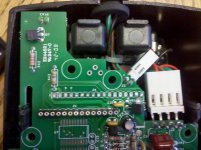
Here are some pictures of the inside of the scanner.

IMG_20110818_160321.jpg

IMG_20110818_160349.jpg

IMG_20110818_160358.jpg

IMG_20110818_160409.jpg

What parts should I clean and with what? Thanks for any help with this.
 

strnjss

Well-known member
Joined
Jul 5, 2010
Messages
322
Location
Boston Area
Here are some pictures of the inside of the scanner.


What parts should I clean and with what? Thanks for any help with this.

First, let me say, I have a graphing calculator that had/has a semi-bad LCD. If I let it sit for too many months, when I go to turn it back on, there are big gaps in the display. To get it working again, I leave it on for a long time (like an hour, I have to keep it from automatically turning off), and eventually the display starts working again. I don't know exactly why, and as long as I don't let it sit around for months, it stays working. Maybe if your screen has been sitting around unused for a while, it may be a problem like this.

On to the cleaning:

It looks like the LCD signal is carried on those pins. While I have a feeling you have a bad LCD, not a connection issue, it's worth a shot to try and clean those pins and hope for the best.

Simply removing and reseating the screen a few times can sometimes be enough, but you can use a pencil eraser to rub those contacts clean.

Whenever I clean contacts, I usually use a pencil eraser, followed by 91% isopropyl alcohol (the higher the percentage the better).

Make sure it's completely dry and reassemble.

With any luck, that will be all it is.

If it doesn't, maybe take a really close look at the whole board (not just the screen module) and see if you can see any bad solder joints (ones that look cracked or lifted away).

Where that screen is a modular part, I would think someone out there would be selling them.
 
Last edited:
To avoid these ads, REGISTER NOW!
OP
S

scott37300

Well-known member
Joined
May 5, 2010
Messages
3,450
Location
Wisconsin
First, let me say, I have a graphing calculator that had/has a semi-bad LCD. If I let it sit for too many months, when I go to turn it back on, there are big gaps in the display. To get it working again, I leave it on for a long time (like an hour, I have to keep it from automatically turning off), and eventually the display starts working again. I don't know exactly why, and as long as I don't let it sit around for months, it stays working. Maybe if your screen has been sitting around unused for a while, it may be a problem like this.

On to the cleaning:

It looks like the LCD signal is carried on those pins. While I have a feeling you have a bad LCD, not a connection issue, it's worth a shot to try and clean those pins and hope for the best.

Simply removing and reseating the screen a few times can sometimes be enough, but you can use a pencil eraser to rub those contacts clean.

Whenever I clean contacts, I usually use a pencil eraser, followed by 91% isopropyl alcohol (the higher the percentage the better).

Make sure it's completely dry and reassemble.

With any luck, that will be all it is.

If it doesn't, maybe take a really close look at the whole board (not just the screen module) and see if you can see any bad solder joints (ones that look cracked or lifted away).

Where that screen is a modular part, I would think someone out there would be selling them.

Thanks for the advice. Yes the LCD is carried on those pins, no cable. I will try and clean them like you suggested and look for bad solder joints.

If anyone knows where to find a replacement LCD board like this that would be great.
 
OP
S

scott37300

Well-known member
Joined
May 5, 2010
Messages
3,450
Location
Wisconsin
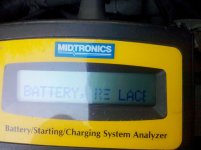
I tried the cleaning with no change but I did notice something today when I tried to hook the tester up. The first thing that appears is "BATTERY RE_LACE" with the R and E having some pixels missing. So the spots aren't dead completely I don't think. But in all the other screens they don't show anything. I don't know much about these display screens but if it halfway works for one thing I would think the screen is still good and might be a problem somewhere else?

Here is a picture of the first screen when you hook the tester up.

IMG_20110819_100648.jpg
 
Joined
Jul 29, 2007
Messages
12,074
Location
Now Leaving , NJ
I wasn't really looking for a capacitance style battery tester, was going to get a carbon pile based on recomendations from others on this forum. But this deal came along and for 65 bucks it would make a pretty nice quick first test for batteries and charging systems. That is if it worked!

the one GM gives us as a special tool is good

now we have the midtronics battery charger ...not so good
 
OP
S

scott37300

Well-known member
Joined
May 5, 2010
Messages
3,450
Location
Wisconsin
the one GM gives us as a special tool is good

now we have the midtronics battery charger ...not so good

Ya just an FYI, I don't work at a dealership so unless GM starts giving out these to home wrenchers I won't be getting a GM one. If this wasn't just for personal use then I would have no problem buying a brand new top of the line one but it's just for home use. I've read lots of good reviews for the midtronics and yours is the first bad one I have read.
 
Joined
Jul 29, 2007
Messages
12,074
Location
Now Leaving , NJ
ya , the ac delco one ..does not communicate with the printer and you never get a good connection , have to jiggle the alligator clips
other than warranty codes , I don't use it , I own my personal snap on load tester
 

strnjss

Well-known member
Joined
Jul 5, 2010
Messages
322
Location
Boston Area
I tried the cleaning with no change but I did notice something today when I tried to hook the tester up. The first thing that appears is "BATTERY RE_LACE" with the R and E having some pixels missing. So the spots aren't dead completely I don't think. But in all the other screens they don't show anything. I don't know much about these display screens but if it halfway works for one thing I would think the screen is still good and might be a problem somewhere else?

Here is a picture of the first screen when you hook the tester up.

IMG_20110819_100648.jpg

I've been looking around the internet for replacement parts for your micro 500, but there doesn't seem to be any anywhere.

where some more of it came back, I'm wondering if maybe like my calculator, it just needs to have power going to it for a while. Does it have contrast control? Sometimes I need to change the contrast up and down constantly to get my screen to come back.

Assuming the seller/friend of seller was honest and it was working at the time, it could be something like this if it was sitting for a long time.

Other than that, maybe try cleaning the contacts again. Does the screen pins fit nice and tight into those holes?
 

royesses

Well-known member
Joined
Mar 28, 2009
Messages
789
It looks as though there are twisted flange tabs holding that display to the board. Untwist them to pull the metal bezel up and see if there are Zebra strips underneath, or if it is soldered. Then clean the zebra strip with a clean strip of copy paper. Then remount the display and test. There are a couple of potted IC's on the bottom of the board(if I am looking at the photo correctly) and those are driver chips that could be defective. If the display is soldered, look at the joints with a magnifying glass to check for cracked solder joints and the possibility of tin whiskers shorting it out.
 
OP
S

scott37300

Well-known member
Joined
May 5, 2010
Messages
3,450
Location
Wisconsin
It looks as though there are twisted flange tabs holding that display to the board. Untwist them to pull the metal bezel up and see if there are Zebra strips underneath, or if it is soldered. Then clean the zebra strip with a clean strip of copy paper. Then remount the display and test. There are a couple of potted IC's on the bottom of the board(if I am looking at the photo correctly) and those are driver chips that could be defective. If the display is soldered, look at the joints with a magnifying glass to check for cracked solder joints and the possibility of tin whiskers shorting it out.

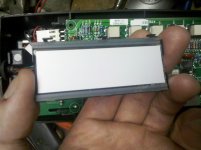
Today I took the tester apart again and un twisted those 6 tabs and the display come off the board. No connecters or cables, just sits on the board and makes contact. I cleaned everything up good and put it back together. Hooked it up to the car and I gained 3 more characters! Still missing one. It also had a few stray lines on the top row, not sure why that happened?

So I'm going to take it apart again and clean some more, one more character and I'll have a nice tester and also learned a little about electronics! Thanks for all the help everyone.

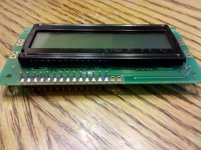
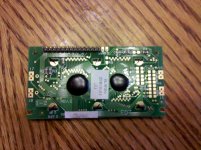
Here's a couple pictures of the display off the board and also the new improvement when hooked up to the car.

The back of the display. Those two clearish strips are what make contact on the circuit board.

IMG_20110820_122838.jpg

The circuit board, the two rows of gold contacts are where the display makes contact.

IMG_20110820_122845.jpg

The display when hooked up to car. You can see the BATT_RY, just missing the E now. Also you can see the stray lines on the first row of characters, not sure what causes these?

IMG_20110820_123940.jpg
 
OP
S

scott37300

Well-known member
Joined
May 5, 2010
Messages
3,450
Location
Wisconsin
Well I did another round of cleaning with no changes, still missing one character. I THINK I can do most of the tests with it how it is, can't read the voltage but I have a fluke for that. I also can't read what it says when it says "rev engine for _ seconds". The number of seconds is the missing character. I'm not sure if more cleaning would do anything or not. Might take it apart one more time since the first cleaning got 3 out of the four characters back and gave me some hope!
 

djb2

Well-known member
Joined
Apr 3, 2010
Messages
639
Location
Redwood forests
The good news is that is a standard display module. There are many replacements that will work, in different colors. (Well, yellow, blue and orange/red.) Search for FleaBay for "lcd character" to find many modules starting at about $4. It appears that matching displays are about $8.

The pin order is a de facto standard known as "HD44780" after the chip on the original version.

Many replacements won't come with the "header" installed -- the gold plated pins that connect to the main board. They are really common parts, but you'll have to solder them in. It's more difficult to find modules with the pins already installed, and they come in slightly different lengths.


In case you were wondering, pins 15 and 16, the empty holes, are used for the backlight. Most replacement LCD modules will have backlight LEDs installed.
 
Last edited:

rv4hess

New member
Joined
Feb 11, 2016
Messages
2
Hi guys could I ask a favor?
I have a Midtronics Micro500XL with no cables. (eBay)
There is a circular 6 pin connector that handles the 12v + and -
I opened it up but the wire colors don't correspond to + or -
Apparently It has several functions, like reverse polarity, which are separate pins to pos and neg.
Could anyone with a Micro500 cable please tell me which pins go to the positive lead and which go to the negative?

It would be much appreciated,
Thanks, John


Sent from my iPad using Tapatalk
 

rv4hess

New member
Joined
Feb 11, 2016
Messages
2
7121ed4af47abfaeafa4b738413c6505.jpg

Here is a pic of the unit plug pins. What I really need is a pin out of the clip wires. I called Midtronics and they said it was "proprietary".... Really??
The tech was only allowed to give general info.
I have a couple wires figured out but don't want to put 12v to it until the others are sorted.

Thanks again,
John


Sent from my iPad using Tapatalk
 

kjohnson1

Member
Joined
Jun 6, 2013
Messages
24
are you going to send the seller a few bucks now that it's got some functionality? Who am I kidding....that never happens.

Today I took the tester apart again and un twisted those 6 tabs and the display come off the board. No connecters or cables, just sits on the board and makes contact. I cleaned everything up good and put it back together. Hooked it up to the car and I gained 3 more characters! Still missing one. It also had a few stray lines on the top row, not sure why that happened?

So I'm going to take it apart again and clean some more, one more character and I'll have a nice tester and also learned a little about electronics! Thanks for all the help everyone.

Here's a couple pictures of the display off the board and also the new improvement when hooked up to the car.

The back of the display. Those two clearish strips are what make contact on the circuit board.

IMG_20110820_122838.jpg

The circuit board, the two rows of gold contacts are where the display makes contact.

IMG_20110820_122845.jpg

The display when hooked up to car. You can see the BATT_RY, just missing the E now. Also you can see the stray lines on the first row of characters, not sure what causes these?

IMG_20110820_123940.jpg
 

royesses

Well-known member
Joined
Mar 28, 2009
Messages
789
Sometimes the zebra strips need to be replaced. Check with DigiKey. Also I have used alcohol wipes on the gold contacts and had that work. Make sure the twisted tabs are holding the LCD down tight against the board. I've seen the boards warp a little causing some characters to disappear.

Roy
 
To avoid these ads, REGISTER NOW!
Top Bottom