To avoid these ads, REGISTER NOW!

google sketchup - design your garage!

pixelmonkey

Well-known member
Joined
Apr 21, 2008
Messages
137
Location
oklahoma
Sticky!???

I see a question about a computer design program at least one time every other week.

Google SketchUp is a free program to download at http://sketchup.google.com/

Existing models can be found at http://sketchup.google.com/3dwarehouse/

You can design any 3 dimensional object and take the measurements to exact as you would like. This program is great for brain storming or for use as a layout manager for your existing spaces.

link to my models, including a few tool boxes and my garage.

if the admins see fit, this would be a great Sticky!
chris<pixelmonkey>:D
 
To avoid these ads, REGISTER NOW!

revlover

Well-known member
Joined
Mar 27, 2008
Messages
264
I found a really good tutorial site on Google Sketchup.....

http://www.go-2-school.com/

Their videos online, I think, are free... you can also purchase entire tutorials on DVD from them as well...

Hope this helps Google Sketchup Newbies!
 

george4

Well-known member
Joined
Feb 18, 2006
Messages
773
Location
N California
Excellent program for DIY. I have used it for a remodel of my master bath area at home and for a welding table for an evening welding class project. I had very little drafting experience or ability, but the program is pretty easy to pick up. The ability to rotate a design was especially helpful for me to visualize how pieces fit together.
 

burtonry

Active member
Joined
Jan 25, 2009
Messages
27
Location
Arizona
Here are a few of my project. in the jpeg view it's not all that pretty but when running the software with the capability to pan and rotate it's awesome.

Garage.jpg


Garage2.jpg
 

usmc_noma

Well-known member
Joined
Mar 9, 2009
Messages
1,219
Location
virginia
good find and i'll concur with the sticky. this is exactly what i need to plan a layout of stuff in my garage.
 

6th Gear

Well-known member
Joined
Sep 17, 2008
Messages
261
Location
Ohio
Ryan - awesome job! How much time did you spend on that whole project? What about just the truck?

I got as far as putting up 4 walls and doors... I need to get back into it.
 

burtonry

Active member
Joined
Jan 25, 2009
Messages
27
Location
Arizona
Ryan - awesome job! How much time did you spend on that whole project? What about just the truck?

I got as far as putting up 4 walls and doors... I need to get back into it.
I didn't build the truck, bike, cabinets, shovel, or the compressor, you can download what others have already built and shared in the warehouse. The whole project took me 3 hours.
 
To avoid these ads, REGISTER NOW!

curdy

Well-known member
Joined
Mar 20, 2009
Messages
124
Location
Charlotte, NC
Pro version and a few plugins to render it.

Sweet. My father wanted me to talk to someone who had the pro version and pick their brain some on the differences. He's getting more into custom wood working projects and wanted to know if the pro version had programed features for that type of stuff.

Check your PM, I'll shoot you my number.
 

PAToyota

Well-known member
Joined
Jan 20, 2006
Messages
4,366
Location
South Central Pennsylvania, USA
For those interested in the differences, they have a chart here.

The pro version doesn't offer any "automatic" features other than that it SU7 you can create dynamic components. The free version you can use dynamic components created by others, but you can't create your own.

The main differences are the dynamic components, the ability to export to other formats (such as dwg, 3ds, and such), and with the printing options. The free one you can only print at screen resolution - the pro version you can output at much higher resolution for posters, large scale documents (24x36 construction documents and such), and I've even done project billboards for on-site.
 

vaio76109

Member
Joined
Jan 19, 2009
Messages
19
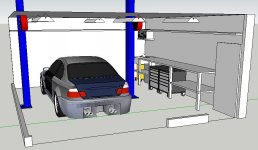
I've been working on this for a couple of hours, not sure if I like it or not. I'm trying to maximize floor space, but then there's not a lot of storage space. FYI, there's not a wall to the left, but there's a car there.
 

Attachments

  • Garage.jpg
    Garage.jpg
    62 KB · Views: 212

usmc_noma

Well-known member
Joined
Mar 9, 2009
Messages
1,219
Location
virginia
i keep having problems running this. every time i open it up and try to work it, it freezes. not sure what i got to do to fix this.
 

N8

Well-known member
Joined
Dec 2, 2006
Messages
314
Location
In a house
This is a pretty cool "free" program.
I had my 3 car garage drawn up in under an hour.
Maybe it could have been faster if I would have read the tutorials but I'm old and stubborn and work as an industrial designer so I like to fingure programs out in real time by working against the program. LOL

My install has a few flaws I believe. I continually have dark grey boxes in the upper right hand corner. They seem like control/tool or info boxes that are not registering information.
All in all its a great little program for the home hobbiest.
Sure beats the price tag of our AutoCAD 2010, 3D MAX and SolidWorks. :)
 

pnut

Well-known member
Joined
Sep 5, 2006
Messages
138
I tried it, and while it would be a very powerful tool, after a few hours, I was not yet good enough to do what I needed, and gave it up.

Still looking for a good 2-d basic drawing program where you can "snap" to the inch or 6 inches.

I remember 15+ years ago there was "macdraw" I used to use on my parent's ancient computer. I want something like that. Simple layout, with crosshairs and a scaled grid where you could choose your snap to points.
 

Keep

Well-known member
Joined
Jan 1, 2009
Messages
1,398
Location
Oshawa, Ontario
This program hates me. I have tried it two or three times.

I downloaded and recreated my house down to the tree in the backyard with an architect suite, but I cannot get google sketchup to draw a damn square garage.
 

N8

Well-known member
Joined
Dec 2, 2006
Messages
314
Location
In a house
I tried it, and while it would be a very powerful tool, after a few hours, I was not yet good enough to do what I needed, and gave it up.

Still looking for a good 2-d basic drawing program where you can "snap" to the inch or 6 inches.

I remember 15+ years ago there was "macdraw" I used to use on my parent's ancient computer. I want something like that. Simple layout, with crosshairs and a scaled grid where you could choose your snap to points.

Try CorelDraw. (Although its not necessarily basic) It's what I consider a great hybrid program that allows you to create complex graphics and also allows you to work within engineering and architectural scales.
it has "snap to" capabilities and you can set up any type of grid you want to wok within.
 
To avoid these ads, REGISTER NOW!
Top Bottom