I have seen a few people on here mention they use the Gyraline App. Looking for feedback on how well it works. I have a couple project cars that I need to at least get the alignment close. As well as daily drivers that I replace suspension parts and would like to also get close before taking it to get aligned if I cant do it with this tool. I looked at the app / tool when it first came out and probably should have done something then as it looks like its $189 now..


You are using an out of date browser. It may not display this or other websites correctly.
You should upgrade or use an alternative browser.
You should upgrade or use an alternative browser.
Gyraline Alignment App
- Thread starter gregs
- Start date
39CAMC
Well-known member
I have had several customers use one and then have me check the alignments later and....it seems like it can get it close enough to get the alignment shop but I am not sure I would trust it for a final.
That said, the toughest part of an alignment is not the measuring tool, it is having the car level and the wheels able to move without bind. I have had to make trackside repairs to my own car and have just done toe adjustments which when checked later on the machine were proven to be pretty far off.
So the gyraline might be fine, it is just tough to get a good baseline.
DaveW
That said, the toughest part of an alignment is not the measuring tool, it is having the car level and the wheels able to move without bind. I have had to make trackside repairs to my own car and have just done toe adjustments which when checked later on the machine were proven to be pretty far off.
So the gyraline might be fine, it is just tough to get a good baseline.
DaveW
I have used it a couple of dozen times. It is hard to get repeatable results. I went back to strings, which are almost as fast if you know what you are doing. In fairness, I was using it in an old iphone, so newer tech may improve how well it works.
Torque&Recoil
Well-known member
I use it with an iPhone 14. It is very fast. Have not had any problems with repeatability. Accuracy is reasonable - certainly not perfect, but in my opinion it is more than accurate enough if your goal is to get the car to an alignment shop. FWIW, there is a second generation version available now (more $) that is a stand-alone with it's own sensors. That one is probably a lot more accurate than using a phone as the sensor.
My thought would be for getting it close enough to get to the alignment shop. There is a really good one man shop that all he does is alignments. Problem is, he doesnt do appointments and stays really busy on a first come first serviced basis. So when I do repairs that needs to have the alignment done it may take me several weeks to find the time to get there and possibly have to wait several hours. So I need something to get it close enough. I have looked at how to do a string box and even have a set of old Snap On magnetic caster / camber gauges. But honestly the time it would take me to do all that infrequently doesnt seem worth the trouble.
American Locomotive
Well-known member
If the app is only good enough to "get you to the alignment shop", it's a waste of time. You can easily do that with a tape measure and two pieces of wood. You aren't going to melt your tires off driving 10 minutes to an alignment shop
The reviews of the app seem very mixed. I understand how it works, but I can't imagine the IMU in any phone has enough long-term stability to do an alignment. Those sensors always have pretty high drift. It's why phones need GPS to navigate, and why VR headsets need tracking systems. The IMU drifts over time and loses its position.
The reviews of the app seem very mixed. I understand how it works, but I can't imagine the IMU in any phone has enough long-term stability to do an alignment. Those sensors always have pretty high drift. It's why phones need GPS to navigate, and why VR headsets need tracking systems. The IMU drifts over time and loses its position.
That would be for toe only. Sometimes I have replaced a lot of front end parts and need to get camber and caster close enough. I may be driving the vehicle for weeks before I can get it aligned, so it needs to be good enough to be safe and not chew up the tires.If the app is only good enough to "get you to the alignment shop", it's a waste of time. You can easily do that with a tape measure and two pieces of wood. You aren't going to melt your tires off driving 10 minutes to an alignment shop
The reviews of the app seem very mixed. I understand how it works, but I can't imagine the IMU in any phone has enough long-term stability to do an alignment. Those sensors always have pretty high drift. It's why phones need GPS to navigate, and why VR headsets need tracking systems. The IMU drifts over time and loses its position.
I agree it seems that it has potentially a lot of downfalls, thats why I am asking for real world experience from members that own it and use it.
I'd rather buy one of these:

No calibration, runout issues or flat batteries and it'll still be working in 100 years time unlike an app which will get discontinued. The way it works means it doesn't need runout compensation which the Gyraline lacks.
I have a really old one just like it.
The only downsides are that it doesn't centre the steering wheel and it can't do low vehicles.
No calibration, runout issues or flat batteries and it'll still be working in 100 years time unlike an app which will get discontinued. The way it works means it doesn't need runout compensation which the Gyraline lacks.
I have a really old one just like it.
The only downsides are that it doesn't centre the steering wheel and it can't do low vehicles.
alwaysFlOoReD
Well-known member
What is it called? How does it work?I'd rather buy one of these:
No calibration, runout issues or flat batteries and it'll still be working in 100 years time unlike an app which will get discontinued. The way it works means it doesn't need runout compensation which the Gyraline lacks.
I have a really old one just like it.
The only downsides are that it doesn't centre the steering wheel and it can't do low vehicles.
The end is spring loaded. You put it between the wheels and zero the scale. Then you roll the vehicle to the opposite position with the bar still in place and can then read the toe.What is it called? How does it work?
SPC Performance 99374 or 99361 TOE GAUGE
If you don't have aggressive toe, camber does not quickly wear down the tires. Besides, you can do camber with a level, you don't really need special tools to do camber.That would be for toe only. Sometimes I have replaced a lot of front end parts and need to get camber and caster close enough. I may be driving the vehicle for weeks before I can get it aligned, so it needs to be good enough to be safe and not chew up the tires.
I have used the old version with an apple phone about 10 times, and just got the new version with built in highly accurate sensors two days ago. I have not tried it on a car yet but did mess around with it. It seems to be a lot more picky about getting it perfect on the tire, which is probably a good thing. It blinks an icon red, yellow, and green to show you if it's being held in a way that affects accuracy. It's good to 0.01 degrees, which is plenty accurate for a normal alignment.
The original one was fine and seemed very repeatable.
My brother replaced a bunch of front end parts on his Camry over a couple months so we used it on that car 4 times, it always tracked straight and felt good when done. After the last time he took it to an alignment shop and they didn't need to do anything, said it was right in the middle of all the specs, which is what I was aiming for when I used the gyraline setup.
I also checked a car I just had aligned at a shop and came up with almost exactly the same numbers as they had.
I would say gyraline works good enough for a final alignment and definitely ok for just getting to a shop.
I have used two ceramic tiles with grease in between to sit the tires on so they don't bind when doing an adjustment, also a folded up trash bag. I just got a used set of bearing plates. They are going to make it much nicer.
The original one was fine and seemed very repeatable.
My brother replaced a bunch of front end parts on his Camry over a couple months so we used it on that car 4 times, it always tracked straight and felt good when done. After the last time he took it to an alignment shop and they didn't need to do anything, said it was right in the middle of all the specs, which is what I was aiming for when I used the gyraline setup.
I also checked a car I just had aligned at a shop and came up with almost exactly the same numbers as they had.
I would say gyraline works good enough for a final alignment and definitely ok for just getting to a shop.
I have used two ceramic tiles with grease in between to sit the tires on so they don't bind when doing an adjustment, also a folded up trash bag. I just got a used set of bearing plates. They are going to make it much nicer.
Since you have experience using it I have a few questions. Watching some of the videos I saw that it needs a reference to establish the centerline I think. They show picking a spot, usually side window corner to make it a repeatable spot on both sides. Do you think there would be any issue using the frame rail, same spot both sides as the reference point?I have used the old version with an apple phone about 10 times, and just got the new version with built in highly accurate sensors two days ago. I have not tried it on a car yet but did mess around with it. It seems to be a lot more picky about getting it perfect on the tire, which is probably a good thing. It blinks an icon red, yellow, and green to show you if it's being held in a way that affects accuracy. It's good to 0.01 degrees, which is plenty accurate for a normal alignment.
The original one was fine and seemed very repeatable.
My brother replaced a bunch of front end parts on his Camry over a couple months so we used it on that car 4 times, it always tracked straight and felt good when done. After the last time he took it to an alignment shop and they didn't need to do anything, said it was right in the middle of all the specs, which is what I was aiming for when I used the gyraline setup.
I also checked a car I just had aligned at a shop and came up with almost exactly the same numbers as they had.
I would say gyraline works good enough for a final alignment and definitely ok for just getting to a shop.
I have used two ceramic tiles with grease in between to sit the tires on so they don't bind when doing an adjustment, also a folded up trash bag. I just got a used set of bearing plates. They are going to make it much nicer.
Does it figure out and show the center for the steering? So that you can get the steering wheel straight and turning an equal amount left and right.
One of my vehicles is a project that isnt using the original body and its not fully mounted yet. Also it has a different steering column and all the suspension has been rebuilt or otherwise touched or moved. The rear axle is wider than the front by and inch or 2 but its mostly all stock parts. I need to get the suspension and alignment close so that when I mount the body I can fit it such that the wheel openings match the wheel locations all the way around.
Keep in mind I am not an expert on alignments. I have done a crapload of car work that needed them after though, and have been really disappointed over the years with how many times I had to repeatably bring cars back that pulled or had an off center steering wheel afterwards. So I got the Gyraline setup to do it myself. Which has worked perfect the 10 or so times I've used it. I was also tired of paying $100 every time to get them done badly.Since you have experience using it I have a few questions. Watching some of the videos I saw that it needs a reference to establish the centerline I think. They show picking a spot, usually side window corner to make it a repeatable spot on both sides. Do you think there would be any issue using the frame rail, same spot both sides as the reference point?
Does it figure out and show the center for the steering? So that you can get the steering wheel straight and turning an equal amount left and right.
One of my vehicles is a project that isnt using the original body and its not fully mounted yet. Also it has a different steering column and all the suspension has been rebuilt or otherwise touched or moved. The rear axle is wider than the front by and inch or 2 but its mostly all stock parts. I need to get the suspension and alignment close so that when I mount the body I can fit it such that the wheel openings match the wheel locations all the way around.
You don't need to use any body reference if you are just doing a simple alignment, only if you want to make sure your car isn't tweaked somehow or if you have done something really major to the front or rear suspension that is adjustable after. It shows all four tires compared to each other normally. Like if the front tires are correctly spaced but both pointing right or left compared to the rear when your steering wheel is centered you know you need to adjust them both the same amount/direction to center them to the steering wheel.
You would want to buy or make something to hold the steering wheel centered during your adjustments, or on a older/project car just leave/take it off and put it on centered when done.
I removed the front steering, suspension, and brakes from my 67 Cougar and replaced it all and modified some stuff so I used the app to get everything right to the car, then put the steering wheel back on centered. It tracks beautifully and has shown no sign of weird tire wear or anything. I used a body line for reference but honestly I am not sure anything on a car that old is really square. Using a referance was also good when I changed the rear leaf springs, I used it to get the axle square to the body and front tires when bolting it all back togather and used a tape measure from the frame to make sure it was centered at the same time.
If you had really clean spots on the frame rail for the two small contact points to touch and you thought the frame was square you could use that, but any undercoating or dirt is going to throw you off. We are taking about about .005 of an inch, so your frame contact points would need to be very clean and flat to do it well.
For your project its not going to show you if your axle is centered, only if its angled. So you would have to measure that separately, which I wouldn't think would be hard to do. If you were dropping the body on you could check to make sure it was square to the frame, but it would not show you if you had it to far forward or back, only if it was angled compared to everything else. As far as I know it doesn't show any distance type measurements, just measures angles.
Also you can switch between degrees, inches, or mm at anytime before, during, or after you take measurements which is great because if you tell me I need to adjust a tire by 2 degrees it aint happening, but if you say 1/8" I'm all over it. Most specs are in degrees so its great being able to go back and forth.
Not sure if that all answers your questions properly, let me know if you need something else or want me to try anything with mine. It has a handy screenshot button so I could get screenshot/s of something if you wanted.
Here are some of the different measurement screens and one where I was messing around with it at my desk. The little line with the specs on that one is the spec for the car you are measuring, it has a database where you can find and add cars, or make a custom one like I did for my Cougar becouse I am not using the stock settings-

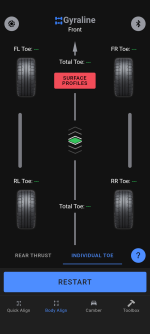
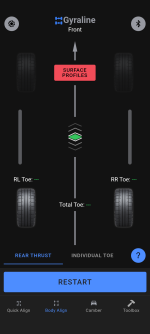


The one where I was messing around and some settings screens-


joe_padavano
Well-known member
It also can't do caster or camber, only toe. You can do toe with two plates and two tape measures. I use this kit.I'd rather buy one of these:
No calibration, runout issues or flat batteries and it'll still be working in 100 years time unlike an app which will get discontinued. The way it works means it doesn't need runout compensation which the Gyraline lacks.
I have a really old one just like it.
The only downsides are that it doesn't centre the steering wheel and it can't do low vehicles.
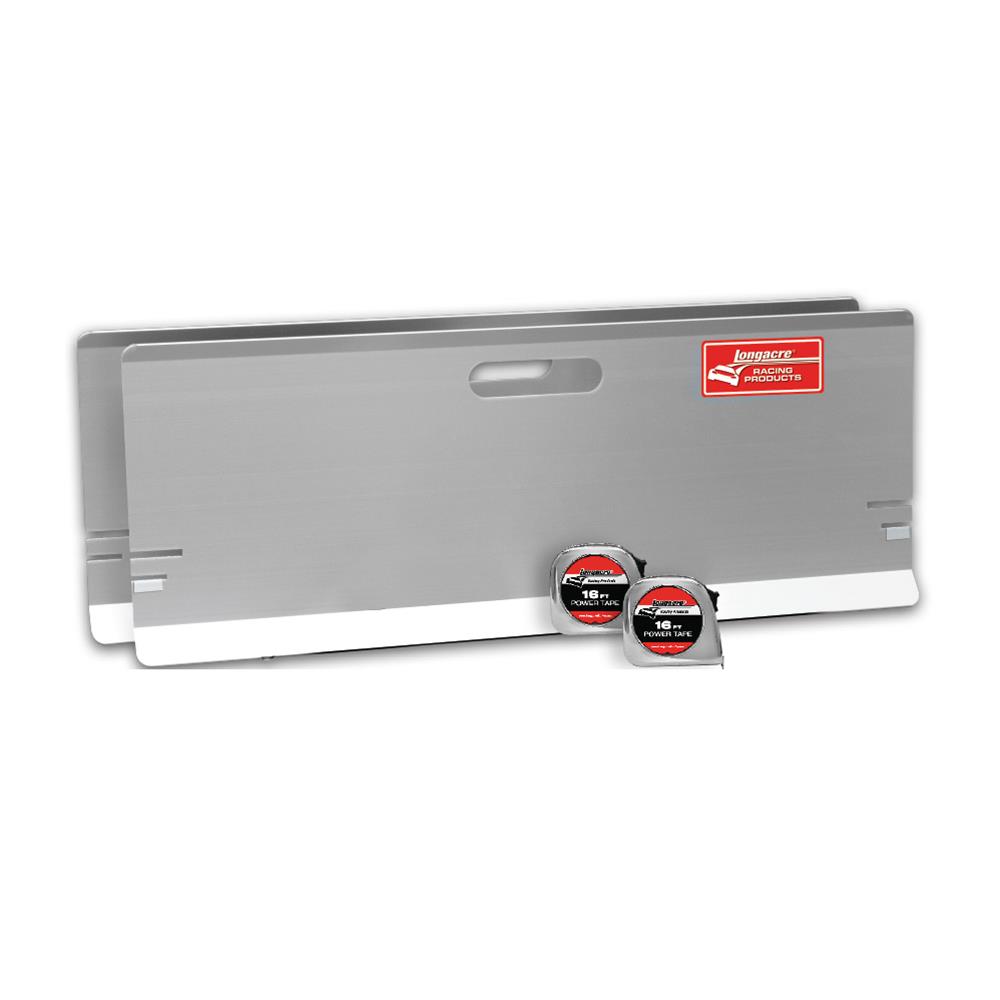
Longacre Racing Products 52-79501 Longacre Toe-In Plates | Summit Racing
Free Shipping - Longacre Toe-In Plates with qualifying orders of $125. Shop Wheel Toe-In Tools at Summit Racing.

That doesn't have runout compensation.It also can't do caster or camber, only toe. You can do toe with two plates and two tape measures. I use this kit.
Longacre Racing Products 52-79501 Longacre Toe-In Plates | Summit Racing
Free Shipping - Longacre Toe-In Plates with qualifying orders of $125. Shop Wheel Toe-In Tools at Summit Racing.www.summitracing.com
But yes it will do the same job that people are trusting the gyraline to do which is a quick alignment to get the vehicle to a proper aligner. Camber/caster are unimportant for that (not that I even think toe is).
It definitely seems to me that the gyraline is a waste of money.
Why? I can do caster, camber, toe, check for tweaked frames/axles etc with it. Its easily paid for itself five times over in the year I have had it. I don't need to take cars to an alignment shop anymore, plus I can align old cars to the specs I want, not what the computer says I should. Old alignment specs were designed around bias-ply tires, you really shouldn't use those settings on anything anymore and unless you find a really good shop they will only do what the computer tells them. And I can align the cars when I want, no taking off work and/or spending forever at the shop waiting.It definitely seems to me that the gyraline is a waste of money.
I'm just curious what makes you think its a waste. I guess if you didn't trust it and still went to a shop after using it that would kinda be a reason, but after having a shop check my setups twice and both times them saying its dead on I don't go to the shop anymore. Plus when I checked a car that had just been at a shop it came up with almost the exact same numbers as the shop printout. It wasn't designed to just get it close enough to go to a shop, it was designed to replace the shop visit. It is plenty accurate to do that, especially the new version with built in sensors that has a .01 degree or .005" accuracy.
Maybe because it doesn't check runout? I roll the vehicle back and then forward before checking, and do that again when I am done and double-check everything. Plus I pull the tires in/out to see if there is any differance in measurments. Maybe if you worked on a bunch of stuff with bent up rims it would be more of an issue, I don't know. I would think a real runout problem would point to worn or damaged parts that need replaced before doing an alignment.
I own the hardware and it doesn't need to be online to work unless you want to look up car data. I guess they could discontinue it but since I am using an Android I can't see why that would matter, I use a ton of stand alone apps that are no longer made or supported. Some are 10 years+ old. Maybe with a CrApple product that would be an issue, but they **** for that and a million other reasons so I avoid them. I like owning what I pay for and Apple seems to have a real problem with that idea.
Thanks for the run down, that really helps. What I want to do is to get the chassis squared up and setup like it needs to be. Then when I install the body I can adjust it to the chassis as needed.Keep in mind I am not an expert on alignments. I have done a crapload of car work that needed them after though, and have been really disappointed over the years with how many times I had to repeatably bring cars back that pulled or had an off center steering wheel afterwards. So I got the Gyraline setup to do it myself. Which has worked perfect the 10 or so times I've used it. I was also tired of paying $100 every time to get them done badly.
You don't need to use any body reference if you are just doing a simple alignment, only if you want to make sure your car isn't tweaked somehow or if you have done something really major to the front or rear suspension that is adjustable after. It shows all four tires compared to each other normally. Like if the front tires are correctly spaced but both pointing right or left compared to the rear when your steering wheel is centered you know you need to adjust them both the same amount/direction to center them to the steering wheel.
You would want to buy or make something to hold the steering wheel centered during your adjustments, or on a older/project car just leave/take it off and put it on centered when done.
I removed the front steering, suspension, and brakes from my 67 Cougar and replaced it all and modified some stuff so I used the app to get everything right to the car, then put the steering wheel back on centered. It tracks beautifully and has shown no sign of weird tire wear or anything. I used a body line for reference but honestly I am not sure anything on a car that old is really square. Using a referance was also good when I changed the rear leaf springs, I used it to get the axle square to the body and front tires when bolting it all back togather and used a tape measure from the frame to make sure it was centered at the same time.
If you had really clean spots on the frame rail for the two small contact points to touch and you thought the frame was square you could use that, but any undercoating or dirt is going to throw you off. We are taking about about .005 of an inch, so your frame contact points would need to be very clean and flat to do it well.
For your project its not going to show you if your axle is centered, only if its angled. So you would have to measure that separately, which I wouldn't think would be hard to do. If you were dropping the body on you could check to make sure it was square to the frame, but it would not show you if you had it to far forward or back, only if it was angled compared to everything else. As far as I know it doesn't show any distance type measurements, just measures angles.
Also you can switch between degrees, inches, or mm at anytime before, during, or after you take measurements which is great because if you tell me I need to adjust a tire by 2 degrees it aint happening, but if you say 1/8" I'm all over it. Most specs are in degrees so its great being able to go back and forth.
Not sure if that all answers your questions properly, let me know if you need something else or want me to try anything with mine. It has a handy screenshot button so I could get screenshot/s of something if you wanted.
Here are some of the different measurement screens and one where I was messing around with it at my desk. The little line with the specs on that one is the spec for the car you are measuring, it has a database where you can find and add cars, or make a custom one like I did for my Cougar becouse I am not using the stock settings-
The one where I was messing around and some settings screens-
Is the information and screens you showed for the new G2 version? Is it the same for the original version? Do you have the option that has the vehicle specifications?
joe_padavano
Well-known member
Given that most alignment shops are clueless about older cars, I do my own alignments. The toe gauges have worked fine. If runout is a concern, a dial indicator on a stable base will tell you if it's a problem. I also have a Longacre caster/camber gauge and a set of turntables.That doesn't have runout compensation.
But yes it will do the same job that people are trusting the gyraline to do which is a quick alignment to get the vehicle to a proper aligner. Camber/caster are unimportant for that (not that I even think toe is).
It definitely seems to me that the gyraline is a waste of money.
Its the newest version, it comes with the vehicle database access so you can find and add cars. I believe the app looks the same for the older model now but the accuracy is slightly less, but still plenty to get a vehicle within spec.Thanks for the run down, that really helps. What I want to do is to get the chassis squared up and setup like it needs to be. Then when I install the body I can adjust it to the chassis as needed.
Is the information and screens you showed for the new G2 version? Is it the same for the original version? Do you have the option that has the vehicle specifications?
I have another question on using it for an actual alignment verses just checking where things are at. I am guessing that you have to check your readings first, then try to make the adjustment and start over again checking the specs? Verses an alignment machine that is reading the data in live time as make the actual adjustments. Do you find that its easy enough to guess how much to move things each time?Its the newest version, it comes with the vehicle database access so you can find and add cars. I believe the app looks the same for the older model now but the accuracy is slightly less, but still plenty to get a vehicle within spec.
Its really easy because you can switch from degrees to inches. So I see how far its out in inches and then measure from the rim to a frame member to figure out what to do. It might take 2-3 tries if you overshoot, but it goes really fast. Took maybe 15 mins to adjust a car that I changed a lower control arm on recently. The toe was pretty far out, almost 1/2". I checked it, made an adjustment, checked it - went too far so I did a little bit the other way, checked again and it was done. Took three checks with the Gyraline at about 30 seconds each.I have another question on using it for an actual alignment verses just checking where things are at. I am guessing that you have to check your readings first, then try to make the adjustment and start over again checking the specs? Verses an alignment machine that is reading the data in live time as make the actual adjustments. Do you find that its easy enough to guess how much to move things each time?
I also drive around the block or at least back and forth a couple times and check it one more time, but so far I have not seen anything change enough to do another adjustment. And then go for a drive as a final check for pulling/wandering/steering centering etc. On one beater with about 400k on it I did end up adjusting the toe to the extreme inner specs because it felt kinda squirrelly, I think everything in the suspension was so shot it needed more toe in to compensate for all the play in the bushings.
Do you have / use turning plates? Does it read how many degrees you turn the wheels far left and right and then the center point to get everything centered up?Its really easy because you can switch from degrees to inches. So I see how far its out in inches and then measure from the rim to a frame member to figure out what to do. It might take 2-3 tries if you overshoot, but it goes really fast. Took maybe 15 mins to adjust a car that I changed a lower control arm on recently. The toe was pretty far out, almost 1/2". I checked it, made an adjustment, checked it - went too far so I did a little bit the other way, checked again and it was done. Took three checks with the Gyraline at about 30 seconds each.
I also drive around the block or at least back and forth a couple times and check it one more time, but so far I have not seen anything change enough to do another adjustment. And then go for a drive as a final check for pulling/wandering/steering centering etc. On one beater with about 400k on it I did end up adjusting the toe to the extreme inner specs because it felt kinda squirrelly, I think everything in the suspension was so shot it needed more toe in to compensate for all the play in the bushings.
I just got a set of used plates for a good price but have not used them yet. I have used everything from folded up trash bags to a couple of big ceramic tiles with grease between them. Folded trash bags work really well if you don't have anything else.Do you have / use turning plates? Does it read how many degrees you turn the wheels far left and right and then the center point to get everything centered up?
For toe it just measures the angle of your tires sitting still compared to the other axle and each other. It gives you a visual of where the tires are pointed compared to the rear and each other, then you need to move one or both the correct amount so they are pointing straight with the correct amount of toe. So like on the lower control arm replacement I did it showed the front left about correct, but the front right that I had worked on was pointing outward almost 1/2". Very easy to see what to move.
They recently added some better videos, the original ones they had were pretty useless. They are still kinda homemade looking, but you can see what they are doing.
I received my G2 a couple days ago.
My feedback is that its accurate, but fiddly depending on the rim style you have.
For repeatability the measuring device really needs to be at the same tilt in two planes, front and back (indicated by center diamond in the app) and the same side to side (indicated by green, yellow, red).
When measuring steel wheels on my corolla, because of the lip, you can center and constrain the measurement device exactly in the same spot every time on both sides.
The challenge is on wheels that have flat lips or curved lips. Its up to you to find the center of the wheel, and to control the tilting in two planes.
My feedback is that its accurate, but fiddly depending on the rim style you have.
For repeatability the measuring device really needs to be at the same tilt in two planes, front and back (indicated by center diamond in the app) and the same side to side (indicated by green, yellow, red).
When measuring steel wheels on my corolla, because of the lip, you can center and constrain the measurement device exactly in the same spot every time on both sides.
The challenge is on wheels that have flat lips or curved lips. Its up to you to find the center of the wheel, and to control the tilting in two planes.
I ordered the G1 last week and got the 3d printed holder part today. I was seeing how my phone would fit with or without the case and find it’s a little finicky. The top “ledge” the phone sits on seems very narrow. But the thing that seems to not work so good is the clamp. I was expecting the clamp end of the bolt to swivel, kinda like a c clamp. But the black cap is threaded on to the bolt and it fits tight into the wedge. So when I try to tighten the phone in place the bolt seems to bind and the phone doesn’t stay flat. It also doesn’t feel like it’s secure and gives me the feeling that the phone could fall out if it gets bumped. Wondering about others experience with this. Thanks
QuadBlazer_1
New member
- Joined
- Jul 5, 2026
- Messages
- 1
The G1 is on sale for $139 for the July 4th weekend. I had this on my list of "wants" at MSRP, which to me was a good deal. $139 is a steal. I will report back on accuracy and user experience, but I'm going to put it through its paces.
The G2 I don't believe is an upgrade to the G1, especially for the price. It was designed to capture the Android market. Android phones lack the consistent sensor resolution needed to make this software work as intended. Hence the very high price for the G2. Whereas with an iPhone, you've already paid the exorbitant cost for said sensors.
iPhone IMU drift is overblown. There's a kernel of truth there, but in practice, modern iPhone's are plenty accurate for this application and well within tolerances/spec of industry practices for alignment.
The G2 I don't believe is an upgrade to the G1, especially for the price. It was designed to capture the Android market. Android phones lack the consistent sensor resolution needed to make this software work as intended. Hence the very high price for the G2. Whereas with an iPhone, you've already paid the exorbitant cost for said sensors.
iPhone IMU drift is overblown. There's a kernel of truth there, but in practice, modern iPhone's are plenty accurate for this application and well within tolerances/spec of industry practices for alignment.
I got my issues worked out and have been learning how to use is. I think it’s fairly accurate. The thing is that you have to train yourself to get the holder to land on the wheel in the same place every time to be able to get good repeatability. The more you use it the better you get at it. I got it to help with getting my project truck set up and it has worked well. I feel like when I am done with it I will forget how to use it the next time I need it….
rlitman
Well-known member
I too had been on the fence for some time, but no more. This site is way too expensive...The G1 is on sale for $139 for the July 4th weekend. I had this on my list of "wants" at MSRP, which to me was a good deal. $139 is a steal...