
To avoid these ads, REGISTER NOW!

Help tuning a jointer

NBraun

Well-known member
Joined
Sep 14, 2020
Messages
158
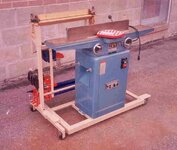
I am chasing my tail here. I have a rigid 6" jointer I'm trying to tune. Right now I believe it is putting a slight twist into the boards, so they rock corner to corner. I also believe that it is tapering the boards as well. I have gone through it trying to alleviate these issues and It is still doing it. Before I go through and start this whole process over again, I figured I'd share my measurements and get some advice. I'm sure it's user error, I just don't know where I'm going wrong.

I have a straight blade head. Using the ruler method of setting blades I have the following values for each.

Blade 1 (fence side to front of jointer)
11/32
11/32

Blade 2
10/32
10/32

Blade 3
11/32
12/32

For the beds, my process has been to lower the outfeed just below the infeed. Using a 54" machined straightedge, and using the infeed as reference for the straightedge. I then use feeler gauges to see how much space there is between the straightedge and the bed. Taking a value at each corner of the outfeed.

Those values are,

.014 back left .15 back right
.014 front left .16 front right

Obviously none of these values are exactly the same. But I wouldn't think that these values would be bad enough to be causing my issues. My test block is a piece of Fir 4.5"x4.5"x12" to avoid movement while jointing.
 
To avoid these ads, REGISTER NOW!

JohnC1957

Well-known member
Joined
Mar 19, 2022
Messages
84
I have never heard of the ruler method of setting blades. On a jointer
the cutting circle of the knives should be the outfeed table top. I use a dial indicator, zero it to the table , and set the knives to it. The protrusion of the knives from the cutterhead is from the manual or general guidelines so the knives are locked Checking for table alignment and drop is another
exercise.
 

Firebrick43

Well-known member
Joined
May 12, 2015
Messages
14,031
Location
West central Indiana
Get a surface gauge with a dial indicator with button foot or even better a Oneway Multigauge.

.002 is enough to feel rocking on your piece. Also what are you checking it against? Could that be warped, have you moved it to another flat standard and the test piece rocks in the same fashion.

I don't understand "tapering the boards as well" ?

Jointers only get you two flat sides 90 degrees from each other. The planer then sets the wide side parallel to those jointed side and controls your final dimensions in thickness. Table saw does any narrow edges. If there is taper, its not the jointers fault as it cant correct taper.
 
OP
N

NBraun

Well-known member
Joined
Sep 14, 2020
Messages
158
I have never heard of the ruler method of setting blades. On a jointer
the cutting circle of the knives should be the outfeed table top. I use a dial indicator, zero it to the table , and set the knives to it. The protrusion of the knives from the cutterhead is from the manual or general guidelines so the knives are locked Checking for table alignment and drop is another
exercise.

I've read that you don't want your knives completely even with your outfeed, but that you want them slightly above the outfeed. The ruler method is just a way to measure the blades without a dial indicator.

Get a surface gauge with a dial indicator with button foot or even better a Oneway Multigauge.

.002 is enough to feel rocking on your piece. Also what are you checking it against? Could that be warped, have you moved it to another flat standard and the test piece rocks in the same fashion.

I don't understand "tapering the boards as well" ?

Jointers only get you two flat sides 90 degrees from each other. The planer then sets the wide side parallel to those jointed side and controls your final dimensions in thickness. Table saw does any narrow edges. If there is taper, its not the jointers fault as it cant correct taper.

I do have a dial indicator with a magnetic base, but the base certainly wasn't helping anything.

I'm checking the piece against my cast iron top on the table saw.
 
Last edited:

PCustoms

Well-known member
Joined
Jul 23, 2011
Messages
22,707
Location
VT
Start with getting the blades even.

Blade 3, being crooked and high, is causing you issues.
 

Firebrick43

Well-known member
Joined
May 12, 2015
Messages
14,031
Location
West central Indiana
I've read that you don't want your knives completely even with your outfeed, but that you want them slightly above the outfeed. The ruler method is just a way to measure the blades without a dial indicator.


I do have a dial indicator with a magnetic base, but the base certainly wasn't helping anything.

I'm checking the piece against my cast iron top on the table saw.
That’s why you need a surface gauge base. They are more stable with no magnets and can be slid around on the cast iron table much easier and stable
 
To avoid these ads, REGISTER NOW!

lilredex

Well-known member
Joined
Apr 29, 2006
Messages
5,956
Location
Toronto
To adjust the out feed table all you need is a board resting on the cutter head, twist the cutter head by hand and when the board stops moving ahead, you have the table at the right height. That's always how I've adjusted mine.
 

Attachments

  • Jointer.jpg
    Jointer.jpg
    215 KB · Views: 11

jar944

Well-known member
Joined
Jul 26, 2010
Messages
5,917
Location
Northern VA
The ruler/stick method is fine I use it to double check the setup if something seems off. Generally I prefer the outfeed to be .002-.004" below the knives. It gives you a bit more time before you need to lower the outfeed due to edge dulling. Too close to 0 or anything higher than the knives on the outfeed will cut a taper.
Screenshot_20241206_091301_Gallery.jpg

Check to see if the beds are out of plane/twisted.
 

BTL-A4

Well-known member
Joined
Feb 28, 2018
Messages
1,252
Location
Santa Clarita
Regarding the tapered boards: are you jointing both faces? You only joint one face and one edge on a jointer. You then plane it to thickness and rip it to width and cross-cut it to length on a TS.

Is the wood still a bit wet? Is there moisture in the air? That might warp and twit the boards as well.

Sorry if you've checked all this, but I had to ask! :)
 
OP
N

NBraun

Well-known member
Joined
Sep 14, 2020
Messages
158
Thanks for the input guys.

I thought I had it figured out but it seems I still need to do some work. I'm using a jointer pal to set the blade heights. I followed the directions to a T and it seems my blades were all within .001. I measured with my indicator on the magnetic base though, so I'm taking that with a grain of salt. I then set my outfeed .004 below the height of the blades.

Running my test piece through after that yielded good results, but after running some longer 4/4 boards through it looks like I still might have some work to do. It appears to be putting a curve into them, taking more out of the center of the board than the ends. This very well could be user error though.

The ruler/stick method is fine I use it to double check the setup if something seems off. Generally I prefer the outfeed to be .002-.004" below the knives. It gives you a bit more time before you need to lower the outfeed due to edge dulling. Too close to 0 or anything higher than the knives on the outfeed will cut a taper.
Screenshot_20241206_091301_Gallery.jpg

Check to see if the beds are out of plane/twisted.

How do you set your beds?

Going off my earlier checking, I believe my beds to be set correctly but I could be wrong. Using the infeed as the reference bed, and checking the outfeed using feeler gauges. I read that within .002 is fine for the beds.

Those of you asking by what I meant by tapering. I ran this board through on the edge several times and you can see when you cut the otherside on the saw it's tapered. These boards are straight line ripped from the dealer, so should be pretty close to begin with.
20241208_155337.jpg

I did end up ordering a oneway multi guage. I want to go through and dial in all my tools, so it made sense. Plus i'm pretty well over this jointer nonsense.
 

bigfunwmu

Well-known member
Joined
Oct 26, 2013
Messages
407
Location
S. MN
You say you set the leading edge of your outfeed .004 below the blades. Is it straight & level compared to the infeed side? If it slopes you will get tapers. For example, the leading edge is .004 below, but 10 inches out it's .050 above and rising as you go, tapers will happen.
 

jar944

Well-known member
Joined
Jul 26, 2010
Messages
5,917
Location
Northern VA
For the beds, my process has been to lower the outfeed just below the infeed. Using a 54" machined straightedge, and using the infeed as reference for the straightedge. I then use feeler gauges to see how much space there is between the straightedge and the bed. Taking a value at each corner of the outfeed.

Those values are,

.014 back left .15 back right
.014 front left .16 front right

Obviously none of these values are exactly the same. But I wouldn't think that these values would be bad enough to be causing my issues. My test block is a piece of Fir 4.5"x4.5"x12" to avoid movement while jointing.

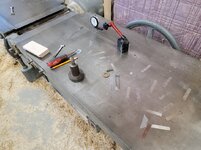
Keep the outfeed higher than the infeed (by .010" or so and set your straight edge on the outfeed. Measure the front and back of the infeed with feeler gauges.

Are you sure your straight edge is straight?
 
To avoid these ads, REGISTER NOW!
Top Bottom