To avoid these ads, REGISTER NOW!

help with moving three way switch

jpcjguy

Well-known member
Joined
Jan 6, 2014
Messages
1,473
Location
Richmond, VA
Hi all,

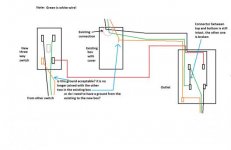
So I need to move a three way switch from the right side of a door opening to the left side. I have questions on the best way to wire it. Look at the attached pictures of the existing and new. I am concerned about the ground wire (orange) from the other switch now not being part other grounds. Can I run a single ground from the new to the existing? Or do a put a junction box in the crawl space and cap the existing green and black wires (from the other switch) in the existing three way box? This way I can have the grounds together in the the junction box to maintain what is there?

Also, the red traveler wire is stapled in the wall and goes between studs. Obviously it needs to stay in place for the black and green to connect, anyway.
Can I run a single red wire from the outlet to the new three way switch? Without any other wires? Not sure on code on this.

Any suggestions would be great!

Thanks
Joe
 

Attachments

  • existing wiring.jpg
    existing wiring.jpg
    17.8 KB · Views: 116
  • new_wiring.jpg
    new_wiring.jpg
    18.7 KB · Views: 81
To avoid these ads, REGISTER NOW!

cybrdyke

Well-known member
Joined
Sep 9, 2014
Messages
3,442
Location
USA
I honestly dont know why people still pull wire for 3-way switches anymore, especially for renovation where you have to try to break into drywall and studs.
I'm sure someone will chime in to say that regular 3-ways only cost a dollar. But unless you have zero value for your time and effort to fish wire and patch drywall, who cares?
Change one switch to a master switch and get a wireless companion switch to go with it. Then stick it on the wall wherever you want. Done.
You dont need a hub, or wifi, or bluetooth, or any of that witch craft.
http://www.cooperindustries.com/content/public/en/wiring_devices/products/lighting_controls/aspire_rf_wireless/anyplace.html
Good luck,
CD
 
OP
J

jpcjguy

Well-known member
Joined
Jan 6, 2014
Messages
1,473
Location
Richmond, VA
Thanks for the option. In my case, i can access from the crawlspace and just drill up into the wall cavity. So not too much of a pain..(famous last words)... :)
 

egdede

ALLIANCE MEMBER
Joined
Dec 20, 2009
Messages
2,063
Maybe you can unhook the existing wire, pull it down, and pull it up the other side of the door? If the switch is fed from the side you want to move it to, it should work.
 
OP
J

jpcjguy

Well-known member
Joined
Jan 6, 2014
Messages
1,473
Location
Richmond, VA
Maybe you can unhook the existing wire, pull it down, and pull it up the other side of the door? If the switch is fed from the side you want to move it to, it should work.

that is the plan - but I am concerned about the ground. In the new location it would not be "connected" to the other grounds it is currently. Not sure if that is an issue....
 

nutjob

Well-known member
Joined
May 8, 2008
Messages
804
Location
NE, PA
You dont need a hub, or wifi, or bluetooth, or any of that witch craft. Good luck,CD

But you do need a battery in the switch and sooner or later the battery will die and so does your switch. Complete failure! Why do so many people want to depend on a battery to be working for so many things to HAVE to operate?

Kevin
 

BillK

Well-known member
Joined
Aug 24, 2006
Messages
9,298
Location
Beautiful Southern Maryland
I honestly dont know why people still pull wire for 3-way switches anymore,
.
.
.
get a wireless companion switch to go with it. Then stick it on the wall wherever you want. Done.

Some of us, including myself, still prefer the reliability of wire. It pretty much works all of the time. Simple and bulletproof. You cant convince me of that with wireless of any type.
 

CJ7VFR

Well-known member
Joined
Jan 13, 2015
Messages
2,939
Location
Central New Jersey
I honestly dont know why people still pull wire for 3-way switches anymore,...
You dont need a hub, or wifi, or bluetooth, or any of that witch craft.
http://www.cooperindustries.com/content/public/en/wiring_devices/products/lighting_controls/aspire_rf_wireless/anyplace.html
Good luck,
CD

Z-wave, by your own description of wireless tech, would also fall under the "witch craft" category. Z-wave is its own form of wireless, but uses less power than wifi or Bluetooth, and has a longer range. But it is still wireless, and thus still "witch craft".

Also, if you wanted to use more than one of the switches you have posted, you would have to have a hub right? At least that is what I get from the product description.

Anything wireless is going to have its share of issues from time to time. But a simple wired pair of three sway switchs is still the best, most reliable, and cheapest way to wire a set of switches if you have easy access to the areas where the switches and lights will be.

Now, if access is an issue, and punching holes in walls and ceilings to gain access to raceways between floor joists and wall framing is not something one wants to do, then a wireless switch is a nice, simple to install option that literally anyone can do, and requires no special tools.

Jim
 
Last edited:

cybrdyke

Well-known member
Joined
Sep 9, 2014
Messages
3,442
Location
USA
Also, if you wanted to use more than one of the switches you have posted, you would have to have a hub right? At least that is what I get from the product description.

No, you dont need a hub. You can connect 5 devices. If you need more than that, then a different system would be better. But this thread is about 3-ways.
CD
 

cybrdyke

Well-known member
Joined
Sep 9, 2014
Messages
3,442
Location
USA
But you do need a battery in the switch and sooner or later the battery will die and so does your switch. Complete failure! Why do so many people want to depend on a battery to be working for so many things to HAVE to operate?

Kevin
It's a remote switch with a battery that will likely last 10 or more years. It's really not a big deal. If you just hate batteries, you can get a wireless switch with no batteries at all.

Some of us, including myself, still prefer the reliability of wire. It pretty much works all of the time. Simple and bulletproof. You cant convince me of that with wireless of any type.
I'd argue that wired switches are far from bulletproof. They fail over time, too. And when they do fail, it's not as easy to replace them as it is to change a battery.

Anything wireless is going to have its share of issues from time to time. But a simple wired pair of three sway switchs is still the best, most reliable, and cheapest way to wire a set of switches if you have easy access to the areas where the switches and lights will be.


Jim
As I stated, it's only the cheapest way if you dont value your time crawling around in the crawlspace and drilling holes in the sill plates or floor joists as the OP said he was going to, or cutting in old work boxes, or spending time on the internet trying to figure out the wiring diagram.
I'd disagree that a remote switch in a home, a few feet away from the master switch will have "issues from time to time". It's really not that complicated.

CD
 

CJ7VFR

Well-known member
Joined
Jan 13, 2015
Messages
2,939
Location
Central New Jersey
No, you dont need a hub. You can connect 5 devices. If you need more than that, then a different system would be better. But this thread is about 3-ways.
CD

In the description of the item you posted, it says: "You can use Eaton’s Home automation Hub or a compatible controller to associate each battery operated switch with up to (5) other Z-Wave load controlling devices."

Does this mean it requires a some type of hub? That is why I asked the question.

Also, I was talking about three way switches, just like the thread is about. I don't know why you suggested I am talking about something else. The OP wanted to know about ways to move it and wire it up. You suggested going wireless, I, and a few others suggested wiring it to make it more reliable.

...I'd argue that wired switches are far from bulletproof. They fail over time, too. And when they do fail, it's not as easy to replace them as it is to change a battery.

As I stated, it's only the cheapest way if you dont value your time crawling around in the crawlspace and drilling holes in the sill plates or floor joists as the OP said he was going to, or cutting in old work boxes, or spending time on the internet trying to figure out the wiring diagram.
I'd disagree that a remote switch in a home, a few feet away from the master switch will have "issues from time to time". It's really not that complicated.

CD

I like that pulling wire, and hooking up any type of actual switch, be it single pole or three way, will work every time I throw the switch, except when the power is out. I can not say the same for anything I have that is wireless, except the part when the power goes out. Wireless stuff seems to have a mind of it's own. One day it works, next day it does not, and for seemingly no reason other than a bird flew over the house.

I agree that hard wired is far from bullet proof. But hard wiring a switch to control something is much more reliable than anything wireless. Wireless has its place, as I have a ton of wireless stuff in my own home.

But, I can say that everything I have that is hard wired is 100 percent more reliable than the wireless items, even Z-wave items.

Bullet proof, no. Better and more reliable than wireless, yes. I can't think of a single example of something that is wireless that will work as reliably as something that is hard wired. Even the experts on this forum will tell you that if you want internet access in your shed/garage/out building or whatever, that you will get better and more reliable service if you go hard wired versus wireless.

As for the time it takes pulling and running wire versus just putting a wireless switch here or there, yes, I can agree that pulling and running wire will take longer. But if I have the time to do it, and access to do it, and knowledge and tools to do it, I will always do something the best more reliable way possible.

The frustration of something wireless not working, and taking the same amount of time trying to figure out why my lights won't go on, is a waste of my time versus running some wire and knowing the light will go on every time I throw the switch.

Jim
 
Last edited:

Itsjustdirt

Well-known member
Joined
May 15, 2013
Messages
531
Location
San Diego, California
I fought wifi for years until I went wired. Problem solved. I also have to reprogram my wireless Skylink TB-318 3 way switch every 6 months or so. Wires are way more reliable in my opinion, but not always worth the hassle.
 

nadogail

Well-known member
Joined
Jan 23, 2009
Messages
31,904
Location
Coronado, CA
We have a couple of wireless switches, the concept of wireless switches is likened to a pocket on a shirt, sliced bread, or beer in a can.
 

exranger06

Well-known member
Joined
Aug 9, 2015
Messages
1,686
Location
CT
Hi all,

So I need to move a three way switch from the right side of a door opening to the left side. I have questions on the best way to wire it. Look at the attached pictures of the existing and new. I am concerned about the ground wire (orange) from the other switch now not being part other grounds. Can I run a single ground from the new to the existing? Or do a put a junction box in the crawl space and cap the existing green and black wires (from the other switch) in the existing three way box? This way I can have the grounds together in the the junction box to maintain what is there?

Also, the red traveler wire is stapled in the wall and goes between studs. Obviously it needs to stay in place for the black and green to connect, anyway.
Can I run a single red wire from the outlet to the new three way switch? Without any other wires? Not sure on code on this.


Any suggestions would be great!

Thanks
Joe
What type of wire do you currently have, and what type of wire do you plan to install? Do you have individual wires in a conduit, or are you using Romex? The "red traveler wire stapled in the wall" sounds sketchy. Can you elaborate on that?
 

ard

Well-known member
Joined
Feb 16, 2015
Messages
4,391
Location
Sierra Foothills... California
I like that pulling wire, and hooking up any type of actual switch, be it single pole or three way, will work every time I throw the switch, except when the power is out. I can not say the same for anything I have that is wireless, except the part when the power goes out. Wireless stuff seems to have a mind of it's own. One day it works, next day it does not, and for seemingly no reason other than a bird flew over the house.

I agree that hard wired is far from bullet proof. But hard wiring a switch to control something is much more reliable than anything wireless. Wireless has its place, as I have a ton of wireless stuff in my own home.

But, I can say that everything I have that is hard wired is 100 percent more reliable than the wireless items, even Z-wave items.

Bullet proof, no. Better and more reliable than wireless, yes. I can't think of a single example of something that is wireless that will work as reliably as something that is hard wired. Even the experts on this forum will tell you that if you want internet access in your shed/garage/out building or whatever, that you will get better and more reliable service if you go hard wired versus wireless.

As for the time it takes pulling and running wire versus just putting a wireless switch here or there, yes, I can agree that pulling and running wire will take longer. But if I have the time to do it, and access to do it, and knowledge and tools to do it, I will always do something the best more reliable way possible.

The frustration of something wireless not working, and taking the same amount of time trying to figure out why my lights won't go on, is a waste of my time versus running some wire and knowing the light will go on every time I throw the switch.

Jim


+1000

Next house probably wont be like that, but until then I like a system that will work in 25-50 years. :)
 

shadycrew31

Well-known member
Joined
Jun 23, 2017
Messages
58
Location
Burbs of Philly
This thread is way off from the OP's main question.

I dont think he got an actual reply just a ton of debate on home automation devices.

OP: If you are just moving the switch from one side of the door to another what you are attempting to do would potentially be easier to run a new 14/3 from your outlet to the new switch bypassing any confusion of which wire goes where.
 
To avoid these ads, REGISTER NOW!
OP
J

jpcjguy

Well-known member
Joined
Jan 6, 2014
Messages
1,473
Location
Richmond, VA
This thread is way off from the OP's main question.

I dont think he got an actual reply just a ton of debate on home automation devices.

OP: If you are just moving the switch from one side of the door to another what you are attempting to do would potentially be easier to run a new 14/3 from your outlet to the new switch bypassing any confusion of which wire goes where.

Thanks shadycrew31 - the thread did go a bit sideways. :)

I agree on having a new "traveler" wire (red) from the outlet to the new switch location. But I still need to have the wire from the second switch (across the room) moved to the new location - this then makes the ground wire "all alone" as in it is not combined with the others in the current box. I guess I need to see what the ground does at the switch that is not moving and ensure that it is grounded properly. I assume that I cannot have the ground in the wire between the 2 switches just attached to the green screws on each switch - what purpose would that serve? Hopefully that is somewhat clear......
 

exranger06

Well-known member
Joined
Aug 9, 2015
Messages
1,686
Location
CT
The purpose of connecting a ground wire to a switch is to ensure the yoke (body) of the switch never becomes energized and shocks you. The screws for the cover plate screw into the yoke, so if an energized wire were to come in contact with the yoke, you could get shocked if your hand brushed against one of the cover plate screws. Switches only somewhat recently required grounds. My house was built in 1979 and all of the switches did not have a ground wire connected to them. The switches didn't even have a screw to attach one. As long as the ground wire eventually makes its way back to the breaker panel, it's fine.

Your diagrams and first post confuse me though. Please see my question in post #15. Your "new wiring" diagram has a lone red wire going from the outlet to the new switch. Is this supposed to be an individual conductor in conduit? What type of wiring are you using?
The "existing wiring" diagram doesn't make sense. You have 3 conductors coming from the "other switch" to the switch in the picture, and one of them is a ground. In order for a 3-way circuit to work, you need 3 conductors PLUS a ground, for a total of 4 conductors. I don't see how this circuit possibly works correctly as-is.
 
OP
J

jpcjguy

Well-known member
Joined
Jan 6, 2014
Messages
1,473
Location
Richmond, VA
The purpose of connecting a ground wire to a switch is to ensure the yoke (body) of the switch never becomes energized and shocks you. The screws for the cover plate screw into the yoke, so if an energized wire were to come in contact with the yoke, you could get shocked if your hand brushed against one of the cover plate screws. Switches only somewhat recently required grounds. My house was built in 1979 and all of the switches did not have a ground wire connected to them. The switches didn't even have a screw to attach one. As long as the ground wire eventually makes its way back to the breaker panel, it's fine.

Your diagrams and first post confuse me though. Please see my question in post #15. Your "new wiring" diagram has a lone red wire going from the outlet to the new switch. Is this supposed to be an individual conductor in conduit? What type of wiring are you using?
The "existing wiring" diagram doesn't make sense. You have 3 conductors coming from the "other switch" to the switch in the picture, and one of them is a ground. In order for a 3-way circuit to work, you need 3 conductors PLUS a ground, for a total of 4 conductors. I don't see how this circuit possibly works correctly as-is.

Sorry for the confusion. This is all romex - no individual wires. House is 1993. Looking at the existing wiring diagram, the wire from the outlet to the existing three way switch is a 14/3 romex. Also the "green" wire is really white - just needed to change the color for it to show up! I noted that at the top of the new wiring diagram but forgot to add it to the existing wiring diagram picture. Sorry! Does that help clarify?
 

teamextreme

Well-known member
Joined
Aug 10, 2013
Messages
867
Location
Lakewood, CO
Still not sure I'm clear on what your exact 3-way circuitry issue is, but you keep asking about a ground not being tied to others, or being all alone. All the grounds in a given box need to be tied together, regardless of where they come from or go to. If you have 4 cables entering a box, all 4 ground wires will be tied together. Even if 2 are for one circuit or purpose and 2 are for another, you wouldn't use 2 ground splices of 2 wires each, all 4 would be tied together. Hopefully this answers your question.
 

cybrdyke

Well-known member
Joined
Sep 9, 2014
Messages
3,442
Location
USA
What type of wire do you currently have, and what type of wire do you plan to install? Do you have individual wires in a conduit, or are you using Romex? The "red traveler wire stapled in the wall" sounds sketchy. Can you elaborate on that?

I agree on having a new "traveler" wire (red) from the outlet to the new switch location. But I still need to have the wire from the second switch (across the room) moved to the new location - this then makes the ground wire "all alone" as in it is not combined with the others in the current box. I guess I need to see what the ground does at the switch that is not moving and ensure that it is grounded properly. I assume that I cannot have the ground in the wire between the 2 switches just attached to the green screws on each switch - what purpose would that serve? Hopefully that is somewhat clear......

The purpose of connecting a ground wire to a switch is to ensure the yoke (body) of the switch never becomes energized and shocks you. The screws for the cover plate screw into the yoke, so if an energized wire were to come in contact with the yoke, you could get shocked if your hand brushed against one of the cover plate screws. Switches only somewhat recently required grounds. My house was built in 1979 and all of the switches did not have a ground wire connected to them. The switches didn't even have a screw to attach one. As long as the ground wire eventually makes its way back to the breaker panel, it's fine.

Your diagrams and first post confuse me though. Please see my question in post #15. Your "new wiring" diagram has a lone red wire going from the outlet to the new switch. Is this supposed to be an individual conductor in conduit? What type of wiring are you using?
The "existing wiring" diagram doesn't make sense. You have 3 conductors coming from the "other switch" to the switch in the picture, and one of them is a ground. In order for a 3-way circuit to work, you need 3 conductors PLUS a ground, for a total of 4 conductors. I don't see how this circuit possibly works correctly as-is.

Sorry for the confusion. This is all romex - no individual wires. House is 1993. Looking at the existing wiring diagram, the wire from the outlet to the existing three way switch is a 14/3 romex. Also the "green" wire is really white - just needed to change the color for it to show up! I noted that at the top of the new wiring diagram but forgot to add it to the existing wiring diagram picture. Sorry! Does that help clarify?

Still not sure I'm clear on what your exact 3-way circuitry issue is, but you keep asking about a ground not being tied to others, or being all alone. All the grounds in a given box need to be tied together, regardless of where they come from or go to. If you have 4 cables entering a box, all 4 ground wires will be tied together. Even if 2 are for one circuit or purpose and 2 are for another, you wouldn't use 2 ground splices of 2 wires each, all 4 would be tied together. Hopefully this answers your question.

Or......you could just change the existing switch to a master switch and make the new switch wireless...

Just sayin'.....:evil:
CD
 

exranger06

Well-known member
Joined
Aug 9, 2015
Messages
1,686
Location
CT
Sorry for the confusion. This is all romex - no individual wires. House is 1993. Looking at the existing wiring diagram, the wire from the outlet to the existing three way switch is a 14/3 romex. Also the "green" wire is really white - just needed to change the color for it to show up! I noted that at the top of the new wiring diagram but forgot to add it to the existing wiring diagram picture. Sorry! Does that help clarify?

I wasn't talking about that wire. I was talking about the wire that comes up in the center and says "from other switch" into the "existing three way switch." There should be one more conductor there.

All Romex will have a ground wire in it. So in the "new wiring" diagram, there should be a ground wire running parallel to the red wire. You connect the ground wire to all the other ground wires in each box. So in the end, all of the ground wires WILL be connected to each other.
 
OP
J

jpcjguy

Well-known member
Joined
Jan 6, 2014
Messages
1,473
Location
Richmond, VA
I wasn't talking about that wire. I was talking about the wire that comes up in the center and says "from other switch" into the "existing three way switch." There should be one more conductor there.

All Romex will have a ground wire in it. So in the "new wiring" diagram, there should be a ground wire running parallel to the red wire. You connect the ground wire to all the other ground wires in each box. So in the end, all of the ground wires WILL be connected to each other.

exranger06 - that is exactly how it is wired - hence my confusion.

so i added the other switch wiring to the image. Attached to this post. Now it is clear that that other switch is the "main" since it has the always hot connection. this determines whether the white (green) or black wire is hot to the switch that I am moving. That allows for the red traveler to "power" the outlet or not. Wow. Interesting wiring.
So in the other switch all the grounds are connected but nothing on the switch itself. I guess I can then not worry about the ground in the 'to be moved' switch and when I pull that wire and push it to the new box just attach it to the actual switch - since that ground does tie into others in the "main" switch. Please correct me if I am wrong!

As for the red traveler wire, I cannot move that wire as it is between studs. So really all I need is a new single "red" wire from the new switch back to the outlet. The existing wire will just be capped off in the outlet box and in the "to be moved" box. This new red wire will go down into the crawlspace and then back up to the new outlet. What kind of wire can I run? seems silly to run a new 4/3 romex for one wire? will I need conduit under the house?
 

Attachments

  • existing wiring_updated.jpg
    existing wiring_updated.jpg
    40.9 KB · Views: 24
OP
J

jpcjguy

Well-known member
Joined
Jan 6, 2014
Messages
1,473
Location
Richmond, VA
So I ended up running a single traveler wire from outlet to new switch location. Everything works fine.
 

exranger06

Well-known member
Joined
Aug 9, 2015
Messages
1,686
Location
CT
:shocking: yeah, that's not code compliant. :headshake You need to use wire that's specifically for residential wiring. There are a few different kinds, NM/B (aka Romex) is the most common. You can run individual wires (as long as they're THWN type) but the wires must be in conduit the whole way, the conduit must be properly installed ad supported, etc. It might be time for you to call an electrician to do this properly.
 
OP
J

jpcjguy

Well-known member
Joined
Jan 6, 2014
Messages
1,473
Location
Richmond, VA
Ok - I will swap it out for some romex and just use 1 wire then as the traveler. I assume that wrapping the single wire in red electrical tape (just in the box) to designate it as the traveler is sufficient?

Since the fence wire is otherwise known as tracer wire and it also is approved up to 600 volts and performs well up to 90 degrees Celsius and can withstand up to 75 degrees Celsius in wet conditions because of its polyethylene coating, could I have used it inside of conduit? Can someone please explain the nuances of the differences? I want to learn. Thanks.
 
Last edited:
OP
J

jpcjguy

Well-known member
Joined
Jan 6, 2014
Messages
1,473
Location
Richmond, VA
Why not just swap out with 12-3?

Because I only need 1 wire from the outlet to the new switch location. The original 14/3 from the outlet to the switch is still there because the original house wiring used the switch box as junction box - the white and black connect to another set of wires that go somewhere!
 

egdede

ALLIANCE MEMBER
Joined
Dec 20, 2009
Messages
2,063
Ok - I will swap it out for some romex and just use 1 wire then as the traveler. I assume that wrapping the single wire in red electrical tape (just in the box) to designate it as the traveler is sufficient?


I guess I'm not understanding the big picture. Seemed like you wanted to swap in 12-2 romex and a single wire. So I suggested 12-3 romex
 
To avoid these ads, REGISTER NOW!
Top Bottom