I’m just getting started with Sketchup. If I’m creating a simple rectangular part that is symmetrical is it better to place the lower left corner of the part at the origin so that the entire drawing is in the first quadrant or place the center of the part at the origin so the drawing ends up being in all 4 quadrants? I’m thinking ahead in terms of what will be easiest to modify.

You are using an out of date browser. It may not display this or other websites correctly.
You should upgrade or use an alternative browser.
You should upgrade or use an alternative browser.
Help with Sketchup
- Thread starter LG63
- Start date
Rusty Musket
Well-known member
I am not sure it will matter. The only thing I consider before drawing is what face I want to see when you click on the "front" elevation tab. You can easily move or rotate your entire drawing at any time and reposition it relative to the origin if you need to. If you want to use the origin as a fixed measurement point then I would say align it with the left side of your drawing so you are measuring everything with the numerical value ascending left to right (0,1,2,3....units as opposed to 3,2,1,0 units).
NineFingerFury
Well-known member
Any videos out there in how to use it for just making basic plans like property layout?
zuk123
Well-known member
I'm with Rusty, it really doesn't matter. sketchup is different from other CAD programs. You don't spend any time typing in the console, or referencing points. It uses 'inference' to decide what you are trying to do. When it works it's magic, when it doesn't, you'll want to smash things.
I'm no expert by any means, but I find the "best/fastest/easiest" approach is to just start adding primitive shapes, and then modifying them with the push/pull tool. For complex shapes, build shapes from primitives and intersect them.
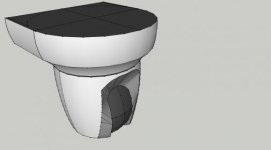
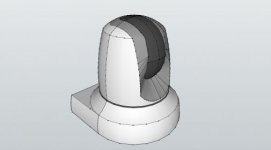
Here's a very complex shape I did quickly with no reference other than a pdf line drawing I stole online... there are minor problems with the model (some things intersected due to improper positioning, and they make the top surface not quite right.) I tried to attach the model, but the forum won't let me.
The more you work with it, the more you will understand the philosophy behind it and the style of working that is best.
Zuk
Oh, one other thing-- before drawing any model or part, search the 3d warehouse. You'd be amazed what people have already done and it will save a ton of work.
I'm no expert by any means, but I find the "best/fastest/easiest" approach is to just start adding primitive shapes, and then modifying them with the push/pull tool. For complex shapes, build shapes from primitives and intersect them.
Here's a very complex shape I did quickly with no reference other than a pdf line drawing I stole online... there are minor problems with the model (some things intersected due to improper positioning, and they make the top surface not quite right.) I tried to attach the model, but the forum won't let me.
The more you work with it, the more you will understand the philosophy behind it and the style of working that is best.
Zuk
Oh, one other thing-- before drawing any model or part, search the 3d warehouse. You'd be amazed what people have already done and it will save a ton of work.
Attachments
zuk123
Well-known member
Nine Finger,
There are some videos in the tutorial sections. Download and install it, then click on help. Or search using google- which will find a bunch.
That said, sketchup is mainly designed for 3d models, and is not so good for simple 2d ground plans (it's overkill). Once you build your model though, it's easy to get the 2d view. for a garage, I'd build it in 3d, then just print a view that is 2d. It will actually be quicker that way.
A simple garage, without roof or contents, should take about a half hour even if you've never used it before. Just watch the intro videos.
zuk
There are some videos in the tutorial sections. Download and install it, then click on help. Or search using google- which will find a bunch.
That said, sketchup is mainly designed for 3d models, and is not so good for simple 2d ground plans (it's overkill). Once you build your model though, it's easy to get the 2d view. for a garage, I'd build it in 3d, then just print a view that is 2d. It will actually be quicker that way.
A simple garage, without roof or contents, should take about a half hour even if you've never used it before. Just watch the intro videos.
zuk
NineFingerFury
Well-known member
Sounds like fun
That said, sketchup is mainly designed for 3d models, and is not so good for simple 2d ground plans (it's overkill).
zuk
Since I don't have much time invested I might consider going a different route if there is something with a quicker learning curve for 2D. I will be using it as a layout tool to determine angles and dimensions for simple jigs and fixtures. Any suggestions? Doesn't have to be free, I have no problem paying for the best tool for the job.
theoldwizard1
Well-known member
I don't think t will matter in the lon run.I’m thinking ahead in terms of what will be easiest to modify.
It IS difficult to ALWAYS think in 3D ! (Walls and roofs have to have "thickness".)
Last edited:
Cryptic1911
Well-known member
omg, sketchup is the most frustrating piece of software I've used.. I'm just not compatible with it or something, because I ALWAYS fight with it. I try to design something simple, and it's got a mind of its own
mmm i find sketchup a super easy and quick 2and3D drawing program, did my house and garage in 3D with it and now designing the terras. Try and begin with simple shapes. once you get the hang its a simple use of a couple of tools in the program
theoldwizard1
Well-known member
You have to THINK in 3D ALL OF THE TIME !omg, sketchup is the most frustrating piece of software I've used.. I'm just not compatible with it or something, because I ALWAYS fight with it. I try to design something simple, and it's got a mind of its own
I played with SketchUp for awhile. You just have get used to the concept.
I would love to take a class because some of the things I wanted to do were beyond my capability. Like sticking a dormer through a roof and being able to lok at it from the outside as well as inside in relation to the floor and ceiling !
zuk123
Well-known member
Since I don't have much time invested I might consider going a different route if there is something with a quicker learning curve for 2D. I will be using it as a layout tool to determine angles and dimensions for simple jigs and fixtures. Any suggestions? Doesn't have to be free, I have no problem paying for the best tool for the job.
I find angles and getting the relationship right between faces and features difficult in sketchup.
There are several other GJ threads about cad and 3d software.
Draftsight is a full feature, Autocad level program from Dessault systems. It is entirely free for personal use. I think it is just as hard to use as Autocad too

LibreCAD (free) and DeltaCAD always get votes too. DeltaCAD has been around forever and is fairly straightforward.
If you are working with solids, autodesk has some free choices too. Check out http://www.123dapp.com/
I don't think there is any reason to pay for design software unless you are using it professionally, and even then... if it doesn't violate the license, why pay more?
For years I paid to keep TurboCad current, but not anymore...
Honestly, the fewer features, the quicker you will be working in it. When you find things your free software just won't do, then upgrade to paid.
Depending on how involved the drawings are, Visio from Microsoft might be a good choice too. I use it all the time for floorplans and layouts. It's really easy. (But paid. I think you can get a trial online from MS.)
There are tons of online diagramming tools too. Just google 'visio online' and you'll get a ton of hits.
If that didn't help, ask again and I'll try some more
zuk
zuk123
Well-known member
omg, sketchup is the most frustrating piece of software I've used..
I thought that too the first time I tried to do something specific with it. I started drawing with a parallel and drafting table, then learned (a little) autocad running on DOS...
Once you understand the philosophy behind sketchup, and stop trying to use it like other CAD programs, it gets a LOT easier. The tutorials are a must if you have ANY other CAD experience. It is simply a totally different way of doing things.
zuk
I find angles and getting the relationship right between faces and features difficult in sketchup.
If that didn't help, ask again and I'll try some more
zuk
Thanks that did help. I usually follow the masses on these type things which is why I started with Sketchup. This is the one program that kept coming up as I searched different DIY forums. Beyond Sketchup there doesn’t seem to be any consensus on the next best program for low end users like myself. I’m surprised as long as CAD’s been around that there hasn’t been more convergence in the entry level programs.
One of the reasons I’d like a quick learning curve is because I may go months between uses and as I age the “use it or lose it” thing has really kicked in. I don’t want to have to relearn a bunch of commands every 6 months.
Right now I’m laying out a mounting plate for a compressor skid that I’d like to build. A couple months ago I was building a closing mechanism for a gate. Fairly simple stuff.
zuk123
Well-known member
^^ that is the kind of stuff I still sketch on paper.
Unless I have to communicate it to someone else, or there are tricky fit issues...
zuk
(or that I layout full size on luan.)
Unless I have to communicate it to someone else, or there are tricky fit issues...
zuk
(or that I layout full size on luan.)
^^ that is the kind of stuff I still sketch on paper.
I may end up back on quadrille pad but I really like the idea being able to play the "what if" games once the basic layout is on the computer.
I’m just getting started with Sketchup. If I’m creating a simple rectangular part that is symmetrical is it better to place the lower left corner of the part at the origin so that the entire drawing is in the first quadrant or place the center of the part at the origin so the drawing ends up being in all 4 quadrants? I’m thinking ahead in terms of what will be easiest to modify.
For me personally, I put the entire build in a single quadrant. That way, the axes guides aren't constantly crossing my field of view or protruding from my model. I can think of a few times it may be useful but that just isn't how I do it. Besides, it's a breeze to just move your axes if need be. Got to the Tools drop-down, click on Axes and place it where you want it.
ODIS
Well-known member
SU has been a great go to tool for my projects. I like it and while learning the process of using SU, hated it. Why, because, it was not intuitive for me to use. Plenty of on-line tutorials and purchased a reference book via Amazon: Sketch Up For Dummies.
Also, Fine Wood Working offers several tutorials that can be downloaded and some of these are free and others are fee based. Some of the tutorials have been very helpful while others were a little frustrating only because I did not have the knowledge base to work from yet. SU, like any other modeling program, requires some home work and requires practice to get better at drawing what you want to see be it 3d or just line form.
Have not drawn anything in the last couple of months and hope to refresh these skills again soon.
Take the time to learn and practice this program and once you understand the basics, learn more of the advanced functions, you will be surprised at what can be accomplished.
Example:


Also, Fine Wood Working offers several tutorials that can be downloaded and some of these are free and others are fee based. Some of the tutorials have been very helpful while others were a little frustrating only because I did not have the knowledge base to work from yet. SU, like any other modeling program, requires some home work and requires practice to get better at drawing what you want to see be it 3d or just line form.
Have not drawn anything in the last couple of months and hope to refresh these skills again soon.
Take the time to learn and practice this program and once you understand the basics, learn more of the advanced functions, you will be surprised at what can be accomplished.
Example: