To avoid these ads, REGISTER NOW!

How do I stop losing stuff to lightning storms?

reader2580

Well-known member
Joined
Dec 31, 2014
Messages
14,516
Location
Minneapolis, MN
I have now lost electrical items in three separate lightning storms over three years. After the first storm I installed a Siemens Boltshield whole house surge protector, Surgestop power strip for TV and related items, and Zerosurge power strip for Internet/networking items. I lost ALL of my network/Internet stuff in the storm last night. I am using the hot spot on my phone right now.

How do I stop losing electronics to storms? I have lost thousands of dollars in electronics so far. I replaced my entire service entrance in fall 2020 including two new ground rods. (It was inspected.) Do I need to go out and dig up the ground rods to make sure everything is still connected?

Equipment lost:
Pioneer 50" plasma TV (About $3,000 to get an equivalent TV)
TWO Tivo DVRs (Not replaceable as Comcast won't activate cable cards anymore)
Home theater receiver
Unifi POE switch (I have a Cisco switch I was going to replace with.)
Cable modem (I own mine, but I was just about to replace so I had a new one.)
Edgerouter X router

I don't know if I can get a new router today so I might have to get up at 3:30 am to drive 30 miles to the office for a 5 am cutover. I was going to do it from home. My hot spot is not good enough for this. There is a Microcenter 30 miles away, but not sure I want another Edgerouter X.
 
To avoid these ads, REGISTER NOW!

rdoty

ALLIANCE MEMBER
Joined
Feb 7, 2018
Messages
637
Location
Massachusetts
We have all of our expensive and/or critical electrical devices on UPS. I like the SmartUPS line - power conditioning, undervoltage and overvoltage compensation, and clean power output. They are expensive new, but you can find refurbished units with new batteries for a reasonable price.

Liebert is another company that tends to be good.

We haven't had any problems since we went this route. Of course we also haven't had any nearby lightning strikes since we installed them... But they have been great for power outages. We can ride through short outages, under 5 minutes, with no problems. We also have enough time to get the generator hooked up for a longer outage.

You also need to look out for network and telephone wiring - these can be major paths for lightning. We have Fiber to the home for network and phone which eliminates this path for lightning. But then we have a lot of network and phone cables inside the house which would be an issue for a close strike...
 

larry4406

Well-known member
Joined
Jan 27, 2006
Messages
19,062
Location
Northern Virginia
ugh...

Is your incoming cable service (and TV antenna if you have one) properly grounded at the utility ground bar near the meter?

Couple years back, we had a bad lightning storm at my house. Fried my desktop PC and the HDMI ports of our TV. Found that the incoming Comcast feed was grounded to a separate ground rod driven into the earth near where the cable entered the house. Entered 40+ feet from where the meter and panel is (ground rods not accessible). Comcast ground not the same as house ground.

In the basement I discovered a copper ground wire home run to the panel which grounded the copper water service. I used a split bolt and connected the Comcast ground to this ground wire and disconnected the local ground rod.

Knock on wood and no recurrence.
 
OP
R

reader2580

Well-known member
Joined
Dec 31, 2014
Messages
14,516
Location
Minneapolis, MN
No, my Comcast coax is not properly grounded due to being lazy I guess. I added the required grounding point when I redid the service, but the grounding wire to the Comcast connector was 10 AWG, and doesn't fit in the grounding point. I need to go to Home Depot and get a short piece of 12 AWG green THHN. I also have a gas tube surge protector somewhere that needs to go on the coax line.

The install of the coax surge protector is probably a half day project as it isn't really designed to go outside. That is why I haven't done it. At this point I have no idea what happened to the thing. I'll probably have to order another one.
 
OP
R

reader2580

Well-known member
Joined
Dec 31, 2014
Messages
14,516
Location
Minneapolis, MN
The strange thing is only the Ethernet port is dead on the cable modem. I have no idea how a surge into the coax port would have killed only the Ethernet port. Comcast was still reporting the modem as being online through the Xfinity app on my phone, and all the status lights were correct. I just couldn't get a link light on the Ethernet port no matter what device or cable I tried.

I actually have a Vertiv Liebert rackmount UPS I need to get mounted in my new cabinet for my network equipment. I was going to get a quality rack mount surge protector, but I found this UPS open box cheap. It seems to work fine.
 
Last edited:

CJM8515

Well-known member
Joined
Mar 8, 2014
Messages
9,292
Location
NJ
cable line needs to be properly grounded, you also need a surge protector where you can put the cable line in and out of to protect yourself.

had this happen 25 years ago when i lived with my parents. we figured it was an emp and it also struck the cable lines. as any tv or computer was fried. the oven control board, hvac controls, phones, etc. we got a surge protector and also protected the cable lines and never had another issue
 
OP
R

reader2580

Well-known member
Joined
Dec 31, 2014
Messages
14,516
Location
Minneapolis, MN
cable line needs to be properly grounded, you also need a surge protector where you can put the cable line in and out of to protect yourself.

had this happen 25 years ago when i lived with my parents. we figured it was an emp and it also struck the cable lines. as any tv or computer was fried. the oven control board, hvac controls, phones, etc. we got a surge protector and also protected the cable lines and never had another issue
I have a gas tube coax surge protector I bought after the first storm, but never installed it. The problem is I have no idea what happened to it in the past two years. I never installed it as it is at least a half day project to install it. It needs to be protected from the weather, but also needs a direct ground connection so it really needs to go outside in a weatherproof box.

I am going to see if I can find it and get it installed today. I have way better things I was going to do with my time today like do my yardwork, but I need Internet for working remotely.
 
OP
R

reader2580

Well-known member
Joined
Dec 31, 2014
Messages
14,516
Location
Minneapolis, MN
I'm thinking I should switch to Verizon Home Internet to get rid of the coax line into my house altogether. That eliminates one source of electrical surges. I'll have to see if I can get an appointment today at the local Verizon store. (They are so busy you must have an appointment.)
 

Innovate1

Well-known member
Joined
Jul 28, 2014
Messages
4,281
Location
Illinois near St. Louis, Missouri
Definitely need to have a common ground on things as others have noted. Lots of older installs just drove a small ground rod for TV, satellite dish, etc and that's just asking for trouble. Beyond that whole house surge protector in main panel, protectors for cable, etc. That should take care of all but very close hits which may not be feasible to protect against and are pretty unlikely for most sites.
 

Stuart in MN

Well-known member
Joined
Sep 8, 2005
Messages
23,017
Location
Minneapolis
Ugh, that's too bad. The power blinked off for about 5 seconds at my house but that was it, fortunately no damage. I heard on the news that I think 50,000 Xcel Energy customers were without power.
 
OP
R

reader2580

Well-known member
Joined
Dec 31, 2014
Messages
14,516
Location
Minneapolis, MN
I don't think the power went out. I would have noticed it with my CPAP most likely. As I mentioned in my original post I have a Siemens Boltshield whole house surge protector in my panel, and a ZeroSurge protector that all of the network gear was plugged into.

I do not have surge protection on my coax. I spent about two hours today trying to find the coax surge protector I bought, but I have not found it yet. I did get my basement into better shape while looking for the surge protector.
 

niget2002

Well-known member
Joined
Oct 2, 2012
Messages
11,121
Location
Josephine, TX
My sister just lost all the electronic devices in their house while they were on vacation. Everything plugged in on the first floor was fried including their ac unit. I couldn't imagine having to replace all that their insurance is covering it, but they still have to pay their deductible.
 

rdoty

ALLIANCE MEMBER
Joined
Feb 7, 2018
Messages
637
Location
Massachusetts
I'm thinking I should switch to Verizon Home Internet to get rid of the coax line into my house altogether. That eliminates one source of electrical surges. I'll have to see if I can get an appointment today at the local Verizon store. (They are so busy you must have an appointment.)
If you go to FIOS for Internet, phone, and cable you will eliminate copper coming into your house. The fiber will completely isolate you from lightning coming into the house from outside. Of course if a lightning strike is close enough it can still hit the wiring inside the house...

A whole house surge protector is a good idea. Putting critical equipment on a UPS provides an additional layer of protection. Higher end units like APC SmartUPS that provide power conditioning as well as uninterruptable power provide a higher level of isolation and protection than a standard UPS does. It would take a serious lightning hit to make it through a power conditioning UPS.
 

lmg

Well-known member
Joined
Mar 17, 2023
Messages
96
Current (no pun) Siemens Boltshield units have warranty up to 10 years and $10,000 depending on the model.
 
OP
R

reader2580

Well-known member
Joined
Dec 31, 2014
Messages
14,516
Location
Minneapolis, MN
I don't have a fiber Internet option, or I would probably be using it already.

I was able to borrow a spare router from work to get up and running. I already had a new cable modem and new switch for a planned upgrade. Comcast was sending me email that I needed to upgrade my modem. I grounded the coax with some #10 AWG THHN to the main grounding system for the house. I had added a grounding block when I replace the outside service.
 

mike93lx

ALLIANCE MEMBER
Joined
Dec 9, 2013
Messages
37,407
Location
Richmond, VA
I have fiber, but also zero devices connected via coax or ethernet, besides my wifi router. Wifi can easily support nearly all use cases.

For surge, I have multiple whole house units in each panel, plus devices on each hvac unit.

Knock on wood, no problems yet
 

wyliesdiesels

Well-known member
Joined
Aug 14, 2012
Messages
19,994
Location
Modesto, CA
No, my Comcast coax is not properly grounded due to being lazy I guess. I added the required grounding point when I redid the service, but the grounding wire to the Comcast connector was 10 AWG, and doesn't fit in the grounding point. I need to go to Home Depot and get a short piece of 12 AWG green THHN. I also have a gas tube surge protector somewhere that needs to go on the coax line.

The install of the coax surge protector is probably a half day project as it isn't really designed to go outside. That is why I haven't done it. At this point I have no idea what happened to the thing. I'll probably have to order another one.
this is most likely why you took a hit....

lightning is looking for pathways to earth and if everything is at the same potential, lightning will take a different pathway....

I have my coax protected with a gas discharge tube along with bonding to GEC as well as UPS protecting everything...
 

wyliesdiesels

Well-known member
Joined
Aug 14, 2012
Messages
19,994
Location
Modesto, CA
Found that the incoming Comcast feed was grounded to a separate ground rod driven into the earth near where the cable entered the house. Entered 40+ feet from where the meter and panel is (ground rods not accessible). Comcast ground not the same as house ground.
an isolated ground rod is the worst thing you can have in terms of surges and strikes
 
OP
R

reader2580

Well-known member
Joined
Dec 31, 2014
Messages
14,516
Location
Minneapolis, MN
I'll have to buy another coax gas tube surge protector if I can't find the one I already bought. Morgan Systems is closed this week so I can't order a replacement until next week. I spent a couple of hours looking for the surge protector yesterday, and I still have some other places to check.
 

DGersic

Well-known member
Joined
Mar 12, 2017
Messages
6,276
Location
DeKalb, IL
The strange thing is only the Ethernet port is dead on the cable modem. I have no idea how a surge into the coax port would have killed only the Ethernet port.

Ive had ports die from nearby lightning. Not even a full strike. My theory is that the wire in the cable acts as an inductor and kills the port.
 
To avoid these ads, REGISTER NOW!

wyliesdiesels

Well-known member
Joined
Aug 14, 2012
Messages
19,994
Location
Modesto, CA
I'll have to buy another coax gas tube surge protector if I can't find the one I already bought. Morgan Systems is closed this week so I can't order a replacement until next week. I spent a couple of hours looking for the surge protector yesterday, and I still have some other places to check.
i bought mine on amazon


heres the spec sheet for it


AA/FC

Well-known member
Joined
Dec 9, 2010
Messages
2,080
I'm in the southern TC metro area..... My lights blinked 2 or 3 times the other night when the big storms came through but luckily we never lost power. I do have a generator that I can use for full house backup but it's NOT a true "backup generator" with automatic transfer switch. I have to manually do everything. Not a big deal but it's ***** to do in the dark when it's raining. lol. I need to check my coax cable coming into my house (overhead) from Comcast/Xfinity. I have never lost any electronics to lightning but now that I think about it, I don't believe my coax is properly grounded at the entrance. I need to do that soon. The gas discharge tube that wyliesdiesels posted should work great for my application.

 
OP
R

reader2580

Well-known member
Joined
Dec 31, 2014
Messages
14,516
Location
Minneapolis, MN
Would it be okay to mount the coax surge protector inside the house? I would need to run about 20 feet of wire to reach the main grounding point outside the house. Would this be too long a ground wire with 10 AWG?

I am also worried about adding another junction to my coax line by moving it inside. If it is outside it replaces the coupler that is already there.
 

Innovate1

Well-known member
Joined
Jul 28, 2014
Messages
4,281
Location
Illinois near St. Louis, Missouri
Would it be okay to mount the coax surge protector inside the house? I would need to run about 20 feet of wire to reach the main grounding point outside the house. Would this be too long a ground wire with 10 AWG?

I am also worried about adding another junction to my coax line by moving it inside. If it is outside it replaces the coupler that is already there.
Shorter is better. At the speed of lightening surge 20 ft is a big deal. Larger wire or braid is better but doesn't make up for long run. If you can make it significantly shorter I would do that. Sounds like that would be outside.
 
OP
R

reader2580

Well-known member
Joined
Dec 31, 2014
Messages
14,516
Location
Minneapolis, MN
I really, really wish it didn’t have to be outside, but it is what it is. I am going to have to see if anyone makes a double gang PVC box that is deeper than 2”. Carlon makes them, but only in single gang.

I don’t really want to use a junction box if I can help it. For one, I have no idea how to connect anything to a junction box in a watertight way. Second, they look pretty ugly.
 

wyliesdiesels

Well-known member
Joined
Aug 14, 2012
Messages
19,994
Location
Modesto, CA
Would it be okay to mount the coax surge protector inside the house? I would need to run about 20 feet of wire to reach the main grounding point outside the house. Would this be too long a ground wire with 10 AWG?

I am also worried about adding another junction to my coax line by moving it inside. If it is outside it replaces the coupler that is already there.
it should go outside just before where the coax enters the house. you dont want the surges travelling inside the house. Typically it replaces the existing grounding block you already have in your DEMARC can. There should already be a ground wire going to that
 

Innovate1

Well-known member
Joined
Jul 28, 2014
Messages
4,281
Location
Illinois near St. Louis, Missouri
Where is the existing bonding point where the ground attaches to the coax? Seems like a simple thing to replace that with the surge protector. If they have sealed connectors it should be ok. My Spectrum internet/TV coax is in a box on the side of my house - not totally water tight but helps shed the rain. Some pics would help understand your installation.
Looks like wyliesdiesels and I were typing the same thing and the same time...
 

wyliesdiesels

Well-known member
Joined
Aug 14, 2012
Messages
19,994
Location
Modesto, CA
I really, really wish it didn’t have to be outside, but it is what it is. I am going to have to see if anyone makes a double gang PVC box that is deeper than 2”. Carlon makes them, but only in single gang.

I don’t really want to use a junction box if I can help it. For one, I have no idea how to connect anything to a junction box in a watertight way. Second, they look pretty ugly.
Who is your cable company? Comcast houses their ground blocks and splitters in gray plastic DEMARC cans that are 10x10x3. Does your service not terminate in a can?
 
OP
R

reader2580

Well-known member
Joined
Dec 31, 2014
Messages
14,516
Location
Minneapolis, MN
Who is your cable company? Comcast houses their ground blocks and splitters in gray plastic DEMARC cans that are 10x10x3. Does your service not terminate in a can?
Comcast. No can/enclosure. Coax comes out of the ground, connects to a coupler with ground connection, and then my coax comes out of the house and attaches to the coupler. Orange line in the picture next to the gas.

It has been exposed to the weather for over a decade.IMG_0203.jpeg
 

wyliesdiesels

Well-known member
Joined
Aug 14, 2012
Messages
19,994
Location
Modesto, CA
umm wow

right next to the copper gas line, which IMHO is no bueno. we only use iron pipe here...

you do realize the bond wire for your coax isnt connected to anything? thats why youre having issues.

I would move that gas line....

I would call comcast out and have them give you a demarc can and fix the ground wire
 

mike93lx

ALLIANCE MEMBER
Joined
Dec 9, 2013
Messages
37,407
Location
Richmond, VA
umm wow

right next to the copper gas line, which IMHO is no bueno. we only use iron pipe here...

you do realize the bond wire for your coax isnt connected to anything? thats why youre having issues.

I would move that gas line....

I would call comcast out and have them give you a demarc can and fix the ground wire
Don't be a technophobe... Its Bluetooth grounding!
 

larry4406

Well-known member
Joined
Jan 27, 2006
Messages
19,062
Location
Northern Virginia
umm wow

right next to the copper gas line, which IMHO is no bueno. we only use iron pipe here...

you do realize the bond wire for your coax isnt connected to anything? thats why youre having issues.

I would move that gas line....

I would call comcast out and have them give you a demarc can and fix the ground wire
Interesting OP has no ground at all for Comcast. I would agree its the source of the problem.

I am assuming that no ground is worse than the separate independent ground that I originally had?

His 200A disconnect is right there nearby. That is considered the main panel right? So from the disconnect he should be able to connect a ground for Comcast and confirm his ground connection to the house UFER/pair of driven ground rods.
 
OP
R

reader2580

Well-known member
Joined
Dec 31, 2014
Messages
14,516
Location
Minneapolis, MN
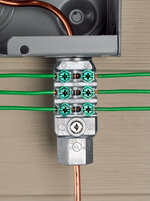
That is an old picture from my phone. I installed a 10 AWG grounding wire a few days ago.

I would move the coax long before I would move the gas line. Copper is commonly used for natural gas in Minnesota. Copper is okay to use for natural gas when the sulfur content is low. It would cost $500 to $1,000 to move that gas line, and a bunch of hassle trying to find a contractor to do the work.

There is a Southwire grounding bridge installed below the emergency disconnect switch.MEIBB application.jpg
 
OP
R

reader2580

Well-known member
Joined
Dec 31, 2014
Messages
14,516
Location
Minneapolis, MN
Is there really a need to move the coax away from the gas pipe? I will do it if need be, but is there really enough electrical current in coax to worry about?

I have very limited space for my gas meter and electric meter due to an egress window immediately to the left of the gas meter, and the kitchen window above. The house didn’t have gas when I bought it, and that is where the utility put the gas meter when it was installed in 2014.
 

Fav Onefour

Well-known member
Joined
Jul 14, 2022
Messages
695
Location
MN cold and hot
I see the bonding bridge. Is the ground buried inside the conduit? I don't see any ground connection.

The cable guys often attach their ground to the nearest point with some sort of clamp connector. I'm assuming the bonding bridge wasn't an option when they did the install. What did they connect to at the time? The wire is there and it was connected.

BTW, It's crazy talk to move the gas line. We'd be in a world of doo if that was a problem. It's super common to see gas, electric, and cable in the same corner of houses around here.
 

wyliesdiesels

Well-known member
Joined
Aug 14, 2012
Messages
19,994
Location
Modesto, CA
same corner is different than same entry point.... imagine lightning surge tracking down the coax and then finds a place to jump to the gas line and boom! it happens with SST all the time.
 
OP
R

reader2580

Well-known member
Joined
Dec 31, 2014
Messages
14,516
Location
Minneapolis, MN
same corner is different than same entry point.... imagine lightning surge tracking down the coax and then finds a place to jump to the gas line and boom! it happens with SST all the time.
Does this mean I should rewire my entire house so nothing is near the gas line inside the house? I would end up having to tear half my house apart to replace the wiring. I suppose I should plan to relocate the panel inside the house too as it is on the wall near the gas line.

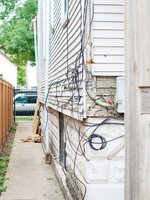
My worry is ending up with a complete mess of coax running all over the outside of my house. That is what I had when I moved into my house. A previous owner had run coax on the ground all the way around the house and just punched holes into rooms through the siding. I removed the majority of it and ran coax inside.

I don't want my house to look like this:
cable-clean-up-02-1.jpg
 
Last edited:
To avoid these ads, REGISTER NOW!
Top Bottom