To avoid these ads, REGISTER NOW!

How to make photos larger?

Joined
Jul 24, 2016
Messages
3,371
Nearly every image on the forum is the size of a postage stamp. Straight up aggravating):) You have to click on them to get larger. (Straight up aggravating):) Even off site hosting such as postimage comes through small. How do you post an up front full size photo that doesn't need expanding? :headscrat
 
To avoid these ads, REGISTER NOW!

3baygarage

Well-known member
Joined
Sep 1, 2013
Messages
11,982
Location
SW Florida/from Buffalo,NY
The only way I know is upload the pic from your computer or device to your GJ photo album, and then copy it’s image link into your post using the image button in your reply. It can be a bit of a pain, and fills up your album with pics that you may not care much about in the long run. Most of the time I do thumnails only now,as it is less work.

Photobucket pics worked the same way when I used them. They would appear large in a post when linked using that image button.
 

3baygarage

Well-known member
Joined
Sep 1, 2013
Messages
11,982
Location
SW Florida/from Buffalo,NY
At least thumbnails don’t have to be resized now.:thumbup:
Some forums automatically resize all images to a nice large photo. Others, it will be a large photo, but has to be resized by the user first.

Way too many variables with photos and different devices.
 

ducksface

Banned
Joined
Oct 25, 2012
Messages
2,477
Just click it, wait a half second, click it again. It will become bigger than full screen. You'll have to pan to see it all.
(my example is very low resolution, very low light)
 

Attachments

  • 20170313_195218.jpg
    20170313_195218.jpg
    74 KB · Views: 18
Last edited:

njhoudini

Well-known member
Joined
Feb 27, 2018
Messages
351
Location
Central Jersey
Nearly every image on the forum is the size of a postage stamp. Straight up aggravating):) You have to click on them to get larger. (Straight up aggravating):) Even off site hosting such as postimage comes through small. How do you post an up front full size photo that doesn't need expanding? :headscrat

Not sure if this is what you mean, but I use flickr.


After you upload images to your free account, you click a share icon and from here, you can get BBCode to copy/paste into your thread. This option allows you to pick how big the photo is in the link.


It takes a little longer to setup the post, but the result is being able to put whatever size photo you want into your post where you want it.
 

astroracer

Well-known member
Joined
Jun 22, 2005
Messages
3,001
Location
Mid_Michigan
Any photos I share are uploaded to Fotki first. I then copy and paste the image url. I have to "open" the image to get the correct url.
100_8634-vi.jpg

If I copy it from the "album" it will come in as a thumbnail.
100_8634-th.jpg


I also see a difference in size depending on what camera is used. The above pics were taken with a Kodak Z12 digital.
The below pic was taken with the Sony Mavica 73. It saves to a 3 1/2" disk so the files aren't quite as massive as the Kodak. (They also up load much faster...)
MVC004S-vi.jpg

This is the thumbnail from the Mavica camera.
MVC004S-th.jpg

Mark
 

ducksface

Banned
Joined
Oct 25, 2012
Messages
2,477
I find the double click a huge advantage over the ******* fold out size some people would post of a generic screwdriver handle, to be reposted five more times in the same thread by people too lazy to edit a quote.

I have the time to double click a picture of interest to me, I do not have the patience to see a half page size picture for the umpteenth time.


I like the double click thumbnails.
Please do not post mattress size pictures.
 
OP
M
Joined
Jul 24, 2016
Messages
3,371
I find the double click a huge advantage over the ******* fold out size some people would post of a generic screwdriver handle, to be reposted five more times in the same thread by people too lazy to edit a quote.

I have the time to double click a picture of interest to me, I do not have the patience to see a half page size picture for the umpteenth time.


I like the double click thumbnails.
Please do not post mattress size pictures.

What if it IS a mattress though? :lol:

I can appreciate that aspect for sure especially when it's 20 huge photos in a quote after quote after quote and the thumbwheel bushings on my mouse are starting to overheat and wear out from spinning through those repeat images.

I appreciate the input everyone!
 

ChaseDE

Well-known member
Joined
Aug 25, 2016
Messages
2,178
Location
Delaware
Go advanced

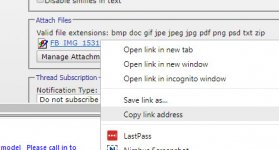
Attach large image using the "manage attachments" form, close form

Right-click and "copy link address" on the uploaded attachment like this

attachment.php


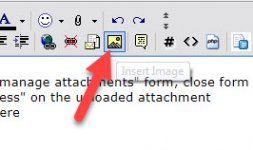
Click the "insert image" button here

attachment.php


paste that link in there

should look like this in your post body text

[IMG]https://www.garagejournal.com/forum/attachment.php?attachmentid=788784&stc=1&d=1531236209[/IMG]

Click OK

Submit reply

you get this

attachment.php


:thumbup:
 

Attachments

  • FB_IMG_1531143086480.jpg
    FB_IMG_1531143086480.jpg
    109.5 KB · Views: 86
  • 2018-07-10_11-22-10.jpg
    2018-07-10_11-22-10.jpg
    42.9 KB · Views: 85
  • inwsert.jpg
    inwsert.jpg
    21.8 KB · Views: 81

ducksface

Banned
Joined
Oct 25, 2012
Messages
2,477
Go advanced

Attach large image using the "manage attachments" form, close form

Right-click and "copy link address" on the uploaded attachment like this

attachment.php


Click the "insert image" button here

attachment.php


paste that link in there

should look like this in your post body text

[IMG]https://www.garagejournal.com/forum/attachment.php?attachmentid=788784&stc=1&d=1531236209[/IMG]

Click OK

Submit reply

you get this

attachment.php


:thumbup:


Here's why I ask that it not be done.(the picture, not the lesson. The lesson was perfect)
It's a full page scroll to get past a picture of a washing machine I don't care about, or it's a Double click if I did care.
I'd rather accommodate the 99 percent that don't care and have to do a double click, than accommodate myself by posting a huge picture that all. MUST see.
I see it as a
Hey! Look at me!
Selfishness.
Usually followed by
I'm too lazy to edit a quote
Selfishness
 
Last edited:
To avoid these ads, REGISTER NOW!

ChaseDE

Well-known member
Joined
Aug 25, 2016
Messages
2,178
Location
Delaware
I can go either way really, there are mods for this platform to prevent people from quoting pictures but I think the team here is planning to move to a new platform soon so that isn't really a need.
 

njhoudini

Well-known member
Joined
Feb 27, 2018
Messages
351
Location
Central Jersey
Here's why I ask that it not be done.(the picture, not the lesson. The lesson was perfect)
It's a full page scroll to get past a picture of a washing machine I don't care about, or it's a Double click if I did care.
I'd rather accommodate the 99 percent that don't care and have to do a double click, than accommodate myself by posting a huge picture that all. MUST see.
I see it as a
Hey! Look at me!
Selfishness.
Usually followed by
I'm too lazy to edit a quote
Selfishness

I suspect those who reply using "Quote" and don't edit the previous poster's post may not know how to do it. The code may be a bit unnerving.

:willy_nil:willy_nil:willy_nil

I rather enjoy the large photos in the threads of many members to whom I've subscribed. I do get a little overwhelmed when I have to scroll down past someone who replied without editing what they are quoting. Not sure if this should become one of those GJ etiquette things that should be encouraged.
 

ChaseDE

Well-known member
Joined
Aug 25, 2016
Messages
2,178
Location
Delaware
The one advantage to big pictures is they are easier to interact with on my phone, I do not use tapatalk so I don't need to click to enlarge, then find the tiny X, etc.
 

ducksface

Banned
Joined
Oct 25, 2012
Messages
2,477
Is there a tiny
X
On this one?

On my phone I just click the picture then click it again if I want it full screen.
The second click makes a screen and a half size, and zoomable.
If I don't want to take a closer look in detail, the thumbnail is just an anti pinch(what is a reverse pinch called?) two fingers from a cursory look.
 

Attachments

  • 20140823_182301.jpg
    20140823_182301.jpg
    147.6 KB · Views: 11
Last edited:

3baygarage

Well-known member
Joined
Sep 1, 2013
Messages
11,982
Location
SW Florida/from Buffalo,NY
I suspect those who reply using "Quote" and don't edit the previous poster's post may not know how to do it. The code may be a bit unnerving.

:willy_nil:willy_nil:willy_nil
.

Probably this. I know I learned from trial and error, and reading threads like this.. No one walks up and says this is how you post on an internet forum. Every day leople need help wih pictures or other stuff. It’s all a learning experience because not everyone is a computer person. Still learning new things here all the time.

Here's why I ask that it not be done.(the picture, not the lesson. The lesson was perfect)
It's a full page scroll to get past a picture of a washing machine I don't care about, or it's a Double click if I did care.
I'd rather accommodate the 99 percent that don't care and have to do a double click, than accommodate myself by posting a huge picture that all. MUST see.
I see it as a
Hey! Look at me!
Selfishness.
Usually followed by
I'm too lazy to edit a quote
Selfishness

Pages are also congested with people quoting Ducksface posts, due to the fact they are likely to be deleted or edited for reasons unknown. :lol:
 

ducksface

Banned
Joined
Oct 25, 2012
Messages
2,477
An explanation is probably due.
They are edited or deleted because I've either posted a dozen pictures for no reason other than to help the op, and the op, never acknowledges them, leading me to conclude they're worthless, so I delete the only picture anyone posted of a carpeted garage, that the op ignored to instead of looking at the picture of 3xactly what he needed to know, did three posts to defend the word
Lanai.
Or
I type 300 words or so, to be followed by fifteen other people saying the same thing, so I must conclude that I was wrong somehow, and I delete.

I don't consider myself being a member of the
Brightest half of the room club.
If someone counters the post I made about jerky and the cost and poundage of raw meat and the weight when done and the cost the finish weight amounts to,
by posting under me that he has been making jerky for fifteen year and his five pounds of raw meat always turns into five pounds of finished jerky...
I have to figure one of us is just damn stupid, and I almost always pick me as being wrong, and delete my wrong(per someone more adamant than I need to be about jerky) information.

I do it to clean up stuff.

If the op asks for a number 26 hf key, and my answer didn't fit in the slightest, I clean it off. No one but the op is interested, he doesn't need the information, I delete it.

If someone is coming by my place in July, and I invite them to stop by, I'll probably remove that very specific post after they do stop by.

If I wade into baboon territory of **** slinging, I delete.
 
Last edited:

ducksface

Banned
Joined
Oct 25, 2012
Messages
2,477
Here's how to delete pictures from quotes.
Look within the quote for. Brackets similar to the whole quote.
It will probably say IMG.
Delete the brackets and everything between the brackets.
Done, mostly.
 

3baygarage

Well-known member
Joined
Sep 1, 2013
Messages
11,982
Location
SW Florida/from Buffalo,NY
No need to explain, I was just kidding around. Agreed, advice often falls on deaf ears. Half the time I miss your initial posts, which are truly enjoyable in a twisted fortune cookie kind of way.
 
To avoid these ads, REGISTER NOW!
Top Bottom