To avoid these ads, REGISTER NOW!

How to post multiple pictures?

Danners

Member
Joined
Jun 28, 2016
Messages
15
Location
Halifax Nova Scotia
Every time I attach a file it will only let me upload one per post. I've noticed other people have posts with larger pictures, ones that don't have attachment labeled next to them and it's easier to read them that way. Any help would be awesome!
 
To avoid these ads, REGISTER NOW!
OP
D

Danners

Member
Joined
Jun 28, 2016
Messages
15
Location
Halifax Nova Scotia
A couple of questions.
Where do you have them hosted?
Do you use the insert image symbol?

I am using pictures that are stored in my hard drive.
I've been using the [manage attachments] it's the only way I can see to upload a photo from my photo album.

Thanks!
 

Git

Well-known member
Joined
May 18, 2008
Messages
6,894
Location
S Cal
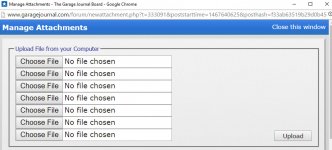
When you click on Manage Attachments - a window should open like this one.

Use each "choose file" to browse to the pic on your hard drive. As you can see there are up to 7. Then click on upload after you have selected all the pics
 

Attachments

  • SNAG-0317.jpg
    SNAG-0317.jpg
    116.2 KB · Views: 3
OP
D

Danners

Member
Joined
Jun 28, 2016
Messages
15
Location
Halifax Nova Scotia
When you click on Manage Attachments - a window should open like this one.

Use each "choose file" to browse to the pic on your hard drive. As you can see there are up to 7. Then click on upload after you have selected all the pics

I've been doing it this way, it will let me chose all 7 but only ever upload one at a time. Also they are little images or thumbnails that need to be clicked on to be inlarged. If you have a look at this thread it seems the images are displayed differently, and can be viewed a lot better. http://www.garagejournal.com/forum/showthread.php?p=3990517#poststop
Thanks again
Danny
 

larry_g

Well-known member
Joined
Apr 28, 2007
Messages
16,879
Location
oregon
For me I find it easiest to up load pictures to an album on this site. You do that under the users CP tab. Then you just put the BB code into your post and it comes in great and doesn't get lost whey Photobucket or some other hosting site goes south.

If you click on my user name, and then public profile you can see my albums.

lg
no neat sig line
 
Last edited:

NUTTSGT

Super Moderator
Staff member
Joined
Sep 14, 2009
Messages
50,949
Location
Northern Central Ohio
I would guess the issue is that your file is too large. Attachments have a max file size, if one picture exceeds that amount and takes too much, it won't allow the other pictures to upload.
 
To avoid these ads, REGISTER NOW!

NUTTSGT

Super Moderator
Staff member
Joined
Sep 14, 2009
Messages
50,949
Location
Northern Central Ohio
I've been doing it this way, it will let me chose all 7 but only ever upload one at a time. Also they are little images or thumbnails that need to be clicked on to be inlarged. If you have a look at this thread it seems the images are displayed differently, and can be viewed a lot better. http://www.garagejournal.com/forum/showthread.php?p=3990517#poststop
Thanks again
Danny

Those pictures that are posted by Alex have been hosted on Photobucket (PB) and linked here. What you are trying to do is attach them to GJ.
 

NUTTSGT

Super Moderator
Staff member
Joined
Sep 14, 2009
Messages
50,949
Location
Northern Central Ohio
All makes sense now. Thanks for clearing it up!

Thanks to everybody!

No a problem, that's what we are here for.


BTW, if you choose to use a photo hosting site, Imgur links do not work here as GJ has a classified section and it's a violation of their policies.
 

Git

Well-known member
Joined
May 18, 2008
Messages
6,894
Location
S Cal
If you upload them to the forum - they 'should' always be with the post. Nothing worse than someone deletes their photohosting account somewhere or renames it and the pics no longer work

Also, personally, I prefer thumbnails. I hate it when someone posts a really large pic and you have to scroll the screen sideways to read the post

Here are all 7 pics from the post you linked to uploaded to the forum in one shot
 

Attachments

  • 20141128_122427_zpsiveqkzpp.jpg
    20141128_122427_zpsiveqkzpp.jpg
    46 KB · Views: 5
  • 20141128_164424_zpsgmixilvr.jpg
    20141128_164424_zpsgmixilvr.jpg
    42.8 KB · Views: 6
  • IMG_3358_zps47493c99.jpg
    IMG_3358_zps47493c99.jpg
    80.3 KB · Views: 5
  • IMG_3362_zps7a3331b6.jpg
    IMG_3362_zps7a3331b6.jpg
    83.5 KB · Views: 3
  • IMG_3363_zps59bd8c15.jpg
    IMG_3363_zps59bd8c15.jpg
    44.3 KB · Views: 4
  • IMG_3364_zpsf191b5ba.jpg
    IMG_3364_zpsf191b5ba.jpg
    57.4 KB · Views: 2
  • IMG_3366_zpsda1fa510.jpg
    IMG_3366_zpsda1fa510.jpg
    83.3 KB · Views: 1

Shiftless

Well-known member
Joined
Mar 9, 2014
Messages
14,544
Location
East Bay SFO
Also, it seems as though with an iPad you can only upload one picture and it shows as a thumbnail. When I attempt to select a second pic in that window with the 7 spaces for selections, the second pic I select simply replaces the first one I selected. So still only one photo gets posted. Is that the case for all of the GJ iPad users?
I have an older one running 6.0.1
 
Last edited:
To avoid these ads, REGISTER NOW!
Top Bottom