To avoid these ads, REGISTER NOW!

How would one learn CNC software?

Brent T

Well-known member
Joined
Sep 29, 2018
Messages
459
Location
Arizona, USA
So, I'm 60 years old and recently retired. Pretty handy and somewhat computer literate. I've long considered getting a CNC plasma table and/or a CNC mill or lathe, maybe a 3D printer. The software learning curve has always scared me off. What's the best way to learn? I've dabbled with a vinyl cutter a little, but mostly just cut from downloaded patterns or simple designs. I don't want to invest $$ in equipment and find out I'm not able to use it because I'm not familiar with the software. No plan to get too exotic, but I see a lot of cool items folks have made and I'd love to learn the basics.
 
Last edited:
To avoid these ads, REGISTER NOW!

whateg01

Well-known member
Joined
Mar 13, 2006
Messages
11,369
Location
doo dah, kansas, usa
Unless you are building your own machine, it will likely come with its own software whether it's proprietary or something like Linux cnc. If you are asking about the cad and cam software, that's different. There are different software packages available some of them more user friendly to beginners than others and some of them more capable than others. I am using fusion for cad and cam despite my absolute hate for Autodesk
 
Last edited:

Firebrick43

Well-known member
Joined
May 12, 2015
Messages
14,091
Location
West central Indiana
So you need to decide what machine you want to do first.

3d printing is nothing like programming a mill. Any fool can download STL files and open them in the slicer program. It generates all the G code and there is rarely any need to actually know it. Unless you build your own printer the rare place you have to know G code is macros but a bought machine has all of them written for you

Most cnc plasma cutters have little to no programming. Drag your dxf or dwg file in, set some parameters such as start point, kerf inside or outside, metal type, thickness, ect and hit go.

cnc mills and lathes you really don't have to program them anymore with good CAM software but you better be able to read and troubleshoot G code.
 

GrayFlattop

Well-known member
Joined
Jan 18, 2018
Messages
1,051
Location
Chicago
Of course this depends on where you live, but our local library has a “maker’s lab” with 3D printers and very basic CNC mills. Likely not capable of producing anything involved, but enough to get your feet wet. The lab fee for classes is nominal.

You also might want to check if your local high school or community college offers classes.
 

paranoid56

Well-known member
Joined
Dec 18, 2008
Messages
1,596
Location
San Diego, Ca
against what others here have said, from the drawing part, its the same for 3d printing, cnc milling, plasma table bla bla. you need to learn how to draw first. 3d printing is easier as you can just go find some drawings and try printing them.
my 2c is to go download the free version of fusion360. start drawing up things, its going to be frustrating as **** trying to draw lol. watch youtube to help. once you can draw up the object you want to make, from there you can easily export to a 3d printer, or head to the manufacturing dropdown and start playing with the cutting paths and tool types. you can also preview the cutting sim.

all cnc start from there,
 

CapriMikeC

Well-known member
Joined
May 31, 2019
Messages
420
Location
AZ
A CNC mill, 3d printer, plasma table, CO2 laser all may use G codes, but the ways they are programmed are very different. What do you want to make? How often will you be using this machine?

For 3d printers, a free fast exercise is to download Cura slicing software and any old solid model from Thingiverse. Pick a few options based on filament material and quality and the software creates the G code file. Put the file in the printer and wait for it to finish. It's uncommon to actually edit the G code file directly, much easier to change in the slicer and regenerate the G code.

2D parts created on a plasma table or with a simple laser might be done using Corel or similar. Like the 3d printer, chose a few settings in the software and dump it to the cutter.

In the milling/turning world, programming can be complicated but doesn't always need to be complicated. For simple tasks like a bolt hole circle, or a rectangular cavity many CNCs have some built in "fill in the blank" programming capabilities.
 

bugnut

ALLIANCE MEMBER
Joined
Jul 14, 2012
Messages
3,929
Location
Central Ohio
I would suggest a stop by your local trade, 2 year or 4 year school. Ask questions as most allow for seniors to take classes without charge. Local vocational school did offer night courses for some trades. Good luck!
 

RoninB4

Well-known member
Joined
Jul 22, 2020
Messages
3,568
Location
Under My House
-IMO a lot will depend upon what the OP would like to try creating. Plasma burnout is a lot different than milling/turning. Don't have enough experience with 3D printing but others have stated that it's not difficult to get started with packaged software on simple projects. With milling/turning you need to know/understand the rules of speed/feed for cutting different materials. A lot will also depend upon how simple/complex the part is you want to make that will satisfy your ambitions. Cutting/burning flat sheets in 2D is a fairly simple affair. Anything made that's 3D (regardless of the additive/subtractive process) adds a layer of complexity to the project.

-Downloading projects already coded from various websites may not be a good idea. There used to be malware/spyware attached to many of the free files, don't know how secure those files would be today. At some point anybody is going to want to work beyond what they can find online so that means CAD and/or CAM modeling. Flat work is usually a 2D dxf file and that's fine for gaskets, signs, or plate construction. I work in 3D because I prefer it but others have trouble visualizing what they want to make. The learning curve for 3D from your own imagination can also be somewhat frustrating until you know how to use the software.

-The only way to become proficient with all of the above is by using it, there are no shortcuts to making your own designs. Taking a course at the local junior college or trade school is a good suggestion for introduction without much cash outlay. Purchasing anything CNC controlled is going to mean a few thousand (minimum) for entry level machinery that will just barely get the job done due to size and/or capability. Entry level machinery often means entry level results, you get what you pay for.

-It would be good to have a number of things in mind you'd want to make, ideas for a product line, or a frequent need for something on a regular basis because all of the machines/material/tooling is expensive. If you have the money/time you can make just about anything you can dream up with the right machinery. It's not rocket science but it does require a certain amount of dedication/focus before before the possibilities open up or become truly useful.
 
OP
B

Brent T

Well-known member
Joined
Sep 29, 2018
Messages
459
Location
Arizona, USA
Thanks for all the responses. I guess I don't have a real plan so I'll work on that first. I'd probably just like to do 2d type stuff with a plasma cutter. Signs, brackets, etc. I've also always wondered about being able to 3d print parts for old items that are no longer available. Example the plastic cover for the OBD port on my BMW is broken. I'm sure I could find one somewhere eventually, just haven't taken the time. My first thought was it would be nice to just make one on a 3D printer. As for the plasma cutter/table, my assumption is it's similar software to a vinyl cutter? I've played around with a small vinyl cutter some and it's not too bad - and a lot less expensive both in equipment and materials than a plasma table. I'd be more interested in making my own patterns than downloading files. I guess I need to research G Code as well. I'd never even heard of it until today! That shows my ignorance. I'll do some research and see where some classes are available.

Honestly, this is the first time in my adult life I've felt I had enough spare time to pursue some new hobbies, so I'm just looking for something to learn and occupy my time without breaking the bank. Maybe make a few $$ on the side.

I've already started doing a lot more reading since retirement a few months ago and am teaching myself to play the guitar. What I don't want to do is be the old retired guy that just sits around and drinks beer. I need to stay busy.
 
To avoid these ads, REGISTER NOW!

Firebrick43

Well-known member
Joined
May 12, 2015
Messages
14,091
Location
West central Indiana
Thanks for all the responses. I guess I don't have a real plan so I'll work on that first. I'd probably just like to do 2d type stuff with a plasma cutter. Signs, brackets, etc. I've also always wondered about being able to 3d print parts for old items that are no longer available. Example the plastic cover for the OBD port on my BMW is broken. I'm sure I could find one somewhere eventually, just haven't taken the time. My first thought was it would be nice to just make one on a 3D printer. As for the plasma cutter/table, my assumption is it's similar software to a vinyl cutter? I've played around with a small vinyl cutter some and it's not too bad - and a lot less expensive both in equipment and materials than a plasma table. I'd be more interested in making my own patterns than downloading files. I guess I need to research G Code as well. I'd never even heard of it until today! That shows my ignorance. I'll do some research and see where some classes are available.

Honestly, this is the first time in my adult life I've felt I had enough spare time to pursue some new hobbies, so I'm just looking for something to learn and occupy my time without breaking the bank. Maybe make a few $$ on the side.

I've already started doing a lot more reading since retirement a few months ago and am teaching myself to play the guitar. What I don't want to do is be the old retired guy that just sits around and drinks beer. I need to stay busy.
I am not trying to discourage you from buying a plasma cutter but I have found that having it cut by a company is much cheaper.

i still want one but cant even buy the steel for what sendcutsend.com or oshcut.com can sell you cut parts if they are under 42" dimension. And a local guy I have since found gets me over that hurtle...

On top of that I dont have to transport the steel sheets, store, keep rust free, or cut down to size to fit on the table or deal with scrap.

All of the options you listed, you need to learn a CAD software. Look at Fusion 360, Solidworks, or Onshape. All of them have a free version that is somewhat limited but it will get you started and then you can just upload your dxf file and pay for a service like sendcutsend.

The learning curve is steep, I used 2D cad for my job and was very good at it plus a some Creo and ProE but it took a good week of watching tutorials on youtube (and sometimes still do) to learn Fusion 360.

A 3d printer would be an excellent first step as a machine as they have really come down in price and it allows almost instant prototyping and some repair parts depending on application.

Your example of OBD2 covers, there are several on thingiverse. don't know what model you have but here is one example.


I just did a thread where I printed some interior repair parts for my suburban.
 
Last edited:

KwikFab

Well-known member
Joined
Jul 27, 2024
Messages
1,206
Location
Central Valley, CA
If you want some one-on-one help in basic CAD and CAM (for CNC plasma), I'd be happy to help walk you through it via Zoom.

I don't have much of a presence here on the forum, but I'm a moderator and an active member to a specific CNC group on FB.

I'm helping people on a daily (strangers from all over) on whether it's - troubleshooting failures, dialing in better cut quality, explaining rules for cut paths, and more.

I'm self-taught, and have been running CNC plasma from home for going on 2.5 years now.

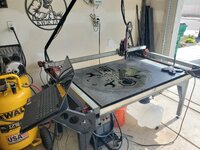
Started on a Langmuir Crossfire -

20230111_215010.jpg

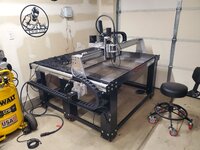
And what was originally a hobby, earned me money to upgrade my garage (along with my table) to a Crossfire Pro -

20240310_130554.jpg

To upgrading yet again as of 2 weeks ago to an STV table (still in assembly phase) -

20250515_131917.jpg

So while I've been very successful with it given that I'm disabled and a stay at home dad, I like to use myself as an example that anyone and everyone can succeed if they put a bit of time into it.

I help others because I didn't get the help I needed when I started. The hobby has way too many gatekeepers and I've done as much as possible to break down that barrier.

Don't hesitate reaching out.
 

KwikFab

Well-known member
Joined
Jul 27, 2024
Messages
1,206
Location
Central Valley, CA
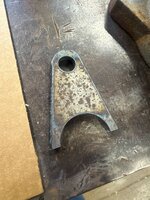
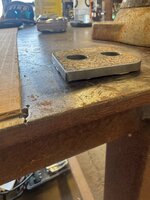
To add, here's the latest individual I helped.

He messaged me yesterday and showed me this -

Screenshot 2025-05-17 231023.png

He couldn't even cut a straight line to save his life (his words).

Untitled.jpg

We did spend 2 hours on Zoom today, but he took all my advice, went out to buy steel, and not only got his software ready but immediately got it dialed in with very nice and straight edges.

Untitled2.jpg

Untitled3.jpg

Untitled4.jpg

Screenshot 2025-05-17 231134.png

So while yes, if you get into the drawing part of it, you can outsource your stuff and have someone like SEND CUT SEND cut your parts out for you. But you said you want to get into something new, so why would you want someone to discourage you from doing it all yourself?

I wouldn't.

Sometimes just being able to accomplish stuff like this is a reward by itself. To me it was.
 

R07AG

Well-known member
Joined
Feb 26, 2024
Messages
54
Location
Wisconsin
Check out Titans of CNC https://academy.titansofcnc.com/

They offer free courses on CAD, CAM, CNC.

Like others have said, the challenge is learning CAD. Once you can draw/model, a CAM or slicer software will do the programming. If this is something you end up wanting to go more into, see what your local community/technical college offers. Many will let you take or audit a course for relatively cheap.
 

NORTON'S SHOP

Well-known member
Joined
Dec 30, 2010
Messages
1,581
Location
Upper Midwest
So, I'm 60 years old and recently retired. Pretty handy and somewhat computer literate. I've long considered getting a CNC plasma table and/or a CNC mill or lathe, maybe a 3D printer. The software learning curve has always scared me off. What's the best way to learn? I've dabbled with a vinyl cutter a little, but mostly just cut from downloaded patterns or simple designs. I don't want to invest $$ in equipment and find out I'm not able to use it because I'm not familiar with the software. No plan to get too exotic, but I see a lot of cool items folks have made and I'd love to learn the basics.
If you want to learn G code for a mill or lathe, go to your local machine shop that has CNC machines. Ask if they have any old manuals for their machines. More than likely they will be for a Fanuc control, but G code is the same for any control. If they haven't already thrown them away, they're probably sitting in a corner collecting dust. Read up on the section that explains what each G code performs. You'll learn allot. Programming a lathe is pretty simple to do manually. Programming a mill manually is pretty much just the same, unless you have complex shapes. If so, then you'll probably want a CAM program.
 

banjopete

Well-known member
Joined
Oct 5, 2014
Messages
302
Location
Edmonton, Alberta, Canada
Fusion, all day fusion 360.

It's a learning curve but a fun one. I'm a few versions into my own cnc's at home now and it's a handy thing to have access too, and doesn't take all the work folks are suggesting.

I bought a 3d printer to make my first cnc, learned what I needed in fusion to design things, and create the gcode for the printer. From there it's just another step of learning CAM which you can also do in fusion for free, then you're cnc'ing.

I know folks will tell you as they are doing above that machine shops, and gcode language, and programming etc but you don't really need this. It's useful knowledge for problem solving, but you don't really need it. You just have to figure out how to draw what you want, and create toolpaths in cam. I've never plamsa cnc'd so I'll let kwikfab tell you what's up there.

If you're curious I'd say jump in, you can definitely learn as you go. I did my first CAM in esltcam which is a simple program compared to fusion, but the learning curve is quicker. Fusion was my next jump, it has way more bells and whistles, but is also more complex, and more powerful.

You can make fun stuff, at different scales, easy things, hard things, it's cool

1747781459434.png

1747781500514.png
 
OP
B

Brent T

Well-known member
Joined
Sep 29, 2018
Messages
459
Location
Arizona, USA
Many thanks for all the responses. I'll start researching. Was not even aware of outfits like SendCutSend. That's seems like a great resource at a reasonable cost. I may just start off with a 3D printer to get my feet wet.

One more question. How messy is a plasma table? I don't have a dedicated shop as my 3-car attached garage doubles as a workshop and vehicle parking. How much debris ends up settling on everything? My gut tells me I'm not going to like the answer. I've already begun doing most of my cutting and grinding outside instead of in the garage.
 

whateg01

Well-known member
Joined
Mar 13, 2006
Messages
11,369
Location
doo dah, kansas, usa
Many thanks for all the responses. I'll start researching. Was not even aware of outfits like SendCutSend. That's seems like a great resource at a reasonable cost. I may just start off with a 3D printer to get my feet wet.
Design is design, but while a 3d printer is a CNC machine, it's hard to compare it to a VMC, for example. Completely different processes.

One more question. How messy is a plasma table? I don't have a dedicated shop as my 3-car attached garage doubles as a workshop and vehicle parking. How much debris ends up settling on everything? My gut tells me I'm not going to like the answer.
If you have a good downdraft or water table, the dust can be kept to a minimum. Otherwise, it's something I do outside. It's not just regular old dust. It's metallic.
 

KwikFab

Well-known member
Joined
Jul 27, 2024
Messages
1,206
Location
Central Valley, CA
Many thanks for all the responses. I'll start researching. Was not even aware of outfits like SendCutSend. That's seems like a great resource at a reasonable cost. I may just start off with a 3D printer to get my feet wet.

One more question. How messy is a plasma table? I don't have a dedicated shop as my 3-car attached garage doubles as a workshop and vehicle parking. How much debris ends up settling on everything? My gut tells me I'm not going to like the answer.

A 3 car attached is a whole car bigger than my 2 car garage.

If you're worried, keep the car parked outside while you work.

The water table can be messy, but it only gets bad if you do tons of cutting and neglect cleaning it out a whole year straight.

20250520_162000.jpg

Just make sure the door is open, the space is well ventilated, and you wear a mask.
 

OccupantRJ

Well-known member
Joined
May 15, 2009
Messages
11,131
Location
Eastern North Carolina
Thanks for all the responses. I guess I don't have a real plan so I'll work on that first. I'd probably just like to do 2d type stuff with a plasma cutter. Signs, brackets, etc. I've also always wondered about being able to 3d print parts for old items that are no longer available. Example the plastic cover for the OBD port on my BMW is broken. I'm sure I could find one somewhere eventually, just haven't taken the time. My first thought was it would be nice to just make one on a 3D printer. As for the plasma cutter/table, my assumption is it's similar software to a vinyl cutter? I've played around with a small vinyl cutter some and it's not too bad - and a lot less expensive both in equipment and materials than a plasma table. I'd be more interested in making my own patterns than downloading files. I guess I need to research G Code as well. I'd never even heard of it until today! That shows my ignorance. I'll do some research and see where some classes are available.

Honestly, this is the first time in my adult life I've felt I had enough spare time to pursue some new hobbies, so I'm just looking for something to learn and occupy my time without breaking the bank. Maybe make a few $$ on the side.

I've already started doing a lot more reading since retirement a few months ago and am teaching myself to play the guitar. What I don't want to do is be the old retired guy that just sits around and drinks beer. I need to stay busy.
I am retired and stay so busy at various things around the house and shop that it makes me wonder how I ever had time to hold down a job!
 

CapriMikeC

Well-known member
Joined
May 31, 2019
Messages
420
Location
AZ
The first step is to not be intimidated by anything. People use all these things everyday and they are not smarter than you, they just know something you do not know yet.

If you're doing simple plasma cutter shapes, the controller often has a built-in friendly way of programming shapes. No other software is needed. Learning curve is minutes, not years. Waterjets are similarly controlled.

A 3d printer has only a few functions. All the programming happens in the slicer software on a PC. The programming is generally as simple as import a model, pick the filament material (temperatures), and the layer thickness. The software does the rest and the code goes to the printer.

Some CNC mills/lathes have limited built-in programming. Haas is a common example but there are also retrofitted knee mills with comparable easy-to-use functions like Trak mills.

The longer time investment is CAD software if you want to make something not readily available for download already. Designing good models can be a time vampire. Fortunately, there are lot of free models already on the web. For example, McMaster often has a model of the part they are selling.
 
To avoid these ads, REGISTER NOW!
Top Bottom