To avoid these ads, REGISTER NOW!

Hunter p411 alignment machine need help

Joined
Dec 5, 2020
Messages
20
Location
Home
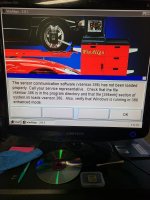
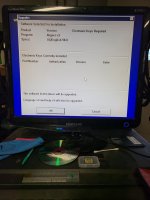
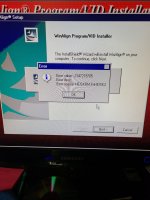
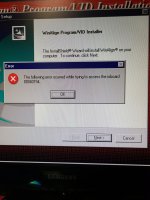
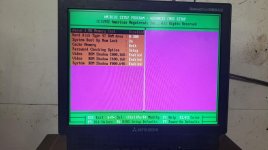
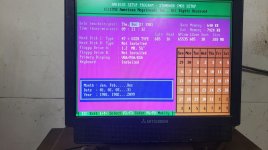
I have a hunter p411 alignment machine that the computer took a dump on. I have reinstalled windows 95 and the winalign software, but winalign is not seeing the software keys that are installed so I am unable to use the machine still. Does anybody have pictures of each page of bios setting so I can verify mine? I also get an installer error as well wich may be related to settings.
Any help is much appreciated!

Thanks Chris
 

Attachments

  • 20210508_192528.jpg
    20210508_192528.jpg
    112.1 KB · Views: 55
  • 20210514_193331.jpg
    20210514_193331.jpg
    62.2 KB · Views: 52
  • 20210514_185411.jpg
    20210514_185411.jpg
    103.8 KB · Views: 50
  • 20210514_193325.jpg
    20210514_193325.jpg
    71.7 KB · Views: 54
  • 20210514_201955.jpg
    20210514_201955.jpg
    98.8 KB · Views: 57
  • 20210514_201946.jpg
    20210514_201946.jpg
    93.3 KB · Views: 55
  • 20210514_201914.jpg
    20210514_201914.jpg
    96.3 KB · Views: 57
To avoid these ads, REGISTER NOW!
OP
T
Joined
Dec 5, 2020
Messages
20
Location
Home
Ok I got rid of the installer errors, but winalign is still not seeing any of the software keys that are installed..
 

djbmw

Well-known member
Joined
Jun 20, 2013
Messages
1,115
Location
Ottawa, Ontario, Canada
I'll try to boot up mine tonight or tomorrow and take pics of the bios pages. However, I think you might need to repair the WinAlign install. Do you have the original discs? I'll see if I have them and, if I do, I'll make a copy for you.
 

djbmw

Well-known member
Joined
Jun 20, 2013
Messages
1,115
Location
Ottawa, Ontario, Canada
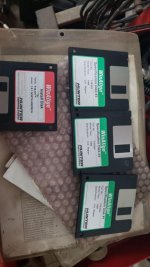
I've attached a few pictures of my BIOS settings below... I also have the floppy discs and CDs for WinAlign... but it looks like you also have them so Im not sure if there'd be any value in me copying them for you?

Also... are you running in compatibility mode? Do you NEED to do the upgrade?.. or can you keep it with V3? I have WinAlign V1.1 running on Windows 3.11 so you would be downgrading if you install the WinAlign version that I have ...
 

Attachments

  • 20210518_111027.jpg
    20210518_111027.jpg
    87.9 KB · Views: 54
  • 20210518_111129.jpg
    20210518_111129.jpg
    96.7 KB · Views: 51
  • 20210518_111148.jpg
    20210518_111148.jpg
    109.2 KB · Views: 49
  • 20210518_111159.jpg
    20210518_111159.jpg
    103.3 KB · Views: 52
  • 20210518_110427.jpg
    20210518_110427.jpg
    67.2 KB · Views: 130
Last edited:

djbmw

Well-known member
Joined
Jun 20, 2013
Messages
1,115
Location
Ottawa, Ontario, Canada
In the event that anyone needs it ... HERE is the RAR file for WinAlign V01.1. Once you unRar the file you'll see all of the ISO images that you can either mount, or burn to CDR discs.
 
Last edited:
OP
T
Joined
Dec 5, 2020
Messages
20
Location
Home
In the event that anyone needs it ... HERE is the RAR file for WinAlign V01.1. Once you unRar the file you'll see all of the ISO images that you can either mount, or burn to CDR discs.

I am not seeing the file.. just the "getting started" from media fire, even when logged in.

also it appears we have different computers in our machines my bios is very different.
 
OP
T
Joined
Dec 5, 2020
Messages
20
Location
Home
I have tried reinstalling winalign multiple times (v2 and v3), all of my hardware seems to be functional and running without any conflicts. winalign just isn't seeing the software keys..
maybe starting with V01.1 will add some driver or configuration I am missing.
 
To avoid these ads, REGISTER NOW!

djbmw

Well-known member
Joined
Jun 20, 2013
Messages
1,115
Location
Ottawa, Ontario, Canada
Sorry about that - This one should work now: WinAlign V01.1
For reference, my machine is a P211 (released in 1993.. but I think mine is from 1995 as some of the components have that date stamped) which is a slightly older model than the P411 (released 1997). As far as I know they were both essentially the same with the exception of the upgraded computer with the P411. Of course, you can clone the hard drive and use any modern system running a VM with Win 3.11/95/98 and have a hardware interface with the IDE and BUS peripherals.
 
Last edited:
OP
T
Joined
Dec 5, 2020
Messages
20
Location
Home
Got it going, seeing all keys now! honestly kind of a stupid on my part.... on the sensor card in the computer there is what looks like a cmos battery holder, and there in fact was a battery in it when I bought it. however the bottom post was not making contact with the battery... so I "fixed" it. well come to find out that is not a battery socket at all! its a key socket! so removing that battery solved my issue.. and now all is well.
 
OP
T
Joined
Dec 5, 2020
Messages
20
Location
Home
On to the next thing, Upgrading the version/specs. does anybody know how far (version/specs) the p411 can upgrade to? I talked with my local hunter rep and all he said is the 411 is no longer supported by hunter... not much help.

my machine is currently running winalign 3.0 and specs are updated to 2003, using DSP308 heads. I would really like to update specs to 2013 or more recent.
 
Last edited:

thehood

New member
Joined
Apr 24, 2024
Messages
3
I have tried reinstalling winalign multiple times (v2 and v3), all of my hardware seems to be functional and running without any conflicts. winalign just isn't seeing the software keys..
maybe starting with V01.1 will add some driver or configuration I am missing.
Hello, I am looking for v2 software, and any help installing, I only have keys for 245-1001v2
 

thehood

New member
Joined
Apr 24, 2024
Messages
3
I am looking for help with 211

win95 osr
win align 1.4

i ran all the installs
reelmagic 2.21 splash screen only shows ports that norm?

win align errors with communication error restart vsenor.386

senor irq no changes see pics

i lose secondary ide with vsenor in use

running mb with mr bois
i have set irq to legacy isa for 11 and 12

Thanks
 

Attachments

  • IMG_0042.jpeg
    IMG_0042.jpeg
    622.2 KB · Views: 18
To avoid these ads, REGISTER NOW!
Top Bottom