To avoid these ads, REGISTER NOW!

I messed up somewhere...Mini split wiring.

jconnor3

Well-known member
Joined
May 22, 2015
Messages
79
Location
Indianapolis, IN
Hi All, Hoping someone can point out my blunder.

I would say I have an understanding of electricity, but fairly basic. I wired our entire addition, can add ligts, switches...the basics. So I didn't think it would be much to tackle the wiring for my Mr. Cool DIY minisplit. I have never installed a double 20v break or an outside disconnect so everything was new territory, but it really all seemed pretty straight forward. I think that's why i'm so irritated about it not working...and I could have potentially hurt the unit. Here is the situation.

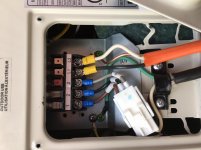
Put in a new double 20v breaker, ran that outside to a disconnect (connected the wires from the breaker box to the "Line" sections) and then ran that to the mini split. The weakest point in the whole thing is the connection to the actual minisplit. I was planning on just making a loop with the wire end and then putting the hold down screw in. Well, the screw wasn't long enough for that so I had to use the connectors you see in the picture. I don't have the right crimpers to put those one, but I squeezed the hell out of them with pliers and channel locks. They are on there solid, but for 10-2 wire, they sure do seem flimsy.

Anyway, I put everything together, go to flip the break and POP, the breaker immediately blows. So obviously there is an issue and I'm guessing a few people here are going to see the issue right away and i'll feel like an idiot for missing it, but it is what it is. Learn and move on. I just hope I didn't hurt the new unit.
 

Attachments

  • image5 (2).jpg
    image5 (2).jpg
    150.9 KB · Views: 115
  • image4 (2).jpg
    image4 (2).jpg
    147.6 KB · Views: 111
  • image3 (6).jpg
    image3 (6).jpg
    126.8 KB · Views: 116
  • image1 (12).jpg
    image1 (12).jpg
    130.3 KB · Views: 112
  • image2 (8).jpg
    image2 (8).jpg
    127.4 KB · Views: 94
To avoid these ads, REGISTER NOW!

malibu101

Well-known member
Joined
Jul 1, 2005
Messages
3,908
Location
Walnutport PA
Looks to me like the "line" wires in the disconnect are landed on the outside lugs.
I think they should both land on the center lugs marked "line".
 
OP
J

jconnor3

Well-known member
Joined
May 22, 2015
Messages
79
Location
Indianapolis, IN
^^Thanks for taking a look. The wires coming from the breaker box comes through the back of the disconnect and go into the center "line" lugs. Then the wire that feeds the actual mini split are connected to the outside lugs that weren't marked and exits through the bottom of the box.

What I have read and seen on videos is that the "line" lugs are on the outside, but I just assumed the disconnect I got from Lowes was different and also the "line" lugs are very clearly marked on the center 2 lugs.
 

tyme2par4

Well-known member
Joined
May 16, 2016
Messages
571
Location
NH
^^Thanks for taking a look. The wires coming from the breaker box comes through the back of the disconnect and go into the center "line" lugs. Then the wire that feeds the actual mini split are connected to the outside lugs that weren't marked and exits through the bottom of the box.

What I have read and seen on videos is that the "line" lugs are on the outside, but I just assumed the disconnect I got from Lowes was different and also the "line" lugs are very clearly marked on the center 2 lugs.

Your disconnect does say line on the inside lugs, so it should be correct.
Everything appears to be correct to me. Did you try turning the breaker on with the disconnect open? If it pops with the disconnect open, you have a problem before that.
Other than that, my only thought is that you may have nicked a wire somewhere, so it's shorting to ground.
Or it is possible that the AC unit is faulty.
 
OP
J

jconnor3

Well-known member
Joined
May 22, 2015
Messages
79
Location
Indianapolis, IN
That's a good idea about pulling the disconnect plug and flipping it. I'll give that a shot when I get home from work if nobody sees a glaring issue before then.
 

pattenp

Well-known member
Joined
Jun 4, 2008
Messages
10,175
Location
Virginia - USA
NM wire is not rated for outdoor use even when in conduit. Also using crimp on spade connectors on solid copper is not a great idea. They are prone to create hot spots causing crimp to over heat. It is best to use stranded THHN.
 
OP
J

jconnor3

Well-known member
Joined
May 22, 2015
Messages
79
Location
Indianapolis, IN
Thanks for the feedback guys.

At the unit, do you think it matters if the black or white is on L1 or L2 or the interchangeable? I thought interchangeable, but didn't know if that could be an issue. The instructions are **** and just say to see the inside of the panel. There is a picture of it above.
 

pattenp

Well-known member
Joined
Jun 4, 2008
Messages
10,175
Location
Virginia - USA
Just an FYI... Remarking a white as a hot is only allowed if the white wire is part of a multiwire cable such as NM. If using Individual THHN in conduit the wires need to be the correct color, no remarking allowed on conductors #6 or smaller.
 

theoldwizard1

Well-known member
Joined
Feb 22, 2011
Messages
43,225
Location
SE MI
Remove the "line" wires from the disconnect, turn of the breaker and check to voltage there.

If it is good, re-install, remove the wires at the unit and check voltage there.

You only have to remove one wire in each case. (RED sharpie is good on those white wires.)
 
OP
J

jconnor3

Well-known member
Joined
May 22, 2015
Messages
79
Location
Indianapolis, IN
So it sounds like I didn't do it totally wrong, there is just something small that's causing it to trip.

I'll try the testing methods mentioned above, thanks guys. Do you think i'm causing any harm to the unit if I test a couple things and keep popping the breaker?
 

tyme2par4

Well-known member
Joined
May 16, 2016
Messages
571
Location
NH
So it sounds like I didn't do it totally wrong, there is just something small that's causing it to trip.

I'll try the testing methods mentioned above, thanks guys. Do you think i'm causing any harm to the unit if I test a couple things and keep popping the breaker?

Probably not, but I would disconnect it anyway just to be safe.
 
To avoid these ads, REGISTER NOW!

Todd.Brock

Well-known member
Joined
Jul 15, 2008
Messages
4,250
Location
Cincinnati
Do you have a GE or Cutler Hammer panel? I see 2 different types of breakers. It all looks fairly clean. Do you have a multi meter you can test the voltage with the a/c disconnected. If the breaker doesn't trip with the a/c disconnected, then you may start looking at the unit it self. Disconnect the a/c, see if it trips, if not- test voltage. If it does, keep working back towards panel.
 

wyliesdiesels

Well-known member
Joined
Aug 14, 2012
Messages
20,051
Location
Modesto, CA
Thanks for the feedback guys.

At the unit, do you think it matters if the black or white is on L1 or L2 or the interchangeable? I thought interchangeable, but didn't know if that could be an issue. The instructions are **** and just say to see the inside of the panel. There is a picture of it above.

Doesnt matter which way the hots go.

As said above by Todd, u need to check what brand of panel u have and replace any breakers that arent listed and labeled for that panel. U have at least 2 different brands of breakers.
 
OP
J

jconnor3

Well-known member
Joined
May 22, 2015
Messages
79
Location
Indianapolis, IN
I'll check when I get home, but I know a majority are GE and work just fine so I wouldn't think the new double 20 GE that I put in would be a problem. Unless there are different versions within the GE brand.
 
OP
J

jconnor3

Well-known member
Joined
May 22, 2015
Messages
79
Location
Indianapolis, IN
When I ran the wiring from the Breaker Box to the Disconnect outside I accidentally bought 10-3 wire instead of 10-2. Since I had it and didn't want to go back to the store, I just tightly clipped the red wire so it's just inside of the orange sheathing. So the black and white is the only wires exposed, but there is a 3rd red wire in there that goes the length of the run....surely that isn't causing any issue is it?
 

gregtwojeeps

Well-known member
Joined
Jul 30, 2013
Messages
5,096
Location
Ky
No, but you need your pliers hand slapped for cutting off the reds, then using the white has a hot. :)
 

wyliesdiesels

Well-known member
Joined
Aug 14, 2012
Messages
20,051
Location
Modesto, CA
I'll check when I get home, but I know a majority are GE and work just fine so I wouldn't think the new double 20 GE that I put in would be a problem. Unless there are different versions within the GE brand.

No the breaker issue Todd and i brought up is a seperate issue. Has no bearing on the AC circuit.

When I ran the wiring from the Breaker Box to the Disconnect outside I accidentally bought 10-3 wire instead of 10-2. Since I had it and didn't want to go back to the store, I just tightly clipped the red wire so it's just inside of the orange sheathing. So the black and white is the only wires exposed, but there is a 3rd red wire in there that goes the length of the run....surely that isn't causing any issue is it?

It wouldve been easier to just use the red wire so u dont have to recolor the white. And no need to cut any unused wire. Just fold it against the jacket.
 

Todd.Brock

Well-known member
Joined
Jul 15, 2008
Messages
4,250
Location
Cincinnati
Check to make sure when you clipped the red wire , maybe nicked the white or black and they are making contact. That's a bit of a stretch , but possible. My guess is that you may have to pull it all out and check your wiring for knicks , kinks, slits and whatever else once you determine the A/C unit is not at fault. Hell , maybe something is loose in the disconnect and causing them to arc and trip the breaker. Good luck- this can be particularly frustrating. If you need to redo - use a liquid tight whip for your disconnect to a/c unit. It will be stranded and color coded
 
OP
J

jconnor3

Well-known member
Joined
May 22, 2015
Messages
79
Location
Indianapolis, IN
Just got home. I pulled the plug from the disconnect and had the wife watch the box while I flipped the breaker to see if there were any sparks or whatnot. I flipped the breaker and POP it goes immediately. Wife said there was no sparks or noises at the disconnect sooooo now looks like I may have to rerun my wire from the box to the disconnect. I'm going to check my connections again though.
 
OP
J

jconnor3

Well-known member
Joined
May 22, 2015
Messages
79
Location
Indianapolis, IN
Found the issue. On a whim, I cut the line from inside the house right where it passes through to the outside and it didn't trip the breaker. So something got pinched or something while passing it through the hole in the house.

Random, but is there any issue with mounting a disconnect box sideways instead of straight vertical?
 

justsam

Well-known member
Joined
Aug 20, 2010
Messages
1,268
Location
Penngrove, California
In finding the issue does that mean it is now working?

In the wiring diagram for the unit that you show it looks like there are to be jumpers on Line 1 and Line 2 from your incoming power lead. They go over to terminal 1 and terminal 2 located on the same barrier strip. The unit will not operate without them.
 
Last edited:
OP
J

jconnor3

Well-known member
Joined
May 22, 2015
Messages
79
Location
Indianapolis, IN
Yep, all is working good! I see what you mean though, but all I have read and researched, no-where says anything about a jumper.

On a side note - the only concerning thing is now there is a slight hum at the location of the breaker. WTF could that be from?
 

rlitman

Well-known member
Joined
Oct 18, 2010
Messages
24,638
Location
Long Island
NM wire is not rated for outdoor use even when in conduit. Also using crimp on spade connectors on solid copper is not a great idea. They are prone to create hot spots causing crimp to over heat. It is best to use stranded THHN.

+1 Crimps on solid = no bueno. Some lugs (and it is critically important to read the manufacturer's instructions here), may specify that crimps are ok on solid if double jaw crimpers are used. Some may not allow it at all.

Or just lose the crimp ends and stick the wire under the screw like it's supposed to be. The square washer is made for just this.

jconnor3;6088724...On a side note - the only concerning thing is now there is a slight hum at the location of the breaker. WTF could that be from?[/QUOTE said:
Could be a bad breaker, but I doubt it. If this is an inverter mini-split, they produce a lot of current harmonics that can be heard as noise in upstream breakers and transformers.
 
OP
J

jconnor3

Well-known member
Joined
May 22, 2015
Messages
79
Location
Indianapolis, IN
Thanks everyone for the advise. For the crimp ends, that isn't what I wanted to go with either, but when I went to put the solid wire under the screw, the screw wasn't long enough for the thickness of the copper to catch the threads so I went with the crimp ends. I'll try to pick up longer screws because those crimp ends are pretty iffy.

The hum went away when the unit went off so you could be right rlitman about them producing a lot of current harmonics. I just wanted to make sure everything was ok and not going to burn the dang place down!
 
To avoid these ads, REGISTER NOW!
Top Bottom