To avoid these ads, REGISTER NOW!

I need internet wireless router tech help.

PWC Repair

Well-known member
Joined
Dec 27, 2012
Messages
3,182
Location
Arkansas
OK.....I have a cable modem with wireless in the house. I have an ethernet cable directly plugged in and it runs with a phone line in conduit underground about 175-200ft into the shop. In the shop I have that plugged into a wireless router "access point" so the wireless stuff works in the shop. Been this way for 6 years. I've had a router quit but no real issues. For about a week, the internet in the shop has been real slow. This morning it was on and off a few times then quit working. I stll have internet in the house. I just figured the wireless router in the shop must have quit because (it says) there is no internet signal. I plugged the ethernet cable directly into the computer and 'VIOLA' internet! OK, bought a new wifi router this evening and guess what it also cannot "see" an internet signal........but I plug the cable directly into the computer and NO PROBLEM. I switched cables around and tried a different cable with no such luck. I just brought the NEW router into the house and plugged it directly into an ethernet port in the house, on the modem, and it 'sees' signal here so I guess it's working. So why can't it "see" signal in my shop? What is going on here?
 
To avoid these ads, REGISTER NOW!

wyliesdiesels

Well-known member
Joined
Aug 14, 2012
Messages
20,022
Location
Modesto, CA
need make a model of the router in the shop and what port youre plugging it into.

but my guess as to what is happening is you are having an IP conflict issue or a config issue.

when you say the router says it has internet signal, what specifically are you referring to? have a screenshot?
 
OP
P

PWC Repair

Well-known member
Joined
Dec 27, 2012
Messages
3,182
Location
Arkansas
It's just that the internet light never lights up on the wireless router.....no internet. Then when I try to setup the router, on the screen it says there is no internet connection. But I take that exact cable and plug directly into the computer and I do IN FACT get internet. I bring the router up into the house and plug in EXACTLY where the ethernet cable runs down to the shop and it lights right up showing internet.
 

dogdog

Well-known member
Joined
Nov 15, 2011
Messages
12,711
make and model of your “access point” would help. If you bought a “router” and trying to set it up as an “access point” then plug the network cable into the “LAN” port and set it up as an access point in the configuration.

If you bought an “access point” rare these days. It should only have one network port. Then you just need to configured it.

That is the in short setup.
 

djbmw

Well-known member
Joined
Jun 20, 2013
Messages
1,143
Location
Ottawa, Ontario, Canada
You have a router in the house that has created a subnet (local network that all of your home stuff runs on). Connecting another router in the shop will create a double NAT scenario (another private network, seperate from your home network) which is not ideal, and will cut your speeds in half usually.

Ideally, you want to configure your shop router to act as an access point (so that its on the same network as your home), AND allow your home routers DHCP to dish out IP addressess... otherwise, as the above posters commented, you will have IP address conflicts.

Having said that, you should also check to ensure that none of your gear has a static internal IP address.. and everything is set to automatic IP assignment.
 

betulauber

Well-known member
Joined
Dec 10, 2010
Messages
62
If you're using something like OpenWRT you can connect the two routers in Bridge mode vs. 'Dumb' Access Point mode and let the main router handle the traffic & issue the IP addresses.
 

wyliesdiesels

Well-known member
Joined
Aug 14, 2012
Messages
20,022
Location
Modesto, CA
It's just that the internet light never lights up on the wireless router.....no internet. Then when I try to setup the router, on the screen it says there is no internet connection. But I take that exact cable and plug directly into the computer and I do IN FACT get internet. I bring the router up into the house and plug in EXACTLY where the ethernet cable runs down to the shop and it lights right up showing internet.
sounds like youre connecting it into the WAN port.

you really dont need 2 wireless routers on the same service. would be best to buy just a wireless access point which would eliminate the issues youre having. also get a POE switch so you can power the WAP and have extra ports available.
 
Last edited:
OP
P

PWC Repair

Well-known member
Joined
Dec 27, 2012
Messages
3,182
Location
Arkansas
OK guys. First....This is a new problem after storms and EVERYBODY around here lost internet that morning. Then the internet came and went a few times. That is when (I thought) I had equipment issues......but I still had internet in the house. Strange. So I narrowed it down to my shop wireless router. Bought this new one and problem persists. Here is the shop computer hooked straight into the ethernet cable......which goes underground up to the house......and right into my cable modem. Works fine.
 

Attachments

  • IMG_2980.JPG
    IMG_2980.JPG
    985.5 KB · Views: 57
OP
P

PWC Repair

Well-known member
Joined
Dec 27, 2012
Messages
3,182
Location
Arkansas
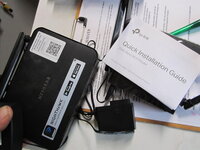
Here is the new shop router, and the old one which I'm thinking probably still works. Either one hooked up will NOT light the little internet led up. Signifying that it can't "find" internet.
 

Attachments

  • IMG_2979.JPG
    IMG_2979.JPG
    541 KB · Views: 51
  • IMG_2981.JPG
    IMG_2981.JPG
    477.8 KB · Views: 43
OP
P

PWC Repair

Well-known member
Joined
Dec 27, 2012
Messages
3,182
Location
Arkansas
And I set it up as 'access point' and followed through the setup prompts but here are the messages.
 

Attachments

  • IMG_2982.JPG
    IMG_2982.JPG
    870.3 KB · Views: 40
  • IMG_2983.JPG
    IMG_2983.JPG
    985.8 KB · Views: 34
  • IMG_2984.JPG
    IMG_2984.JPG
    877.2 KB · Views: 29
  • IMG_2985.JPG
    IMG_2985.JPG
    918.2 KB · Views: 31
OP
P

PWC Repair

Well-known member
Joined
Dec 27, 2012
Messages
3,182
Location
Arkansas
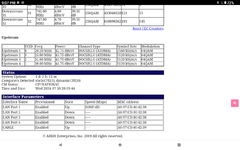
At this point I have to assume something 'changed' when the internet provider was down and it jacked up my settings in the main house cable modem.....which is an Arris Surfboard SBG7600AC2. Do these screenshots help?
 

Attachments

  • Screenshot_20240710-210143.png
    Screenshot_20240710-210143.png
    140.4 KB · Views: 24
  • Screenshot_20240710-210201.png
    Screenshot_20240710-210201.png
    52.4 KB · Views: 19
  • Screenshot_20240710-210230.png
    Screenshot_20240710-210230.png
    145.5 KB · Views: 17
OP
P

PWC Repair

Well-known member
Joined
Dec 27, 2012
Messages
3,182
Location
Arkansas
This is from cable modem 'status', and other stuff.
 

Attachments

  • Screenshot_20240710-210702.png
    Screenshot_20240710-210702.png
    167.4 KB · Views: 16
  • Screenshot_20240710-210921.png
    Screenshot_20240710-210921.png
    114.8 KB · Views: 23

GRN96WS6

Well-known member
Joined
Dec 23, 2012
Messages
2,234
Location
SOMD
Have you powercycled the house modem at any point post outage? May be worth a shot.
 

djbmw

Well-known member
Joined
Jun 20, 2013
Messages
1,143
Location
Ottawa, Ontario, Canada
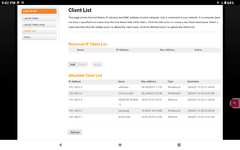
Those screenshots tell me that the router (in access point mode) in your shop is seeing your router at home. The home router has also assigned an IP to your shop access point (the last IP in the range, mind you: 192.168.0.254). There should be a tab in your Arris router that allows you to see all of the DHCP clients so that you can see if theres any IP conflicts there...

Edit: under LAN Setup > Client list perhaps
 
OP
P

PWC Repair

Well-known member
Joined
Dec 27, 2012
Messages
3,182
Location
Arkansas
Have you powercycled the house modem at any point post outage? May be worth a shot.
Oh yes, multiple times, and repowered the computer, and unhooked everything, and repowered, and hooked stuff back up.....tried everything.
 

Speedster356

New member
Joined
Jul 10, 2024
Messages
2
OK.....I have a cable modem with wireless in the house. I have an ethernet cable directly plugged in and it runs with a phone line in conduit underground about 175-200ft into the shop. In the shop I have that plugged into a wireless router "access point" so the wireless stuff works in the shop. Been this way for 6 years. I've had a router quit but no real issues. For about a week, the internet in the shop has been real slow. This morning it was on and off a few times then quit working. I stll have internet in the house. I just figured the wireless router in the shop must have quit because (it says) there is no internet signal. I plugged the ethernet cable directly into the computer and 'VIOLA' internet! OK, bought a new wifi router this evening and guess what it also cannot "see" an internet signal........but I plug the cable directly into the computer and NO PROBLEM. I switched cables around and tried a different cable with no such luck. I just brought the NEW router into the house and plugged it directly into an ethernet port in the house, on the modem, and it 'sees' signal here so I guess it's working. So why can't it "see" signal in my shop? What is going on here?
Check out Eero A couple of Eero PRO6Es should do the trick. https://www.eero.com/shop/eero-pro-6e
 
OP
P

PWC Repair

Well-known member
Joined
Dec 27, 2012
Messages
3,182
Location
Arkansas
I
Those screenshots tell me that the router (in access point mode) in your shop is seeing your router at home. The home router has also assigned an IP to your shop access point (the last IP in the range, mind you: 192.168.0.254). There should be a tab in your Arris router that allows you to see all of the DHCP clients so that you can see if theres any IP conflicts there...

Edit: under LAN Setup > Client list perhaps
found this client list, 'DESKTOP' hooked to ethernet is my shop office computer........where I NEED wireless to work for credit card payments, printer, my diagnostic scan tool, etc.
 

Attachments

  • Screenshot_20240710-212039.png
    Screenshot_20240710-212039.png
    105.1 KB · Views: 23

djbmw

Well-known member
Joined
Jun 20, 2013
Messages
1,143
Location
Ottawa, Ontario, Canada
I

found this client list, 'DESKTOP' hooked to ethernet is my shop office computer........where I NEED wireless to work for credit card payments, printer, my diagnostic scan tool, etc.
Your shop access point isnt showing up there... so thats the problem. Your shop access point might need to be reset, or go through the setup again... as it should be listed under the Arris Client List (since its relying on the Arris routers DHCP server to set the IP and then dish out the connection).
 
OP
P

PWC Repair

Well-known member
Joined
Dec 27, 2012
Messages
3,182
Location
Arkansas
For giggles, I just ran down to the shop and grabbed both routers. My old one, and the new one. Guess what......old one still works, client R6020.....wireless NETGEAR20! So if it works up here, plugged straight into an ethernet port, why won't it work in my shop anymore??
 

Attachments

  • Screenshot_20240710-213750.png
    Screenshot_20240710-213750.png
    96.3 KB · Views: 20
  • Screenshot_20240710-213808.png
    Screenshot_20240710-213808.png
    74.5 KB · Views: 17
To avoid these ads, REGISTER NOW!

djbmw

Well-known member
Joined
Jun 20, 2013
Messages
1,143
Location
Ottawa, Ontario, Canada
Perhaps your network line connecting your home to your shop is damaged (damn mice!). But... you stated that connecting a computer directly into your shops ethernet cable worked (with the wireless connectivity on the computer off to ensure youre not on wifi)?
 
OP
P

PWC Repair

Well-known member
Joined
Dec 27, 2012
Messages
3,182
Location
Arkansas
Correct. Shop computer on client list 'ethernet'. The whole need for the router in the shop is cause in my all metal shop 100ft away there is ZERO wireless or cell phone signal for that matter.
Perhaps your network line connecting your home to your shop is damaged (damn mice!). But... you stated that connecting a computer directly into your shops ethernet cable worked (with the wireless connectivity on the computer off to ensure youre not on wifi.
 
OP
P

PWC Repair

Well-known member
Joined
Dec 27, 2012
Messages
3,182
Location
Arkansas
Here is the new router also working fine hooked up in the house to the Arris modem. 'Archer' on client list and TPlink that my tablet can find right now!
 

Attachments

  • Screenshot_20240710-214236.png
    Screenshot_20240710-214236.png
    97 KB · Views: 10
  • Screenshot_20240710-214309.png
    Screenshot_20240710-214309.png
    74.1 KB · Views: 37

djbmw

Well-known member
Joined
Jun 20, 2013
Messages
1,143
Location
Ottawa, Ontario, Canada
So that means that the only factor that has changed is the network cable from your home router to the shop.

I would unplug both ends and visually inspect for burns on the pins or damage and reconnect. Make sure the connection isnt loose.
If that doesnt help then you could buy a network cable tester for $20 on amazon... it will tell you if any of the condoctors within the cable are damaged/not making a connection.

I personally own this one https://a.co/d/0eZAS8TU

Edit: try connecting the cable into a different port of your router as well
 
Last edited:
OP
P

PWC Repair

Well-known member
Joined
Dec 27, 2012
Messages
3,182
Location
Arkansas
Yep, tried connections and different ports already. So, is it possible for that ethernet cable to somehow pass signals right to the computer but NOT to the router? It sure seems like that must be the case.
 

BrandonV

Well-known member
Joined
Jun 9, 2023
Messages
4,030
Location
Arizona
Was the cable that was run a pre-terminated patch cable or was it punched down/crimped by someone?

I'm late to the thread but it sounds like a physical problem more than anything.
 

rooster59

Well-known member
Joined
Nov 16, 2014
Messages
960
Location
Land of the Pines
When the router is in the shop which jack did you plug the cable into? If it’s like mine, Should be like 1, 2, 3, or 4, not the internet jack. When you’re in setup it’s probably going to show no internet, that just means no signal on the internet jack. Try Connecting to your garage access point with a phone. If it works you’re good.
 
OP
P

PWC Repair

Well-known member
Joined
Dec 27, 2012
Messages
3,182
Location
Arkansas
I tried on LAN 1,2,3,&4. But it's ALWAYS been hooked to the WAN port. Then the computer, cameras, and one other one were in LAN ports.
 
OP
P

PWC Repair

Well-known member
Joined
Dec 27, 2012
Messages
3,182
Location
Arkansas
So that means that the only factor that has changed is the network cable from your home router to the shop.

I would unplug both ends and visually inspect for burns on the pins or damage and reconnect. Make sure the connection isnt loose.
If that doesnt help then you could buy a network cable tester for $20 on amazon... it will tell you if any of the condoctors within the cable are damaged/not making a connection.

I personally own this one https://a.co/d/0eZAS8TU

Edit: try connecting the cable into a different port of your router as well
Thanks. I think I'll order a tester so I know for sure if something happened to that line.
 
OP
P

PWC Repair

Well-known member
Joined
Dec 27, 2012
Messages
3,182
Location
Arkansas
Your shop AP should be connected to one of the numbered ports on you Arris router at home, not the WAN port
Correct, no WAN port on the Arris, it's a cable modem. I meant down IN the shop I tried the ethernet cable into both LAN and WAN on the WAP.
 

betulauber

Well-known member
Joined
Dec 10, 2010
Messages
62
This is a new problem after storms...

If this happened after a lighting storm then make sure and double check all the network equipment not just the shop router. A few years ago, I had a lighting strike and 3 LAN ports & the 2.4ghz radio on my router died, but the 5ghz radio and WAN port worked just fine. So it appeared fine for some devices and other didn't work at all.

Is your main router separate from the modem or is it a modem/router combo? If it's separate I would try setting up the new router in the house, then test the others in the shop and see if that gets you anywhere.
 

bugnut

ALLIANCE MEMBER
Joined
Jul 14, 2012
Messages
3,915
Location
Central Ohio
@PWC Repair I am not a wifi/computer connection guru. But like you, smart enough to track down problems. I had a similar situation recently, same setup as you router in the house, extension cord to shop and router in the shop. Worked well for years then started dropping internet (wi-fi) in the shop. After much trying, like you and frustration like you, I bought similar test tool as @djbmw described above. Sometime it would work sometime not. Helped me to recognize problem was in the extension cord. Eventually after using alligator clip extensions, to bypass the plug ends, on the male/female plug ends for the wan connection in the home at the router, I was able to determine one of the female ends had a failed connection. Amazon supplied Klien tool and ends to replace and after cutting the wire installing new ends, using the matching wiring schematic, I solved the problem. This issue occurred after 7 years of operating the system daily in my shop. Hope you find it soon as it is frustrating as hell!

Klein tool & alligator extension wire clips

Klein Tools 80024 Ratcheting Data Cable

40 PCS Alligator Clips Electrical, 5-Color 21.5inch Test Leads with Alligator Clips


Denwood

Well-known member
Joined
Sep 22, 2014
Messages
4,191
Location
Thunder Bay, Ontario, Canada
Correct, no WAN port on the Arris, it's a cable modem. I meant down IN the shop I tried the ethernet cable into both LAN and WAN on the WAP.
In your shop, make sure you only use the LAN ports on the router. Also, turn off DHCP on the shop device. Your report of on/off internet on the last day things were working might point to a LAN drop issue. Also the port you were using on the home side may be damaged so test with another port that you know is good. Test your shop setup plugged in on the home side first…then take it out to the shop so you know all those bits are working first. This would isolate the issue to your shop’s LAN drop.

I would 100% check the LAN drop between buildings with a proper LAN tester. It will have a remote dongle to go with the tester to check all eight wires to ensure both ends are ok. One of these (Klein Tools VDV500-705) will test both ends, and is handy to have for wire tracing etc down the line:

Then, you should install surge protection at both ends. It’s not uncommon for lightning to introduce ground/potential differences that can damage ports at either end, or the LAN drop itself. This is why many recommend fiber these days for this application.

I have a LAN drop to my shop so have seen the cooked ports etc issues. It’s been fine since adding surge arresters at both ends along with new switches.
 
Last edited:

1blink

Well-known member
Joined
Mar 18, 2014
Messages
47
Sounds like a problem with the cat5 wire, or the connections on the end of the wire.
With a wire run that long, wire pin out and crimp technique need to be perfect. There's already a good bit of signal loss over that long of a run, so minor defects can kill it
 
OP
P

PWC Repair

Well-known member
Joined
Dec 27, 2012
Messages
3,182
Location
Arkansas
Is your main router separate from the modem or is it a modem/router combo? If it's separate I would try setting up the new router in the house, then test the others in the shop and see if that gets you anywhere.
It's a combo. Yep, tried old and new shop router in the house, work fine, see screenshots above.
 
OP
P

PWC Repair

Well-known member
Joined
Dec 27, 2012
Messages
3,182
Location
Arkansas
In your shop, make sure you only use the LAN ports on the router. Also, turn off DHCP on the shop device. Your report of on/off internet on the last day things were working might point to a LAN drop issue. Also the port you were using on the home side may be damaged so test with another port that you know is good. Test your shop setup plugged in on the home side first…then take it out to the shop so you know all those bits are working first. This would isolate the issue to your shop’s LAN drop.

I would 100% check the LAN drop between buildings with a proper LAN tester. It will have a remote dongle to go with the tester to check all eight wires to ensure both ends are ok. One of these (Klein Tools VDV500-705) will test both ends, and is handy to have for wire tracing etc down the line:

Then, you should install surge protection at both ends. It’s not uncommon for lightning to introduce ground/potential differences that can damage ports at either end, or the LAN drop itself. This is why many recommend fiber these days for this application.

I have a LAN drop to my shop so have seen the cooked ports etc issues. It’s been fine since adding surge arresters at both ends along with new switches.
Yep, tested in the house last night, then took to shop........nothing.
Yep, I'll get a tester.
I have nice protectors on both ends for power and ethernet.......lost a couple routers to lightning in the first year or 2.
 

wyliesdiesels

Well-known member
Joined
Aug 14, 2012
Messages
20,022
Location
Modesto, CA
I tried on LAN 1,2,3,&4. But it's ALWAYS been hooked to the WAN port. Then the computer, cameras, and one other one were in LAN ports.
when you do that youre doing whats called double NAT. youre putting all the stuff in the shop on a separate subnet than all the stuff in your house which is on the other side of the WAN port... this means that any host in the house will not be able to see any host in the shop....

you should be connecting the cable to a LAN port to not have the double NAT
 
To avoid these ads, REGISTER NOW!
Top Bottom