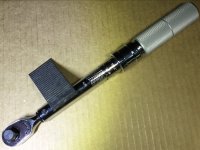
Picked up a pair of the Icon G2 1/4" locking flex head ratchets not long ago, finally got around to converting one of them to 3/8". As others have pointed out, even though almost every internal part of the Icon is different from the Snap On Dual 80, the guts are largely interchangeable.
Parts:
You can buy the Snap-On parts directly from Snap-On (shop.snapon.com), but you'll get hit for a $25 flat rate shipping fee for orders under $250, or if you are on a SO truck route buy from them, or buy on eBay and also pay a premium, but still less than adding in the $25 shipping fee...
Other stuff needed:
There are only five parts that you actually need to replace.
From the repair kit, the new 3/8 anvil, the o-ring/seal, and the two screws. You will have left over parts in the repair kit. And the new cover plate purchased separately.
The screws used on the original Icon face plate have a taper seat, and the new face-plate and screws have a flat seat, so don't be tempted to re-use the original screws
You can replace all the internals with the replacement SO parts, but it is unnecessary and slightly more complex. The Snap-On anvil works perfectly with the remaining Icon internals.
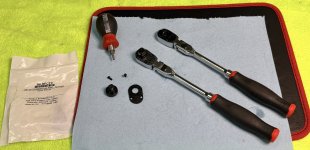


Parts:
- Icon G2 1/4" locking Flex Head Ratchet, R1LKG, SKU 70451. List price $55 (recently on sale for $33)
- Snap-On RKRFC72 repair kit (3/8" Drive Repair Kit For FC72 and FCF72 Ratchets). List price $11
- Snap-In FC72-2 cover plate (Also for FC72 ratchet). List price $13.55
You can buy the Snap-On parts directly from Snap-On (shop.snapon.com), but you'll get hit for a $25 flat rate shipping fee for orders under $250, or if you are on a SO truck route buy from them, or buy on eBay and also pay a premium, but still less than adding in the $25 shipping fee...
Other stuff needed:
- HIGH QUALITY Torx 8 bit and driver. You might think a T10 fits, but it doesn't..
- Optionally, your favorite ratchet lube. I like SuperLube ISO 100-150 (its a thick oil, but not as thick as grease).
- Optionally magnetic parts pickup tool
- Remove T8 screws from faceplate of ratchet. They have a bit of locktite on them, but with a good bit they will come out without drama. I like using a stubby bit driver (Wiha bit, Wiha stubby bit driver), it allows me to really control the pressure and turning of the screws so they don't strip out.
- Hold the anvil in place with your finger as you finish removing the screws so it all doesn't inadvertently come apart.
- Remove the cover plate. I find a small magnetic pick up tool is perfect for doing this. Again, hold the anvil in place while you remove the cover plate.
There are only five parts that you actually need to replace.
From the repair kit, the new 3/8 anvil, the o-ring/seal, and the two screws. You will have left over parts in the repair kit. And the new cover plate purchased separately.
The screws used on the original Icon face plate have a taper seat, and the new face-plate and screws have a flat seat, so don't be tempted to re-use the original screws
You can replace all the internals with the replacement SO parts, but it is unnecessary and slightly more complex. The Snap-On anvil works perfectly with the remaining Icon internals.
- Gently remove the anvil while holding the pawl in place with your finger.
- Put the new seal on the new anvil.
- Gently install the new anvil [might take a bit of wiggling, but shouldn't be too hard]
- Add a few drops of lube if you like.
- Put the new cover plate on.
- Install first screw, snug not tight.
- Install and tighten second screw. Don't go gonzo, it's a tiny fastener and has loctite on it.
- Tighten first screw .
Last edited: