BrandoJames
Well-known member
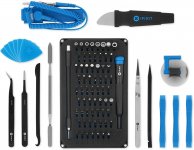
I just picked up the iFixit Pro Tech tool kit for $65 via Amazon. I needed the kit to upgrade my Mac Mini with an SSD drive. I’ve already installed an NVMe SSD, which was quite simple—just pop the case and the PCIe slot was easily accessible. I use that drive to run my Mac OS 11 partition.
However, my Linux CentOS partition was running on the original SATA HDD, so I wanted to upgrade that drive to SSD. On the Mac Mini, replacing the SATA drive means a complete teardown/rebuild. I’m retired, with plenty of spare time and nowhere to go, so why not. I ordered the iFixit tool kit and went to work yesterday. Popped the lid, removed the fan, removed power supply, removed logic board (which meant disconnecting several tiny plastic connectors)—just to get to the SATA drive. Note: iFixit has excellent videos on computer repair.
The tool kit was pretty handy. I used a Torx 5, Torx 6 Security, Torx 7. Finally got the Mac stripped down to the bare case, installed my SSD Samsung SATA drive, then put it all back together. Powered it up and she booted fine into Mac OS, which recognized the new SSD drive. Then I recreated a bootable Linux CentOS partition on the new SSD and restored some user files from backup.
Last night, I noticed that my LED no longer works—the little green power light that flashes when the system is asleep (that’s one of those tiny plastic connectors that I obviously destroyed). But other than that snafu the Mac is total SSD now. And I’ve already upgraded my PS4 to SSD. One silver lining about the Covid lockdown: people are learning how to fix their own stuff. Or in my case, fix one thing & break another.
https://www.amazon.com/gp/product/B01GF0KV6G/?tag=atomicindus08-20
However, my Linux CentOS partition was running on the original SATA HDD, so I wanted to upgrade that drive to SSD. On the Mac Mini, replacing the SATA drive means a complete teardown/rebuild. I’m retired, with plenty of spare time and nowhere to go, so why not. I ordered the iFixit tool kit and went to work yesterday. Popped the lid, removed the fan, removed power supply, removed logic board (which meant disconnecting several tiny plastic connectors)—just to get to the SATA drive. Note: iFixit has excellent videos on computer repair.
The tool kit was pretty handy. I used a Torx 5, Torx 6 Security, Torx 7. Finally got the Mac stripped down to the bare case, installed my SSD Samsung SATA drive, then put it all back together. Powered it up and she booted fine into Mac OS, which recognized the new SSD drive. Then I recreated a bootable Linux CentOS partition on the new SSD and restored some user files from backup.
Last night, I noticed that my LED no longer works—the little green power light that flashes when the system is asleep (that’s one of those tiny plastic connectors that I obviously destroyed). But other than that snafu the Mac is total SSD now. And I’ve already upgraded my PS4 to SSD. One silver lining about the Covid lockdown: people are learning how to fix their own stuff. Or in my case, fix one thing & break another.
https://www.amazon.com/gp/product/B01GF0KV6G/?tag=atomicindus08-20