To avoid these ads, REGISTER NOW!

Installine POE Cameras

Flargen

Active member
Joined
Aug 20, 2013
Messages
39
Location
San Antonio, TX
Lots of solid info in here. pobinga also did a great job of explaining PoE (an unused pair of wires provides ~48v DC power to the endpoint).

Based on the camera model info you provided, it does have an external 12v power input (presumably a barrel connector), for which they may or may not have provided a power brick for. Find one of the appropriate amperage and connector and you should be set.

When connecting it to your laptop, you'd ultimately need to either connect it directly to your laptop via a crossover cable (basically a normal Ethernet cable, but with the Tx and Rx pairs reversed). Otherwise you'd need to connect both the laptop and camera to a switch or hub as an intermediary.

If you're set on PoE cameras (which I am - already invested in a 48-port PoE gigabit switch for my house infrastructure), go ahead and order a PoE switch with enough ports to get that ball rolling, as both PoE and non-PoE devices can be connected to it.

Regarding connecting to the camera for the first time, you may have some difficulty without vendor-specific software if you aren't familiar with networking at a basic level. You essentially need to determine what the camera's default IP address is (if any), or check whatever router is present in your network that is responsible for IP assignment (via a protocol called DHCP) to see what IP was leased to the camera when it came online. Assuming it pulls an IP via DHCP, you should be able to access it without any further configuration on the laptop you're using to configure it (provided it also pulls an IP via DHCP from the same router), typically via a web-based interface listening on HTTP or HTTPS (simple terms: assuming the camera got the IP 192.168.1.123, you'd navigate to http://192.168.1.123 or https://192.168.1.123 in your laptop's browser). Default login credentials should be provided within the camera's docs.

If you've got a friend who's handy with home networking and WiFi setup-type work, offer them a few beers to give you a crash course. It can be an exhaustive conversation starting from scratch via a forum thread.
 
To avoid these ads, REGISTER NOW!

Flargen

Active member
Joined
Aug 20, 2013
Messages
39
Location
San Antonio, TX
No need for a crossover cable if you have a gigabit Ethernet port as it will auto negotiate.
I was unaware the GigE auto-negotiated crossover, at least when it comes to devices (like NICs, or that camera... whose controller is likely bottom-dollar). GigE switches have auto-negotiated Tx/Rx channels for quite a long time, though.
 

Tmart86

Well-known member
Joined
Jul 12, 2017
Messages
151
Location
Cedar Rapids Iowa
I was unaware the GigE auto-negotiated crossover, at least when it comes to devices (like NICs, or that camera... whose controller is likely bottom-dollar). GigE switches have auto-negotiated Tx/Rx channels for quite a long time, though.

Haven’t run into a camera yet that won’t work just plugged into my laptop and a simple poe injector. Not saying some won’t work but I haven’t needed a crossover cable yet. I’m pretty sure you only need one end with gigE and it will still auto negotiate.
 

4EyedTurd

Well-known member
Joined
Oct 3, 2009
Messages
595
Location
Texas
Anyone care to recommend a good POE camera system that does good/great night time stuff?
 

vette-kid

Well-known member
Joined
Jul 21, 2008
Messages
3,636
Location
Navarre, FL
Anyone care to recommend a good POE camera system that does good/great night time stuff?
Hickvision 3345 are pretty good for me. I preferred together my own because I wasn't happy with the kits out there.

Sent from my Moto Z (2) using Tapatalk
 

Git

Well-known member
Joined
May 18, 2008
Messages
6,894
Location
S Cal
Anyone care to recommend a good POE camera system that does good/great night time stuff?

Dahua Starlight

I just replaced a couple of Hikvision 3mb cameras with Dahua 2mb starlight cams - primarily for their low light visibility, and I am really pleased with the results. The one Dahua I purchased, (very popular PC-HDW5231R-ZE) has a motorized lens that really worked out great.

What I mean by that is when you usually buy a camera, they come with different. 'fixed' lens options - 2.8 mm, 4 mm, 6 mm, etc. The lower the number the wider the coverage. So if you want to cover a certain section of your front yard for example, you need to try to figure out which lens to get. The next step up is called a 'varifocal' lens that give you more flexibility. A varifocal will come with a range - 2.7mm to 13.5mm or something like that. So you initially set up the camera where you want it and then you can manually play around with the lens to get the coverage you want, and then you lock it down (it's fixed)

example camera with varifocal

The Dahua 5231R takes it to the next step and motorizes the lens so you can set the zoom level to what you want from a web browser. You can move the lens whenever you want (unlike a varifocal) but it is not really meant to be a PZT (Pan Zoom Tilt) camera

IPC-HDW5231R-ZE

I would suggest to start reading at IPCAMTALK.com. They are very helpfull, the forum members have reviewed a lot of different cameras and they have one vendor on board - EmpireAndy, who sells direct from China or through his Amazon store. At least look at their Wiki

https://ipcamtalk.com/threads/dahua-cameras-quick-reference-guide-cam-specs-reviews.39870/

Don't get caught up in the 4k or some high megapixel number for the cameras, there is more to it than that
 
Last edited:

slodat

ALLIANCE MEMBER
Joined
Feb 6, 2010
Messages
3,679
Location
Central-ish, WA
Everything Git said. I have many of the Dahua Starlight varifocal cameras going to Blue Iris. Can't recommend it highly enough!
 

4EyedTurd

Well-known member
Joined
Oct 3, 2009
Messages
595
Location
Texas
How good do you need? How far away are you trying to view etc?

About 90’, as far as how good, I’d like to be able to see what’s going on at night but I’m not sure what to expect. I’ve watched a few promo vids and they all kinda promote the HD 4K but GIT says don’t get hung up on that.

And holy cow with all the abbreviations, reading a description I’ve got to sidetrack to figure out what they mean.
 
Last edited:

Tmart86

Well-known member
Joined
Jul 12, 2017
Messages
151
Location
Cedar Rapids Iowa
About 90’, as far as how good, I’d like to be able to see what’s going on at night but I’m not sure what to expect. I’ve watched a few promo vids and they all kinda promote the HD 4K but GIT says don’t get hung up on that.

And holy cow with all the abbreviations, reading a description I’ve got to sidetrack to figure out what they mean.

Realistically you are probably going to need a Infrared illuminator at 90’ depending on how much detail you want. I would agree not to get hooked on 4k cameras. Pixel size decreases on the image sensor gets smaller and impacts low light performance unless you increase the image sensor size. 1080p is probably just fine. Never used the starlight cameras but they get lots of good reviews.

Do you want license plates at 90’ or just to be able to see a person. How wide do you want to image at 90’ this will help with lens choice.
 

Git

Well-known member
Joined
May 18, 2008
Messages
6,894
Location
S Cal
So basically you have daylight conditions and low light conditions. Unless your willing to spend big $$$, you are not going to get one single camera to perform well under both situations. You need to decide what your more concerned about and it seems most people, not all, would say low light.

As Tmart pointed out, unless the camera is optimized for low light, you need to provide some sort of lighting. Most decent cameras come with infrared illuminators but you can also supplement that with a standalone illuminator, but getting out there 90' is pretty far.

One of the problems I saw with the 'packaged' systems is you are limited to what is in the package. You are not able to pick and choose the cameras that best fit your situation. On the other hand, those types of systems are fairly easy to set up

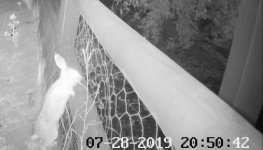
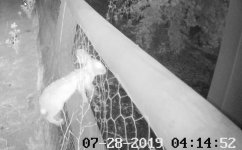
Currently I am having an issue with rabbits getting in my backyard and chewing the **** out of my grass. I took one of the old Hik bullet cames that I replaced with the Dahua and set it up so I could see what was going on. While doing so, it made me think of this thread and in reality how easy it is to get a camera system up and running - just to test the waters, if you take it one step at a time.

For instance, if you were to buy a camera like the Dahua Starlight with the varifocal lens to play around with, you would be out about $200 and have a very good camera ($176 for the camera plus $18 for the injector plus tax) Once you connect it to your home network, you would be able to live stream the video to any computer (you would pull it up in a web browser or VLC) and if you wanted to view it on your phone you would purchase an app like TinyCam. With the web browser, you would be able to access the camera's settings, and set up things like alerts, motion recording etc. You could just add a memory card right into the camera, and set the camera up to record the card.

At that point you could decide how to proceed further - a DVR based system or something running from a dedicated computer running Blue Iris software to control the camera. There really are a lot of options, but spend the money on a decent camera at first to get your feet wet and go from there. (you would be able to use this cam with a Dahua dvr, Blue Iris, it doesn't matter - you can basically use just about any cam)

And here is that fking rabbit going through my fence :(

https://www.amazon.com/dp/B07B7K1P28/?tag=atomicindus08-20

https://www.amazon.com/gp/product/B001PS9E5I/?tag=atomicindus08-20
 

Attachments

  • GR8-771.jpg
    GR8-771.jpg
    56.1 KB · Views: 49
  • GR8-772.jpg
    GR8-772.jpg
    60.7 KB · Views: 50
To avoid these ads, REGISTER NOW!

Tmart86

Well-known member
Joined
Jul 12, 2017
Messages
151
Location
Cedar Rapids Iowa
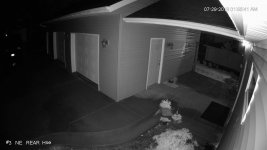
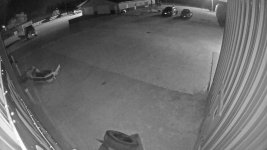
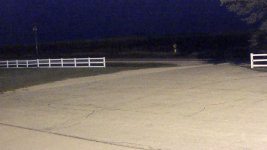
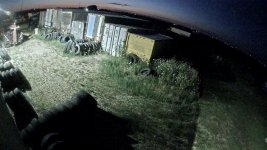
Not sure how the pictures are going to show up using the upload feature but the two black and white images one of a house/detached garage is lorex 4k at night. This image looks good in the hot spot of the built in IR and has help from a light source on the right side of the image. Image of the driveway between two shops is in a poorly lit area with a single metal halide light on a poll a long way away. This camera is an Axis m2025-LE recording to an SD card. The axis camera shows no signs of dark edges etc. this camera is capable of a color image if we wanted to but the image gets noisy/grainy because of the settings required.

The other two color images are also axis cameras with decent lighting placement that allows color images all night.
 

Attachments

  • 6E74A589-83B8-4BD1-9B3B-942E5A3B5447.jpg
    6E74A589-83B8-4BD1-9B3B-942E5A3B5447.jpg
    92.3 KB · Views: 59
  • A9C83397-01EA-4048-A61E-20D2A4769A8B.jpg
    A9C83397-01EA-4048-A61E-20D2A4769A8B.jpg
    101.7 KB · Views: 56
  • A4241AD9-4E67-4DA0-8224-2A4158ECF552.jpg
    A4241AD9-4E67-4DA0-8224-2A4158ECF552.jpg
    111.2 KB · Views: 59
  • B47D5CDA-A416-4DF4-9B24-61A10D6DAC83.jpg
    B47D5CDA-A416-4DF4-9B24-61A10D6DAC83.jpg
    151.2 KB · Views: 60

PNWguy

Well-known member
Joined
Jan 3, 2018
Messages
494
Location
Near Grants Pass, OR
I'm building a place now, and would like to install cameras - but I don't think I'll have the time to fully investigate everything before it's too late.

Is it reasonable to run Cat6 to potential camera locations, and place the other end all in the same location, where the POE injector would go?

Also, any thoughts on placing the DVR into my safe? My concern is that it would get too warm, because of the lack of airflow in the safe. Sure would be nice to have the recorder locked up.
 

vette-kid

Well-known member
Joined
Jul 21, 2008
Messages
3,636
Location
Navarre, FL
I'm building a place now, and would like to install cameras - but I don't think I'll have the time to fully investigate everything before it's too late.

Is it reasonable to run Cat6 to potential camera locations, and place the other end all in the same location, where the POE injector would go?

Also, any thoughts on placing the DVR into my safe? My concern is that it would get too warm, because of the lack of airflow in the safe. Sure would be nice to have the recorder locked up.
That's what I would do. I'd make a run to each outside corner, one in the garage, one facing the front door and maybe one in a location to face the mailbox or drive entrance. No to the safe unless it's ventilated. I put one in an alarm box in the closet once but I had to punch out all the knock out holes to keep it from overheating. Just get a wall mount media box that's lockable and make sure it's mounted really well. Should serve as a good enough deterrent. Any good thief will find a way, just make it so it isn't worth their time and effort.

Sent from my Moto Z (2) using Tapatalk
 

Tmart86

Well-known member
Joined
Jul 12, 2017
Messages
151
Location
Cedar Rapids Iowa
Cat6 is probably overkill but cost wise it keeps you future proof. Get a good quality shielded cable. If I use an nvr from a kit system i just put it out of the way like a laundry room or closet under the stairs.

Most of the systems I’ve done use SD cards in the cameras and a poe network switch so they would have to grab every camera to get footage or they record to a Network attached storage or just a pc. Both really aren’t big targets for robbers.
 

PNWguy

Well-known member
Joined
Jan 3, 2018
Messages
494
Location
Near Grants Pass, OR
Thanks Vette Kid & Tmart.

One of my runs will be at least 400' (from the shop to the driveway gate). Is that going to be a POE or data problem? IIRC, max length on Cat5 is 100m.
 

Git

Well-known member
Joined
May 18, 2008
Messages
6,894
Location
S Cal
I'm building a place now, and would like to install cameras - but I don't think I'll have the time to fully investigate everything before it's too late.

Is it reasonable to run Cat6 to potential camera locations, and place the other end all in the same location, where the POE injector would go?

Also, any thoughts on placing the DVR into my safe? My concern is that it would get too warm, because of the lack of airflow in the safe. Sure would be nice to have the recorder locked up.

It's called 'Home Run' wiring - everything leads back to one place - be it a DVR or POE switch, etc. If you are going to have several cameras, you don't really want injectors - each of them needs to be plugged into an ac outlet versus something like an 8 or 16 port POE switch or DVR

I recently purchased this Dahua camera for the front of my house and it works out really well. It's actually two separate cameras on one feed/line. Each camera has it's own separate channel
 

Attachments

  • GR8-774.jpg
    GR8-774.jpg
    149.8 KB · Views: 37

Git

Well-known member
Joined
May 18, 2008
Messages
6,894
Location
S Cal
Thanks Vette Kid & Tmart.

One of my runs will be at least 400' (from the shop to the driveway gate). Is that going to be a POE or data problem? IIRC, max length on Cat5 is 100m.

Dahua has their 'enhanced POE line'

"The ePoE lineup includes cameras, switches, and recorders ideal for applications with long distance transmission requirements. These network devices allow for data transmission up to 2625ft (800m) without repeaters, providing a lower total cost of ownership to users who require long transmission distances without interruption. "

Thats about all I know about it, your going to have to do some digging. (I think you need to use a Dauha DVR, but not sure)

As I mentioned, ipcamtalk.com would be a good reference source and 'EmpireAndy' could probably get you some pricing

https://us.dahuasecurity.com/2017/09/25/dahua-usa-launches-enhanced-poe-technology/
 

Tmart86

Well-known member
Joined
Jul 12, 2017
Messages
151
Location
Cedar Rapids Iowa
Thanks Vette Kid & Tmart.

One of my runs will be at least 400' (from the shop to the driveway gate). Is that going to be a POE or data problem? IIRC, max length on Cat5 is 100m.

This can be solved with a fiber / power run. Or run power over coax using a good quality direct bury rg59/rg11 and you can do poe over coax for a single camera out to about 1000’ lots of adapter options on amazon for under $100.

This power over coax is the same as power over ethernet just lets you go further distances by using ethernet to powered coax adapters on both ends.
 
Last edited:

4EyedTurd

Well-known member
Joined
Oct 3, 2009
Messages
595
Location
Texas
Ah, after the talk of POE, I started to lean that direction mainly for ease of installation.
 

newbinga

Active member
Joined
Dec 6, 2014
Messages
41
Location
Atlanta GA
I would not run coax for any ip cameras. That's just going backwards.

CAT5 is rated for around 328'. There is nothing that shuts it off after that. It is also rated at that distance for a certain wattage. However most of the cameras being discussed are never going to use the full rated wattage even at night with IRs.

We have runs in warehouses where we are over 400' and no issues. We did have a plan in case there was an issue.

Fiber is going to require power at both ends as you will need a switch or media converter, plus power for the camera.

Look at poe extenders. Veracity has a good product.

Sent from my SM-G965U using Tapatalk
 

newbinga

Active member
Joined
Dec 6, 2014
Messages
41
Location
Atlanta GA
If you have to trench a line just for the camera, look at Ubiquiti wireless. If you are already running power/communications for the gate, this may not apply.

Sent from my SM-G965U using Tapatalk
 
To avoid these ads, REGISTER NOW!
Top Bottom