If anyone reading this thread wants a free Ubiquiti Unifi UAP with POE injector, PM me and it's yours for the actual cost of shipping.
This is now spoken for; "Dissident" has claimed it.


If anyone reading this thread wants a free Ubiquiti Unifi UAP with POE injector, PM me and it's yours for the actual cost of shipping.
Finally got the AP installed and functional. Took me a few hours to figure it out though. Through a lot of reading, I found that I had to connect the AP directly to the computer to access the menu. Apparently it cannot be accessed otherwise.
Connecting to the computer is for first time setup only. Once you assign it a fixed IP address and it is live on your network, you can access its web interface in your browser. Just use the IP address for the browser's location field. All configuration options are available in the web interface.
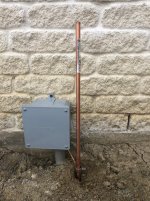
Here is where I’m at now. I drove the 8’ x 5/8” copper ground rod as far as I could get it to go. I’ll have to cut it off at ground level. Then, I’ve got my 6 gauge ground wire attached to it and run to the grounding block in the garage. I’m going to get a recessed wall box so I can hide all the connections and make it look nice. Obviously, I’ve got quite a bit more work to go.
Oh, ok. I must have done something wrong then. I’ll have to go back and try again because I can’t access it unless it is connected to the computer. Thank you.
The only thing you need to do while it is connected to your computer is go into network settings, and assign it a fixed IP address that is on your LAN. When it reboots, you will lose your connection to the computer likely. Then plug the AP into a switch/port on your LAN and you should be able to ping that IP address from your computer. Then open your browser and go to that IP address. You can do all the rest of the configurations there. First thing, change the default password.
I may be wrong, but I'm thinking you'll have to be on the hardwired part of your network to access it too. It may not let you connect to it over the WiFi.
I had an AP that was that way too. You had to jack in to the network switch that the AP was plugged in to in order to administer it. If you were only connected to the network via WiFi, it wouldn't let you login.