To avoid these ads, REGISTER NOW!

Internet to the Garage - Trenching versus Wireless -Tips Wanted

gsebast1

Well-known member
Joined
Feb 6, 2006
Messages
58
Location
TX
I looked at several wireless options for getting internet into my workshop.
The workshop is about 90 feet from my house and I’ve been putting off running internet because I thought it would be costly. After research, it looked like a Ubiquiti point to point was going to be the solution. The price wasn’t bad, but I
was going to have to pay someone to install the hardware because it would be pretty high up on he buildings and the roofs are really steep.

Before I pulled the trigger on the Ubiquiti system I decided to call a local irrigation company just to see how much it would cost to trench a line from the house to the workshop and put in a Cat6 cable. I figured that since they install complete sprinkler systems and wire the controllers into the garage this may be fairly straightforward.

I was surprised when he said it would be very simple and he would trench it and provide the 1 1/4” gray schedule 40 electrical pvc for $250 bucks. This included running my direct-bury Cat6 cable through the pvc and drilling a hole through the brick and running the cable inside. He will then backfill the trench.
This seems really reasonable to me. I have a friend that owns an AV/Home theater business that can help me terminate and hook up the cables and configure everything. The biggest obstacle for hardwiring was the trenching.

Hardwiring seems like the way to go. My plan is to use 1 1/4” gray schedule 40 pvc and run two Cat6 direct-bury cables and a string through it. We would use one of the Cat6 cables now and have the other cable and string in there in case I wanted to do something else in the future.

Any tips or things I’m not thinking of?
My building is already pre-wired for a tv, speakers, cameras, etc.
 
Last edited:
To avoid these ads, REGISTER NOW!

larry4406

Well-known member
Joined
Jan 27, 2006
Messages
19,512
Location
Northern Virginia
Someone with more knowledge than I will come along and say add surge protection at each end to your Cat6 and you are golden. Then others will say go fiber.

I am in same situation with my barn except I already have a 1" conduit so I am following along.
 
OP
G

gsebast1

Well-known member
Joined
Feb 6, 2006
Messages
58
Location
TX
Someone with more knowledge than I will come along and say add surge protection at each end to your Cat6 and you are golden. Then others will say go fiber.

I am in same situation with my barn except I already have a 1" conduit so I am following along.

Thanks.
I just discovered some info about surge protection of Cat6 versus fiber this morning and was hoping someone would comment along those lines. I have the Cat6 and the specs for it are really good. Unless there is an absolutely compelling reason to go fiber, I will stick with what I have. I have a tendency to over-do everything.
 

wyliesdiesels

Well-known member
Joined
Aug 14, 2012
Messages
20,067
Location
Modesto, CA
theres numerous threads on this forum about this exact topic. try using the search feature... definitely put in surge protection
 
OP
G

gsebast1

Well-known member
Joined
Feb 6, 2006
Messages
58
Location
TX
theres numerous threads on this forum about this exact topic. try using the search feature... definitely put in surge protection

I searched and read a number of threads on here. My angle was that after reading these threads I thought that hard wiring would be too difficult and expensive, so I was going to go wireless like many of the threads I read. Then I found out it was no big deal to an irrigation company and is very affordable. I wanted to share that.

I have my direction, just asking if anyone has tips or things to I should do. Surge protection is a great tip. Thanks.
 

jeepxj

Well-known member
Joined
Mar 2, 2008
Messages
17,891
hard wire for sure. $250 bucks is a no brainer cost.

some will insist fiber only. some will say cat6 without surge. some will say with. do your own homework as 1.25" will accept any of those options.
 

Tom Sestito

Well-known member
Joined
Dec 25, 2017
Messages
310
Location
Winnipeg, MB
You will have to configure the router in your garage to the same network name and password as the one in your house, ortherwise your device's will always be searching for the wrong network and not work.
I used an old router I had on hand to do it and it works pretty well. You should Google the topic for the in's and out's of your specific router configuration because it's not just as simple as using the same network name and password. But once you get it figured out it works awesome. Good luck
 

My Old Tools

Well-known member
Joined
Jun 4, 2014
Messages
5,446
Location
Hamrick Lake, TX
You will have to configure the router in your garage to the same network name and password as the one in your house, ortherwise your device's will always be searching for the wrong network and not work.
I used an old router I had on hand to do it and it works pretty well. You should Google the topic for the in's and out's of your specific router configuration because it's not just as simple as using the same network name and password. But once you get it figured out it works awesome. Good luck

No. You don't have to do that at all. You just register your devices to both networks and it will automatically log in to the one it sees. Or you can use a Google mesh (or other mesh) router for your garage endpoint. That will give you a single network across both. The Google mesh devices have hardwire option. I just set one in the office window and one in the shop window and let it WIFI mesh. Not sure if it will reach 90 feet.
 

aggie113

Well-known member
Joined
Jul 22, 2015
Messages
476
Location
San Antonio, TX
Wired is always going to be the best choice you can make for a solid network connection. Of course, that's not always the only thing taken into consideration. I wouldn't worry too much about the lighting thing unless you live on a hill or have an abundance of lightning strikes in your area. I ran a single cat 6 through some Hydromaxx conduit that was left over from the lift install and I'm just running that from the house along the fence to the garage (only about 40 ft). I put some expanding foam on the side of the conduit that's outside so it's nice and sealed up from the elements.
If you can do wired, I'd say do wired. If not, a good wireless setup from Ubiquiti like the 60Ghz setup will probably serve all your needs as well.
 

tvtaurus

Well-known member
Joined
Nov 16, 2014
Messages
1,547
Location
Indiana
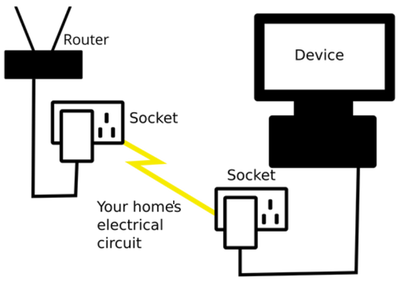
The price for trenching and hardwiring I agree is a good price. I have in the past at my brother's shop installed Ethernet wall bridges and a second wifi router at the shop side. The ethernet wall bridge transmits the internet connection over the shared power lines already running to the building, then at the building, it is converted back into an ethernet connection.
powerline_1.png
 

jeepxj

Well-known member
Joined
Mar 2, 2008
Messages
17,891
The price for trenching and hardwiring I agree is a good price. I have in the past at my brother's shop installed Ethernet wall bridges and a second wifi router at the shop side. The ethernet wall bridge transmits the internet connection over the shared power lines already running to the building, then at the building, it is converted back into an ethernet connection.
powerline_1.png

not a good fit if you weld FYI.
 

tvtaurus

Well-known member
Joined
Nov 16, 2014
Messages
1,547
Location
Indiana
I do weld and I haven't had issues. Although I don't use the wifi while I am welding. I would still pay and trench for ethernet personally. That seems like a fair price to me. I was just purposing an alternative that works on the cheap.

giphy.gif
 

pr3dict

Well-known member
Joined
Jul 25, 2020
Messages
221
Location
NJ
I looked at the cost difference between the two and trenching + fiber was still cheaper then doing the P2P wireless from ubiquiti. And I'm going 300 ft.
 

wyliesdiesels

Well-known member
Joined
Aug 14, 2012
Messages
20,067
Location
Modesto, CA
You will have to configure the router in your garage to the same network name and password as the one in your house, ortherwise your device's will always be searching for the wrong network and not work.
I used an old router I had on hand to do it and it works pretty well. You should Google the topic for the in's and out's of your specific router configuration because it's not just as simple as using the same network name and password. But once you get it figured out it works awesome. Good luck

I wouldnt even bother with using a second router. get a switch and access point. Much easier to setup than dealing with a router.

No. You don't have to do that at all. You just register your devices to both networks and it will automatically log in to the one it sees. Or you can use a Google mesh (or other mesh) router for your garage endpoint. That will give you a single network across both. The Google mesh devices have hardwire option. I just set one in the office window and one in the shop window and let it WIFI mesh. Not sure if it will reach 90 feet.

yes and no. IF the host still sees the AP in the house, regardless of whether the signal is useable, it could stay connected to the house AP and thus not work if the signal is crappy.

if one wants true roaming with the same SSID and password, would need to get a mesh or enterprise WIFI system that monitors signal level of the hosts...
 

rharman

Well-known member
Joined
Apr 22, 2012
Messages
8,894
Location
SoCal
I'd put in a second conduit for any potential future adds. Cheap insurance.
 

laser3kw

Well-known member
Joined
Nov 17, 2012
Messages
7,276
Location
northen IL
hard wire for sure. $250 bucks is a no brainer cost.

some will insist fiber only. some will say cat6 without surge. some will say with. do your own homework as 1.25" will accept any of those options.

X2
plus with the pvc in ground, it allows for future uses / telephone / cable etc
 

AFChief

Well-known member
Joined
Mar 22, 2009
Messages
55
Is it a bad idea to add this conduit run with the same trench as power lines?
 

madhatter

Well-known member
Joined
Jun 19, 2019
Messages
82
Location
pa
maybe run a extra conduit or pull string at the same time. You really never know what the future might bring and this will give you options.
 

madhatter

Well-known member
Joined
Jun 19, 2019
Messages
82
Location
pa
I could potentially cause signal degradation. I know in house runs the recommend avoiding running the network line parallel to power lines within so many inches/feet (don't remember the distance)
 
To avoid these ads, REGISTER NOW!

jlv03

Well-known member
Joined
Jan 19, 2020
Messages
347
Location
SE IA
Concerns about burying communication conduits near power conduits could go away if fiber is used instead of CAT5/6 cable.
 

reklund5

Member
Joined
Aug 15, 2005
Messages
15
Location
Northern Nevada
Just did this at my place. 120' from the house to the shop, dug a 30-36" deep trench with an excavator, buried a 3/4" conduit for Coax and CAT6, and a 1 1/4" conduit for power. I played hell trying to bounce wireless internet out to the shop for months before I got the trench dug and the line pulled.

For $250, do it. You'll be glad you did.
 

ScaldedDog

Well-known member
Joined
Jan 15, 2008
Messages
1,065
Location
Sedalia, CO/NSB, FL
OP, your trenching solution seems really cheap. I'd certainly have gone that route for that price.

For others looking that this thread in the future, I went with the 5Ghz Ubiquiti solution rather than the 60Ghz B2B bridge. I've been surprised how well it works. I run my Dish box in the barn over Ethernet, rather than coax, and have had zero issues, either with live TV or streaming. It'll certainly do all my 40Gb WISP internet service will support.

Mark
 
OP
G

gsebast1

Well-known member
Joined
Feb 6, 2006
Messages
58
Location
TX
Thanks for all the awesome ideas and tips.

I have the workshop building and house on separate 200amp power so there was no using the electrical wiring to get internet into the workshop.
I have an Orbi mesh system in my house that works excellent. I may just hardwire another Orbi satellite in the garage and keep it simple.
 

lonestardiver

Well-known member
Joined
May 6, 2017
Messages
62
your WISP has a per gb charge? ouch.


He mentioned over 10 GB...so there is a data usage cap/window. Sounds as bad as HughesNet.

I have point to point fixed wireless, only 15MB down/3.5 up but it is free with no data cap. It is supports VPN which I have to have for work. Satellite has too much latency to support VPN unless you have a lower orbit bird to work from.

I have a contract with the ISP since they make use of my tower I get free service. Sometimes it is beneficial to be a ham radio operator.
 

kj_mustang

Well-known member
Joined
Feb 9, 2011
Messages
1,213
Location
Harrisonburg, VA
WISP charges $50/month for 10 GB speed up/down. You want faster then you pay $10 per 1 GB more. This is my only internet option outside of Hughes Net so I got to pay the man.
 

jeepxj

Well-known member
Joined
Mar 2, 2008
Messages
17,891
WISP charges $50/month for 10 GB speed up/down. You want faster then you pay $10 per 1 GB more. This is my only internet option outside of Hughes Net so I got to pay the man.

I dont know anything about your area but if internet is important to you consider setting up your own PTP link. just gotta find a neighbor with good internet. surely there is someone near
 

wyliesdiesels

Well-known member
Joined
Aug 14, 2012
Messages
20,067
Location
Modesto, CA
ScaldedDog,

What do you have to pay a month for your WISP service? Mine charges $10 extra per 1 GB over 10.

no cap or per GB charge for my shop's WISP service however, I pay $199/mon for 20/10mbps. only thing available.

WISP charges $50/month for 10 GB speed up/down. You want faster then you pay $10 per 1 GB more. This is my only internet option outside of Hughes Net so I got to pay the man.

I assume thats a typo since no WISP would be able to deliver 10Gbps speed over an unlicensed link...
 

jeepxj

Well-known member
Joined
Mar 2, 2008
Messages
17,891
no cap or per GB charge for my shop's WISP service however, I pay $199/mon for 20/10mbps. only thing available.


I assume thats a typo since no WISP would be able to deliver 10Gbps speed over an unlicensed link...
while i agree no wisp is doing 10gbps to the customer they do make unlicensed 10gb stuff now:
https://www.lightpointe.com/airelink-60-10-gig

i have no experience with them but the spec sheet says they can do it. but we all know the magical dream world specs sheets operate in.
 

jaycoflyer

Member
Joined
Feb 5, 2013
Messages
16
$250 to bury the conduit is great. I'll recommend the approach I took which is close to what you're thinkging as it was relatively inexpensive and I find it works awesome. Do the trench and conduit. Use GB ethernet cable long enough for single run from existing wifi router in your house to planned location of wifi router in garage (I mounted mine upside down right in the center of the ceiling). Plug the cable directly into one of the ethernet ports on the back of the house router. Plug the garage end of the cable into the "internet" port on the garage router. Go into the setttings menu on the garage router and set it to Access Point (AP) mode. That way it acts as a repeater broadcasting the same SSID (and password) as the house is sending it. I can wander between the two and connection is seamless (even watching YT videos!). Plenty of videos online how to do this and likely instructions for your specific router vendor on their site.

I think it helps to have the same router but not essential. I use 2 Netgear NIghthawks that I picked up for $50 and $80 at different times. BF now is great chance to look.

Can't live without internet in the garage
 

kj_mustang

Well-known member
Joined
Feb 9, 2011
Messages
1,213
Location
Harrisonburg, VA
Apologies, can't believe I typed that multiple times. My WISP speeds are mbps not gb. I pay $60 for 11 mbs. Rarely get close to that though. Last night's speed test, it was 4 up, 2 down.
 

ScaldedDog

Well-known member
Joined
Jan 15, 2008
Messages
1,065
Location
Sedalia, CO/NSB, FL
ScaldedDog,

What do you have to pay a month for your WISP service? Mine charges $10 extra per 1 GB over 10.
We pay $130 for 40Mbps down, 25 up, with no caps. We started with 20Mbps, but that was not functional, as you often get less than half the rated throughput.

Mark

Sent from my SM-G986U using Tapatalk
 

jeepxj

Well-known member
Joined
Mar 2, 2008
Messages
17,891
We pay $130 for 40Mbps down, 25 up, with no caps. We started with 20Mbps, but that was not functional, as you often get less than half the rated throughput.

Mark

Sent from my SM-G986U using Tapatalk


you guys are all signed up for starlink right?

https://www.starlink.com/


cliffs: way better rural internet. in beta testing now.
 

wyliesdiesels

Well-known member
Joined
Aug 14, 2012
Messages
20,067
Location
Modesto, CA
Apologies, can't believe I typed that multiple times. My WISP speeds are mbps not gb. I pay $60 for 11 mbs. Rarely get close to that though. Last night's speed test, it was 4 up, 2 down.

I would call them. They probably dont know. Could be a new AP in the area running on the same channel causing interference
 
To avoid these ads, REGISTER NOW!
Top Bottom