To avoid these ads, REGISTER NOW!

IP Cameras?

meburdick

Well-known member
Joined
Jul 21, 2011
Messages
211
Hi, all.

I'm looking to add a camera or two to the exterior of the house and am NOT having much luck finding what I'm looking for. If anyone has any suggestions, I'm all ears.

Requirements:

- IP-based so that I can reach them with a web browser
- Must be able to record video and take still photos
- Must be able to store video / images on SMB or CIFS host
- Must not be battery operated
- Would ideally have some sort of SD card for short-term storage if the server were not available, but not a hard requirement
- Must be controllable via HTTP / REST - I need to be able to script setting a zoom level (if supported) and then "snapping a pic". This is for integration with a home automation system.
- Some level of "night vision" would be useful
- Pan/Tilt/Zoom would be nice, just Zoom would be ok, none are required
- Must be at least weather resistant if not weatherproof as they will be mounted outside
- Must be able to operate in cold weather (maybe as low as ten below in the winter, Fahrenheit)
 
To avoid these ads, REGISTER NOW!

xplodn

Member
Joined
Feb 9, 2014
Messages
10
Good Luck. I have been searching for the last few years without luck. I hope someone can chime in with a quality option out of whats available for PoE cameras.
 

Mongo68

Well-known member
Joined
Aug 28, 2009
Messages
166
I have Hikvision cameras. I think they do everything except I dont know about the HTTP/ REST. I think I have that functionality through my Blue Iris setup. There was an issue with the SMB/ CIFS host depending on Sw version, but i didnt upgrade or mess with my SW, just went Blue Iris...
 

Kaizen

Well-known member
Joined
Jan 9, 2015
Messages
6,938
Location
New England
you didn't say if you were wiring to the location or what you are going to do to connect.
if you are then poe cameras are what you want. ptz if automatic would be great but alone the cameras are 4 times the price so i'd rather just use more cameras.
as mentioned hikavision is decent on their own. I have one that has a sd slot and unfortunately fills up in like 1 day.....its the biggest card it accepts. have problems with it when running on a nvr. my dahua ones work and mesh easier. I have like 4 different kinds. each seem to have their own drawbacks.
things to consider. mount these at or just above head level. I have mine in overview mode now high up on the peak but for actual face and close detail proof it has to be low.
also just as an example I have 4 running right now on my nvr with 2 poe routers. my nvr I just upgraded to a 4tb hard drive. all record continuously so I run out of space in less then 3 weeks. so disc management is needed. I have had a hard time setting up my cameras with nvr but nvr company has great support. zero support for the above cameras. I found the whole setup not fun. so far though its reliable. look up the above cams on amazon and they clearly list what they do. all I think have snapshot. also several long threads on poe over on the garage forum electrical area
 

Killer95Stang

Well-known member
Joined
Jan 1, 2008
Messages
341
Q-see, Lorex and those Clearview camera setups above are all Dahua NVR's with Dahua cameras.

Depending how tech savy you are (you did ask pretty technical questions), you would probably well served by a Dahua NVR recorder and cameras, or the equivalent setup from Hikivision
 
OP
M

meburdick

Well-known member
Joined
Jul 21, 2011
Messages
211
Great comments, everyone - thank you.

While I have been drawn to the HikVision cameras, I am concerned about getting grey market ones. HikVision is very strict on what ones they will provide support for and refuse to even give you access to firmware for ones that are not bought through a licensed reseller. And, even on Amazon, there appear to be many that are sold with the Chinese firmware on them and have been "hacked" to show English. Upgrade and you're stuck with Chinese.

I agree that PTZ seems to add a -lot- of cost, and that's part of why PTZ isn't a hard requirements.

I can wire to them, or I can leverage WiFi if need be (even though I will still have to wire power to them).

My initial "need" for this camera is very specific: I have a home automation system and have a wireless sensor at the beginning of my driveway. At night, anything that breaks the beam will cause the front lights of the house to turn on. If the garage door opens within four minutes, the lights will remain on until the garage door is closed. Otherwise, they turn off after four minutes.

I would like to use the driveway sensor being tripped as a trigger to run a script on the automation controller that will tell the camera to snap a still and save it to my server (or even begin recording and save it to the server). I can also save things to an SD card and then periodically transfer content to the server using scripted calls. I do not need constant recording, so a full NVR system isn't absolutely necessary. I definitely do not want to be tied into only being able to use cloud storage.

FWIW, I'm quite tech savvy and mechanically inclined as well. So, whatever the requirements are to get a camera up and running is fine so long as the camera can operate the way that I need it to.

I have been looking at a Trivision NC-335PW 3 Megapixel HD 1080P camera a bit. It supports PoE or WiFi and seems to have the functions that I'm looking for. The ability to make an HTTP connection to the camera with a specific URL that will trigger image capture is the one thing that I'm trying to understand if it's present or not.

https://www.amazon.com/dp/B00Y0LXDZE/?tag=atomicindus08-20
 

ddawg16

Well-known member
Joined
Jul 11, 2008
Messages
21,005
Location
S. California
The Lorex NVR I have also has discrete 'alarm' inputs you can wire up and use to trigger events.

But, if you just use the motion detect feature of the camera, you don't need anything else.
 

Jeepster04

Well-known member
Joined
Jun 25, 2013
Messages
3,092
Ive had the Q-See cameras for a few years and like them. If youre knowledgeable in this stuff it may be easy to setup but I struggled a bit getting it all setup. QSee seems to have good tech support but at first I struggled with my ISP changing the IP all the time. Finally I figured out how to set it up so that the Qsee unit could change the IP so that it would continue to work remotely.

Then I changed my ISP and the modem they gave me wont let me open the ports I need to... Kinda got tired of messing with it. It still records and works great, I can see whats going on as long as Im on the home network.
 
OP
M

meburdick

Well-known member
Joined
Jul 21, 2011
Messages
211
The Lorex NVR I have also has discrete 'alarm' inputs you can wire up and use to trigger events.

But, if you just use the motion detect feature of the camera, you don't need anything else.

I don't know that I could leverage alarm inputs, specifically, but good info to have.
 

Trey T

Well-known member
Joined
Aug 3, 2011
Messages
3,749
Location
Houston, TX
I run a mixture of commercial dome cameras from Sony and Samsung. I have Sony Ipela VM600B and Samsung SNV-6084R cameras. Brand new ones are $500 each and PTZ are significantly more expensive.

W/ commercial type cameras, you have all sorts of features under the sun. You can run these w/o a recorder (DVR or NVR) and access it anywhere (web or iphone).
 
OP
M

meburdick

Well-known member
Joined
Jul 21, 2011
Messages
211
While I'm sure they're nice, they're a lot more than I'm looking to spend. Thanks for the info, though.
 
OP
M

meburdick

Well-known member
Joined
Jul 21, 2011
Messages
211
Depending how tech savy you will be (you asked entirely specialized inquiries), you would most likely all around served by a Dahua NVR recorder and cameras, or the proportionate setup from Hikivision

I don't see any value in having the NVR. I have plenty of drive space available on my home network and can make it available via whatever network protocol the cameras required. Purchasing a system that includes a "specialized" disk doesn't have any appeal for me.

Additionally, I am -NOT- looking to record 24x7, so having the disk from an NVR doesn't really bring any benefit to me.
 

Trey T

Well-known member
Joined
Aug 3, 2011
Messages
3,749
Location
Houston, TX
whats your budget? what type of camera housing (dome or bullet) you prefer? How many camera do you need?
 
OP
M

meburdick

Well-known member
Joined
Jul 21, 2011
Messages
211
If I can keep the cameras at or below about $150, I'm happy. The TriVision camera that I've been looking at is a little more but it does seem to have everything I'm looking for. The price of it goes up, however, because I will have to add a POE injector for about $20 per camera.

I don't care about style as much as I do functionality. They'll be mounted under the soffit outside, so either style will be reasonably protected from the bulk of weather.
 

Trey T

Well-known member
Joined
Aug 3, 2011
Messages
3,749
Location
Houston, TX
Look into Hikvision or Dahua if you want those features w/o breaking your wallet. Get POE IP camera only. POE injector requirement is typically on older IP camera or cheap ones.

Dome will cost more than bullet, and anti-vandal dome for outdoor is significantly more than bullet. I highly recommend staying away from bullet because it stick out from the house like a sore thumb. Anti-vandal dome is the best way to go.
 
OP
M

meburdick

Well-known member
Joined
Jul 21, 2011
Messages
211
Look into Hikvision or Dahua if you want those features w/o breaking your wallet. Get POE IP camera only. POE injector requirement is typically on older IP camera or cheap ones.

Dome will cost more than bullet, and anti-vandal dome for outdoor is significantly more than bullet. I highly recommend staying away from bullet because it stick out from the house like a sore thumb. Anti-vandal dome is the best way to go.

POE devices require power be supplied over the CAT5 cabling. There are only two ways to accomplish this that I am aware of - injector, or POE switch. What are you identifying as "POE camera only" and why do you state that the injector is typically on older cameras?

I've already stated that I like HikVision in principle, but haven't a clue where to buy from because there are apparently a LOT of vendors on Amazon that are not selling retail product with a warranty.
 

TahoeKen

Member
Joined
Feb 20, 2012
Messages
16
I am thinking about doing a home and lake house security camera system as well. I don't know much about it - yet - so my question is if there is a good site to go to do some research on them? Any help is appreciated.
 
To avoid these ads, REGISTER NOW!

Kaizen

Well-known member
Joined
Jan 9, 2015
Messages
6,938
Location
New England
I have never heard of someone redoing firmware like you are saying. I think the camera alone has enough features at that price range that you can program an alarm to take a picture. As stated though you can just use motion to activate video and for how long. Not sure I would trust a snapshot only.
Here is a clip from my hikavision cam then my dahaua. I strongly recommend putting them at a lower level then I have these. I have to move them as the angle shows a lot but misses faces and license plates
Untitled-1.jpg

The black at the bottom of this is a light I adjusted and now blocking patio
Untitled-2.jpg
Both about the same picture quality.
 
Last edited:
OP
M

meburdick

Well-known member
Joined
Jul 21, 2011
Messages
211
If you read the HikVision camera comments on Amazon, there are a number of vendors that have sold "gray market" versions of the cameras that have used "hacked" firmware. The only reputable seller that's mentioned appears to no longer sell them on Amazon. Unless I can find a known reputable place to buy them for a decent price, I can't justify trying to buy them from Amazon.
 

Trey T

Well-known member
Joined
Aug 3, 2011
Messages
3,749
Location
Houston, TX
Kaizen: Yup. I recommend you lower those camera to about 5-8ft from the ground surface. I pay attention to a lot of robbery footages in Houston here on the news and thieves understand geometry better than camera installers.
 
OP
M

meburdick

Well-known member
Joined
Jul 21, 2011
Messages
211
Trey T - any suggestions for a "drop" mount that could attach at the soffit (about 9') but position the camera lower?
 

Kaizen

Well-known member
Joined
Jan 9, 2015
Messages
6,938
Location
New England
Kaizen: Yup. I recommend you lower those camera to about 5-8ft from the ground surface. I pay attention to a lot of robbery footages in Houston here on the news and thieves understand geometry better than camera installers.


Yup hence my preaching. Just had some punk go through everyone's cars. Luckily mine were all locked. Got an ok image but if it was at lower it would have been perfect for police. Haven't found time to adjust mine yet


Sent from my iPhone using Tapatalk
 

Jethro Tull

New member
Joined
Sep 20, 2016
Messages
1
I joined this forum to get involved with this topic for discussion.
I am an engineer with 15 years of experience in camera systems and 20 years of experience with networks. Camera systems over networks can be a lot of fun. The best camera manufacturer out there is Axis Camera. They control 50 to 55 percent of the digital camera market worldwide. They were the first to market with a fully digital camera with an IP interface. They were also the first to market with a fully IR heat monitoring digital camera that most people could afford. Because they are so big, just about all recording software will work with their cameras. Have never had a problem.

Be careful when looking for cameras. Make sure you get cameras that are fully digital, are IP and POE designed. There are still a number of analog cameras with IP interfaces out there. Stay away from them. The key is they do not comply with the POE power standards. They consume too much power compared to other like cameras. A quick way to check is to look at the camera package without the housing, and PTZ servos. If the electronics is bigger than a half a pack of cigarettes it is an analog camera. Power consumption is another give away. Also, the lens sizes will be smaller for like cameras.

Axis Cameras only made digital cameras. They have about everything you can think of. They have your Indoor and outdoor, both types of IR, concealed, PTZ with heater and other stuff. They have internal recording devices (NVR like) in some cameras, I/O contacts at the camera, multi-sessions, and on and on. They have their own monitoring software and the cameras work with almost everything software package on the market. There are other issues as well.

Axis also has or did have a camera certification class to introduce folks to their products and basic networking, standards, and wiring skills. Good class. They also have or did have other online video seminars on various networking/camera classes. Check it out or contact Axis Cameras. Great people.

Someone above mentioned a mounting height of 8 feet for monitoring faces. Good height for such. Also a good height for camera tampering. They also said something about geometry. Geometry is also important to understand as well. Optics is another topic to understand (both digital and analog zoom). Lighting is also very important. If you want low light cameras you will pay extra for it. Consider motion detectors as well. There are some commercial units out there that will cover you whole yard if designed correctly. You will want to plan what you want to do with your systems as well. Such thing as the following;
1. Monitor doors (people coming and going or both). Camera placement can be different based on need.
2. Monitor spaces or for equipment being removed.
(monitoring larged spaces) a good mounting height is 25 feet (20 to 30). You can see over most
items and control the area. Much higher and you lose perspective, unless it is a large parking lot. Waehouses have other issues
3. Power ac or dc and other equipment specs.
4. Are you going to have someone respond to the camera system alarms.
5. Ceiling mounting is better than wall mounting for PTZ cameras.
6. Look at hiding cameras.
Once your neighbors know you have cameras, so does very criminal and they will take steps to overcome the system (example - hide their face).
Example, on the importance of knowing your system and the people around you.
Had a camera monitoring an interior door. Needed to record every face coming and going through the door. Had a manager that did not want the camera in his work area. Felt someone would put a PTZ camera in his area and monitor him and his staff. Long story! Removed the wall camera and put a junction box in the ceiling and built a housing that look like a monitoring device or smoke sensor for the camera (removed camera from housing and mounts). The camera has been installed for over 7 years and the manager still does not know about its installation. Point, understand your challenges and what resources you can access. Plan what you want to do.

All good cameras and related equipment are sold through distributors. Prices are set buy the distributors. Prices can very as much as 50 percent. When searching the internet make sure you find several sources. If your pricing does not very buy 30 percent between the high and low quotes, you have not done your homework. Learn the terminology and it will make the searches easier.

There are standards for POE out there (Standard 802.** series for Ethernet). Some manufacturers follow these closely, others do not. To date, I am unaware of anyone building to the high power POE standard completely. HP has or did have a switch that has a power supply that can supply power to all switch ports (24 or 48 ports) for most POE cameras. There are a number of other manufacturers that make smaller Ethernet switches (2 to 8 ports) with POE power. Most are commercial grade switches. Once you know the products, and standards, Ethernet systems can be real easy and fun.

Someone said they were not putting in a NVR device. The only place I would do this is if you place a camera on your homes front door with a porch/door alarm (door bell was rang) to que the camera and alert your cell phone. Without a NVR, you have a real big toy (some cameras have a NVR like recording function). There is software out there that will turn your home server/ work station into an NVR. It will cost some funds, but you need a NVR. It is cheaper to run a pc as a NVR than purchase and repair and NVR, if you can afford the software needed. Also, most NVRs become obsolete in 3 to 5 years. With a good purchase you can keep a pc operating for more than 10 years.

SOFTWARE - SOFTWARE - SOFTWARE
There is a lot of software out there. The free stuff will support 1 to 4 cameras with PTZ controls on your pc. Axis has a free package (called a demo package). After that you start paying for it in cuts by a thousand knifes or in three of four phases, depending on the manufacturer and their cost models. The software can do most anything you can imagine. You can run 1 camera to over 10,000. You can run at storage rates of 1 frame per second to 30 frames per second. Start cameras on motion, etc, etc. Software can be the real cost of most systems.

Hope this helps. Maybe more latter.

Think its time for a sticky on Ethernet Camera Systems (POE, digital, etc).
 

mx500

Well-known member
Joined
Feb 14, 2010
Messages
161
Location
Michigan
research the Dahua. Get them on amazon if you want. Ive had the cameras for a year with my mac mini as the nvr. You have to pay for the recording software, or just buy an nvr. I ended up buying an NVR after a year and the quality is a lot better. a ton more options too. The 8 channel NVR was like $300-350. You can see the grass blades.
Heres a clip from my house. companies spend thousands to get quality like this.

 
OP
M

meburdick

Well-known member
Joined
Jul 21, 2011
Messages
211
While the quality is definitely good, why do they not include a mechanism with the camera to record video without purchasing software?

Could you save a http URL as a shortcut and simply by loading it cause the camera to snap a still photo? Or to start or stop recording? That's the kind of functionality that I am looking for. If you can save the URL in a browser as a shortcut to execute a specific function, then the camera can be controlled in the way that I want...
 

mx500

Well-known member
Joined
Feb 14, 2010
Messages
161
Location
Michigan
There are brands that take a memory card. climb the ladder and remove. not sure how you would log into them. Buy a wifi adapter of some sort. Ive never used them before though. Ill see what i can find. Its pretty cool to log into your cameras remotely, if you ever need to.
 

Roobaix

Well-known member
Joined
Mar 3, 2016
Messages
255
Location
White Plains, NY
While the quality is definitely good, why do they not include a mechanism with the camera to record video without purchasing software?

Could you save a http URL as a shortcut and simply by loading it cause the camera to snap a still photo? Or to start or stop recording? That's the kind of functionality that I am looking for. If you can save the URL in a browser as a shortcut to execute a specific function, then the camera can be controlled in the way that I want...

I work with Pelco cameras at work. While I can log into each camera via a static IP address and change various settings, all of the PTZ and mask settings are done in their software.

If I want a camera to start recording when it sees motion or a preset that it's zoomed out but once it sees enough motion zooms/moves into the position where it can see what I need it to see I need to set that up in their software.

Hikvision does make a decent product and has DVR's that not only include the software but also act as a network for the cameras. They plug directly into the unit. You'd simply add the DVR to your network and you'd be able to log into it remotely.
 

Trey T

Well-known member
Joined
Aug 3, 2011
Messages
3,749
Location
Houston, TX
While the quality is definitely good, why do they not include a mechanism with the camera to record video without purchasing software?

Could you save a http URL as a shortcut and simply by loading it cause the camera to snap a still photo? Or to start or stop recording? That's the kind of functionality that I am looking for. If you can save the URL in a browser as a shortcut to execute a specific function, then the camera can be controlled in the way that I want...
The two camera model I stated earlier have SD slot you can record (snapshot or video based on motion) to and playback at work. The samsung I have is better with iPOLiS because you can access the SD card w/ smartphone app.

I've seen commercial/enterprise installation move away from computer altogether. The NVR is the way to go, which is what I have. BENEFIT: You can have an NVR that takes 20w instead of like 200w for small form factor computer. There are a lot of companies out there producing the NVR; so the abundance of NVR out there really says a lot, that NVR is a better way to go.
 
Last edited:
OP
M

meburdick

Well-known member
Joined
Jul 21, 2011
Messages
211
The two camera model I stated earlier have SD slot you can record (snapshot or video based on motion) to and playback at work. The samsung I have is better with iPOLiS because you can access the SD card w/ smartphone app.

I've seen commercial/enterprise installation move away from computer altogether. The NVR is the way to go, which is what I have. BENEFIT: You can have an NVR that takes 20w instead of like 200w for small form factor computer. There are a lot of companies out there producing the NVR; so the abundance of NVR out there really says a lot, that NVR is a better way to go.

I have three servers running in my house already, so it's easy to leverage money already invested in hardware and to run them. An NVR is just another item to purchase, locate, power, operate, maintain, and "worry" about dying for me (I do get what you're saying as it pertains to the masses).
 

vpogv

Well-known member
Joined
Mar 26, 2012
Messages
62
Location
NW OH
My 2 cents based on doing this over the summer - I went with Hikvision cameras, BlueIris for the DVR software and used hard drives I already had for storage. That all being said if you are starting with nothing and need it all then the FLIR package costs is pretty close to what you would be paying if you pieced it together.

There are a few sellers on Amazon that are in the US and sell actual Hikvision with support on them. Each of my cameras I bought came in Hikvision boxes with good firmware.
 
OP
M

meburdick

Well-known member
Joined
Jul 21, 2011
Messages
211
My 2 cents based on doing this over the summer - I went with Hikvision cameras, BlueIris for the DVR software and used hard drives I already had for storage. That all being said if you are starting with nothing and need it all then the FLIR package costs is pretty close to what you would be paying if you pieced it together.

There are a few sellers on Amazon that are in the US and sell actual Hikvision with support on them. Each of my cameras I bought came in Hikvision boxes with good firmware.

If you can identify the sellers, or tell us how to figure out the ones that are selling supported cameras, that would be great.
 

Git

Well-known member
Joined
May 18, 2008
Messages
6,894
Location
S Cal
Like previously mentioned Hikvision of Daihua is what you should be looking at, along with a computer running BlueIris software

Go over to IPCAMTalk and start reading. Get a catalog from 'milkisbad' - he sells 'rebranded' Hikvision cameras for a very good price and they are the US version (not chinese) and they come with a warranty. That way you don't have to worry about hacked firmware, etc (rebranded - displays the company's logo and not the Hikvision logo)

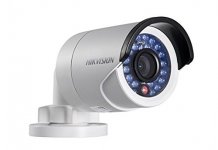
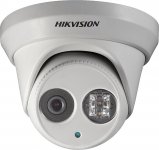
Bullets like the Hik 2032 work very well, they are usually a little cheaper but can sometimes be a problem with spiders being attracted to the infrared lights. Also look at the turret - the Hik 2342

https://www.ipcamtalk.com/showthread.php/257-Good-source-to-buy-IP-items-at
 

Attachments

  • Hikb.jpg
    Hikb.jpg
    17.8 KB · Views: 12
  • hikt.jpg
    hikt.jpg
    124.4 KB · Views: 11

Trey T

Well-known member
Joined
Aug 3, 2011
Messages
3,749
Location
Houston, TX
I have three servers running in my house already, so it's easy to leverage money already invested in hardware and to run them. An NVR is just another item to purchase, locate, power, operate, maintain, and "worry" about dying for me (I do get what you're saying as it pertains to the masses).
I should've stated with an exception for those w/ one or more server ... :lol_hitti

I'm curious .... for 3 servers to run 24/7 ... that's expensive to operate annually, isn't it? If a computer is rated 200w (energy cost is $0.1kwh), that's about $500 per year to operate (or $175/yr/computer).
 
OP
M

meburdick

Well-known member
Joined
Jul 21, 2011
Messages
211
I've set the "media" server to turn off the hard drives when there's no activity, so that helps. One of the others is entirely SSD based and the third is being decommissioned and replaced with one that is entirely SSD based.

Electric rates here in CT are REALLY high and I've measured my highest consuming system at about $75/year.

The amount of power your server draws is directly related to the power needed to run motors (hard drive, fans, etc.) and the draw required to power the CPU. As a storage type server, power draw is very low (I run Linux, not Windows) and averages around 60W over time.
 

Fixin'Stuff

Well-known member
Joined
Jun 14, 2016
Messages
584
Location
HotterNHellHouston
...

I'm curious .... for 3 servers to run 24/7 ... that's expensive to operate annually, isn't it? If a computer is rated 200w (energy cost is $0.1kwh), that's about $500 per year to operate (or $175/yr/computer).

Here's an example for you: The system I'm on right now is an i7-4770k, overclocked to 4.2 GHz. It has an SSD, 16GB of RAM, two internal spinning drives, 1 external drive, two monitors and a powered speaker system. The main box is on 24/7. Only the monitors get shut off when not in use. Everything is powered through a UPS. According to my UPS software, which keeps track of such things, it has cost me $50.48 in electricity over the last year at 11 cents per Kwh.
 
To avoid these ads, REGISTER NOW!
Top Bottom