To avoid these ads, REGISTER NOW!

Label Maker for Shop

Ruxpin

Well-known member
Joined
Mar 1, 2016
Messages
124
Location
England
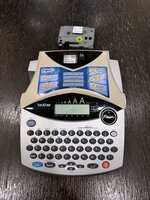
Anything Brother/ P-touch.
Agreed on Brother P-Touch.
The quality of the tape / heatshrink and printing is brilliant and very hardwearing. But you also pay a premium for this quality.
For those concerned about the tape wastage, there are a couple of work-arounds to cut down on waste. Several videos on Youtube.

I use an old *** Roovers label stamper that I 'restored' a few years back. It's not fast, but it makes nice heavy duty labels. For more temporary labels, I use green gaffer's tape and a marker, or one of the Dymo sticky labels.
I love the look of the labels this stamper makes. You could definitely sell sets of labels you make - especially here on GJ.
 
Last edited:
To avoid these ads, REGISTER NOW!

humber2

Well-known member
Joined
Feb 13, 2011
Messages
1,755
Location
Downunder
The Roovers product has to be the most durable.

I’ve not been impressed with Dymo

I haven’t bothered with Brother pTouch

I’m using up my Kroy tape supply slowly, reluctantly.

examples for the washer containing drawers in row 1

FB7E5218-0966-4D5A-8261-CD6DD0FC72A9.jpeg
 

GarageHobbyist

Well-known member
Joined
Feb 18, 2024
Messages
361
Location
Illinois
I also have a P-Touch H110. It's good. I don't know why there's so much enthusiasm for them though. It was a top recommendation when I was shopping, so it's what I bought. It's simple and robust.

I got my mom a label maker for Christmas though - a NIIMBOT D110. It's a wireless bluetooth label printer with a companion phone app. I was just playing with it today and it feels MILES ahead of my P-touch. Like a label maker for 2025 instead of 1995.

Mostly what I like is that I can apply symbols, outlines, text, etc and move it around with my finger on the phone screen over an image of the final label. I.e. you get to see what your label will look like ahead of time. The pre-sized labels are easy to peel off the tape, there's not a massive amount of wasted tape like the P-touch and I don't have to cut out the shape myself with scissors after.

One disadvantage is that my P-touch prints out a label as long as my text, whereas the NIIMBOT's labels are pre-sized (so you can shrink your text to fit, but it might get crowed if you're printing out a label for something "supercalifragilisticexpialidocious". I don't know though, maybe the labels are available in different sizes...
My wife and I use the Phomemo version of the M110 for our vintage booth. It works pretty good, and you can get all kinds of labels (cheap too!). I do believe you can get just rolls of solid label paper and go pretty much as long as you want, but we haven't had a need for that.

I like using it with my computer at home, but it is great being able to take it to the store with us when we are restocking to reprice items that are there already, and replace missing or damaged tags.

Edit- Sorry, we use the M110 with larger labels, not the D110.
 

Steve W.

Well-known member
Joined
Mar 27, 2019
Messages
1,244
Location
Southwest oHIo
Aside from the awesome looking metal tags, I'm a fan of the Brothers. The handheld one does up to 1/2", the larger does up to 1" wide. I get generic label cartridges from Amazon, they have heat shrink tape you can get to which is handy to have.

20250104_091420.jpg
I have a slightly older version of the one on the right. Almost identical, but has a round "joystick pad" instead of the square one shown.
Also have a Brother PT-P700.
1736027151033.png
The biggest DISadvantage of the P700 is that it MUST be used with a computer, as there is no keyboard other than the three buttons shown on the top. However, the biggest ADvantage is that you get to use a computer to make your labels. Lots of clip art available in the editor program, can also print from .jpg files but they do have to be small pictures.

I use one of these at work, where we print asset tags for equipment. We list all the equipment in an inventory spreadsheet that includes all the information about the devices. We can link the spreadsheet to the label printer, it will print off label after label with the only "waste" at the beginning of the first label (which it cuts off). Neatly cuts each label, keeps on printing. Yeah, there is a bit of waste if you print one at a time, but in larger batches, you only waste it on the first label.

We only use the basic tapes, have not needed to check out all the others that are available.

.
 

johnre

Well-known member
Joined
Dec 1, 2016
Messages
1,045
Location
Portland, OR
The biggest DISadvantage of the P700 is that it MUST be used with a computer, as there is no keyboard other than the three buttons shown on the top. However, the biggest ADvantage is that you get to use a computer to make your labels. Lots of clip art available in the editor program, can also print from .jpg files but they do have to be small pictures.
The model I showed in post #22 - and its successor that I linked - gives you both features. Usually I just use the keyboard though.

We only use the basic tapes, have not needed to check out all the others that are available.
Special TZE series high-strength adhesive tape here; supposedly good for rough surfaces and harsh environments:
 

JradM

Well-known member
Joined
Sep 4, 2019
Messages
1,812
Location
Alberta
My wife and I use the Phomemo version of the M110 for our vintage booth. It works pretty good, and you can get all kinds of labels (cheap too!). I do believe you can get just rolls of solid label paper and go pretty much as long as you want, but we haven't had a need for that.

I like using it with my computer at home, but it is great being able to take it to the store with us when we are restocking to reprice items that are there already, and replace missing or damaged tags.

Edit- Sorry, we use the M110 with larger labels, not the D110.
Same idea though. I don't get why this style lable-maker hasn't entirely supplanted the P-Touch.

There could be a reason. I just don't know what it is.

I don't find the P-touch all that intuitive and the designs are much more restrictive. You enter your text and it displays on the screen - but not in the format or size it will be on the label. When I haven't used the P-Touch in awhile I'm often googling steps to remember how to do specific things.

Contrast that with the Niimbot. The manual is like four post-it notes - just telling you to pair it, turn it on and how to load the paper. You don't need any instructions about how to use it, it's obvious.

When I design a label, I see a digital version first. The text and images can be placed anywhere in the printable area.

It seems easier, better and cheaper. What am I missing?
 

GarageHobbyist

Well-known member
Joined
Feb 18, 2024
Messages
361
Location
Illinois
Same idea though. I don't get why this style lable-maker hasn't entirely supplanted the P-Touch.

There could be a reason. I just don't know what it is.

I don't find the P-touch all that intuitive and the designs are much more restrictive. You enter your text and it displays on the screen - but not in the format or size it will be on the label. When I haven't used the P-Touch in awhile I'm often googling steps to remember how to do specific things.

Contrast that with the Niimbot. The manual is like four post-it notes - just telling you to pair it, turn it on and how to load the paper. You don't need any instructions about how to use it, it's obvious.

When I design a label, I see a digital version first. The text and images can be placed anywhere in the printable area.

It seems easier, better and cheaper. What am I missing?
One thing I wish it did was was give the option to pull info from spreadsheets for certain fields in a template.
For us, we do mostly the same label with just a price and a one or two word item title to keep some type of loose record of what we sell.

Obviously not a big deal for using it in the garage, and a bit of an ask for a ~$30 printer though.
 

AndreaW

Well-known member
Joined
Aug 23, 2024
Messages
52
Location
Texas
I've had this p-touch almost 20 years. I still use it often. Batteries last a long time too. Since it does everything I've needed, I haven't felt the urge to upgrade it to something modern or replace it with a different brand.
IMG_8033.jpeg
 

SwissMetric

Well-known member
Joined
Dec 28, 2024
Messages
186
Location
Switzerland
Various p-Touch and laminated tapes. Where proprietary batteries are used, it should also be possible to use regular primary batteries (e.g. AA) as proprietary spare batteries are expensive. Due to the high power requirements it's best to use either the rechargeable battery as long as it lasts or rechargeable standard-size batteries. Using regular AA's or so is quickly expensive. Also where possible a power adapter should be used as it's way less expensive than batteries.

I've seen labels in switchgear which last decades and also the adhesive is quite good (using the high quality laminated tapes). I don't know the Dymo, as child I used their embossed tapes but I haven't seen them recently. Where I live mostly the Brother p-Touch are common, the only annoyance are compatibility issues with some tape cartridges and possible misalignments problems with the transparent laminating tape.

I once checked a PC-connected Brother label printer but there were software issues so I didn't get it.

Since years I privately use a cheap p-Touch, it still works and I don't need any manual to use it. Like others I try to print several labels at the same time and simply add spaces and use scissors.

I don't use Brother office products, I never found service manuals and only got poor support. Wouldn't get any Brother CNC either, I'd prefer a Willemin-Macodel. :)
 

decableguy2000

Well-known member
Joined
Nov 4, 2012
Messages
650
I use a P-touch just about everyday. I gave up on Dymos. The basic P-touches are very limited on options and tape sizes. The PT-e550w that I use the most, I can print cable flags, cable wraps, patch panel labels. Has a symbol library and can send custom labels to it. Runs on AC, rechargeable battery, or AA's.
 

RTM

Well-known member
Joined
May 13, 2019
Messages
13,087
Location
SF Bay Area
Special TZE series high-strength adhesive tape here; supposedly good for rough surfaces and harsh environments:
I just found out about this from a guy at work, going to be buying some soon, to Get labels to stick to plastic blow molded cases better.
 

CMB41

Well-known member
Joined
Dec 31, 2018
Messages
81
Location
california
Car guy here. Epson px900. Prints directly on heat shrink tubing as well as regular tapes. It has completely changed how I mark wires, lines etc. The P-touch is now in the house. Epson runs a BOGOF deal on their website at least once a year so wait for that if you can and split it with a friend.
 

scooby074

Well-known member
Joined
Oct 26, 2008
Messages
5,231
Location
Nova Scotia
Dymo like OP in my shop, im on my 2nd one. Would go Ptouch if I didnt have a big stash of label stock for Dymo. Brady professional models are what I used at work, they are considerably better than the dymo, way more money though.
 

senlow

Well-known member
Joined
Apr 26, 2008
Messages
2,228
Location
Wheat Ridge, Colorado
+99999 for the Brother P-Touch. I have an older PT-520 that I've been using for over 20 years. It's done a great job for me.

I use the tape with the extra strength adhesive almost exclusively. It's more expensive, but well worth the cost. It sticks well to damn near anything. I still flame treat some plastics for best adhesion.

The wasted tape is a minor irritation but is easily mitigated by printing multiple labels together with an extra space between them. Changing settings is a little clunky, but not a deal breaker. I've considered adding a PC based P-Touch for better integrated setting changes and, "what you see is what you get" label making. With my portable P-Touch, it is kinda a pain to print labels to a size restriction. It hasn't been a big enough irritation for me to buy a more capable unit,

It would be great if @PelicanPines would chime in. He seems to be obsessed with labeling. . . and other things. Err, please allow me to re-phrase; Pines is our resident labeling expert.
 

SwissMetric

Well-known member
Joined
Dec 28, 2024
Messages
186
Location
Switzerland
Car guy here. Epson px900. Prints directly on heat shrink tubing as well as regular tapes.
Do you require specific shrink tubing?
I'd like something to mark Raychem (Tyco) RNF-3000 with a good contrast.

I only use very specific types of shrink tubing, they're the only ones for which I'm confident enough about their ageing. Also only black tubes are UV resistant though the colored ones (mostly BN, GY, BU, RD and bicolor GNYE, dark blue and light blue is not that formally defined as dark can fade to light) used for conductor marking don't fade out inside enclosures.

Laser marking is great but expensive and with plastics results can be random.
 

CMB41

Well-known member
Joined
Dec 31, 2018
Messages
81
Location
california
Do you require specific shrink tubing?
I'd like something to mark Raychem (Tyco) RNF-3000 with a good contrast.

I only use very specific types of shrink tubing, they're the only ones for which I'm confident enough about their ageing. Also only black tubes are UV resistant though the colored ones (mostly BN, GY, BU, RD and bicolor GNYE, dark blue and light blue is not that formally defined as dark can fade to light) used for conductor marking don't fade out inside enclosures.

Laser marking is great but expensive and with plastics results can be random.
I know the Epson stuff is rated for 300V. To be clear, it is printing directly on the Epson heatshrink tubing that comes out of a cartridge. I am not applying a label other tubing. I have Epson printed stuff that is about 18 months old now and it has not faded. Minimal sun exposure.

I could not find a spec sheet on the Epson website. The Epson CS number is 800 458 3430. Hope that helps.

 
To avoid these ads, REGISTER NOW!

PelicanPines

ALLIANCE MEMBER
Joined
Apr 30, 2014
Messages
38,105
Location
New Jersey, USA, Earth, My own reality
+99999 for the Brother P-Touch. I have an older PT-520 that I've been using for over 20 years. It's done a great job for me.

I use the tape with the extra strength adhesive almost exclusively. It's more expensive, but well worth the cost. It sticks well to damn near anything. I still flame treat some plastics for best adhesion.

The wasted tape is a minor irritation but is easily mitigated by printing multiple labels together with an extra space between them. Changing settings is a little clunky, but not a deal breaker. I've considered adding a PC based P-Touch for better integrated setting changes and, "what you see is what you get" label making. With my portable P-Touch, it is kinda a pain to print labels to a size restriction. It hasn't been a big enough irritation for me to buy a more capable unit,

It would be great if @PelicanPines would chime in. He seems to be obsessed with labeling. . . and other things. Err, please allow me to re-phrase; Pines is our resident labeling expert.
I like that Brother PT-520 but I'm a Brady Label Printer guy... I have two. My original Brady is no longer available but it's current version is the M210. I also have a "more portable" M211... it is controlled via a PHONE APP.

To give you an image of how much I label. I have purchased 35 x 16' label cartridges from amazon. NOT INCLUDING the ones I have purchased at Staples which is an untold number.

Brady for the win. Brady M210 link

I also have a BROTHER PT- P700 sitting in my office.
 

Rinspeed

Well-known member
Joined
Apr 26, 2020
Messages
1,817
Location
NY
I've only had my Dymo for a couple years but it works just fine.
 

SwissMetric

Well-known member
Joined
Dec 28, 2024
Messages
186
Location
Switzerland
(...) Iam not applying a label other tubing. (...)
Thanks for your feedback, I wasn't sure if the tubing was supplied by Epson.

Too bad there isn't any affordable inkjet printer which can print 3D objects with a very high quality ink similar to the one formerly used by marking plotters for (srew or screwless connection) terminal blocks and other markings. A long time ago I used plotters with some special Rotring ink, a huge mess to clean but was reliable. That said, industrial inkjet heads can be a major PITA to clean too, I hate them.
 

qdvuu

Well-known member
Joined
Feb 8, 2008
Messages
610
Location
Norcal
Same idea though. I don't get why this style lable-maker hasn't entirely supplanted the P-Touch.

There could be a reason. I just don't know what it is.

I don't find the P-touch all that intuitive and the designs are much more restrictive. You enter your text and it displays on the screen - but not in the format or size it will be on the label. When I haven't used the P-Touch in awhile I'm often googling steps to remember how to do specific things.

Contrast that with the Niimbot. The manual is like four post-it notes - just telling you to pair it, turn it on and how to load the paper. You don't need any instructions about how to use it, it's obvious.

When I design a label, I see a digital version first. The text and images can be placed anywhere in the printable area.

It seems easier, better and cheaper. What am I missing?
Many people don't want gear that requires a phone app. Plus, labels tend to be a bare-bones use case, just requiring clear and simple lettering.
 

Brian Puccio

Well-known member
Joined
Aug 30, 2017
Messages
105
I have a Rhino 4200 and no real complaints aside from the waste associated with each label. If I were to do it over again, I’d get an Epson PX900 — no waste, half cut option, 360 DPI, can even print on magnets.


CMB41

Well-known member
Joined
Dec 31, 2018
Messages
81
Location
california
Thanks for your feedback, I wasn't sure if the tubing was supplied by Epson.

Too bad there isn't any affordable inkjet printer which can print 3D objects with a very high quality ink similar to the one formerly used by marking plotters for (srew or screwless connection) terminal blocks and other markings. A long time ago I used plotters with some special Rotring ink, a huge mess to clean but was reliable. That said, industrial inkjet heads can be a major PITA to clean too, I hate them.
Sorry. Neglected to notice you are in Switzerland! I haven't heard the brand "Rotring" in a long time! Gave me pause...


Looks like the Epson is not available in EU. I am not familiar with this Brother unit but it prints on polyolefin tubing as well.
Not sure if you are closer to Germany or France so apologies if I got it wrong. I lived in Bern for a bit 20+ years ago.
 

liliysdad

Well-known member
Joined
Jul 18, 2008
Messages
5,378
I am still rocking the Dymo roulette wheel manual embossing label maker. I like the way the labels look, they remind me of the way a shop is supposed to look.
 
OP
M

moparfreak

Well-known member
Joined
Jan 24, 2005
Messages
853
Location
Milwaukee, WI
Same idea though. I don't get why this style lable-maker hasn't entirely supplanted the P-Touch.

There could be a reason. I just don't know what it is.

I don't find the P-touch all that intuitive and the designs are much more restrictive. You enter your text and it displays on the screen - but not in the format or size it will be on the label. When I haven't used the P-Touch in awhile I'm often googling steps to remember how to do specific things.

Contrast that with the Niimbot. The manual is like four post-it notes - just telling you to pair it, turn it on and how to load the paper. You don't need any instructions about how to use it, it's obvious.

When I design a label, I see a digital version first. The text and images can be placed anywhere in the printable area.

It seems easier, better and cheaper. What am I missing?
The Niimbot seems like a great option. The only thing that holds me back is the fact that I can't seem to find that it has options for a continuous roll, so you have to switch rolls depending on if you're doing a short or long label. I always enjoyed not having to switch rolls around much. But, it probably only takes 2 seconds to do it also. You're definitely right - a lot of functionality for a reasonable price and I have no issue with phone based inputs.

How is the longevity of the stickiness of those Niimbot labels? My Dymo labels just keep peeling off all the time, it's maddening.

The PTouch seems like another variant similar to the Dymo I have just a different brand. Seems like better executed as it's got a lot of upvotes here.
 

JradM

Well-known member
Joined
Sep 4, 2019
Messages
1,812
Location
Alberta
The Niimbot seems like a great option. The only thing that holds me back is the fact that I can't seem to find that it has options for a continuous roll, so you have to switch rolls depending on if you're doing a short or long label. I always enjoyed not having to switch rolls around much. But, it probably only takes 2 seconds to do it also. You're definitely right - a lot of functionality for a reasonable price and I have no issue with phone based inputs.

How is the longevity of the stickiness of those Niimbot labels? My Dymo labels just keep peeling off all the time, it's maddening.

The PTouch seems like another variant similar to the Dymo I have just a different brand. Seems like better executed as it's got a lot of upvotes here.
I think you're right, I don't see continuous tape. There are a BUNCH of labels options, but all pre-sized. The manufacturer lists them here.

Installing the tape is just popping the lid and inserting a new roll with a little hanging out. The printer then auto-retracts the extra so you're lined up for your print.

Switching back and forth would certainly be an extra step over just printing as long as your text - but so is cutting your labels to size each time with scissors.

Plus I think it looks neater to have labels of a consistent size rather than sizing each by the text you print. Pure functionality though, maybe it's advantageous to have the text characters always remain the same size, even if some labels are short and others long.

I can't speak to the durability of the labels. Haven't had any long enough to say.

P-Touch is the established system though. There are lots of NIIMBOT label options, but there's even more Tze tapes.
 

moab11

Well-known member
Joined
Nov 22, 2015
Messages
554
Location
Thunder Bay, Ontario
I think the people dismissing the Dymo labels are talking about the cheap consumer ones. The Rhino uses a different cartridge and has much more options that are way better. I've got a bunch that have been outdoors for years and still look good.
 

tak1313

Well-known member
Joined
Feb 4, 2018
Messages
651
I have Brother and Dymo (Rhino). The Rhino can do quite a variety of labels, including heatshrink tubing. I've never compared the adhesive strength, and always use the "permanent" or "heavy duty" labels for whatever that's worth.

I have noticed while labels for both seem to peel off quite readily if removed immediately, both brand labels adhere better as the label is left undisturbed over time.

I haven't used the Brother in a few years though, as the label waste REALLY annoys me, and for MY PURPOSES (around the house), the Dymo labels work well enough. I do like the vinyl labels, and they stick really well (probably because of the extra flexibility of the vinyl) but mostly use polyester because the vinyl material usually have a small "divot" in them where the backing is split. This occasionally causes a portion of the lettering to miss where the divot is.
 

pbon

Well-known member
Joined
May 14, 2017
Messages
3,498
For my steel tool chests and cabinets, I just bought a bunch of magnetic 3/4” x 4” label holders on Amazon. I can use my computer to print labels on regular paper and cut them to fit or use a label maker and slip the label behind the clear cover on the magnetic label holders. As for the best brand of label maker, I have no idea but have a couple I may try if I decide not to print and cut.
 

MichaelP

Well-known member
Joined
Jul 27, 2009
Messages
919
Location
IL/WI border
I'm using Brother P-Touch for 30 years, and it works just fine. The only things I dislike are 20th century rudimentary display and very awkward formatting requiring to either read the manual or resort to trial and error. However, If all you need is to use the same style/font, it's perfectly fine. We use it for name labels on manila folders. I wonder if newer models made it more user-friendly and contemporary (WYSIWYG, ideally).

I also bought Brady M210 about three years ago. Good well built printer I use in my workshop, but the non-QWERTY keyboard drives me nuts and slows typing dramatically. I guess they designed it this way to keep the unit narrow. Bad decision.
I still don't know how to peel labels off the backing paper easily and quickly. P-touch has a tool for it.
And I wonder if Brady has extra retentive tapes suitable for those plastic cases many tools come in: any dimpled or otherwise non-smooth surfaces make adhesion weak. Any hints?
 
Last edited:

aka Larry

Well-known member
Joined
May 2, 2012
Messages
8,016
Location
Eastern, NC
How do the P-touch do in really warm environments?
I labeled the wiring in our boiler room and after a few years the printing has faded to the point of - not readable.
Note that I've had a few labelers and I'm not 100% sure these were created with a PTouch (but I'm thinking they were) so maybe some folks who have used PTouch labels in boiler room temperatures for more than a couple of years can comment on longevity under those conditions.

I have an older (20 years) P-Touch and this is my problem with it. My shop gets really hot in the summer and all the labels on my pegboard are now unreadable. Is there a specific tape for high temps?
 

Aaron_W

Well-known member
Joined
Feb 6, 2018
Messages
2,893
Location
Northern California
I see they are still in business, but haven't found a price on one yet!

About $4600, these are also a much larger machine than I first imagined. I found a short video showing the operation, and this is a real bench top machine, not something you toss in a drawer between uses. Even used these seem to be asking $1500+.


I'd love to have something making metal tags like that, but way more than I'm willing to pay for a label maker.


Dymo does still make a hand held metal tag embossing machine the M1011, can't do as large of metal tape, only 1/2" vs up to 1" for the Roover but much more affordable at $300 +/-.


I also ran across a few Chinese options for much less money. I think I could live with something like this at the under $150 price range. There are a bunch of similar machines on Amazon and the other usual suspects.

Manual Metal Plate Embossing Machine
 
OP
M

moparfreak

Well-known member
Joined
Jan 24, 2005
Messages
853
Location
Milwaukee, WI
I think you're right, I don't see continuous tape. There are a BUNCH of labels options, but all pre-sized. The manufacturer lists them here.

Installing the tape is just popping the lid and inserting a new roll with a little hanging out. The printer then auto-retracts the extra so you're lined up for your print.

Switching back and forth would certainly be an extra step over just printing as long as your text - but so is cutting your labels to size each time with scissors.

Plus I think it looks neater to have labels of a consistent size rather than sizing each by the text you print. Pure functionality though, maybe it's advantageous to have the text characters always remain the same size, even if some labels are short and others long.

I can't speak to the durability of the labels. Haven't had any long enough to say.

P-Touch is the established system though. There are lots of NIIMBOT label options, but there's even more Tze tapes.
Good points, I'm going to try the Niimbot out and see how it goes. If it doesn't work well in he shop I'm sure it could be useful in the kitchen / home. Got a few sizes of labels that should likely cover my needs. It's all pretty cheap on Amazon, so not a huge investment to try it out.
 

seber

Well-known member
Joined
May 31, 2016
Messages
4,195
Location
Deep East Tx.
Same idea though. I don't get why this style lable-maker hasn't entirely supplanted the P-Touch.

There could be a reason. I just don't know what it is.

I don't find the P-touch all that intuitive and the designs are much more restrictive. You enter your text and it displays on the screen - but not in the format or size it will be on the label. When I haven't used the P-Touch in awhile I'm often googling steps to remember how to do specific things.

Contrast that with the Niimbot. The manual is like four post-it notes - just telling you to pair it, turn it on and how to load the paper. You don't need any instructions about how to use it, it's obvious.

When I design a label, I see a digital version first. The text and images can be placed anywhere in the printable area.

It seems easier, better and cheaper. What am I missing?
That only looks intuitive if you grew up with a smartphone in your hand. I looked at the on line instruction and knew immediately that it would be frustrating as hell for us old fogies.
 

JradM

Well-known member
Joined
Sep 4, 2019
Messages
1,812
Location
Alberta
That only looks intuitive if you grew up with a smartphone in your hand. I looked at the on line instruction and knew immediately that it would be frustrating as hell for us old fogies.
Ha, fair. Although I'm too old to have "grown up" with a smart phone, I understand. It's got some menus to navigate if you want to get fancy, fonts, touch-and-drag formatting, etc.

However, is a P-touch simpler? I can't remember how to do things when I haven't used it in awhile. Plus when you change settings, it doesn't show up on your screen - you don't see it until you print. At least that's true with my H110 - I haven't tried the expensive models.

I'm not saying the NIIMBOT is the ultimate label printer - I'm just surprised it hasn't supplanted the old-school P-touch. This thread is proof that many people still REALLY like that one.

NIIMBOT might be improved for some with continuous label tape or a version with a built-in screen. But it's $15.
 

dscheidt

Well-known member
Joined
Apr 26, 2017
Messages
2,886
I'm not saying the NIIMBOT is the ultimate label printer - I'm just surprised it hasn't supplanted the old-school P-touch. This thread is proof that many people still REALLY like that one.
I've never wanted a label that was anything other than plain text[1]. I've never wanted a label maker that didn't just print labels without having to faff around with a phone. I just want to print a label. I've never wanted a label maker that will stop working when the manufacturer gets bored of supporting the phone app I don't want to faff around with. I rather suspect that all of this is true of people who actually print labels on a regular basis.

People like the p-touch printers because they do the thing they're supposed to do. They do it reliably. they do it without drama. they do it for a long time. they do it cheaply enough. There are tested and reliable specialty labels if you need to label wires or the like. there's enough of them around that if brother decided today to stop making them and their consumables, label tape would be available the rest of my life.

[1] I do see the attraction of being able to print 2-d barcodes, though.
 
To avoid these ads, REGISTER NOW!
Top Bottom