To avoid these ads, REGISTER NOW!

Label makers

JackOfDiamonds

Well-known member
Joined
Jul 31, 2020
Messages
706
Location
Idaho (USA)
I need things to be labeled. All labelers apparently ****.

Classic manual Dymo tape labeler...you know, the kind that your granddad had in the 1980s that emboss labels by hand. Never runs out of batteries. Tape is dirt cheap. But face it, the labels are ugly, they are small and hard to read for old eyes. And they don't stick very well, and since they are thick plastic, they don't go on curved surfaces...and you probably will have arthritis by the time you get your drawers labeled squeezing by hand...

Brother/dymo/etc. portable thermal tape labelers: Units are sort of expensive. The labels are still small like the classic embossed labels (hard to see). Yeah there's different types of tape available, but you never have the one you need in the machine. SLOW to use with a little keyboard and LCD screen...I don't want to spend a minute making a label. And the batteries die and I can't find it when I need it.

Desktop label printer that use labels on a roll...like a Dymo 550. I used to use these at work and thought they would be the ticket. They print off big labels, anywhere from small address labels (still way bigger and easier to see than label tape), up to the big UPS-size labels. They print FAST. Can't get lost, because they are stuck to the computer and can't run out of batteries because they are plugged into the wall. The problem I found is that Dymo DRM'd the latest generation so you have to use expensive 1st-party labels, plus they don't support linux. So screw them.

I'm literally back to masking tape and sharpie as the optimum way to label things. Has technology failed us this bad?
 
To avoid these ads, REGISTER NOW!

eejack

Well-known member
Joined
May 18, 2021
Messages
166
Location
the garden state
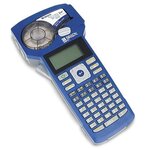
We use brady bmp21 plus printers all day long for labeling wiring, devices, panels etc.

The printers have accessories available...mine has a rechargable battery pack and a rare earth magnet mount so I can stick it on whatever metal is nearby. They are not tiny and the buttons are easy to manipulate.

Labels run from small 1/4" heat shrink to 3/4" weather resistant vinyl in lots of colors.

Granted the labels can get pricey and you really cannot beat on the printer but overall a nice solution for what we do.
 
OP
J

JackOfDiamonds

Well-known member
Joined
Jul 31, 2020
Messages
706
Location
Idaho (USA)
Brother P-touch...I have one...maybe it's my personality, but typing on that little screen...then waiting forever for it to print (zzhhzzzhhhh), then it prints out 2 extra inches of label that I have to cut off with scissors, then I have to somehow peel the backing paper off with stubby fingernails and pick the tiny pieces of backing paper off the floor...repeat for all 64 drawers in my organizer. And the labels are still pretty small...

First world problems I guess
 

Sumboodie

Well-known member
Joined
Mar 20, 2021
Messages
10,650
Location
AK
Brother P-touch...I have one...maybe it's my personality, but typing on that little screen...then waiting forever for it to print (zzhhzzzhhhh), then it prints out 2 extra inches of label that I have to cut off with scissors, then I have to somehow peel the backing paper off with stubby fingernails and pick the tiny pieces of backing paper off the floor...repeat for all 64 drawers in my organizer. And the labels are still pretty small...

First world problems I guess
I do hate that it makes the label way too long
 

PassnThru

Well-known member
Joined
Jan 5, 2010
Messages
6,510
Location
Bowling Green KY
The problem I found is that Dymo DRM'd the latest generation
I was skeptical when I read that.

Seriously - an RFID chip in a roll of labels?
Reminds me of Intermec 'our print head warranty is only valid if you use our labels'. There is no shortage of that sort of thing in the manufacturing and the corporate world but this is ridiculous.
 

Daedalus

Well-known member
Joined
Sep 28, 2009
Messages
5,949
Classic manual Dymo tape labeler...you know, the kind that your granddad had in the 1980s
Goodness, how young do you think we are? Some of us had our own Dymos in the '70s or earlier!

Brother P-touch...I have one...maybe it's my personality, but typing on that little screen...then waiting forever for it to print (zzhhzzzhhhh), then it prints out 2 extra inches of label that I have to cut off with scissors, then I have to somehow peel the backing paper off with stubby fingernails and pick the tiny pieces of backing paper off the floor...repeat for all 64 drawers in my organizer. And the labels are still pretty small...

First world problems I guess
Was actually using one a few minutes ago at home, and I use 1 at work quite often. Totally agree with you. The waste is excessive and it simply lacks common sense functionality. How much more would it cost to add a feature where I could plug in a USB keyboard? Why such a small character buffer? Why no sort of copy/paste function? But yeah, I haven't found anything better.

For my toolbox my wife made some fancy drawer labels for me using a silhouette printer, but it certainly wasn't quick. They came out nice, but it was more a side project just to test out the printer when she first got it.
 

pooterguy

Well-known member
Joined
Jun 12, 2013
Messages
92
Location
USA on the road
I have an old Brother PT-D200 which works as advertised. But I also bought what the salesman wanted me to have for magnetic and shrink tubing labels - first a K-Sun (now Epson) Pearlabel 360 which works as advertised but is not portable. Then came an Epson LW-PX900 for portability. But neither of those two *upgrades* is a good value for my limited use, and the specialty tape reels are extrordinarily expensive.

I don't want to regress to masking tape and Sharpie, but Avery 5160 sheets and Sharpie looks good for the price.
 
Last edited:

bgriffin509

Member
Joined
Jul 13, 2010
Messages
19

DYMO LetraTag 200 Bluetooth Label - This unit prints from bluetooth on a phone to a small box. It does not have the greatest quality - BUT it is only $30 at Walmart, and from Amazon I have found multiple vendors of aftermarket tapes. It is also cheap enough that if I have a tech drop one, or leave it in a ceiling, or set it on fire I will not feel like I am out a huge amount.​

The software on the phone also lets me save text that I do repeatedly which is a nice feature.
 

jcarapet

Well-known member
Joined
May 22, 2017
Messages
276
Location
Texas

DYMO LetraTag 200 Bluetooth Label - This unit prints from bluetooth on a phone to a small box. It does not have the greatest quality - BUT it is only $30 at Walmart, and from Amazon I have found multiple vendors of aftermarket tapes. It is also cheap enough that if I have a tech drop one, or leave it in a ceiling, or set it on fire I will not feel like I am out a huge amount.​

The software on the phone also lets me save text that I do repeatedly which is a nice feature.
ARE WE YELLING NOW BECAUSE I'M OKAY WITH THAT
 

LeeG

Well-known member
Joined
Nov 29, 2012
Messages
1,525
Location
Phoenix, AZ
I have an old p-touch I picked up off ebay that I've been using for years. Recently I added a Rhino 5200 for the heat shrink labels. And there is always the fall back of return address labels off the laser printer if I need a bunch.

Lee
 

LryFx1

Active member
Joined
Apr 5, 2011
Messages
36
Location
central Wisconsin
I have a Brother PT-D600 label maker and I am pleased with it in most ways. While I do not use it daily, I do use it quite regularly for labeling components of projects I build. I bought the kit with the wall wart power supply, as most of the jobs I use it for happen in my shop or in a location where an outlet is readily available. I still put the batteries in it though, as the memory needs them to store frequently used labels. Since I use it plugged in most of the time, the batteries last a couple of years usually. It needs 4 or 6 ( don't recall for sure - it's out in the shop right now ) AA batteries.

The things I like about this model are :

It has a real keyboard to type with. It is smaller than a normal one of course, but easy enough to use.

As you type the label, the screen shows exactly what the label will look like.

The tape cut length is settable so you don't waste so much tape on blank ends. There is still some waste, but not as much as the normal defaultsetting creates.

It takes 1/2", 3/4" and 1" tapes. For me, that is plenty of choices. While the Brother tape is pretty expensive, the generic Chinese tapes from Amazon work fine in it, and they are decent quality, with good adhesive. Because that tape works so well, it makes it pretty economical to have lots of colors and sizes in stock. I don't do a lot of labels that get exposed to the weather, but the ones I have used that way are holding up fine - for a few years now on some of them.

There is a program that you can install on a computer to type the labels, and then send them to the machine. I have the program, but have never found a need to use it. It's plenty easy enough to just type them on the label maker.

I forgot how many label memory slots it has, but it has that feature. I think it may be 30 or so.

The things I don't like about this one are :

It does not do shrink tube labels for cables and wiring. So I make flag style labels for wiring, and they work well. They are not as elegant as the shrink tube ones, but most jobs I use them on will never be seen by anyone but me anyhow. On a per label basis, the flags with normal tape are cheaper anyhow.

It is a bit clunky to get to the symbols page when you want to add them.

It does not have a momentary Shift key. If you use it, it says On until you press it again.

When you unplug it from the wall wart, it does not retain the short cut length if you have it set that way. If you just turn it Off, but leave it plugged in, it does retain that setting. That does not make sense, but that's how it works.

All in all, for me it was a good combination of reasonable price, capabilities, and availability to get cheap (ish) tapes.
 

Jinks

Well-known member
Joined
Aug 28, 2012
Messages
2,885
Location
Daytona Beach
I use a Brother P-touch most of the time, but if I want something special or colorful I revert to Avery or Office Depot printer labels. Print them from my computer, select the size, font, color, etc. on screen, print, peel, stick. Easy/quick........ :dunno:
 

4xdog

Well-known member
Joined
Aug 18, 2012
Messages
5,595
Location
Santa Fe, NM
I do hate that it makes the label way too long
Yes, that's a big frustration, particularly because we KNOW Brother did it to use tape faster. Grrr...

What I do is to stack as many labels as I can in a string (even there, my P-touch has a memory that's too short IMO) and print them all as a string.

I always cut the labels apart by hand so they have single-space tails, and I have a bunch of the unavoidable cutoffs I use for Sharpie-written labels, where they work quite well.

It's gotten to the point where I use scissors to cut the label free from the labelmaker, which then gives a long tail only on one end. And it helps the tape from getting stuck under the print head because it's always slightly extended out of the printer.

But I gotta look at @Grant Gunderson's Brady...
 

Two Speed

Well-known member
Joined
Sep 20, 2014
Messages
1,272
Location
Ontario Canada
I'd love a brady for the wire labelling function.

OP, if you get a Ptouch, get one you can connect to a computer and use the software if you want to do more than a basic label, gives you more flexibility. As for label size, you can set character size, and do multiple lines even on 1/2" tape. If you leave it on "Auto" it'll use the biggest letters it can, which can end up with a ridiculously large label if you forget to change it if someone else has used the labeller.
 

Paul_The_Builder

Well-known member
Joined
May 9, 2020
Messages
217
Location
Dallas, TX
I use Brother P-touch label makers. I use them with the desktop computer program 99% of the time, I batch up like 10 labels at a time and print them, less waste that way, and always comes out exactly how I want it. Can upload and print custom pictures in the labels. I have a folder full of simple pictograms that I like to include on labels. The phone app works pretty well too if you're just doing text and whatnot. Either way is 100% better than using the stupid little keyboard built into a label maker.

~$99 for the USB and bluetooth compatible printer... 1" wide tape. Tape refills are cheap and available on Amazon in all sorts of colors and sizes. Heat shrink tubing available.
I use the **** out of mine. Probably have gone through 20 rolls of label tape in the past few years.
 
To avoid these ads, REGISTER NOW!

GaryM909

Well-known member
Joined
Apr 11, 2016
Messages
1,515
Location
Calgary, Alberta, Canada
I brought home a Brother P-touch a couple years ago. My wife figured it was something else I didn't need.
I buy cheap label refills from Amazon that work good except occasionally it skips the first letter of the label I am printing. There is quite a bit of waste though with the excess size of the label. Also my wife uses it more than I do and to top it off she had her friend come over and print off about 20 labels.
 

Etchase

Well-known member
Joined
Nov 10, 2017
Messages
1,957
Location
Hawaii
The iron on fabric labels used in the Brother P-touch works great on bags and pouches, and the 1 inch wide labels are pretty big. For metal cabinet drawers, I use magnetic whiteboard cut to a convenient size, and hand write on them. I like the esthetic of the hand written sign and really like black “whiteboard” with white ink.
 

ToddG

Well-known member
Joined
Oct 15, 2011
Messages
109
I have a Brother QL-700 label printer. Granted, it's not portable or battery powered, but it can create multiple labels very fast. The software to run it can do lots of things easily.
 

Racer_X

Well-known member
Joined
Jun 25, 2007
Messages
367
Location
MI
My P-Touch has to be 20 years old, and it does 1 inch labels and can be connected to the computer for customized (e.g. with graphics) labels.
 

kbuhagiar

Well-known member
Joined
Dec 27, 2005
Messages
1,730
Location
Escondido, CA
Get a Brady. They are like a professional version of the Ptouch ****. Will even label heat shrink. Plus you can dictate the label length to prevent waisting feet and feet of material like the brother ones do.
The PTouch isn't ****. It's miles ahead of whatever was available before (Dymo?), affordable, and perfectly suitable for 95% of users who only need it once every few months. The Brady looks awesome and appears to be worth every penny for professionals or anyone else who needs durable, professional permanent labels on a regular basis.
 

kngelv

Well-known member
Joined
May 25, 2011
Messages
2,214
Location
Detroit, MI
I use various Brady's at work and have a P-Touch at home. The Brady's are much nicer but the P-Touch is fine for home use. Not something to overthink though. just get a P-Touch. They are usually dirt cheap with extra labels at Costco. Since we are talking about Brady's on here has anyone else noticed the **** battery life on them. We take the batteries out after every use because they go dead in about two weeks even though the label maker is off. It's weird.

James
 

CN Spots

Well-known member
Joined
Apr 21, 2016
Messages
3,063
Location
NW Mississippi
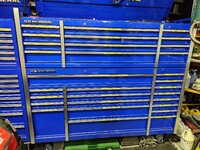
I keep a P-Touch at the office. You reminded me that I needed a few labels for the spare tool chest. I agree that it uses too much label.

IMG_2845.jpg
 

Grant Gunderson

Well-known member
Joined
May 17, 2013
Messages
2,312
Location
Bellingham, WA
Since we are talking about Brady's on here has anyone else noticed the **** battery life on them. We take the batteries out after every use because they go dead in about two weeks even though the label maker is off. It's weird.

James
Never had that issue. Are you using poor quality or near expired batteries?
 

Jgaz

Well-known member
Joined
Dec 16, 2016
Messages
1,630
Location
AZ
It does not do shrink tube labels for cables and wiring. So I make flag style labels for wiring, and they work well. They are not as elegant as the shrink tube ones, but most jobs I use them on will never be seen by anyone but me anyhow.
Before we had a shrink tube printer at work we used a P touch.
We just trimmed the label close to the top and bottom of the printed text and slipped this trimmed label into a piece of clear, non adhesive, shrink tube.
After applying heat the label was still legible but much better protected than the “flag” method.
Not the best, or quickest way, but it worked fine.

The Belden cable we used for the vast majority of our transducers was a four conductor cable of slightly less than 3/16 OD.
 

cnc-me

Well-known member
Joined
Jan 6, 2010
Messages
1,183
Location
MI
Rhino Pro 5000 it's okay, but I would not recommend it.
Label stock is expensive.
Mostly use it for electrical work.
Some part is broke inside the thing, and now I can't use the wider labels, like 3/4"
not really a big deal for me, as I mostly use 1/2" labels anyway.
 

The Cobbler

Super Moderator
Staff member
Joined
Oct 24, 2013
Messages
25,802
Location
Niagara Region, Ontario, Canada
I did not read all the posts, but I did see several mentioning Brother P touch... I have a P Touch & got a bunch of OEM labels on clearance. It works great & does what I need it to do.
 

Renegade1LI

Well-known member
Joined
Mar 11, 2018
Messages
4,920
Location
long island ny
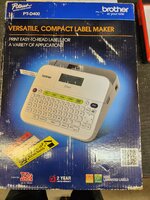
I've had this one a few years PT-D400, works great, lots of colors and sizes available.
 

Attachments

  • 20230516_135521.jpg
    20230516_135521.jpg
    993.1 KB · Views: 29
  • 20230516_135529.jpg
    20230516_135529.jpg
    899 KB · Views: 28
  • 20230516_135533.jpg
    20230516_135533.jpg
    944.6 KB · Views: 24

couch67

Well-known member
Joined
Mar 18, 2016
Messages
1,398
Location
Ontario Canada
I have a P-Touch and it does what I need. IIRC the leading and trailing margin can be minimized in the menus.

Edit: Racer_X beat me to it
 

kaymccampbell

Well-known member
Joined
Feb 27, 2015
Messages
29,405
Location
Upstate New York
I swear by my Brother P-Touch. Pines swears by his Brady. Both make really nice labels, in varying widths, with varying font sizes. Even my old dim eyes like them. And I can read the little display.
 

FredWanaker

Well-known member
Joined
Mar 27, 2021
Messages
1,470
Location
NorCal
I actually supported label makers of different types on my last job before I retired. If to label letters files etc then DYMO Label-writer. If to label items around the house etc., P-Touch is inexpensive and you can easily find labels of different sizes. If you are going to do professional labeling, then there are more expensive options that change all the time. If you have an old 70's Dymo with the hard plastic push to punch a letter labels, you would be nuts to use it when there are so many better options.
 
To avoid these ads, REGISTER NOW!
Top Bottom