To avoid these ads, REGISTER NOW!

labeling service panel - P touch?

rvcoaster

Well-known member
Joined
Nov 18, 2011
Messages
202
can i use my P touch to label my service panel? the existing 10 year old pencil marks are unreadable due to fading and i have redone the entire electrical layout so nothing matches the labeling anyway.

i have been keeping a sheet next to the panel that is accurate.

just looking ahead to the future; i have noticed at work that no one can read the 10 year old panels labeled with pencil either.

better ideas?
 
To avoid these ads, REGISTER NOW!
OP
R

rvcoaster

Well-known member
Joined
Nov 18, 2011
Messages
202
i just figured there might be some weird NEC thing that prohibits p touch or some such.

never know till you ask i guess. thanks!
 

jeffmoss26

Well-known member
Joined
May 25, 2011
Messages
12,854
Location
Cleveland, Ohio
I would say that nice clean labels fall under 'workmanlike manner' so it should be fine.
I guess you can check with your local AHJ to be sure.
 

Stuart in MN

Well-known member
Joined
Sep 8, 2005
Messages
23,089
Location
Minneapolis
You're talking about the panel schedule that goes in that little plastic sleeve inside the door, that lists the names of the various circuits? As long as it's done in a workmanlike manner as mentioned above, the labels will be fine. I often see them done on a computer and then printed out on a piece of paper, or you can even do them neatly by hand with a pen.
 
OP
R

rvcoaster

Well-known member
Joined
Nov 18, 2011
Messages
202
You're talking about the panel schedule that goes in that little plastic sleeve inside the door, that lists the names of the various circuits? As long as it's done in a workmanlike manner as mentioned above, the labels will be fine. I often see them done on a computer and then printed out on a piece of paper, or you can even do them neatly by hand with a pen.

yep. thats the one; the one in the house while accurate is almost impossible to read as well.
 

malibu101

Well-known member
Joined
Jul 1, 2005
Messages
3,908
Location
Walnutport PA
2011 NEC Article 408.4(A) has your answer.
In a nutshell- I would not have a problem with what the OP is asking.
EDIT- Video on the subject-
 
Last edited:

Sureshot

ALLIANCE MEMBER
Joined
Jan 3, 2011
Messages
3,134
Location
Bridge Creek, OK
I used them and in some places also put them on the outlet or switch. You can get small clear ones that are barely noticeable. These circuits are just numbered.
 

Gary S

Well-known member
Joined
Dec 27, 2008
Messages
2,972
Location
Bismarck, ND
On all my panels, I taped a sheet of paper inside the cover with all the information on it. I make up the sheet with the correct information using the spreadsheet on my computer, and any changes mean a simple change to the file and a newly printed sheet to replace the old one.
 

Attachments

  • breakerbg.jpg
    breakerbg.jpg
    78.5 KB · Views: 196

rlitman

Well-known member
Joined
Oct 18, 2010
Messages
24,596
Location
Long Island
Just don't use the cheap paper only labels. I've found the printing on those to fade. The clear labels, and the ones with the plastic overlay are excellent.
 

Roots

Well-known member
Joined
Oct 31, 2010
Messages
1,788
I've used a P touch for years for wire/cable/breaker/switch/relay identification.
 

Falcon67

Well-known member
Joined
Jun 11, 2009
Messages
18,371
Location
Merkel, TX
NEC Article 7734-40 requires the use of quick fade markings on panels, with the option to not follow the individual breaker markings when hooking up the wires. Our house panel complies. :lol:
 
To avoid these ads, REGISTER NOW!

malibu101

Well-known member
Joined
Jul 1, 2005
Messages
3,908
Location
Walnutport PA
NEC Article 7734-40 requires the use of quick fade markings on panels, with the option to not follow the individual breaker markings when hooking up the wires. Our house panel complies. :lol:


Most panels comply with that. :willy_nil
Once tandem breakers (2 single poles that take up 1 breaker space) are installed then marking certainly becomes optional. :eyecrazy::willy_nil:eyecrazy:
 

schwalby

Well-known member
Joined
Feb 25, 2011
Messages
242
Location
New Hampshire
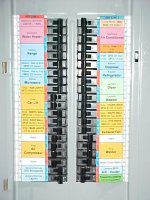
What about this? It is out of Shopnuts thread.


Oh yeah, it was me. :) :) :)

Thanks to mpire, you now can DOWNLOAD THE LABEL FILE. It was certainly timely with R1chy asking for it.

This is how they will print out:
853-Electrical-Labels-01.JPG

This is how they are intended to go on:
852-266-Back Wall.JPG

Just a few notes...
This is a MicroSoft Excel 2007 spreadsheet file and you will need to edit the cells to match your main panel layout.

Spots for double pole breakers for the 220V devices (Water Heater, Range, Welder, etc.) are "merged" cells. Unmerge them and merge others as needed.

Use the "Fill Cell" menu to change colors and group things together.

When the label is cut down the middle, each side is 2" wide so standard packing tape can be used to stick over the top of it. Allowing a 1/2" of tape to overhang on the top and bottom makes it easy to stick it to the panel.

I have a GE Power Mark Gold Load Center with 1/2" high breakers. If yours is different, you may have to adjust row heights to match.

The line 1 and line 2 (red and blue "HOT") slots alternate on my load center - yours may be different.

Ask questions if you are having trouble.

Maybe if enough people use this, the next place I buy will finally have good labels on the breakers! :) Good luck.

One last thing - if you find these labels or anything else in this thread useful, feel free to use the "tip jar" (thread Rating menu on the upper right) - it serves as FUEL for the FIRE!
BETTER YET... Post up pictures here of your own labels installed on your panel. I would love to see people actually using them.


Sorry have to click the link, they won't just attach.
 

nkachur

Well-known member
Joined
Jun 29, 2008
Messages
798
Location
Manitoba Canada
I followed SHOPNUTS example and designed this

101_0682.jpg


101_0683.jpg


I tried the lable maker option but it looked like **** as the lables were all diferent sized and the print size difference from 1 line to 2 line was irritating
 
Last edited:

CrashTestDummy

Well-known member
Joined
Apr 20, 2009
Messages
232
I labeled with the P-Touch after the labels I did with a Sharpie faded. Our box is outside, on the west side of our house, so it gets pretty extreme weather. Paper wouldn't hold up, either, so the P-Touch was about the only option.

It doesn't look super-pretty. I didn't get my sign stick out and make sure the labels were perfectly-level and centered, but they do what's most important, label the circuits.

Gene Beaird,
Pearland, Texas
 

BFBOB

Well-known member
Joined
Sep 20, 2011
Messages
5,073
The only possible objection I can think of is the archaic thermal technology found in the ThermoFax and similar copiers found in the 60's and EARLY 70's. These faxes and copies were notorious for fading away in a year or two. Today's label makers, though still thermal, use an entirely different process that is (oddly enough) more like the even older carbon paper. It involves fusing an ink onto the label, working very like a laser printer fusing toner onto paper or other substrate. The resulting image is mostly carbon, and about as stable as an image can be.
In my experience, the only significant difference between label makers is how well the labels stick. I found Office Depot's Ativia labels to stick well only when the surface was extremely smooth-glossy even. The least bit of texture, and they would peel up. By contrast, the Brother P-Touch that I'm using now, will stick very well even to a pebbled surface, like the Panduit face plates that I usually install. There is also a difference in the color of the label. In both brands, the white labels had much better adhesion than the clear ones.

Just my experience.
 

ishiboo

Well-known member
Joined
Oct 27, 2010
Messages
9,481
Location
Oshkosh, WI
The only possible objection I can think of is the archaic thermal technology found in the ThermoFax and similar copiers found in the 60's and EARLY 70's. These faxes and copies were notorious for fading away in a year or two. Today's label makers, though still thermal, use an entirely different process that is (oddly enough) more like the even older carbon paper. It involves fusing an ink onto the label, working very like a laser printer fusing toner onto paper or other substrate. The resulting image is mostly carbon, and about as stable as an image can be.
In my experience, the only significant difference between label makers is how well the labels stick. I found Office Depot's Ativia labels to stick well only when the surface was extremely smooth-glossy even. The least bit of texture, and they would peel up. By contrast, the Brother P-Touch that I'm using now, will stick very well even to a pebbled surface, like the Panduit face plates that I usually install. There is also a difference in the color of the label. In both brands, the white labels had much better adhesion than the clear ones.

Just my experience.

Dunno, I have an expensive RhinoPro which makes very nice looking labels which are highly suspect to wear. Put it on a key tag or something that gets used and the label disappears in no time.

Meanwhile, my $15 Brother with the laminated TZ labels does not have all the features, but the laminated labels do a fantastic job of not wearing out.
 
To avoid these ads, REGISTER NOW!
Top Bottom