To avoid these ads, REGISTER NOW!

Liftmaster 8500 Remote Push Button Question

Junkman

Well-known member
Joined
Dec 18, 2006
Messages
6,626
Location
Northeastern CT
I just had a new Liftmaster 8500 Elite Jackshaft Operator installed, and I wanted to have a couple of pushbuttons added around the garage to open the door like I did when the chain drive door operator was installed 30 years ago. The installer said that this isn't possible, because there will be interference with the circuit board in the operator. I also asked about having a second lock installed, and he told me that it wasn't possible. I had already researched this and knew that it was possible, and this leads me to question his installation knowledge. He also told me that it isn't possible to use a number pad outside of the door to open the door and that the only choice would be to buy additional remote controls. Can you help me with these questions? thanks Junkman
 
To avoid these ads, REGISTER NOW!

HPRifleman

Member Emeritus
Joined
Nov 18, 2019
Messages
767
Location
Wayne, IL
I have 3 8500's on my garage. Each one has a wired control panel inside the garage and there is a single wireless touchpad on the exterior of the garage. The wireless pad will open any one of the doors depending on the code you enter.
 

CombatNinja

Well-known member
Joined
Aug 24, 2013
Messages
1,456
Your installer is full of shite. I have two 8500s, a button inside the garage for each, a wireless touchpad outside for each AND I have 4 cars with HomeLink integrated controllers (the buttons on the mirror) programmed to each. You might be limited to one hardwired button but there is nothing stopping you from installing as many wireless control pads as you like as far as I can see.
 

Viper98912

Well-known member
Joined
Oct 20, 2012
Messages
1,130
Location
GA
It's probable that you can only have one wired panel, but additional wireless ones.

Why do you want a second lock? One should be good enough? We don't know if the lock circuit board can give sufficient power for two?
 

ace10

Well-known member
Joined
Dec 17, 2017
Messages
1,490
Location
Rural NoVA
The keypads are basically a remote control.
I have one on each garage facing each other and can control all of the doors from each of the keypads.
 
OP
J

Junkman

Well-known member
Joined
Dec 18, 2006
Messages
6,626
Location
Northeastern CT
It's probable that you can only have one wired panel, but additional wireless ones.

Why do you want a second lock? One should be good enough? We don't know if the lock circuit board can give sufficient power for two?
The second lock is so the door cannot be pried up from one side. I did check the Liftmaster website, and the second one gets wired into the first one. The door is in the rear of the home, where someone attempting to break in cannot be seen. I had this happen once, where they were able to get a bar under the side that didn't have the lock, and then they were able to put a chain and hook under the edge, and pull the corner of the door out to gain access. Two locks keep it firmly pinned to the concrete floor.
The reason for wanting a couple of remote buttons is because it is easier to close the door by reaching inside to close it after you walk out. I will get some wireless pushbutton controls and program them.
 
OP
J

Junkman

Well-known member
Joined
Dec 18, 2006
Messages
6,626
Location
Northeastern CT
The keypads are basically a remote control.
I have one on each garage facing each other and can control all of the doors from each of the keypads.
In the instructions, I didn't see anything for using a number keypad on the outside like I have for our older doors.
 

ace10

Well-known member
Joined
Dec 17, 2017
Messages
1,490
Location
Rural NoVA
In the instructions, I didn't see anything for using a number keypad on the outside like I have for our older doors.

I have three 8500s in one garage and three 8550s in the other. Each of the keypads are programmed for all of the openers.
 

rlwhitetr3b

Well-known member
Joined
Aug 26, 2008
Messages
683
Location
East Central Illinois
Maybe your installer misunderstood what you wanted. I do not believe you can have more than one wired button. The others are wireless and are linked to the wired one. Like someone else posted I have multiple remote buttons on each of my doors. We have LM891s outside keypad on our doors.
 
Last edited:

HPRifleman

Member Emeritus
Joined
Nov 18, 2019
Messages
767
Location
Wayne, IL
I don't understand how you couldn't have more than one wired button. As long as the wires from each button terminate on the same contacts at the opener, any button would be able to close the circuit to open/close the door.
 

Richie Rich

Well-known member
Joined
May 2, 2009
Messages
190
I don't understand how you couldn't have more than one wired button. As long as the wires from each button terminate on the same contacts at the opener, any button would be able to close the circuit to open/close the door.
Because they aren't simple contact closures (buttons) like traditional garage door openers. The cabling between the opener and the button is more akin to a data cable.
 
To avoid these ads, REGISTER NOW!

Poolshark314

Well-known member
Joined
Jul 5, 2021
Messages
658
Location
MD
The second lock is so the door cannot be pried up from one side. I did check the Liftmaster website, and the second one gets wired into the first one. The door is in the rear of the home, where someone attempting to break in cannot be seen. I had this happen once, where they were able to get a bar under the side that didn't have the lock, and then they were able to put a chain and hook under the edge, and pull the corner of the door out to gain access. Two locks keep it firmly pinned to the concrete floor.
The reason for wanting a couple of remote buttons is because it is easier to close the door by reaching inside to close it after you walk out. I will get some wireless pushbutton controls and program them.
I just installed the cousin model of this (Chamberlain RJO70) and it clearly states that 2 locks can be used. My opener actually has 2 separate slots to plug them into instead of wiring them together
1645902009158.png
 

rockcrawler

Well-known member
Joined
Jan 11, 2013
Messages
930
Location
Dallas, TX
I believe the issue is having two master control panels. Our house has two garage doors with openers and we wanted buttons at each door that goes into the house (one goes into the laundry room and one goes into the kitchen) so we could operate both doors from each location. The original garage door company installed two master control panels at each door while our house was being built. But, they interfered with each other. We had issues where the doors would not open or close and the remotes would stop working. So we disconnected the second set and the garage door guy said it couldn’t be done and left us with that mess. Later on, the builder sent out another garage door guy and he said that you cannot have two master control panels. But, you can have a master control panel and a basic button (similar to a doorbell button). So, he disassembled the second set of master control panels and removed the diodes from the boards. One went to the lock switch and one went to the light button. This essentially made it a master control panel where the only thing that worked was the main open/close button. We don’t care because it works and we never use the light button or the lock switch. But, if we need the lock button, it works on the other two panels. Now, these are cheap, builder grade openers, but I bet the concept is the same. He stated that Liftmaster and other companies all have the same issues. It is not an issue of two buttons, it’s an issue of two master control panels (performs multiple functions). They do interfere with each other.
 
Last edited:

infinkc

Well-known member
Joined
Jan 19, 2012
Messages
862
You can have multiple hard wired switchs. The switches are just simple N.O. push to close circuits.
Do you have one of these openers? The wall control is not just simple push to close circuits. The wall panel links up with the opener and is what the remotes actually pair to, not the opener itself. Much more going on in the wall control for this opener, that’s why it’s limited to 1.
 

Gear Box

Well-known member
Joined
Mar 21, 2013
Messages
159
Location
Minnesota
You can have multiple hard wired switchs. The switches are just simple N.O. push to close circuits.
I do this also, simple door bell button. The main wired switch does communicate with some mux
capability to the power head it seems. I did not lose any features with extra hardwired buttons.
 

AndyL

Well-known member
Joined
Feb 22, 2012
Messages
1,371
Location
Vancouver
Depends on the age of your opener - Yes a normal doorbell/NO button worked for 50+ years; but last I checked the newer liftmaster/chamberlain and some other manufacturers - have gone to a different protocol - where a short doesn't trigger the open anymore.

Easy enough to test - plug in bell wire, short the ends - see if the opener responds.
 

Chevy-SS

Well-known member
Joined
Feb 11, 2010
Messages
1,492
Location
Rhode Island
I have two Liftmaster 8500 openers. There are two wired controllers and two WIRELESS, plus an exterior key pad (see pic below). It's my understanding that you can add as many WIRELESS controllers as you like.
 

Attachments

  • liftmaster22.JPG
    liftmaster22.JPG
    161.8 KB · Views: 19

Poolshark314

Well-known member
Joined
Jul 5, 2021
Messages
658
Location
MD
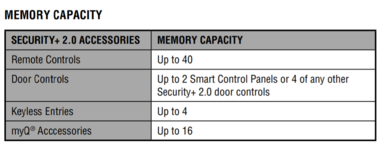
I found this in the Chamberlain RJO70 manual. Oddly, this same table is not in the Liftmaster manual
1645981812094.png
 

frankd

Well-known member
Joined
Aug 5, 2014
Messages
677
Location
Long Island, NY
I just had a new Liftmaster 8500 Elite Jackshaft Operator installed, and I wanted to have a couple of pushbuttons added around the garage to open the door like I did when the chain drive door operator was installed 30 years ago.

Why don't you just buy a couple of extra remotes and use those instead? Rather than running wire for pushbuttons?

Also, just an FYI, you can use one of the other buttons on the remote to operate the door opener light. Liftmaster customer service had no idea how to do it but after extensive googling I figured out a way. Dont remember how but if interested, just shoot me a note and I'll find the instructions.
 

frankd

Well-known member
Joined
Aug 5, 2014
Messages
677
Location
Long Island, NY
FYI for anyone looking for instructions on how to operate the garage light using one of the remotes on the liftmaster 8500:

1- Press and hold button #2 on the remote (or 3rd button if that's the one you want to program).
2- While holding that button on remote, press and hold the "lock" button on the garage keypad.
3- While holding both of those buttons, press and hold the "light" button on the garage keypad.
4- You'll hear a "click". After hearing the click, let go of all 3 buttons.
 
To avoid these ads, REGISTER NOW!
Top Bottom