To avoid these ads, REGISTER NOW!

Liftmaster 98022 additional wall control?

lyonkster

Well-known member
Joined
Nov 18, 2009
Messages
432
Location
Portland, OR
Short version - We're having drywall installed this week in our detached garage, so this is my last chance to run any wires inside the walls that might be needed to operate the garage doors from inside the house. Is that possible with the newer 98022 opener?

Longer version - We're in the process of building a detached 3 car garage (with three 10ft x 8ft doors), and will use three Liftmaster 98022 jackshaft openers. As I understand it, each opener comes with its own 880LMW smart wall controller, so we'll have three of them mounted side by side inside the garage (I wish there was a single panel with three separate buttons, but I don't believe there is such an option?).

I'd really like to also have the ability to open/close the garage doors from inside the house, which seems easier than unlocking the garage man door and then using the wall control to open a garage door. But from what I've read, there is no easy way to do this with the current generation of Liftmaster openers. Apparently @Dakota00 found a way to do this on an 8500W, but it's not clear what he did, or if it would work the same way for the 98022. Plus I prefer not to hack my wall controller.

So my question is what are my options for operating the opener from inside the house - ideally with a wired method, or some wireless method that would not require me to use my phone? I don't know if the signal from the provided three button remote controls would reach the garage from the house, about 50 feet away - that may be the easiest answer if it works.
 
To avoid these ads, REGISTER NOW!

BrandonV

Well-known member
Joined
Jun 9, 2023
Messages
4,030
Location
Arizona
Easiest thing is to start with a wireless 885LM or similar. It will probably work and supports acting as three remotes.

You can always extend the antenna in the 885LM with some hacking to extend the range.
 

pima67

Well-known member
Joined
Dec 5, 2009
Messages
303
Location
Tucson, AZ
98022 comes with myQ. Put the app on your phone and you do what you want. I'v never signed up for myQ since I don't need to open/close from anywhere but the car and garage. Do have an outside keypad that will open both doors. I think all openers now have myQ or maybe not the cheapest ones.
 

BurtEggley

Well-known member
Joined
Oct 8, 2024
Messages
861
only issue with myQ is it is easy to accidentally open the door when you are in the app. I have done it without realizing it.
 
OP
L

lyonkster

Well-known member
Joined
Nov 18, 2009
Messages
432
Location
Portland, OR
Thanks guys. I'll look into the 885LM wireless controller, I guess I'd need three of them, one for each door.

As for myQ, I really would like to avoid having to use my phone for this, maybe I'm too old school. I want to be able to push a button before leaving the house and open the garage door, not have to look for my phone, fire up the app, find the garage door in question, etc.

Looking at the Liftmaster Compatibility Chart , two other things jump out at me. One is the 883LMW wired door control button. It says that it's compatible with 98022, but I'm guessing it has to be used instead of the 880LMW controller, and can't be used in addition to it, which is my goal?

The other item I see is the 821LMC-S, which is the Smart Garage Control - under Features, it says "Add control of a second garage door opener with an additional Smart Garage Control door sensor (SKU: 821LMC-SENSOR, sold separately)." - is this something to look into?
 

BrandonV

Well-known member
Joined
Jun 9, 2023
Messages
4,030
Location
Arizona
Newer versions of the app require a three-second finger press on the screen to activate the door.

Yup. When I went to configure my door opener a few weeks ago I found an option to change it to the three-second finger press. More often than not the application freezes and doesn't recognize my finger press so it's extra security. ;)

Looking at the Liftmaster Compatibility Chart , two other things jump out at me. One is the 883LMW wired door control button. It says that it's compatible with 98022, but I'm guessing it has to be used instead of the 880LMW controller, and can't be used in addition to it, which is my goal?

Yes. You would use that instead of the wall controller you have. You can't run both.

The other item I see is the 821LMC-S, which is the Smart Garage Control - under Features, it says "Add control of a second garage door opener with an additional Smart Garage Control door sensor (SKU: 821LMC-SENSOR, sold separately)." - is this something to look into?

So that device is a hub that lets you basically use the MyQ application with a garage door opener that is dumb. The second sensor would be used if you had two dumb garage door openers and you wanted control of both of them thru MyQ. The sensors are used to detect the position of the door. One comes in the package for one door. Buying a second sensor lets you have the hub control a second door.

Not worth looking at since your openers are already MyQ enabled.

The "supported" way to do what you want is with the wireless control panels which are basically just remotes that mount on the wall.
 

rlwhitetr3b

Well-known member
Joined
Aug 26, 2008
Messages
683
Location
East Central Illinois
Thanks guys. I'll look into the 885LM wireless controller, I guess I'd need three of them, one for each door.

As for myQ, I really would like to avoid having to use my phone for this, maybe I'm too old school. I want to be able to push a button before leaving the house and open the garage door, not have to look for my phone, fire up the app, find the garage door in question, etc.

Looking at the Liftmaster Compatibility Chart , two other things jump out at me. One is the 883LMW wired door control button. It says that it's compatible with 98022, but I'm guessing it has to be used instead of the 880LMW controller, and can't be used in addition to it, which is my goal?

The other item I see is the 821LMC-S, which is the Smart Garage Control - under Features, it says "Add control of a second garage door opener with an additional Smart Garage Control door sensor (SKU: 821LMC-SENSOR, sold separately)." - is this something to look into?
Our remote controller, 893MAX, will control three doors. So you would only need one controller. Just keep it somewhere in the house, and you are all set.
 
OP
L

lyonkster

Well-known member
Joined
Nov 18, 2009
Messages
432
Location
Portland, OR
The "supported" way to do what you want is with the wireless control panels which are basically just remotes that mount on the wall.
Thanks for the explanation, it's very helpful. I'm new to all this "smart" stuff so I appreciate the help.
Our remote controller, 893MAX, will control three doors. So you would only need one controller. Just keep it somewhere in the house, and you are all set.
Thanks, that looks like a great option, assuming the range is sufficient to control the doors form the house.

Anyway, I'm convinced at this point that there is no (easy) wired solution to this, so don't need to worry about slinging additional wires before the drywall goes up next week. After the openers are installed, I can mess around with some of these remotes at my leisure and see what works best. Thanks!
 

ScaldedDog

Well-known member
Joined
Jan 15, 2008
Messages
1,065
Location
Sedalia, CO/NSB, FL
Thanks guys. I'll look into the 885LM wireless controller, I guess I'd need three of them, one for each door.

As for myQ, I really would like to avoid having to use my phone for this, maybe I'm too old school. I want to be able to push a button before leaving the house and open the garage door, not have to look for my phone, fire up the app, find the garage door in question, etc.
I get that, but with a detached garage you're going to have MyQ on your phone, anyway. It's a handy thing to have when locking up for the night.

Mark
 

BrandonV

Well-known member
Joined
Jun 9, 2023
Messages
4,030
Location
Arizona
Anyway, I'm convinced at this point that there is no (easy) wired solution to this, so don't need to worry about slinging additional wires before the drywall goes up next week. After the openers are installed, I can mess around with some of these remotes at my leisure and see what works best. Thanks!

Yup. The only other thing I've seen done is to tap off of the button on the controller and run those wires to a normal button elsewhere.


MyQ is hot garbage but it's better than nothing and the free functionality is good enough for me. Just the other day I forgot to give someone a key and it was very easy to let them into the house without rushing home from work.
 
OP
L

lyonkster

Well-known member
Joined
Nov 18, 2009
Messages
432
Location
Portland, OR
I get that, but with a detached garage you're going to have MyQ on your phone, anyway. It's a handy thing to have when locking up for the night.

Mark
Thanks Mark - I'm sure I'll get to know MyQ over time, I just hate to rely on an app for simple things like opening doors :). Maybe I will change my position once I get used to it.
Yup. The only other thing I've seen done is to tap off of the button on the controller and run those wires to a normal button elsewhere.

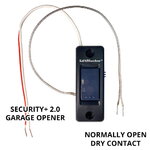
This is interesting, but I don't understand what it does. Where do the Normally Open Dry Contact wires go? I read some Reddit posts about using this gadget with Eufy cameras (which I have no interest in doing), but it seemed like with some 5V relays, they were able to use this device to allow two different wired triggers for the garage door. So could that be used to connect my "in house" switch? Sorry, electronics is not my forte.

1742138515732.jpeg
 

BrandonV

Well-known member
Joined
Jun 9, 2023
Messages
4,030
Location
Arizona
This is interesting, but I don't understand what it does.

They simply tapped into the button on the wall controller, allowing you to simulate a button press using another method, such as a switch or relay.

The goal is to enable the use of a standard switch or relay to mimic a button press on the proprietary wall controller.

So you would hook that up normally as the wall controller to your opener (it would function as it normally would) and then the leads coming out (the normally open ones) would be connected to a regular old doorbell momentary button, etc. elsewhere.

That is really the only way to achieve what you want with a completely wired solution.
 
OP
L

lyonkster

Well-known member
Joined
Nov 18, 2009
Messages
432
Location
Portland, OR
So you would hook that up normally as the wall controller to your opener (it would function as it normally would) and then the leads coming out (the normally open ones) would be connected to a regular old doorbell momentary button, etc. elsewhere.

That is really the only way to achieve what you want with a completely wired solution.
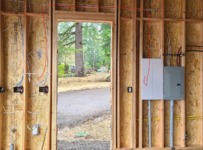
So if I'm reading this right, I will be able replace my three 880LMW smart wall controllers with these three buttons, then run the extra wires from each button to another set of three pushbuttons in the house, and control the garage doors from there? Which is what I wanted, other than losing whatever functionality the 880LMW has that the button won't have. Do I have this right?

If so, seems like I should run a 6 conductor low voltage wire (two for each button) between the area where the pushbuttons will be (below left) to the structured media enclosure I have in the garage (below right), as shown by the red line. The structured media enclosure has a conduit for low voltage wiring going to the house, so I can fish additional wire through that later. Seems to be easier now than after the drywall is up. I may end up getting used to MyQ, or using a remote, etc, but at least this way I'd be future-proofed in case I want to try a wired solution.

1742153343945.png
 

BrandonV

Well-known member
Joined
Jun 9, 2023
Messages
4,030
Location
Arizona
So if I'm reading this right, I will be able replace my three 880LMW smart wall controllers with these three buttons, then run the extra wires from each button to another set of three pushbuttons in the house, and control the garage doors from there? Which is what I wanted, other than losing whatever functionality the 880LMW has that the button won't have. Do I have this right?

Yup. You don't even have to loose functionality. Plenty of people are in the modification game these days if you don't want to do it yourself.

Here is an example of a modified 880LMW. You don't need the reed/magnetic contact switch as that's for monitoring the door state with a home automation system.


Dakota00

Well-known member
Joined
Mar 9, 2008
Messages
1,078
Location
Woodbridge, Ontario
So if I'm reading this right, I will be able replace my three 880LMW smart wall controllers with these three buttons, then run the extra wires from each button to another set of three pushbuttons in the house, and control the garage doors from there? Which is what I wanted, other than losing whatever functionality the 880LMW has that the button won't have. Do I have this right?

If so, seems like I should run a 6 conductor low voltage wire (two for each button) between the area where the pushbuttons will be (below left) to the structured media enclosure I have in the garage (below right), as shown by the red line. The structured media enclosure has a conduit for low voltage wiring going to the house, so I can fish additional wire through that later. Seems to be easier now than after the drywall is up. I may end up getting used to MyQ, or using a remote, etc, but at least this way I'd be future-proofed in case I want to try a wired solution.

1742153343945.png

When adding additional wall controllers (only use basic push button doorbell type) the wiring can be tied together at the opener or at the wall controller. The smart controller supplied with the opener must still be connected to the wiring to retain the light functions and the ability to use the car remote.
 

pima67

Well-known member
Joined
Dec 5, 2009
Messages
303
Location
Tucson, AZ
Research the safety sensors. Are they wireless or do they need wires run someplace. My doors installed in 2006 required wires to the wall comptrollers by the house entry door. Maybe it's all wireless now.
Edit:
And replacement came with an LED light that plugged into the receptacle used by the old center mount opener. We had to run the old opener control wires along the ceiling over to the 98022. If you are going to use the LED lights, you will need to plan for power and location.
 
Last edited:
To avoid these ads, REGISTER NOW!

jblnut

ALLIANCE MEMBER
Joined
Jan 17, 2015
Messages
6,990
Location
In the Middle of MN
I have a four button wireless remote like you’d put in a vehicle (894LT) in my shop that has the two shop doors and the two doors in the shed 100’ away on it. It works great.

Why not just have a vehicle remote in the house ? Super simple and you’d have a spare remote if you need one.

If you have to run wire between the house and shop run a few Cat6 lines. You can use them for the garage doors and for internet.
 

BrandonV

Well-known member
Joined
Jun 9, 2023
Messages
4,030
Location
Arizona
When adding additional wall controllers (only use basic push button doorbell type) the wiring can be tied together at the opener or at the wall controller. The smart controller supplied with the opener must still be connected to the wiring to retain the light functions and the ability to use the car remote.

Maybe.

Like this poster, my unit did not like the 883 button in conjunction with the wall unit. They've gotten finicky recently.

https://www.reddit.com/r/GarageDoorService/comments/1bb2khf
 

Dakota00

Well-known member
Joined
Mar 9, 2008
Messages
1,078
Location
Woodbridge, Ontario
Maybe.

Like this poster, my unit did not like the 883 button in conjunction with the wall unit. They've gotten finicky recently.

https://www.reddit.com/r/GarageDoorService/comments/1bb2khf
The 883 wall button is still a smart controller, which will cause conflicting operational issues with the main wall controller. In my previous post, I mentioned using a basic "dummy" doorbell push button. I've been using 2 basic doorbell style buttons in conjunction with the smart wall controller for my LM8500 going on 12 years now, with no issues.
 

BrandonV

Well-known member
Joined
Jun 9, 2023
Messages
4,030
Location
Arizona
The 883 wall button is still a smart controller, which will cause conflicting operational issues with the main wall controller. In my previous post, I mentioned using a basic "dummy" doorbell push button. I've been using 2 basic doorbell style buttons in conjunction with the smart wall controller for my LM8500 going on 12 years now, with no issues.

That makes sense.

Yeah you can't do that anymore with the introduction of Security+ 2.0 on the new openers. The opener will not accept the contacts being efficiently shorted together anymore. It's why people have been modifying & selling those hacked wall consoles.

The 8500 is a weird opener. The older ones I think say it's Security+ 2.0 (which it is via the wireless interface IIRC with the yellow learn button) but the wired communication protocol between the opener and the console is legacy Security+ 1.0.
 
Last edited:
OP
L

lyonkster

Well-known member
Joined
Nov 18, 2009
Messages
432
Location
Portland, OR
When adding additional wall controllers (only use basic push button doorbell type) the wiring can be tied together at the opener or at the wall controller. The smart controller supplied with the opener must still be connected to the wiring to retain the light functions and the ability to use the car remote.
The 883 wall button is still a smart controller, which will cause conflicting operational issues with the main wall controller. In my previous post, I mentioned using a basic "dummy" doorbell push button. I've been using 2 basic doorbell style buttons in conjunction with the smart wall controller for my LM8500 going on 12 years now, with no issues.
@Dakota00, I was reading your thread from 2014 on this topic, but I thought you said that simply tying the two sets of wires together didn't work:

Update....

I installed the 8500 yesterday. Hooked everything up and got the opener setup with the supplied control panel. I then removed the control panel wires from the opener and hooked up the existing wires I had for the 3 button setup. All the wall controls worked, I was extremely pleased! That's until I hit the remote control, nothing happened, the door didn't move. Damn it!!! So I hooked up the supplied control panel with my 3 button setup to see what would happen. The control panel wouldn't start up and program itself, it just beeps, but my doorbell buttons worked, lol! Amazing how it knows that there is extra doorbell buttons hooked up.

Back to the drawing board, I'll probably run a wire off the momentary switch on the control panel and wire that up to a relay and hook up the rest of my doorbell switches.

It wasn't clear what you had to do to make it work - could you elaborate? Also I realize that you are using the 8500 opener, and I think my 98022 is different in terms of protocol (more complex) - so maybe this won't work for mine.
I have a four button wireless remote like you’d put in a vehicle (894LT) in my shop that has the two shop doors and the two doors in the shed 100’ away on it. It works great.

Why not just have a vehicle remote in the house ? Super simple and you’d have a spare remote if you need one.

If you have to run wire between the house and shop run a few Cat6 lines. You can use them for the garage doors and for internet.
If the wireless remote reaches the garage from the house, that would be the easiest solution, for sure. I just want to do whatever pre-wiring I can do now, before the drywall goes up, in case I later decide to go with wires.

Research the safety sensors. Are they wireless or do they need wires run someplace. My doors installed in 2006 required wires to the wall comptrollers by the house entry door. Maybe it's all wireless now.
Edit:
And replacement came with an LED light that plugged into the receptacle used by the old center mount opener. We had to run the old opener control wires along the ceiling over to the 98022. If you are going to use the LED lights, you will need to plan for power and location.
The wires for the safety sensors are all installed, so that should be good. But funny you mention the LED lights - I didn't consider them earlier, and didn't ask the electrician to install any outlets for them. Only yesterday did I read the installation instructions and realized that unless I wanted the LED lights to be near the jackshaft opener (which I don't), I'd need to provide additional outlets for them. So I was up on the ladder yesterday running wires to these additional outlets near the center of each bay, before the drywall goes up. Good tip!

For now, I've ran three 18/2 wires from the SME to the controller location, so I'm good for drywall to go up. I'll be revisiting this in a couple of months when the garage doors, openers, and controllers are installed.

1742173718695.jpeg
 
Last edited:

Stuart in MN

Well-known member
Joined
Sep 8, 2005
Messages
23,075
Location
Minneapolis
Thanks Mark - I'm sure I'll get to know MyQ over time, I just hate to rely on an app for simple things like opening doors :). Maybe I will change my position once I get used to it.

This is interesting, but I don't understand what it does. Where do the Normally Open Dry Contact wires go? I read some Reddit posts about using this gadget with Eufy cameras (which I have no interest in doing), but it seemed like with some 5V relays, they were able to use this device to allow two different wired triggers for the garage door. So could that be used to connect my "in house" switch? Sorry, electronics is not my forte.

1742138515732.jpeg
I recently replaced my garage door opener with a basic level Chamberlain. I thought I would be able to reuse the existing dumb pushbutton on the wall, but it didn't work - I had to use the new button that came with the opener, which looked just like the one in your picture. I looked inside the new button and it has a little circuit board with an integrated circuit and other components, so I assume it's doing more than just sending a dry contact closure to the opener.

So, based on my experience I don't think connecting a regular dumb pushbutton in parallel with the output of the new pushbutton will work, you'll have to make the connections on the input side of the new pushbutton's internal circuitry. If a person is comfortable working with electronics and doing a little careful soldering it should work.
 

Skooterj

Well-known member
Joined
Mar 11, 2021
Messages
750
Location
Indiana
Easiest thing is to start with a wireless 885LM or similar. It will probably work and supports acting as three remotes.

You can always extend the antenna in the 885LM with some hacking to extend the range.
The 885LM can control 3 doors? I would love to be able to control 2 doors on a remote building from my attached garage, but I don't see anything in the instructions about controlling multiple doors. I can always use MyQ on my phone, but a simple pushbutton would be so convenient.

The Liftmaster website is super confusing. It shows a wall mount remote initially, but then shows a keychain remote further down and says it will easily fit in a purse.
 

kbuhagiar

Well-known member
Joined
Dec 27, 2005
Messages
1,743
Location
Escondido, CA
The Liftmaster website is super confusing. It shows a wall mount remote initially, but then shows a keychain remote further down and says it will easily fit in a purse.
And may I just add, those Liftmaster keychain remotes are useless for my needs, as the buttons are so damn sensitive that placement in a pocket (or even a purse) routinely causes unexpected (and quite possibly unknown) opening/closing events.
 

BrandonV

Well-known member
Joined
Jun 9, 2023
Messages
4,030
Location
Arizona
The 885LM can control 3 doors? I would love to be able to control 2 doors on a remote building from my attached garage, but I don't see anything in the instructions about controlling multiple doors. I can always use MyQ on my phone, but a simple pushbutton would be so convenient.

The Liftmaster website is super confusing. It shows a wall mount remote initially, but then shows a keychain remote further down and says it will easily fit in a purse.

Looks like you're correct. Guess I was too trusting of their website. ;)

Liftmaster does no favors it seems these days... their offerings are super confusing.
 

ScaldedDog

Well-known member
Joined
Jan 15, 2008
Messages
1,065
Location
Sedalia, CO/NSB, FL
Liftmaster does no favors it seems these days... their offerings are super confusing.
Isn't that the truth. Liftmaster doesn't tell you this, but the 878MAX keypad will open two doors, each with its own code. They have to be within range, of course, but it works great if they are. Mine are just a little too old to support it, but I think it'll close both doors with a single press of the <ENTER> key on openers made after 2005.

Mark
 

Dakota00

Well-known member
Joined
Mar 9, 2008
Messages
1,078
Location
Woodbridge, Ontario
@Dakota00, I was reading your thread from 2014 on this topic, but I thought you said that simply tying the two sets of wires together didn't work:


It wasn't clear what you had to do to make it work - could you elaborate? Also I realize that you are using the 8500 opener,
and I think my 98022 is different in terms of protocol (more complex) - so maybe this won't work for mine.
From the opener, I ran a dedicated wire to the smart wall controller. Then, ran another wire from the opener to doorbell button number 1. Then from there, ran another wire to doorbell button number 2. Joined the 2 sets of wires together and connected to the opener. This made it work and didn't cause any issues with the smart wall controller.

The mistake I made prior, I was trying to take the dry contact signal off from the smart wall controller to feed the other doorbell buttons, which didn't work.
 
OP
L

lyonkster

Well-known member
Joined
Nov 18, 2009
Messages
432
Location
Portland, OR
From the opener, I ran a dedicated wire to the smart wall controller. Then, ran another wire from the opener to doorbell button number 1. Then from there, ran another wire to doorbell button number 2. Joined the 2 sets of wires together and connected to the opener. This made it work and didn't cause any issues with the smart wall controller.

The mistake I made prior, I was trying to take the dry contact signal off from the smart wall controller to feed the other doorbell buttons, which didn't work.
So visually below, the upper layout didn't work, but the lower one did?

1742315216578.png
 

Skooterj

Well-known member
Joined
Mar 11, 2021
Messages
750
Location
Indiana
Isn't that the truth. Liftmaster doesn't tell you this, but the 878MAX keypad will open two doors, each with its own code. They have to be within range, of course, but it works great if they are. Mine are just a little too old to support it, but I think it'll close both doors with a single press of the <ENTER> key on openers made after 2005.

Mark
Will it only do two? I thought maybe you could use a different code for as many doors as code variations??
 

pima67

Well-known member
Joined
Dec 5, 2009
Messages
303
Location
Tucson, AZ
When I had the 98022 installed in 12/23, I had to replace the outside keypad installed in 2006 or so with the 878MAX because the old keypad was not compatible with the new stuff. Same with the older 3 button remotes.
 
To avoid these ads, REGISTER NOW!
Top Bottom