To avoid these ads, REGISTER NOW!

lost display format

mikegt4

Well-known member
Joined
Sep 12, 2005
Messages
3,281
Location
sw ohio
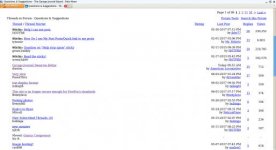
Well I did it again. Somehow I lost the current display format and I now view the forums in 1990's format. I did this before a few years ago and the computer knowledgeable people on this site showed me how to fix the problem. It was a simple fix, enabling the display with a single click but I don't remember what it is called or where to find the button.
Help me return to the 21st century.
Thanks
mike
 
To avoid these ads, REGISTER NOW!

LB-1911

ALLIANCE MEMBER
Joined
Sep 24, 2011
Messages
5,748
Location
Northwestern Il.
Try this - Click User CP - Under Settings & Options select Edit Options then scroll down to Thread Display Options
 
OP
M

mikegt4

Well-known member
Joined
Sep 12, 2005
Messages
3,281
Location
sw ohio
No luck there.

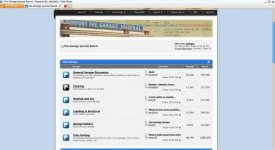
The forum index page (http://www.garagejournal.com/forum/index.php) displays in the current format but when I click on a forum it changes to a basic text format on a plain white background. I also have tried the different display modes (threaded, linear, hybrid) with no change.
 
To avoid these ads, REGISTER NOW!
OP
M

mikegt4

Well-known member
Joined
Sep 12, 2005
Messages
3,281
Location
sw ohio
I still haven't been able to fix my computer. It is pretty frustrating to not be able to view most photos. The only web site that is affected is GJ and there only the forums.

Here is what I see on the index page and a forum.
 

Attachments

  • capture18683.jpg
    capture18683.jpg
    20 KB · Views: 8
  • capture21204.jpg
    capture21204.jpg
    18.5 KB · Views: 7
To avoid these ads, REGISTER NOW!
Top Bottom