Not sure if it's in the correct section but I'm looking for an inexpensive way to make logo stickers and lettering. I've checked local shops and the either want you to buy 50 or charge a fortune for a few simple stickers. I think there called "blotters" not sure what I need to do this honestly so any help would be appreciated. Mostly will be lettering for windows and stencils for paint work.


You are using an out of date browser. It may not display this or other websites correctly.
You should upgrade or use an alternative browser.
You should upgrade or use an alternative browser.
Making my own logo stickers
- Thread starter 188slo50
- Start date
When I was a kid I used to hand cut my own stickers for my BMX bikes out of colored contact paper and colored vinyl tape with an x-acto knife. I would cut logos out of bmx mags, tape them over the contact paper with clear tape and cut them out.
Does anyone make printable sticker sheets? I know they make printable magnetic "paper".
Does anyone make printable sticker sheets? I know they make printable magnetic "paper".
Milton Shaw
Well-known member
- Joined
- Feb 11, 2011
- Messages
- 4,868
Look on Ebay at USCutters. They have a good price on vinyl cutters. From what you are saying I would think you would want to do your own from your own computer. The materials are reasonable cost compared to paying some one to cut and prepare the stencils and lettering for you. I have a 24 inch cutter and it does a good job and easy to use. 10 yards of 24" wide vinyl for signs runs about $30 and that will do a lot of signs.
Del Swanson
Active member
- Joined
- Dec 29, 2010
- Messages
- 34
Look up your local sign shop with a vinyl printer. They usually charge by the square foot.
JakeKohl
Well-known member
I own and operate a graphics shop and what gets you is the setup. If you are providing me print ready digital art, I can make them for you at pretty low cost (we wholesale). However, if you are looking for me to draw and/or clean it up for printing, that runs $60/hour and (even though I'm relatively quick for the industry) people are generally shocked at how long it can take to get something ready to send to the machine.
Look on Ebay at USCutters. They have a good price on vinyl cutters. From what you are saying I would think you would want to do your own from your own computer. The materials are reasonable cost compared to paying some one to cut and prepare the stencils and lettering for you. I have a 24 inch cutter and it does a good job and easy to use. 10 yards of 24" wide vinyl for signs runs about $30 and that will do a lot of signs.
I'll check them out but yes I'd like to do it from my computer.
I own and operate a graphics shop and what gets you is the setup. If you are providing me print ready digital art, I can make them for you at pretty low cost (we wholesale). However, if you are looking for me to draw and/or clean it up for printing, that runs $60/hour and (even though I'm relatively quick for the industry) people are generally shocked at how long it can take to get something ready to send to the machine.
I have a few stickers left ANC just wanted some more done. Local shop said $5 a sticker and all they have to do is duplicate what I give them.
fitz11
Well-known member
I'll check them out but yes I'd like to do it from my computer.
I have a few stickers left ANC just wanted some more done. Local shop said $5 a sticker and all they have to do is duplicate what I give them.
You are looking at $500 minimum to get setup to do your own, and that's with entry level equipment. Also factor in the learning curve for the program and using the cutter.
It's not that easy. If you had the computer file then it would be easy. Having them duplicate from the sticker you have now is the same as going from a drawing, it needs to be drawn and setup to cut on the computer.
How big are your stickers?
Last edited:
JimVonBaden
Well-known member

How big are your stickers?
About 14" long but I'd like a few longer.
I can always use different sizes but can't justify the $500 start up. I did find a 28" plotter for $200 with software on ebay.
James_B
Well-known member
When I'm doing custom engraved glassware, I tell my customers that the first one produced will be expensive. The second and subsequent copies are dirt cheap by comparison.I own and operate a graphics shop and what gets you is the setup. If you are providing me print ready digital art, I can make them for you at pretty low cost (we wholesale). However, if you are looking for me to draw and/or clean it up for printing, that runs $60/hour and (even though I'm relatively quick for the industry) people are generally shocked at how long it can take to get something ready to send to the machine.
The more preparation work that the customer can do, the less that first one will cost.
What are you using for your graphics work? For the LASER engraver/cutter/marker systems that I use, CorelDRAW seems to be the industry standard.
Ocho
Well-known member
Waterloo Structures
Member
- Joined
- May 17, 2014
- Messages
- 12
My sister loves sticker paper I'l get back to her and then tell you about where you can get good ones.
Jay woods
Active member
Show me what you need. my wife has the machine and computer program. She does it all the time. Send me your email and I will show you pics of what she does. VERY cheap. Kind of a hobby. I will send you examples. You could show her what you want and what size and she could mail it to you that day. Check you PM messages.
Jay
Jay
Show me what you need. my wife has the machine and computer program. She does it all the time. Send me your email and I will show you pics of what she does. VERY cheap. Kind of a hobby. I will send you examples. You could show her what you want and what size and she could mail it to you that day. Check you PM messages.
Jay
Pm you back
JakeKohl
Well-known member
I have a few stickers left ANC just wanted some more done. Local shop said $5 a sticker and all they have to do is duplicate what I give them.
"all they have to do is duplicate" could require 15 minutes or 2 hours depending on how complex the existing decals are and what you have for original files. If it's anything but round or square, keep in mind that not only do you have to digitally draw the graphic/text but you have to setup the cut path...it can be pretty complicated to copy something like that. $5 for a 14" decal isn't bad if you are just ordering onezie twozie. Suppose it takes 30 minutes to draw up the graphic...that's $30 computer time. Then it takes 20 minutes to run it on the printer/plotter and there are significant costs there.
I'm just saying that it's easy to look at a decal and think it should cost less than it does. If you order large quantities, there are huge cost savings because the labor per piece goes way down. For me to just print five 2"x4" decals takes me 16 minutes from opening the file to the point of packaging the items. For me to make 50 of them takes 20 minutes.
About 14" long but I'd like a few longer.
I can always use different sizes but can't justify the $500 start up. I did find a 28" plotter for $200 with software on ebay.
The learning curve can be steep but it's fun stuff. However, I wouldn't recommend going the cheap route - poor machine quality/reliability can make the learning curve extremely frustrating. I have a wide format machine, but my printer/plotter cost over $15k and my laminator $8k.
Going with Jay - someone who does it for fun, is probably a good route.
When I'm doing custom engraved glassware, I tell my customers that the first one produced will be expensive. The second and subsequent copies are dirt cheap by comparison.
The more preparation work that the customer can do, the less that first one will cost.
What are you using for your graphics work? For the LASER engraver/cutter/marker systems that I use, CorelDRAW seems to be the industry standard.
We use both Adobe Illustrator and CorelDraw. Much of our business is industrial safety graphics and the way Corel handles sheet tabs within the same file is handy to keep the customer's supplied graphic information, design elements, and the production file in one package. Illustrator doesn't do that very well so we only use Illustrator when we have to (and man I hate paying the $ to upgrade that software that I use once every two weeks).
JakeKohl
Well-known member
For example, this image took me 20 minutes to recreate (precisely) and get it ready to cut solid color vinyl. The fish had to be drawn as a vector image which is comprised of lines and curves - not pixels. I have tracing software (an added expense) that will get the contours drawn pretty well but they usually still need a little cleanup. You have to have the contours to establish the cut path for the plotter. Fonts are already built using lines and curves so they translate into plot files rather easily - once you match the font (which can be another complete ordeal and requires a rather large font library which is more cost).

James_B
Well-known member
Ain't that a can of worms. I think I spend more time dealing with mystery fonts than I do with the rest of the graphics. Too many customers supply a high compression JPEG the size of a postage stamp, and expect me to be able to exactly match font used in the text in that postage stamp sized JPEG. "What the Font?" just throws up it's hands in horror and can't even figure out if it's a serif or sans serif font.Fonts are already built using lines and curves so they translate into plot files rather easily - once you match the font (which can be another complete ordeal and requires a rather large font library which is more cost).
I spent a couple of hours last night manually searching through my font library, trying to match a font for a project I'm not even going to get paid for ... although it may help me land a part time graphics job that I've applied for with the local community newspaper. In the end, I just used an outline tracer and cleaned up the result by hand.
Stuart in MN
Well-known member
If you have a scanned image in a jpeg file, as long as it was a decent scan do you need to recreate the text fonts? I'd think you would just be able to use it as one big object and the plotter wouldn't care.
JakeKohl
Well-known member
If you have a scanned image in a jpeg file, as long as it was a decent scan do you need to recreate the text fonts? I'd think you would just be able to use it as one big object and the plotter wouldn't care.
It depends on how you are using the fonts. If you are going to print the wording and cut an oval around it (for instance), then yes, you can directly use the raster image of the font if the quality is good. However, if you want contour cut letters where each letter is it's on free standing piece of vinyl, then you need the actual font so you can establish the cut path information.
JakeKohl
Well-known member
Ain't that a can of worms. I think I spend more time dealing with mystery fonts than I do with the rest of the graphics. Too many customers supply a high compression JPEG the size of a postage stamp, and expect me to be able to exactly match font used in the text in that postage stamp sized JPEG. "What the Font?" just throws up it's hands in horror and can't even figure out if it's a serif or sans serif font.
I spent a couple of hours last night manually searching through my font library, trying to match a font for a project I'm not even going to get paid for ... although it may help me land a part time graphics job that I've applied for with the local community newspaper. In the end, I just used an outline tracer and cleaned up the result by hand.
Yeah, I find that I'm usually a bit more picky about matching fonts than my customers are...and I've spent a lot of time trying to match fonts.
I had a good friend in advertising (passed away several years ago) that could look at just about any font and name it in a second. I was always amazed at his ability to do that.
Vegaman_Dan
Well-known member
For my needs, a 24" wide cutter was the ideal solution. I've used it to do vehicle graphics and lettering as well as small scale stuff for projects. Yes, the setup was about $1K total, but it was a good investment for my needs.
More recently I wanted colored labels to go on my bolt bins from Dorman that had descriptions of the contents as well as space to add more later. I designed it up in Photoshop, printed it out on a color laser printer, then glued the printouts to black posterboard and laminated the results. To this I put some self adhesive magnetic tape on the back and now have colorful labels for the bins that I can change around.
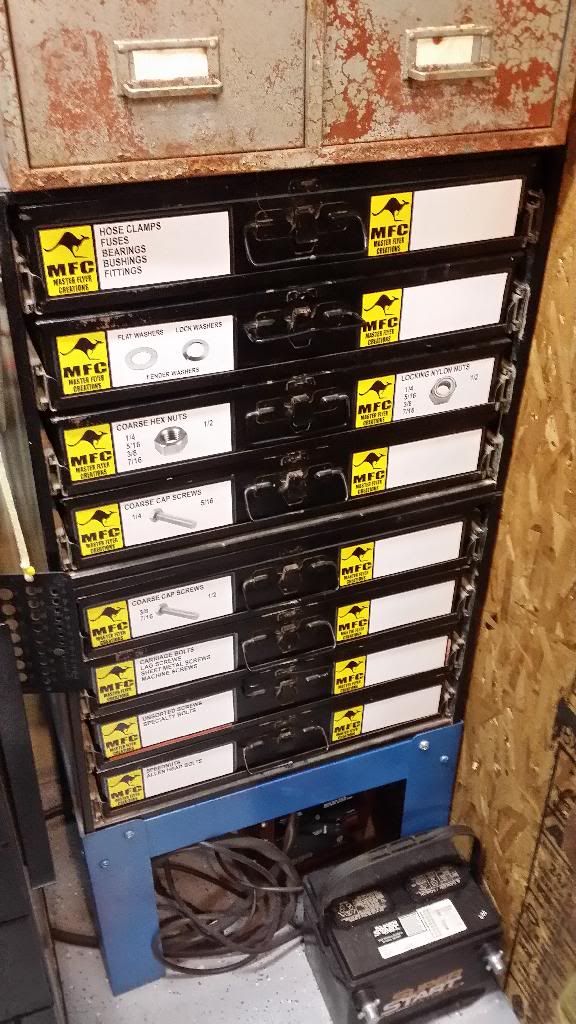
More recently I wanted colored labels to go on my bolt bins from Dorman that had descriptions of the contents as well as space to add more later. I designed it up in Photoshop, printed it out on a color laser printer, then glued the printouts to black posterboard and laminated the results. To this I put some self adhesive magnetic tape on the back and now have colorful labels for the bins that I can change around.

I bought a USCutter 28" MH series cutter a couple years ago and couldn't be happier. If you take the time to setup the cutter properly it will make smooth cuts every time. It even cuts very small items with ease. When I bought mine it was cheaper to get from Amazon than UsCutter directly or ebay so you may want to shop around. But the cheapest place to get Oracal vinyl is UsCutter and they have low cost quick shipping.
If you have any questions about the cutter I'd be glad to help.
If you have any questions about the cutter I'd be glad to help.
Nick Ferry
Well-known member
I got an Ioline plotter years ago and couldn't be happier. My advice is not to think about a decal or two but to vision the big picture. If you are willing to put in the time to learn the machine it can do all sorts of things. I've used it to cut out sand blast masking to do etched glass, cut or weed the reverse to make a paint stencils or replace the cutter with a felt tip pen to make large format patterns or drawings.
paint stencil at 13:17 in this video
trailer lettering
or just recently my wife made treats for my son's classmates and I cut out vinyl for the eyes
https://scontent-a-ord.**.fbcdn.net/hphotos-xpa1/t1.0-9/10448832_406597256148736_3040085396737752352_n.png
paint stencil at 13:17 in this video
trailer lettering
or just recently my wife made treats for my son's classmates and I cut out vinyl for the eyes
https://scontent-a-ord.**.fbcdn.net/hphotos-xpa1/t1.0-9/10448832_406597256148736_3040085396737752352_n.png
Attachments
Last edited:
09zkrankin
Member
- Joined
- May 11, 2014
- Messages
- 23
if you want to do your own you could look into a machine called the silhouette cameo. it is actually a scrapbooking plotter but does very well with vinyl. i have cut out tons of auto stickers and stuff on mine and it works great, i have also used it to cut out vinyl for etching glass. machined an adapter so that i can put a ultra fine sharpie in it and do drawings. it was about $250 and i feel was a great investment
Some of you talk about plotters but remember all these do is cut vinyl copy and simple vector logos. The industry is moved onto digital printers which can reproduce full color art. Jake has a great explanation as to why the cost is so high for 1 or 2 as the set up is where all the time is spent.
When it comes to digital printers they come as basic as a simple $200.00 desktop inkjet printer printing to pressure sensitive paper to what most sign shops use which are 15K - 60K solvent ink printers or the newer latex printers which have 3-5 year outdoor durability.
The next step are the Grand Format printers that can cost 1.5 mil which are just incredible but we won't even start them for less $100.00
Decide what you need and you may be better off just getting some software and learn how to set up "print ready" files and work with someone to output them. Lots of sign shops will work with you if you make there job easy.
When it comes to digital printers they come as basic as a simple $200.00 desktop inkjet printer printing to pressure sensitive paper to what most sign shops use which are 15K - 60K solvent ink printers or the newer latex printers which have 3-5 year outdoor durability.
The next step are the Grand Format printers that can cost 1.5 mil which are just incredible but we won't even start them for less $100.00
Decide what you need and you may be better off just getting some software and learn how to set up "print ready" files and work with someone to output them. Lots of sign shops will work with you if you make there job easy.
JakeKohl
Well-known member
Decide what you need and you may be better off just getting some software and learn how to set up "print ready" files and work with someone to output them. Lots of sign shops will work with you if you make there job easy.
You got that right! A lot of my business is for other sign shops that haven't made the investment into wide format printing. They get incredible rates from me because they send me files that are 90% ready to go to print. I'm not kidding when I state that 75% of the work is getting the files cleaned up and formatted for the printer. You should see the effort that goes into putting together an 18' long boat wrap! Just getting the scale drawing of the boat drawn and verified required about an hour and a half of computer and garage time.


Last edited: