To avoid these ads, REGISTER NOW!

Mesh Network vs Access Point and POE

dcg9381

Well-known member
Joined
Jun 20, 2018
Messages
11,635
Location
Austin, TX
Wiring a new structure with centralized CAT6, planning on using POE unmanaged switch(es) - largely for IP cameras, but also to provide internet access points.

I have lots of friends that have moved to mesh networks and love them. I've never used or installed one, so I'm looking for advice.

I'd like to take advantage of POE so I'm not running power and Ethernet to every single device wifi device.

It looks to me like mesh networks can be wired (or wireless) - but are not often found POE capable without adapters.

AP are relatively easy to find accepting POE.

Mesh seems to be "single point" managed - and allow you to see everything within the mesh network at one place.

APs are usually manged devices - meaning you have to install and manage each one and would have to log into each one for device management functions (unless you have some that are capable of reporting to centralized software)


Advice? Suggestions? Something you love/hate?
 
To avoid these ads, REGISTER NOW!

jdm5

Well-known member
Joined
Jan 1, 2012
Messages
281
Location
CT
I’d recommend AP’s over mesh where possible. Take a look at Ubiquiti / Unifi - easily managed ecosystem that works great.
 

paranoid56

Well-known member
Joined
Dec 18, 2008
Messages
1,596
Location
San Diego, Ca
so, the only reason to use mesh, is if you dont have a network drop all over the house. Sounds like you are wiring it all up, so just put some APs in a few locations and you will be good. (better then mesh)

I my self use a ubiquiti setup, with a 48port POE switch, and all things off that, 15 cameras, 2 APs, and some other random ****.
 

niget2002

Well-known member
Joined
Oct 2, 2012
Messages
11,121
Location
Josephine, TX
I'll third the unifi products. The managed switch, router, and APs can all be configured via a central software.

Sent from my LM-G820 using Tapatalk
 

Specracer

Well-known member
Joined
Nov 12, 2016
Messages
271
If you have a wired infrastructure you will not be using mesh technology.
 

jkeyser14

Well-known member
Joined
Dec 19, 2008
Messages
1,816
Location
(rural) Maryland
Access points will be much faster than mesh. Run cat 6. Add access points wherever the wifi is weak. You can even put one mounted to your soffit for exterior coverage.

Also, with mesh you are locked into one brand. With access points you can mix and match brands. I have a $300 router for my network DHCP gateway and then a bunch of cheap $40 routers configured as my access points. All different brands.
 
Last edited:

kellymc

Well-known member
Joined
Feb 26, 2010
Messages
229
Just removed my mesh system and installed unifi APs - wireless went from 20-30Mbps to 450Mbps - definitely go with the APs - Unifi is a really good system - installed the dream machine, a managed switch and 3 APs
 

Lucid Moments

Well-known member
Joined
Aug 9, 2015
Messages
1,775
Location
Gainesville, Ga
I’d recommend AP’s over mesh where possible. Take a look at Ubiquiti / Unifi - easily managed ecosystem that works great.

This is what I have in my house and shop and once it is set up it just works and works seamlessly. One AP for each building. 2400 sqft house 3k shop and I have complete coverage of both with decent coverage into the yard. Both APs with the same name and password and walking between them is seamless.
 

infinkc

Well-known member
Joined
Jan 19, 2012
Messages
862
I’m running a full UniFi ubiquity network at my house. Have 2 POE switches, 24 port switch, 4 access points, cloud key, usg router running. Has been super stable, glad I went it’s the setup. It’s nice to have access to everything under one app to configure. Easy to keep expanding on also.

Access points with the ubiquity act just like a mesh network, devices auto join based on what access point you are closest to, same ssid.

Mesh are nice to get wireless to points of the house that are weak, but if you are wiring for it, might as well go all out :)

Any questions let me know

70827b825ec86790bd2682f9d93eed56.jpg
 

Attachments

  • 70827b825ec86790bd2682f9d93eed56.jpg
    70827b825ec86790bd2682f9d93eed56.jpg
    18.6 KB · Views: 0
Last edited:

Git

Well-known member
Joined
May 18, 2008
Messages
6,894
Location
S Cal
Advice? Suggestions? Something you love/hate?

It sounds like your running CAT6 so you are definitely going to want to take advantage of that. You also mentioned IP Cams that are going to be hardwired. How are you going to control them or save the recordings? A DVR, dedicated Windows computer running software like Blue Iris or what? Keep in mind, best case scenario is to run your ipcams on a different subnet (preferably with it's own network card)

I am very pleased with my current setup. Since I already have a home server for a variety of things - file server, plex server, Blue Iris, etc, it made sense to to run pfSense software as my router/firewall. I then have a 3 piece ORBI mesh system, strictly to handle my wifi.

So, I currently have 12 IP Cams all hardwired to my POE+ switch is connected to it's own network card in my homeserver and can not talk to anything else on the network. WiFi through the ORBI is on it's own separate network.

If your don't want to run a home server and your going to go with a DVR, then take a look at a pfSense appliance or a lot of people just build their own based on a NUC type box


https://store.netgate.com/SG-3100.aspx

Have one of the Unifi guys price out the system they are recommending for you...
 

infinkc

Well-known member
Joined
Jan 19, 2012
Messages
862
Ya, How much? Price it out please

Poe switches can be had for around 150, 24 port 250, usg 120, ap 100ea, cloud key 60. So have about 1200 into my network. Yea kinda an overkill for home, but worth it in the end.
 

Git

Well-known member
Joined
May 18, 2008
Messages
6,894
Location
S Cal
Poe switches can be had for around 150, 24 port 250, usg 120, ap 100ea, cloud key 60. So have about 1200 into my network. Yea kinda an overkill for home, but worth it in the end.

:yikes:
 

kellymc

Well-known member
Joined
Feb 26, 2010
Messages
229
Same here spend about $1200 on my Unifi setup- well worth the money in the long run with the ability to manage everything on the network and the speed.

You can save some money on using an unmanaged switch, but hey, at that point what's another $150 for the managed switch

Unifi also has POE cameras allowing the whole system to be managed with a single app
 

Showkey

"MEMBER EMERITUS"
Joined
Aug 9, 2014
Messages
8,638
Location
Wausau WI
Just removed my mesh system and installed unifi APs - wireless went from 20-30Mbps to 450Mbps - definitely go with the APs - Unifi is a really good system - installed the dream machine, a managed switch and 3 APs

Your mesh was broken ?

My mesh runs 225 Mbps exactly the same as wired connection .......225 Mbps is my internet service maximum.
 

HenryAZ

MEMBER EMERITUS
Joined
Sep 18, 2012
Messages
1,054
Location
South Congress AZ
Several things to consider. Engenius stand alone APs are also excellent, and they also make good outside-rated APs. They all run on POE.

Cat6 is definitely not necessary for a gigabit network. Cat 5e will do just fine, much easier to terminate, and cheaper. I've been using Cat5e for 18 years now and all devices that are capable get firm gigabit connections.

Finally, instead of a POE switch, you might also consider using POE injectors. Vendors sell them separately (about $25-$30 each). Granted it is another device to plug in, and if you have many devices the switch may make more sense. BUT, a POE switch usually only provides POE on a portion (1/2) of its ports. You likely won't be able to pull maximum power from all the ports simultaneously, because of the overall power limitation of the switch. And POE switches run hot, because of the power being provided, so they have small internal fans, which can fail down the road. Make sure you don't mount a POE switch where it cannot get ventilation (such as in a structured media box). Finally, there are different POE standards. Make sure your switch provides what is needed by your devices. Some brands/devices even run a proprietary POE, which will require a POE injector. Most are moving to, or are already at, the "at" POE standard, though.

I only have three devices requiring POE (two APs and a camera). I've tried a couple of different POE switches, but my switch is inside a structured media box and they ran (what I felt) was too hot. So now I use thee POE injectors with a standard managed switch.

Beyond that, I fully agree with using cabled APs vs a mesh network.
 
Last edited:

rjacobs

Well-known member
Joined
Jul 24, 2015
Messages
3,858
Location
Dallas, TX
I have a full Ubiquiti network that I am slowly expanding.

Ultimate Dream Machine Pro
-14tb Western Digital Ultrastar hard drive
24 port Gen 2 Pro POE switch
3x Nano HD AP's
3x G3 Flex camera's

So far its been a fantastic setup. Its in a 600mm deep Navepoint 9U rack with a 1500w Cyberpower UPS which will currently provide 3 hours run time. Also has an AC Infinity fan controller and 2 120mm fans on the top. I have the temp sensor sitting between the switch and the ultimate dream machine and it runs 81 or 82 degrees most of the time.

As was already said with wires everywhere you arent running mesh... I wouldnt run a mesh setup anyway unless I had no choice...

I wouldnt run POE injectors either unless I had no other choice... What HenryAZ said above about the switches can or can not be true, just need to check the specs on the switch. Ubiquiti has a few that provide **** POE wattage because they run fanless. The Pro series I am running will supply 400w of POE... and has all the latest POE standards(POE++/BT standard). Ill never run out of POE wattage. My current 6 device setup is using 18w of 400 available...
 

jkeyser14

Well-known member
Joined
Dec 19, 2008
Messages
1,816
Location
(rural) Maryland
Cat6 is definitely not necessary for a gigabit network. Cat 5e will do just fine, much easier to terminate, and cheaper. I've been using Cat5e for 18 years now and all devices that are capable get firm gigabit connections.

For an extra $100 a spool I would definitely buy CAT6. It future proofs you for 10 Gig speeds which are coming, and it is cheaper than running fiber.
 

ScaldedDog

Well-known member
Joined
Jan 15, 2008
Messages
1,065
Location
Sedalia, CO/NSB, FL
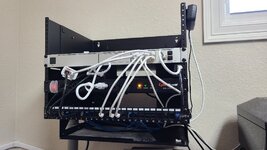
The "mesh" thing seems to be a bit of buzzword bingo. OP, I wouldn't worry about what it's called, as you are doing exactly the right thing. Run good cable in a sensible way, and put APs where you need them for coverage. My experience wasn't great using old routers as APs, but that was awhile ago with old mixed technology equipment. Since you are in a new building and obviously interested in doing things right, do it right with a system you can manage from one place. I love the Ubiquiti setup I have (UDM Pro, 2 APs in the crawl space of our ranch home, another across a wireless bridge in the barn hooked up to a PoE switch), but you don't "need" to spend that kind of money, as functional networks can be built for less.

Here's a pic of my setup and, as you can see, I just run the injectors in the house. My UDMP switch is full, and I'll add a PoE switch and ditch the injectors when I add another device that needs a switch port.

Markc11fa31eceb025188722e44435c5f7d8.jpg

Sent from my SM-G986U using Tapatalk
 

Attachments

  • c11fa31eceb025188722e44435c5f7d8.jpg
    c11fa31eceb025188722e44435c5f7d8.jpg
    413.5 KB · Views: 0
To avoid these ads, REGISTER NOW!

HenryAZ

MEMBER EMERITUS
Joined
Sep 18, 2012
Messages
1,054
Location
South Congress AZ
Run good cable in a sensible way, and put APs where you need them for coverage. My experience wasn't great using old routers as APs, but that was awhile ago with old mixed technology equipment.

I can recall when Wi-fi first arrived on the scene. At that time, for wireless, there were only APs used. Routers were routers only. Then the manufacturers started spitting out consumer devices with several functions (a "wi-fi router"). As a sysadmin then, and to this day (retired), I still feel a network device does one thing well, and the rest are add-ons, with possible compromises made. Our work network spread the functions to dedicated devices. My home network now is fed by VDSL, using a CenturyLink provided all-in-one device (modem, router, wi-fi, dhcp, dns). I separated them out, by neutering the CL device to be only a modem (what it does best and what it was designed for). Routing is handed off to a dedicated router. Wi-fi is done by dedicated APs, and dhcp and dns are performed by a FreeBSD box, where I have much greater control over those functions (actually run two dns services, one for external and one for the internal network, configured differently).

Go for cat6, if the price has come down that much. Terminating it is still a bit more difficult, though.
 
OP
D

dcg9381

Well-known member
Joined
Jun 20, 2018
Messages
11,635
Location
Austin, TX
It sounds like your running CAT6 so you are definitely going to want to take advantage of that. You also mentioned IP Cams that are going to be hardwired. How are you going to control them or save the recordings? A DVR, dedicated Windows computer running software like Blue Iris or what?

Prior, I was letting the cameras do the motion detection / alerting (each) - which is a pain in the ***. The uploaded to an FTP server (local) - with folders or location and date, which worked pretty well.

I've been investigating NVRs and software. Although I'd prefer linux, Blue Iris seems to be the "go to". It looks like I rack-mount a dedicated Windows 1U machine (my closet has 15" deep racks) for around $200 - minus drives... So that's probably where I'm going unless you guys talk me out of it.

I have run the point-to-point ubiquiti stuff - so sounds like that is the recommendation. Their POE APs are about $100. Can someone recommend a switch - which seems to be the control point? I'll need 48 ports.


Yes, it's 100% CAT6, I'll have almost 4,000 feet of the stuff in after I'm done... Looking at the prices of a 10Gb switch, I'll wait until that comes down. I'm getting sensible (or I'm tired of dropping wire) at this point and doing two central locations.

Sounds like "mesh" is a consumer grade thing - I like the one point of control, but as we are all GJ, we can't have simple...
 
Last edited:

Tmart86

Well-known member
Joined
Jul 12, 2017
Messages
151
Location
Cedar Rapids Iowa
Prior, I was letting the cameras do the motion detection / alerting (each) - which is a pain in the ***. The uploaded to an FTP server (local) - with folders or location and date, which worked pretty well.

I've been investigating NVRs and software. Although I'd prefer linux, Blue Iris seems to be the "go to". It looks like I rack-mount a dedicated Windows 1U machine (my closet has 15" deep racks) for around $200 - minus drives... So that's probably where I'm going unless you guys talk me out of it.

What and how many cameras are you running? Blue iris is decent but some of the other big commercial nvr software is also an option for a reasonable price.
 

rjacobs

Well-known member
Joined
Jul 24, 2015
Messages
3,858
Location
Dallas, TX
Curious - what NVR or software are you using?

Im running the Unifi Protect in the UDM Pro with a 14tb hd.

Prior, I was letting the cameras do the motion detection / alerting (each) - which is a pain in the ***. The uploaded to an FTP server (local) - with folders or location and date, which worked pretty well.

I've been investigating NVRs and software. Although I'd prefer linux, Blue Iris seems to be the "go to". It looks like I rack-mount a dedicated Windows 1U machine (my closet has 15" deep racks) for around $200 - minus drives... So that's probably where I'm going unless you guys talk me out of it.

I have run the point-to-point ubiquiti stuff - so sounds like that is the recommendation. Their POE APs are about $100. Can someone recommend a switch - which seems to be the control point? I'll need 48 ports.


Yes, it's 100% CAT6, I'll have almost 4,000 feet of the stuff in after I'm done... Looking at the prices of a 10Gb switch, I'll wait until that comes down. I'm getting sensible (or I'm tired of dropping wire) at this point and doing two central locations.

Sounds like "mesh" is a consumer grade thing - I like the one point of control, but as we are all GJ, we can't have simple...

48 ports in a house is crazy to me, but sounds like you are running wire to every room plus a bunch of other stuff... ive got 24 POE ++ capable ports plus the 8 non POE in the UDM-Pro and I dont think I will ever use them all.

My recommendation for you is as follows:

-UDM-Pro to control everything and run Unifi Protect

-Gen2 Switch Pro 48 POE or Gen 1 Switch POE+ 48(500w). The pro series switches are awesome, but are not cheap. They also have a big enough POE budget you wont exceed it. The 48 port pro has 600w POE. You have to watch the POE wattage with the non-pro switches as they are fanless so their POE power supply is garbage. The Gen 2 Pro switches can do Level 3 routing between vlans on your network. I dont have a need to do this now, but I understand its desirable for some uses. You could also run 2 24 port switches and connect via fiber which is cheap enough.

-AP's...AC Pro's at a minimum. Im running Nano-HD's. Some of the "cheaper" AP's are cheap for a reason... I looked at cost benefit. Some of the "cheaper" AP's are a generation old. I felt the Nano-HD(or Flex-HD) are the latest generation and therefore should be supported the longest. I believe a bunch of older AP's just dropped into end of life so no more support.

-Camera's... Have to balance what you are doing with them. Im running G3 Flex's right now but have plans to add some G4 Pro's because of their wide angle lense as well as their much better IR emitters. As far as 1 HD in the UDM-Pro, if you need more storage than a 14tb drive will give you, you can get the Protect NVR and load it up with 4 drives.

Im really liking my setup which I posted on the first page. All in one control. Cameras are good enough for me for now. I like that I can add to it as I need to. It wasnt a "cheap" setup, but I feel everything is pretty high quality and the support from UI seems to be good and there is a very active forum on their website as well as a few active groups on facebook.
 
Last edited:

rjacobs

Well-known member
Joined
Jul 24, 2015
Messages
3,858
Location
Dallas, TX
Here is a screenshot from the controller of my 2 cameras... They are pretty decent for 70 dollar cameras.


And here is a shot of my rack as it sits now... plenty of room for expansion. Im planning 3 or 4 more AP's and I think 4 more cameras. Plus I will have runs for a couple of TV's as well as a network printer(its currently hooked up to the port on the UDM Pro).
 
Last edited:

kellymc

Well-known member
Joined
Feb 26, 2010
Messages
229
Nope brand new Google mesh, worked well when I was standing next to the AP, but due to old house design and multiple networks in the area I couldn't select the appropriate channels for signal strength. Unifi let's me tune everything

I have 1Gbps service, wifi maxes out in the upper 400s

K


Your mesh was broken ?

My mesh runs 225 Mbps exactly the same as wired connection .......225 Mbps is my internet service maximum.
 

rjacobs

Well-known member
Joined
Jul 24, 2015
Messages
3,858
Location
Dallas, TX
Nope brand new Google mesh, worked well when I was standing next to the AP, but due to old house design and multiple networks in the area I couldn't select the appropriate channels for signal strength. Unifi let's me tune everything

I have 1Gbps service, wifi maxes out in the upper 400s

K

I can confirm this... I just ran a test on my AT&T gig fiber through my unifi system off a Nano HD and averaged 490... Thats after a decent amount of tuning and messing with the AP settings...
 

infinkc

Well-known member
Joined
Jan 19, 2012
Messages
862
Prior, I was letting the cameras do the motion detection / alerting (each) - which is a pain in the ***. The uploaded to an FTP server (local) - with folders or location and date, which worked pretty well.

I've been investigating NVRs and software. Although I'd prefer linux, Blue Iris seems to be the "go to". It looks like I rack-mount a dedicated Windows 1U machine (my closet has 15" deep racks) for around $200 - minus drives... So that's probably where I'm going unless you guys talk me out of it.

I have run the point-to-point ubiquiti stuff - so sounds like that is the recommendation. Their POE APs are about $100. Can someone recommend a switch - which seems to be the control point? I'll need 48 ports.


Yes, it's 100% CAT6, I'll have almost 4,000 feet of the stuff in after I'm done... Looking at the prices of a 10Gb switch, I'll wait until that comes down. I'm getting sensible (or I'm tired of dropping wire) at this point and doing two central locations.

Sounds like "mesh" is a consumer grade thing - I like the one point of control, but as we are all GJ, we can't have simple...

Wow 48 port switch, I have close to that number but I don’t use all of them so I just use a 24 port and the 8 poe port switch for the access points. No need to waste Poe power for a full 48 port if you only have some Poe devices. I’d maybe think of getting 2 24 port units, one now and one later if you need more. I use the sfp ports to connect one another. Everything with ubiquiti configured nicely.
 
OP
D

dcg9381

Well-known member
Joined
Jun 20, 2018
Messages
11,635
Location
Austin, TX
Thanks guys.. Looks like I'll be considering a move to ubiquiti APs - that can do POE.
I have a $600 or so investment in IP Cams - mainly from Nelly Security (manufactured by hikvision).

I won't have more than about 12 cameras, and 3 APs, so I could step that down to a series of POE un-managed hubs (or switches). I don't need 48 ports of POE, at most a 24 port deal.

Plan for managing the cameras based on my reading would be Blue Iris. It looks like I can get a short-depth rack mount Dell r210 II, for around $200. I'd consider in NVR if someone has one that they absolutely love, but it has to be flexible.

I could be swayed if ubiquiti unifi can control everything - APs, cameras, and has good functions?

Appreciate the advice - obviously saves a ton of trial and error.
 

itb45

Member
Joined
Oct 9, 2016
Messages
23
Ubiquiti system here too.

For me the deciding factor of AP over Mesh was, when one mesh talks to the next, all the data still has to go through the first one, so while you might have strong signal everywhere its slow, cause the bottle neck is the first mesh unit.

What made me go with Ubiquiti is they aren't like Linksys or Netgear that have a million different models that are obsolete in a year, Ubiquiti has what maybe 3 or 4 AP's and the same ones have been around for a while.

Then the integrated camera system was the cherry on top.

I am honestly 100% satisfied with it, and love the managed switch, easy to see whats going on. Had one device that was running slow, turns out it was trying to connect to the AP on the opposite end of house not the closest one, would never have guessed that without having the managed system.
 

rjacobs

Well-known member
Joined
Jul 24, 2015
Messages
3,858
Location
Dallas, TX
I could be swayed if ubiquiti unifi can control everything - APs, cameras, and has good functions?

I wont begin to tell you what all functionality the full Unifi suite has as I use it for the basics, but so far so good on the "all in one" setup that the Ultimate Dream Machine Pro has...

You would have to sell your camera's and convert to Ubiquiti cameras though if you wanted it all integrated. They wont talk to other cameras.

My house is 3700 sq. ft. and I will eventually have 5 or 6 AP's, but right now 2 Nano HD's are getting it done, but I could tweak some settings and get better performance if I had more AP's. I have one more to put up out of the initial 3 pack I bought, then I need to eventually put one upstairs in the game/media room, 1 in the garage, and probably one out on the back patio when we do a pool in a few years.
 
OP
D

dcg9381

Well-known member
Joined
Jun 20, 2018
Messages
11,635
Location
Austin, TX
OK, so the basic building blocks of this are:
UDM-Pro

A few questions:
* I assume this is doing the DHCP / IP address allocation?
* I see this used with the UniFi APs... What's the difference between that and the UniFi Mesh APs other than antennas?
* Recommendations for a 12-24 port POE switch? Or just chain a few POE hubs?
 

rjacobs

Well-known member
Joined
Jul 24, 2015
Messages
3,858
Location
Dallas, TX
Yes UDM-Pro handles it.

You put your modem in passthrough mode. I had to change mine from AT&T's IP address range as stock its trying to use the same IP address range of the UDM-P.

I dont think the mesh only AP's have a way to wire them... but back to the original topic, mesh defeats the purpose of running all the wires and ubiquiti gear... I would focus on the AC-Pro, Nano-HD or the Flex-HD. The Lite might be ok for certain uses. Nano and Flex are both the newest AP's that are offered. Both are 4x4 MIMO. The in-wall AP's can also work, but I have not messed with them as the over heads get me done.

I would recommend looking at the Gen 2 switches... The Pro series is what I am running as I was concerned of the low POE budget in the non-pro series. If you are going to run the UDM-P, stick with some flavor of Ubiquiti switches so that the controller controls it all... Obviously ANY switch will work from any company, but with the Ubiquiti switches you maintain the single point of control. If it makes it easier to run cables you COULD run something like a few of the Gen 1 8 port POE switches that have an SFP port... then you could run fiber between them, then branch out from there with Cat 6. Fiber from FS.com is pretty cheap for pre-terminated runs of OM3 and an SFP to fiber module is like 20 bucks.
 

Tommy5725

Member
Joined
May 2, 2020
Messages
15
Location
Vernon, NY
I agree, if your going to wire it in and want a permanent solution I'd go with Ubiquiti / Unifi. If you want a quick down and dirty simple wifi solution I'd get a WiFi 6/AX paired set up from most any brand you've heard of. Most of the newer AX stuff I've seen is decent. Not going to compare with Ubiquiti though.
 

ScaldedDog

Well-known member
Joined
Jan 15, 2008
Messages
1,065
Location
Sedalia, CO/NSB, FL
Yes UDM-Pro handles it.

You put your modem in passthrough mode. I had to change mine from AT&T's IP address range as stock its trying to use the same IP address range of the UDM-P.

I dont think the mesh only AP's have a way to wire them... but back to the original topic, mesh defeats the purpose of running all the wires and ubiquiti gear... I would focus on the AC-Pro, Nano-HD or the Flex-HD. The Lite might be ok for certain uses. Nano and Flex are both the newest AP's that are offered. Both are 4x4 MIMO. The in-wall AP's can also work, but I have not messed with them as the over heads get me done.

I would recommend looking at the Gen 2 switches... The Pro series is what I am running as I was concerned of the low POE budget in the non-pro series. If you are going to run the UDM-P, stick with some flavor of Ubiquiti switches so that the controller controls it all... Obviously ANY switch will work from any company, but with the Ubiquiti switches you maintain the single point of control. If it makes it easier to run cables you COULD run something like a few of the Gen 1 8 port POE switches that have an SFP port... then you could run fiber between them, then branch out from there with Cat 6. Fiber from FS.com is pretty cheap for pre-terminated runs of OM3 and an SFP to fiber module is like 20 bucks.
/\ This. The only things I'll add are: 1) The AP you linked is one that can be used outdoors, and I think it does have a GigE port. Also, I used the Lite APs and they are fine, but I only have a 40mb internet connection, on a good day. I'd use one of the recommended ones if you have fast internet, or stream media from a local server.

2) Sometimes small, cheap, unmanaged switches have their place, so don't be afraid to use them, where appropriate. For example, I stick a little 5-port NetGear behind the TV, and plug the Dish box, TV and receiver into it. The port on the UDM is assigned to my device VLAN, so the NetGear doesn't have to support tagging, etc. For anything that needs to support PoE, or is in a remote building, stick with Ubiquiti if you are basing the network on the UDMP.

Mark

Sent from my SM-G986U using Tapatalk
 

rjacobs

Well-known member
Joined
Jul 24, 2015
Messages
3,858
Location
Dallas, TX
/\ This. The only things I'll add are: 1) The AP you linked is one that can be used outdoors, and I think it does have a GigE port. Also, I used the Lite APs and they are fine, but I only have a 40mb internet connection, on a good day. I'd use one of the recommended ones if you have fast internet, or stream media from a local server.

Yes the AC Pro has an "out" port, but it doesnt pass POE so thats a bummer.

I was going to use one for my outside AP and then daisy chain out to my camera...but with no POE(I dont have a great way to use a POE injector in that location either) its useless so I will likely run a Flex HD outside.

And as you said, you have to read through the specs and see what would work for you.

All of my devices have at least 3x3 mimo antenna so the Lite, which only has a 2x2, was not desirable, for me, as I knew speed would possibly suffer. The AC Pro is 3x3 and the Nano and Flex are 4x4. I dont have a use for the HD(high density) function. I think that the HD labeled APs will support like 200 devices connected to each one...it might actually be more than that.

And to the OP: I bought all my stuff from Streakwave. Setup an account and you can get some amount of discount... its not KILLER, but its something. And if you can buy stuff like AP's and camera's in 3 packs, the price per comes down even more.
 

walta

Well-known member
Joined
Jan 13, 2017
Messages
2,309
Location
Dutzow Missouri
Please help me understand how APs work?

If I have several APs will they all have the same SSID or each has their own?

If I on in my phone standing next to and connected to AP C with 5 bars. Now I take the phone to the other end of the house at some point the connection to AP C will get weak and slow but still connected. Is there logic that will switch the phone to the now stronger signal from AP D?

The Asus Aimesh with wired backhaul sounds appealing to me but not enough to pry open my wallet.

Walta
 

Git

Well-known member
Joined
May 18, 2008
Messages
6,894
Location
S Cal
UniFi-Video Products End of Life Announcement


Tom has lots of good info and worth subscribing to his channel:

attachment.php
 

Attachments

  • TRI - 109.jpg
    TRI - 109.jpg
    120.7 KB · Views: 154
To avoid these ads, REGISTER NOW!
Top Bottom