To avoid these ads, REGISTER NOW!

Mesh Network vs Access Point and POE

ScaldedDog

Well-known member
Joined
Jan 15, 2008
Messages
1,065
Location
Sedalia, CO/NSB, FL
Yes the AC Pro has an "out" port, but it doesnt pass POE so thats a bummer.


I was going to use one for my outside AP and then daisy chain out to my camera...but with no POE(I dont have a great way to use a POE injector in that location either) its useless so I will likely run a Flex HD outside.


And as you said, you have to read through the specs and see what would work for you.


All of my devices have at least 3x3 mimo antenna so the Lite, which only has a 2x2, was not desirable, for me, as I knew speed would possibly suffer. The AC Pro is 3x3 and the Nano and Flex are 4x4. I dont have a use for the HD(high density) function. I think that the HD labeled APs will support like 200 devices connected to each one...it might actually be more than that.


And to the OP: I bought all my stuff from Streakwave. Setup an account and you can get some amount of discount... its not KILLER, but its something. And if you can buy stuff like AP's and camera's in 3 packs, the price per comes down even more.
Sorry. When I said "you", I meant the OP. My bad.

Mark

Sent from my SM-G986U using Tapatalk
 
To avoid these ads, REGISTER NOW!

rjacobs

Well-known member
Joined
Jul 24, 2015
Messages
3,858
Location
Dallas, TX
Please help me understand how APs work?

If I have several APs will they all have the same SSID or each has their own?

If I on in my phone standing next to and connected to AP C with 5 bars. Now I take the phone to the other end of the house at some point the connection to AP C will get weak and slow but still connected. Is there logic that will switch the phone to the now stronger signal from AP D?

The Asus Aimesh with wired backhaul sounds appealing to me but not enough to pry open my wallet.

Walta

If you have more than one you have a controller...

You can setup a minimum signal level for your devices to drop from the AP and pickup the next. Takes a little playing with. Its pretty seamless. Only way I know which of my 3 AP's I am on is going into the controller and checking...
 

rjacobs

Well-known member
Joined
Jul 24, 2015
Messages
3,858
Location
Dallas, TX
Sorry. When I said "you", I meant the OP. My bad.

Mark

Sent from my SM-G986U using Tapatalk

I didnt take it "personally"... more just having a conversation so the OP can make some informed decisions because the variety of AP's that ubiquiti offers can be a bit confusing for somebody new to them.
 

itb45

Member
Joined
Oct 9, 2016
Messages
23
Please help me understand how APs work?

If I have several APs will they all have the same SSID or each has their own?

If I on in my phone standing next to and connected to AP C with 5 bars. Now I take the phone to the other end of the house at some point the connection to AP C will get weak and slow but still connected. Is there logic that will switch the phone to the now stronger signal from AP D?

The Asus Aimesh with wired backhaul sounds appealing to me but not enough to pry open my wallet.

Walta

Correct, when you move to the other one it will transfer, similar to cell towers.

In regards to the SSID (atleast with Ubiquiti), I can have multiple SSID's and choose which AP I won't to broadcast them. For example, the generic SSID I use for phone wifi, gets broadcast on all of them. Then I have a separate SSID for things like thermostat etc, and I have only the closest one to the device broadcast it. I have an AP in the backyard, I don't want the thermostat trying to connect to that one.
 

fat-johnny

New member
Joined
Aug 15, 2014
Messages
2
Poe switches can be had for around 150, 24 port 250, usg 120, ap 100ea, cloud key 60. So have about 1200 into my network. Yea kinda an overkill for home, but worth it in the end.
I have done some network sidejobs for some people. People always balk at spending real $$ when it comes to a home network, but with internet connectivity SO important for most every aspect of today's life (internet, TV, phone, security system, smart lights/outlets/appliances, etc.), I always ask this: "When you built your house, how much did you spend on your plumbing? How much on electric? You spend THOUSANDS on that, but want to handle all of your internet with a $40 Linksys router from Walmart??" In these days, the infrastructure to handle internet/networking is JUST as important in a home as water, sewer, electric, gas, or any other infrastructure. You spend $10k to plumb water all over your house, spend the $2k to plumb reliable fast internet access all over your house.

That usually puts it into perspective for them.
FJ
 
Last edited:

boatshoes

Well-known member
Joined
Feb 20, 2019
Messages
126
Location
Atlanta
I get plenty of signal strength and throughput on my UAP-AC-Lite. Mounted in the basement, it covers my basement and first floor with ease. I have a UAP-AC-LR in the upstairs. 230 Mbps from both which is what I pay for. Obviously that speed drops as you move farther away, through walls, etc. But the PRO and HD are overkill for a home scenario.
I have the 2.4GHz network antennas at medium power and the 5Ghz networks at high power. All this to say, don't discount the Lite off the bat.
 

Git

Well-known member
Joined
May 18, 2008
Messages
6,894
Location
S Cal
I have done some network sidejobs for some people. People always balk at spending real $$ when it comes to a home network, but with internet connectivity SO important for most every aspect of today's life (internet, TV, phone, security system, smart lights/outlets/appliances, etc.), I always ask this: "When you built your house, how much did you spend on your plumbing? How much on electric? You spend THOUSANDS on that, but want to handle all of your internet with a $40 Linksys router from Walmart??" In these days, the infrastructure to handle internet/networking is JUST as important in a home as water, sewer, electric, gas, or any other infrastructure. You spend $10k to plumb water all over your house, spend the $2k to plumb reliable fast internet access all over your house.

That usually puts it into perspective for them.
FJ

Internet is just as important as water and sewage....

That is so funny, that I don't know if you are being serious or not. Are you going to die if you can't check your Facebook or Twitter account every 5 minutes or so?

Get real. You don't need to spend $1,200 to $2,000 to have decent internet in your house...

I have about (30) devices hard wired on my main LAN. Another (13) IP Cams on their own separate network controlled by Blue Iris running on my Home Server. A three piece ORBI system takes care of WiFI and in my 4,000 sq ft we have outstanding coverage. Normally have around 25 or so devices connected on WiFi. And, I don't want my Home Automation on WiFi, that is why I use Z wave.

For a router I am using free software - pfSense, which is also running on my Home Server along with PLEX and some other things. pfSense takes care of everything - DHCP reservations, 5 different sub-nets, firewall rules, etc etc. All in one place

My 3 piece Orbi System (mesh) was around $300 from Costco and all it does is WiFi. I picked up a used Brocade ICX6450 24 Port PoE switch off of eBay for $150 - (that was a $3,000 switch brand new). So around $500 all in

Typical speed test using my laptop on WiFi is around 80 down and 12 up out of a 200 down and 20 up connection.

Lastly, I certainly wouldn't want to limit my choices when it comes to IP Cams. Currently I am using a mix of Hikvision and Dahua, but if something else where to come along, I would no concerns using it

different strokes for different folks, I guess
 

Steve.S

Well-known member
Joined
Sep 25, 2011
Messages
1,641
Location
Cincinnati, Ohio

jkeyser14

Well-known member
Joined
Dec 19, 2008
Messages
1,816
Location
(rural) Maryland
I have done some network sidejobs for some people. People always balk at spending real $$ when it comes to a home network, but with internet connectivity SO important for most every aspect of today's life (internet, TV, phone, security system, smart lights/outlets/appliances, etc.), I always ask this: "When you built your house, how much did you spend on your plumbing? How much on electric? You spend THOUSANDS on that, but want to handle all of your internet with a $40 Linksys router from Walmart??" In these days, the infrastructure to handle internet/networking is JUST as important in a home as water, sewer, electric, gas, or any other infrastructure. You spend $10k to plumb water all over your house, spend the $2k to plumb reliable fast internet access all over your house.

That usually puts it into perspective for them.
FJ

I am confused by your approach... I have an extremely fast home network with full AP coverage of the house and yard. Full strength everywhere. I use "cheap" $30-$40 routers as my access points for extending the wireless network and I plug in all bandwidth hogs directly to my wired LAN. I have 8 4K cameras all on their own POE network plugged directly into my NVR. I didn't spend thousands, I barely spent hundreds.

Networking doesn't need to be expensive.
 

56Safari

Well-known member
Joined
Jun 3, 2016
Messages
130
I’d recommend AP’s over mesh where possible. Take a look at Ubiquiti / Unifi - easily managed ecosystem that works great.


What he said.. I use ubiquiti and I love it! It’s cheap enough for a homeowner, has central management from one dashboard.. and is rock solid.. I do live sound for a living, and all my networking equipment for shows runs on ubiquiti.. I use AC pros APs, HD APs, and when needed the LR AP, and edge routers. My switches are Cisco SG300’s, partially because I already have them, but I would probably still run the Cisco switches.. they’re really good


Sent from my iPhone using Garage Journal
 

greenlizard

Well-known member
Joined
Dec 4, 2012
Messages
186
Location
Chapin, SC
Sounds like the OP made his decision. Just to continue the discussion, I use two ASUS AC1900’s as dedicated access points in a wi-fi mesh. They up link to a Ubiquiti Edgerouter (ER-X) which is the center of my network. I’ve been putting off hardwiring my house since we bought it six years ago, as I hate crawling around in the dirt. However, now that my wife and I both work from home I’m going to have to drag some cat 5e around. While my wi-fi runs at the same speed my wired connections do, about 115 mb, I do need to have the most reliable connections possible. One of the ASUS routers would probably work just fine for just the two of us, but the Edgerouter allows customizations such as ad blocking and firewall rules. The best thing about the Ubiquiti products is they run at commercial levels of stability, going for years without needing a reboot.
Oh yeah, be sure and budget for good UPS’s.
 

56Safari

Well-known member
Joined
Jun 3, 2016
Messages
130
Sounds like the OP made his decision. Just to continue the discussion, I use two ASUS AC1900’s as dedicated access points in a wi-fi mesh. They up link to a Ubiquiti Edgerouter (ER-X) which is the center of my network. I’ve been putting off hardwiring my house since we bought it six years ago, as I hate crawling around in the dirt. However, now that my wife and I both work from home I’m going to have to drag some cat 5e around. While my wi-fi runs at the same speed my wired connections do, about 115 mb, I do need to have the most reliable connections possible. One of the ASUS routers would probably work just fine for just the two of us, but the Edgerouter allows customizations such as ad blocking and firewall rules. The best thing about the Ubiquiti products is they run at commercial levels of stability, going for years without needing a reboot.

Oh yeah, be sure and budget for good UPS’s.


Yup.. friend of mine has one in his warehouse, last time he looked the uplink was over 4 years.... for a router that’s just over $200


Sent from my iPhone using Garage Journal
 
To avoid these ads, REGISTER NOW!
OP
D

dcg9381

Well-known member
Joined
Jun 20, 2018
Messages
11,638
Location
Austin, TX
Sounds like the OP made his decision.

I think so for network. I'm still a little one the fence for BlueIris vs Unify Protect - as BlueIris seems to work with Unify cameras and the few cams that I have sitting around...

It'll be a few months - maybe late December before I buy this stuff.

I have good UPS', a dedicated AV closet/rack, and a dedicated network closet / rack. Everything will be covered by a 20-22k propane generator..
 

paranoid56

Well-known member
Joined
Dec 18, 2008
Messages
1,596
Location
San Diego, Ca
Yup.. friend of mine has one in his warehouse, last time he looked the uplink was over 4 years.... for a router that’s just over $200


Sent from my iPhone using Garage Journal

thats not always the best lol, as you should be updating those to fix things lol
 

Git

Well-known member
Joined
May 18, 2008
Messages
6,894
Location
S Cal
I think so for network. I'm still a little one the fence for BlueIris vs Unify Protect - as BlueIris seems to work with Unify cameras and the few cams that I have sitting around...

It'll be a few months - maybe late December before I buy this stuff.

I have good UPS', a dedicated AV closet/rack, and a dedicated network closet / rack. Everything will be covered by a 20-22k propane generator..

and how does Unifi Protect work with a camera like this? I have one and I am very pleased with it. One line - two cameras. Can be mounted horizontally or vertically. Personally, I would never limit myself with a proprietary system - BlueIris can handle just about any IP Cam that confirms to the Oniv standard

https://ipcamtalk.com/threads/review-dahua-ipc-hdbw4231f-e2-m-dual-starlight-cam.28860/

attachment.php
 

Attachments

  • TRI - 170.jpg
    TRI - 170.jpg
    155.7 KB · Views: 97

ddawg16

Well-known member
Joined
Jul 11, 2008
Messages
21,005
Location
S. California
Cat6 is a heavier gauge of wire vs Cat5E. So it's not so much the speed, but rather the ability to support POE. With Cat6 less voltage drop to POE devices.

When I did my 2-store addition, I ran Cat6 to key places where I knew we would have a TV or other wired device. I also ran a 2" conduit from 'data central' (area under the new stairs where all the data stuff is) to the existing part of my house. This was a life saver getting Ethernet to the existing part of my house....including all my POE cameras.

I'm running the Lorex NVR with 6 HD cameras. The cameras plug directly into the NVR. System works great. I have 2 cameras recording 24/7 and all the rest on event. I've used the event notification feature....but it tends to a PIA unless you use a time schedule. I'll turn it on if we are going to be gone for any length of time.

I also like the fact I can watch the cameras from a PC at work or from my phone.
 

infinkc

Well-known member
Joined
Jan 19, 2012
Messages
862
I'm running the Lorex NVR with 6 HD cameras. The cameras plug directly into the NVR. System works great. I have 2 cameras recording 24/7 and all the rest on event. I've used the event notification feature....but it tends to a PIA unless you use a time schedule. I'll turn it on if we are going to be gone for any length of time.

I also like the fact I can watch the cameras from a PC at work or from my phone.

why only for event recording? i run 16 4k cameras on full recording, i get a weeks footage on a 3tb drive. I found with event recording, if you really wanted to see more footage, you wish it recorded prior. I find this with my ring cameras at another property i have.
 

Git

Well-known member
Joined
May 18, 2008
Messages
6,894
Location
S Cal
why only for event recording? i run 16 4k cameras on full recording, i get a weeks footage on a 3tb drive. I found with event recording, if you really wanted to see more footage, you wish it recorded prior. I find this with my ring cameras at another property i have.

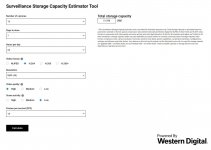
The only way you can get a weeks footage from (16) 4k ip cams would be if you were using the lowest possible settings - like 4 frames per second, and if you were using H265+ which most people don't use because it takes more processing power.

More realistic setting would require over 50 TB...

https://shop.westerndigital.com/tools/surveillance-capacity-calculator

attachment.php


attachment.php
 

Attachments

  • TRI - 175.jpg
    TRI - 175.jpg
    95.5 KB · Views: 88
  • TRI - 176.jpg
    TRI - 176.jpg
    92.1 KB · Views: 88

67CarGuy

Well-known member
Joined
Feb 6, 2008
Messages
763
Location
Outside Boston, MA
Sounds like you all can help me out! I'm running a AP AC Pro, but have been unable to get it work on its own. Currently it's hardwired downstream of an Apple Airport Extreme, which then goes to an Arris Surfboard modem. It all works, but...

I thought I would be able to use the AC Pro *without* the Airport, but when I hook it up I get no access to the outside world. What am I doing wrong?

On a separate but related note, I intend to get at least one more AP, likely the Lite, as I don't get great signal strength on the 1st floor (2 story brick home, router and modem currently upstairs).

Thanks in advance!
 

67CarGuy

Well-known member
Joined
Feb 6, 2008
Messages
763
Location
Outside Boston, MA
Sounds like you all can help me out! I'm running a AP AC Pro, but have been unable to get it work on its own. Currently it's hardwired downstream of an Apple Airport Extreme, which then goes to an Arris Surfboard modem. It all works, but...

I thought I would be able to use the AC Pro *without* the Airport, but when I hook it up I get no access to the outside world. What am I doing wrong? :headscrat:

On a separate but related note, I intend to get at least one more AP, likely the Lite, as I don't get great signal strength on the 1st floor (2 story brick home, router and modem currently upstairs).

Thanks in advance!
 

boatshoes

Well-known member
Joined
Feb 20, 2019
Messages
126
Location
Atlanta
Sounds like you all can help me out! I'm running a AP AC Pro, but have been unable to get it work on its own. Currently it's hardwired downstream of an Apple Airport Extreme, which then goes to an Arris Surfboard modem. It all works, but...

I thought I would be able to use the AC Pro *without* the Airport, but when I hook it up I get no access to the outside world. What am I doing wrong?

On a separate but related note, I intend to get at least one more AP, likely the Lite, as I don't get great signal strength on the 1st floor (2 story brick home, router and modem currently upstairs).

Thanks in advance!

The AC Pro is not a router, it doesn't assign IP addresses. You still need the router in the mix.
 

KSJeff

Well-known member
Joined
Dec 19, 2011
Messages
759
Location
Andover, Kansas
I am confused by your approach... I have an extremely fast home network with full AP coverage of the house and yard. Full strength everywhere. I use "cheap" $30-$40 routers as my access points for extending the wireless network and I plug in all bandwidth hogs directly to my wired LAN. I have 8 4K cameras all on their own POE network plugged directly into my NVR. I didn't spend thousands, I barely spent hundreds.

Networking doesn't need to be expensive.

Pretty similar at my place. A few cheap access points and a bridge in my shop. Probably have $100 in equipment. If my internet goes out for a few minutes, I don't really care that much.

Now, at work (I'm a network engineer by profession) I run $750 Meraki APs with MS350 cloud switches and a bunch of M22 cameras. All managed in the cloud. I don't really care that much about centralized management at home. Not sure I care that much about it at work either really (as long as I have centralized monitoring).

I did install a ubiquiti AP at a customers site because they insisted on the brand. Seemed ok. Performs about like my $20 TP Link.

YMMV, I'm a trained professional. Yada, yada, yada...:beer:
 

niget2002

Well-known member
Joined
Oct 2, 2012
Messages
11,122
Location
Josephine, TX
Internet is just as important as water and sewage....

That is so funny, that I don't know if you are being serious or not. Are you going to die if you can't check your Facebook or Twitter account every 5 minutes or so?

Get real. You don't need to spend $1,200 to $2,000 to have decent internet in your house...

I have about (30) devices hard wired on my main LAN. Another (13) IP Cams on their own separate network controlled by Blue Iris running on my Home Server. A three piece ORBI system takes care of WiFI and in my 4,000 sq ft we have outstanding coverage. Normally have around 25 or so devices connected on WiFi. And, I don't want my Home Automation on WiFi, that is why I use Z wave.

For a router I am using free software - pfSense, which is also running on my Home Server along with PLEX and some other things. pfSense takes care of everything - DHCP reservations, 5 different sub-nets, firewall rules, etc etc. All in one place

My 3 piece Orbi System (mesh) was around $300 from Costco and all it does is WiFi. I picked up a used Brocade ICX6450 24 Port PoE switch off of eBay for $150 - (that was a $3,000 switch brand new). So around $500 all in

Typical speed test using my laptop on WiFi is around 80 down and 12 up out of a 200 down and 20 up connection.

Lastly, I certainly wouldn't want to limit my choices when it comes to IP Cams. Currently I am using a mix of Hikvision and Dahua, but if something else where to come along, I would no concerns using it

different strokes for different folks, I guess

I get what you're saying here, but how long did it take you to piece all that together and figure out how to make it all work together seamlessly?

For someone with the knowledge of computers and networking, yes, you can easily go this route.

For someone with less knowledge, buying components that are known to work together from the same manufacturer has a lot of benefits. 1 source to go to if something goes wrong. 1 source for information on configuration questions.

After dealing with computer stuff all day at work, I prefer to come home to a network that I don't have to touch. I went the unifi route for ease of use. I might have over-spec'ed when I went with the AC Pro, but the extra coverage is nice. I can just about mow my entire 1.25Acre lot streaming spotify from my phone without dropping off the wifi to do it.

Like you, I have a rather large setup with a somewhat unique configuration. Kids have their own VLAN so I can set stronger restrictions through pihole, and the home automation stuff all run on their own VLAN/ESSID.

I haven't started adding cameras yet. Haven't decided if I'm sticking with unifi stuff for that or branching out and playing with Blue Iris. That decision alone is probably why we've lived here over a year and I still haven't bought any hardware yet. Maybe closer to Christmas when I can start crawling around the attic more without melting from the heat.
 

Git

Well-known member
Joined
May 18, 2008
Messages
6,894
Location
S Cal
Couple of weeks ago, I actually bought a UniFi NanoHD access point from Amazon - $160. I found it very awkward to setup. You either have to use an app on your cell phone or you can download the 'controller' software for free. The software actually required me to install java to run. Java in 2020? Once the NanoHD was on my network, the only way to access it was through the controller software or app. Personally, I prefer just pulling up a web page if I need to make some changes....

In any case, I was setting up a new WIFI subnet and I took the opportunity to compare the actual performance of the NanoHD versus my old router setup as an access point. It was a Linksys EA9500 v2. Using my laptop, I did some extensive testing in several different rooms in my house. I measured download speeds with Fing and file transfer speeds with iPerf. In every room, the Linksys outperformed the Nano HD which I ended up returning for a refund.

Like a lot of things in life, the Nano HD simply did not live up to all the hype. But, neither the Nano HD or the Linksys compared to the coverage I was getting from the 3 piece Orbi system I was currently using. Don't get me wrong, I wasn't expecting either device to compare with the 3 piece Orbi, but setting up and installing the Orbi is extremely simple and doesn't require the wired connection like the Nano HD or the Linksys did.

I am certainly not an IT expert - from what I understand, vlans can be a little complicated to setup and you probably are also going to need some managed switches, but nothing is as secure as having separate physical subnets?

I think for the average joe homeowner/garage journal reader - a consumer mesh system will be more than enough to handle their needs unless you are talking about some really unique situations. For the enthusiasts with money to burn, sure, go ahead and buy the Unifi/Snap-On/Festool/Whatever Brand - if it floats your boat, but personally, I would not want to lock myself into a proprietary system like Unifi. I would rather pick and choose the best components that fit my needs instead of being limited to what brand X has to sell
 
To avoid these ads, REGISTER NOW!
Top Bottom