To avoid these ads, REGISTER NOW!

New from P.T. WA

Don T

Well-known member
Joined
Sep 7, 2006
Messages
86
Location
Port Townsend, WA
Hi All,

Been following along for quite a while without posting, so thought I should get off my a?# and introduce my self.

My name is Don and I live in Northwest Washington State (Port Townsend). Started a garage/shop project a while ago and it's all coming together. From my point of view all I can say is "It's about time!!!"

Soon as I figure out how to add pictures I'll try and start a progress thread from the begining.

Really like the site, lot of gooooood info.

Don
 
To avoid these ads, REGISTER NOW!

Choppedsled

Active member
Joined
May 18, 2007
Messages
28
Hello Don, I'm also from WA state.........Spokane. There's a lot of good info on here, but not a whole lot of answers when you ask questions. Unless of course it's about what brand of breakers are best....thats a tough one. LOL
 
To avoid these ads, REGISTER NOW!
OP
D

Don T

Well-known member
Joined
Sep 7, 2006
Messages
86
Location
Port Townsend, WA
Thanks for all the welcomes... I've spent the past half hour trying to post a pic of the building I'm putting together, but having no luck. Must be my age, being hard headed, or I just need step by step (SIMPLE) instructions???

Any help will be welcomed.

Thanks,
Don
 

volvo

Well-known member
Joined
Feb 19, 2006
Messages
1,304
Location
PNW 45th Parallel
,Copied fromthe HAMB....H

There is still some frustration and confusion regarding posting of pictures. hope this will help. If something I have written is confusing let me know and I will try to re-write it in a clearer fashion.


To Post to the HAMB's Server :

1. click on reply
2. scroll down below the area reserved for text responses.
3. find the " manage attachments" gray box and click it
4. browse your hard drive for a picture(s) and then hit upload
5. after a short wait for uploading - click submit reply

If your pictures are less than 80kb's each you will see your pictures in the post.
If you attached pictures that are too big you will see an empty image box....re-size your pictures and try again.
Next we need a tutorial on resizing and options for software.


To Post by linking a photo from another website :

1. click on "user cp" pull down menu
2. click on "edit options"
3. scroll down to the bottom of the page to " miscellaneous options"
4. change selection to " enhanced interface full WYSIMYG editing "
5. now you can post links to pictures from other webpages and hosted sites.
6. to post a picture link hit reply to post
7. above the area to type a message are many icons. Select the icon and then type in or paste the address of the picture. an example would be the address for the above icon. right click it and select properties. copy and paste the address given under properties. http://www.jalopyjournal.com/forum/...insertimage.gif

Linking pictures has many benefits. It doesn't use up HAMB bandwidth and slow down Ryans server. You can post a much larger and prettier picture with a link. There is no 80kb limit.
 
OP
D

Don T

Well-known member
Joined
Sep 7, 2006
Messages
86
Location
Port Townsend, WA
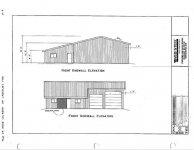
Just want to say "THANKS" for the info on posting pictures, here's my 1st try...

It's a Web Steel building, their out of Sandy, OR. The main shop is 40' deep by 56' wide with a 10' x 10' & a 12' x 12' doors. The wing or extended shed roof is 21' deep by 29' wide, that's going to be an office / rec room - bar.

Any way, more on that later. And I hope this works.

Don
 

Attachments

  • Building.jpg
    Building.jpg
    38.7 KB · Views: 14
To avoid these ads, REGISTER NOW!
Top Bottom