To avoid these ads, REGISTER NOW!

new hard drive for shop computer?

supersteve

Well-known member
Joined
Apr 2, 2012
Messages
451
Location
Camas, WA
I have an old (2007) computer I plan on using in the shop for Mitchell Ondemand and other internet stuff. Problem is, it apparently needs a new hard drive.
If you guys had a Gateway GT5465E desktop computer with a 320GB SATA II (?) hard drive, where would you go to get one and what is a good price? Does it have to be identical to the original hard drive or is this a one size fits all deal? I don't think it would be a problem for me to do the swap myself, I'm an auto repair tech and I have done a cd drive swap on another old computer before.

Any advice or tips?

thanks
Steve
 
To avoid these ads, REGISTER NOW!

Snapped-off

Well-known member
Joined
Feb 22, 2012
Messages
4,756
Location
Indiana
If that's the only hard drive on the computer, you would need some way to restore the operating system (Windows). Any SATA II hdd should work though, just make sure it is SATA II and not IDE. To my limited knowledge, IDE is older tech.

Edit: I've always used Newegg for computer parts. Another popular site is TigerDirect
 
Last edited:

FriendOfYours

Well-known member
Joined
Feb 26, 2012
Messages
303
Any 3.5" sata drive will work. Newegg.com if you can wait or just head to best buy.

1tb can be had for under $100
 

roger55

Well-known member
Joined
Mar 19, 2006
Messages
595
Location
Fort Collins, CO
All SATA controllers and drives are backward compatible. So any SATA drive will work.

Got a Best Buy close to you? They will have a selection of them.
 

Mr.Nutcase

Well-known member
Joined
Apr 23, 2009
Messages
3,850
Location
USA
Is there room to add a second hard drive, and leave the old one?
What operating system do you have?
I would recommend a western digital hard drive.
On the western digital webpage there is a program than you can copy your drive
 
Last edited:

mrobins297aaa

Well-known member
Joined
Sep 20, 2010
Messages
3,283
Location
south east michigan
just curious if the hard drive is shot, when you put the new hard drive in there where are you going to get the windows operating system from?........do you have the windows disk?
just asking because I had this happen to me and ended up have to buy a new windows xp disk to get the system working again
 

Mr.Nutcase

Well-known member
Joined
Apr 23, 2009
Messages
3,850
Location
USA
just curious if the hard drive is shot, when you put the new hard drive in there where are you going to get the windows operating system from?........do you have the windows disk?
just asking because I had this happen to me and ended up have to buy a new windows xp disk to get the system working again

Ebay, amazon, ect
 
OP
S

supersteve

Well-known member
Joined
Apr 2, 2012
Messages
451
Location
Camas, WA
Good point on the OS, I forgot to ask about that. This comp has Windows Vista on it but folks tell me XP is more for business. I have some first hand experience with that. Bought a laptop a couple of years ago to use at work, went to load Ford's IDS program and discovered vista was not supported........

Can I have XP put on this instead?
I'll have to see how much the IT guy at work will charge me to load it on.
 

mdbeck1

Well-known member
Joined
Mar 7, 2010
Messages
2,297
Location
Norman, OK
I have an old (2007) computer I plan on using in the shop for Mitchell Ondemand and other internet stuff. Problem is, it apparently needs a new hard drive.
If you guys had a Gateway GT5465E desktop computer with a 320GB SATA II (?) hard drive, where would you go to get one and what is a good price? Does it have to be identical to the original hard drive or is this a one size fits all deal? I don't think it would be a problem for me to do the swap myself, I'm an auto repair tech and I have done a cd drive swap on another old computer before.

Any advice or tips?

thanks
Steve

If your old drive is a SATA II then it will be easiest to replace it with another SATA II. The harder part will be if you don't have the Windows installation disk(s). Try Ebay or Craigslist if you don't have the disks. they should be cheaper than most computer stores. We also have a monthly computer sale here (http://www.computershowok.com/). They usually have older OS installation disks (and licenses) fairly inexpensively (think about getting windows XP instead of Windows 7. It will save you bucks). If there is something similar near you it would be a good place to start.

The physical replacement of of the hard drive is not a big deal. A couple of screws and plug in a couple of wires. The hard part is getting the files recovered. Remember that the hard drive is the brain of your computer. You've got to rebuild the disk. You might be able to do a ghost copy of the old disk to the new one if the old disk is still functional.

If all else fails call a "geek" friend and offer them a six pack.
 

TheTurk

Well-known member
Joined
Apr 10, 2012
Messages
66
Location
New Jersey
like others mentioned any 3.5" sata hdd would to rest is all personal preferences..
id think for a shop use anything over 500gb should be enough space western digital or seagate brand hdd s never failed me so id look for one of those...
i think you better off with whatever OS installation disc you already have there is not much defference to light pc user IMO
take out the old hdd, install the new hdd the same way , pop in your OS installation disc , boot your pc ...
make sure you have your correct windows product key with your disc !!
good luck...
 

Vendrell

Member
Joined
Jul 4, 2012
Messages
13
How do you know the hard drive is no operable? I would try getting an OS and doing a fresh install before I went out and bought a hard drive and an OS.
 

otis66

Well-known member
Joined
May 28, 2010
Messages
1,875
I would install a removable harddrive. There should be a space for it.
 
OP
S

supersteve

Well-known member
Joined
Apr 2, 2012
Messages
451
Location
Camas, WA
How do you know the hard drive is no operable? I would try getting an OS and doing a fresh install before I went out and bought a hard drive and an OS.

That's a good question, I'm just going by what the barracks lawyers and the IT guy told me. Given the nature of what I will be doing with this, I would feel more comfortable with a new drive.


I would install a removable harddrive. There should be a space for it.

Would this disable the old drive? Is it possible for the old drive to continue to cause problems with this arrangement?
 

Vendrell

Member
Joined
Jul 4, 2012
Messages
13
That's a good question, I'm just going by what the barracks lawyers and the IT guy told me. Given the nature of what I will be doing with this, I would feel more comfortable with a new drive.

Oh if you have had someone from IT say so i would believe him.

Here is the hard drive that i run in my pc's.

1TB
http://www.newegg.com/Product/Product.aspx?Item=N82E16822152185

I wouldn't recommend getting under a 1tb unless you are strapped for cash, as its really only a 15-20 dollar difference from a quality 320-500g drive.

On your case you should have a windows sticker with the factory CD key it should also list what version of Vista it came with. If it came with Business or Ultimate you can get a free downgrade to XP pro from Microsoft. Unfortunately you have to have a XP install disc along with a xp key, so you would need to either have one from another computer or borrow from a friend. Then you would contact MS when activating XP and give them your Vista key and they will activate the product.

A hassle i know but its doing it the legit way.

http://www.microsoft.com/oem/en/licensing/sblicensing/pages/downgrade_rights.aspx#fbid=NprrcU_bogg
 
To avoid these ads, REGISTER NOW!

theoldwizard1

Well-known member
Joined
Feb 22, 2011
Messages
43,132
Location
SE MI
I have been in the computer business for over 30 years. Now that I am retired, I only "support" about a dozen different machines for 8 or so different people. These run from single cor laptops to 6 core desktops used for image editing. I have built computers from the ground up (not cost effective any more). I have purchased and installed dozens and dozens of hard drive. No brag, just facts

Do NOT be lured in by SIZE ! Bigger is not better. FASTER is better !! Western Digital makes the fastest SATA hard drives around. 10,000 RPM. Additionally, WD has FREE software to help you copy the old drive to the new drive.

Western Digital VelociRaptor WD1500HLHX 150GB 10000 RPM 32MB Cache SATA II Hard drive - Newegg $130

Western Digital VelociRaptor WD3000HLHX 300GB 10000 RPM 32MB Cache SATA II Hard drive - Newegg $160

Western Digital VelociRaptor WD6000HLHX 600GB 10000 RPM 32MB Cache SATA II Hard Drive - Newegg $220

5 year warranty

Shop around. Occasionally you can catch these on sale at other places.

Downgrading to XP is difficult and maybe be impossible (missing drivers). The same may be true with Windows 7 (I have done both; not an easy task)
 
Last edited:

philw

Well-known member
Joined
Mar 26, 2007
Messages
724
Location
Ohio

Don't pay for an OS! Ubuntu is nice but it looks like you only have 1gb of memory. If you haven't upgraded your memory then you may want to install Xubuntu or Lubuntu which are lighter weight versions that will still do the things you listed and will be faster.
If you are determined to put a microsoft product on it DO NOT put anything other then XP on it because your memory will make perform horribly. Windows products are memory hogs.
I don't like running Linux (Ubuntu) from a cd or USB drive unless I have to because it runs slower that way. You may try it on a live disk to see if you like it but I would do a hard install if you plan on using it a lot.

Linux is a much more stable OS than windows and runs faster.
You won't have Internet explorer (probably a good thing) but you will have Firefox or chromium (like google chrome) as a browser.

Edit: theoldwizard has an excellent point about drivers. You will have to find new hardware drivers if you downgrade or upgrade and that can be a huge pain. Y
Linux has all the basic drivers built in and you shouldn't have to worry.
 
Last edited:

philw

Well-known member
Joined
Mar 26, 2007
Messages
724
Location
Ohio
Good point on the OS, I forgot to ask about that. This comp has Windows Vista on it but folks tell me XP is more for business. I have some first hand experience with that. Bought a laptop a couple of years ago to use at work, went to load Ford's IDS program and discovered vista was not supported........

Can I have XP put on this instead?
I'll have to see how much the IT guy at work will charge me to load it on.

It's not hard to put an OS on, I wouldn't pay unless you don't have the time to mess with it.

XP is a standard OS. Business really doesn't have anything to do with it except it's more common to find them running XP. XP is OLD and Microsoft will stop supporting it sometime over the next couple of years. Microsoft is making a big push for windows 8 and really wants to see people at least on windows7 computers.
 

AETD

Well-known member
Joined
Jul 12, 2012
Messages
176
Location
In Flanders Fields
Do NOT be lured in by SIZE ! Bigger is not better. FASTER is better !! Western Digital makes the fastest SATA hard drives around. 10,000 RPM. Additionally, WD has FREE software to help you copy the old drive to the new drive.

1) The internet is full of free software. look for clone harddisk and you will find enough

2) Why would he spend 50% more on a highspeed hdd? he is using it for online stuff.
He is not rendering 3Gb photoshop layers on it. He is not architecting on autocad, etc...

if you are running workshop related software on it. stick to xp, but if vista runs good for your needs. stick to vista. as you have probably a vista recovery and drivers cd for your computer with it?
I would prefer to go to win7 (have xp mode) and you are back in the 21st century ;)

If it's up to OS everyone have his own opinion. like on girls, cars, tools, etc... just go with what fit your needs.
 

AETD

Well-known member
Joined
Jul 12, 2012
Messages
176
Location
In Flanders Fields
It's not hard to put an OS on, I wouldn't pay unless you don't have the time to mess with it.

XP is a standard OS. Business really doesn't have anything to do with it except it's more common to find them running XP. XP is OLD and Microsoft will stop supporting it sometime over the next couple of years. Microsoft is making a big push for windows 8 and really wants to see people at least on windows7 computers.

Been palying with the test win8 and i'm not impressed. I stick to win7
All developers had a notice (back in 2009) from microsoft that they will stop the support for xp in 2014. i still know cnc machines working on win95, without any problem.
 

darkk

Well-known member
Joined
Dec 24, 2009
Messages
3,361
Location
Willimantic, Ct.
I have been in the IT business for many years also. It's true that a Linux based OS is faster etc, etc... But! it is not for the uninitiated user. It requires a little bit of finesse that new users generally lack. I would stick with Windows, my preference has been Windows 7 for the general populace. Any new OS install may present driver update issues so don't let that scare you because it isn't difficult.
 

philw

Well-known member
Joined
Mar 26, 2007
Messages
724
Location
Ohio
Been palying with the test win8 and i'm not impressed. I stick to win7
All developers had a notice (back in 2009) from microsoft that they will stop the support for xp in 2014. i still know cnc machines working on win95, without any problem.

That's because it's a cnc machine, the OP is talking about Internet access. Last time I played with 98se on a fresh install it wouldn't even let me load some websites such as Facebook due to browser issues. The newer versions of IE are not even compatible with older windows.

I like windows 7 ( if I have to use windows). I haven't used windows 8 yet but have seen a few reviews and screenshots. It seems most reviewers agree with you.
Due to the OP having vista originally on the computer he could have issues with drivers if he changes. If he only needs Internet access and basic services Linux would be the easiest or keeping vista (but vista *****).
 

philw

Well-known member
Joined
Mar 26, 2007
Messages
724
Location
Ohio
I have been in the IT business for many years also. It's true that a Linux based OS is faster etc, etc... But! it is not for the uninitiated user. It requires a little bit of finesse that new users generally lack. I would stick with Windows, my preference has been Windows 7 for the general populace. Any new OS install may present driver update issues so don't let that scare you because it isn't difficult.

I think you are totally wrong. Maybe you used Linux years ago? I set up Linux machines all the time for people who have virtually no computer knowledge and they love them.

Why would you recommend windows 7? Did you look at the specs of his machine? If its stock he only has 1 gb of memory!!

The newer versions of Linux are easy to install and you can test them first with a live cd.

If you haven't had driver issues then you haven't done enough installs with non conforming hardware.
 

AETD

Well-known member
Joined
Jul 12, 2012
Messages
176
Location
In Flanders Fields
i have an asus eeepc 1005h 1.6mHz atom 1GBRam (upgraded to 2gb) and works verry happy with win7.

the computer is 5 years old. worked unstable for 5 years with vista.

there are 1000 desktops running on vista. only tweakers say it is unstable. for a common house/garage computer. Vista works good for non it techs..

My only thought is. If you have a 7500$ worth car would you put in a 10000$ new engine in it? just to drive you to the hardwarestore and back?
That is what you are doing here. that computer is worth 75$ and you will replace a +100$ harddrive in this?

people talk about OS or expensive hardisks to speed things up. i'm sorry, it is not worth it.

If you realy want to spend $ on it. go for the cheapest hdd
(depending on what you use it for is 160Gb to 320Gb is more than enough for a garage computer. some car brand software, some model specific pdf instructions. what else will you run in your garage?)
and get some cheap secondhand ram to upgrade your system to 2Gb this will cost you about

This wil cost you 75$ and set you good until the next thing fails...

thing with desktop computers is, you can change and upgrade all parts separate, but they stay as slow as the weakest (often the oldest) part.
 

theoldwizard1

Well-known member
Joined
Feb 22, 2011
Messages
43,132
Location
SE MI
2) Why would he spend 50% more on a highspeed hdd? he is using it for online stuff.
I have an old HP laptop. Earlier this year I sprung for a 64GB SSD. Best investment I ever made ! This thing boot in less than 45 seconds, comes out of sleep in like 5. I installed Vista from a retail distribution and dropped the HP Recovery Partition and all the **** HP loads on. Currently only using 25GB.

It is used almost exclusively for surfing and email.


If OP only has 1GB he needs to upgrade. According to Gateway, the max is 2GB (throw away 2 - 512MB DIMMs and buy 2 - 1GB DIMMs). IMHO Vista needs a minimum of 2GB. Win7, 4GB.

It is beginning to sound like maybe it is time for a whole new computer. You can find 2-3 year "off lease" computers on eBay, faster, better graphics, more memory, bigger disk for $300-$400.
 

roger55

Well-known member
Joined
Mar 19, 2006
Messages
595
Location
Fort Collins, CO
I run a custom built and have an Intel Core I7-2600K 3.4ghz, 16GB of RAM, dual 120GB SATA3 SSDs running with Raid0 for the host operating systems. In the machine I also have dual 500GB SATA2 drives running in Raid0 for my data. I also run an external 1GB drive for backups. I also run once a week backups to the computer in my workshop and once a month backups to the HTPC computer in my media room. I believe in redundancy for backups.

I also don't access the internet with Windows. It's just too risky. I do use Windows 7 for my host operation system for my PC but only access the internet with a Virtual Machine running Mint 13 Linux. The PC in my workshop is Mint 13 Linux only.

This would sound complicated to the average person but I have no formal training with computers. Just learned all this stuff from being around them and paying attention since 1985. I don't do anything really unusual that requires a lot of power. Just some photo editing stuff and music. I don't like computer games and don't have a single one. Some people say if you just do normal things on a computer, you don't need the speed and power but I disagree. Once you get used to speed, you get frustrated with a pokey computer pretty darn quick no matter what you are doing.
 
Last edited:

sselander

Well-known member
Joined
Nov 20, 2008
Messages
2,041
Location
CT
I will put my two cents in, since I take care of computers for a living.
It will be cheaper and better for you to get one of the Dell refurb
PC's and then load your software onto it. Sure you can buy a new hard drive and clone your old drive to the new one easily. But then, you are carrying old baggage over. For under $500, you can start off fresh and not worry about if for a few more years.
Today's PC's are more than enough for the average user. If you need to transfer some files over, you can obtain an inexpensive cable allowing you to connect your old hard drive to the new computer via USB. (Hard drive will need to bew removed from the old PC). If you have any questions, you can PM me.

dell.com/outlet
 

philw

Well-known member
Joined
Mar 26, 2007
Messages
724
Location
Ohio
I run a custom built and have an Intel Core I7-2600K 3.4ghz, 16GB of RAM, dual 120GB SATA3 SSDs running with Raid0 for the host operating systems. In the machine I also have dual 500GB SATA2 drives running in Raid0 for my data. I also run an external 1GB drive for backups. I also run once a week backups to the computer in my workshop and once a month backups to the HTPC computer in my media room. I believe in redundancy for backups.

I also don't access the internet with Windows. It's just too risky. I do use Windows 7 for my host operation system for my PC but only access the internet with a Virtual Machine running Mint 13 Linux. The PC in my workshop is Mint 13 Linux only.

This would sound complicated to the average person but I have no formal training with computers. Just learned all this stuff from being around them and paying attention since 1985. I don't do anything really unusual that requires a lot of power. Just some photo editing stuff and music. I don't like computer games and don't have a single one. Some people say if you just do normal things on a computer, you don't need the speed and power but I disagree. Once you get used to speed, you get frustrated with a pokey computer pretty darn quick no matter what you are doing.

:thumbup:

Also, sselander has a good idea. If you want to stay with windows and have to buy the software and the hard drive and upgrade memory then it's probably a good idea to go ahead and upgrade everything. It wouldn't cost that much more.
 
Last edited:

AETD

Well-known member
Joined
Jul 12, 2012
Messages
176
Location
In Flanders Fields
Off topic...

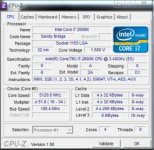
I run a custom built and have an Intel Core I7-2600K 3.4ghz, 16GB of RAM,

if you like the speed, why is it not overclocked to 5Ghz? ;) played with them last winter. they are pretty fun cpu's to play with..
 

Attachments

  • i7 2600K 5ghz.jpg
    i7 2600K 5ghz.jpg
    19.9 KB · Views: 3
To avoid these ads, REGISTER NOW!
Top Bottom