To avoid these ads, REGISTER NOW!

New Post-Modern Garage/Workshop

works4me

Well-known member
Joined
Aug 11, 2011
Messages
250
Location
Houston Texas
Hello! I've been a lurker on this site for a while and have really learned a lot. I thought it was finally time to share.

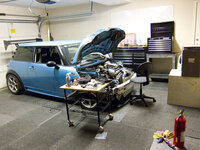
Now that construction has finally started on my new garage, I finally feel comfortable posting about the project. Last year I moved from a townhouse into a new home with a nice size backyard. The house is wonderful except for one minor detail: it has no garage. In the Townhouse I had converted the standard two-car garage into a workshop for my Mini Cooper Racecar:
p993450852-3.jpg
p740638573-3.jpg
p987859619-3.jpg

I've put some more information about my Mini Racecar build here:

http://philomathistory.blogspot.com/2012/01/mini-racecar-build-1.html

And here's a thread in the Mini forum with the whole history:

http://www.motoringalliance.com/forums/project-car-builds/2179-superturbo-mini-project.html#axzz1ql4mTFhP

I wanted to create a workshop that gave me enough room to work on the car as well as room for a variety of metal fabrication tasks - both for the car & other projects/ideas I have. I went through a very large number of design iterations - some by choice, some forced on me by others. For example, the city threw a major wrench in my plans a couple of months ago when they informed me I couldn't build where I wanted to because the buidling setback was 25' instead of 5' (because I was next to a major thoroughfare)!! That forced me to "flip" the design to the other side of the yard.

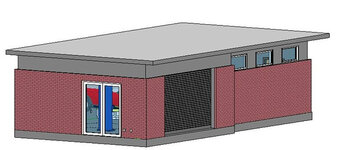
Here's what I finally came up with. The design mirrors the design elements of the house (flat roof, overhangs, courtyards, etc.):

p1003490683-3.jpg
p841868997-3.jpg
p1034483716-3.jpg
p883626337-3.jpg
p496297592-3.jpg
p399150711-3.jpg
p343997732-3.jpg


One half of the building is focused on "clean" work with the car; the other is for the "dirty" metal fabrication & welding. In between is storage cabinets. I've kept the design flexible so that I can easily rearrange things.

For power, I'm running 110 & 220 outlets along the front & back walls, and I will have a total of 200A service just for this building. I will have at least 5 dedicated 50A 220v circuits for welding & heavy equipment (Mill, Lathe, CNC plasma cutter, etc.).

For lighting I'm using 8 4x4' T8 fixtures & aiming for 100 lumens/sf. I will also have separate task lighting over the workbenches.

The walls will be covered with hardiplank sheets laid out in a brick pattern. The ceiling will be drywalled.

I'll post the construction photos next...

Thoughts/comments/feedback are encouraged.


BTW if you hadn't noticed, I never do anything the normal way. ;)
 
To avoid these ads, REGISTER NOW!

ambenz

Well-known member
Joined
Dec 12, 2010
Messages
4,236
Location
NW Chicago Suburbs
Nice modern design, I like its style.
I would spin that garage 90 degrees, along the back property line so you can stretch the garages footprint with the goal of adding another bay to the design.
This will also allow you to view the doors from the house and block the publics view from the street.
Adding some height to the structure would also allow you to have 2 cars in one bay, one on the lift, and one below.
NEVER forget to dream and GO BIG! Get everything you want.
Once the cost estimates come in, think what you can live without...only then, should start being realistic.
Think how you can keep those items you want, or at least have in place for future installs, when your more cash happy.
I was so glad I layed pipe to remove overhead electric wires in the future....last year I use that pipe to make it happen, 7 years after the garage was up.
I am glad I layed gas line too...it took 2 years after I built the garage to afford to use it.
I am sad, I didn't run 100 amp service, coax, telephone, cat5, and a water line.
Guess what I am saying is ...plan for the future!!!
 

Jagmandave

Well-known member
Joined
Nov 6, 2011
Messages
6,299
Location
Overland Park, Ks.
Hello fellow Cooper owner and M/A member!

Garage looks fantastic!

Welcome to the Garage Journal, can't wait to see the rest of the build!

(I'm Minidave on M/A)
 
OP
W

works4me

Well-known member
Joined
Aug 11, 2011
Messages
250
Location
Houston Texas
Thanks for the positive responses!

Here's some photos of the foundation construction. It's a pier and beam 5" (thick) concrete slab. The piers go down 10', and the beams are at least 2' deep. It is easily strong enough to handle any equipment I want to place and/or adding a second floor in the future.

BTW This also shows how high the fences are in the back. The side fence facing the street is 8' tall & the back fence is 12'. The previous owner installed these to mitigate street & freeway noise/lights. I'll probably have to fix/replace them in the near future (they're falling apart).

p332238086-3.jpg

p381986585-3.jpg

p54419025-3.jpg

p146036349-3.jpg

p383177894-3.jpg
 
OP
W

works4me

Well-known member
Joined
Aug 11, 2011
Messages
250
Location
Houston Texas
Great thoughts/feedback. It mirrors the way I've been thinking about it. It's a bit hard to see, but in this placement I can add on either to the left (towards the house) or right (in the back). And I've designed it so that I can add a second floor in the future.

FYI because of the fencing & placement you can't see the whole building from the street....plenty of privacy!!


Nice modern design, I like its style.
I would spin that garage 90 degrees, along the back property line so you can stretch the garages footprint with the goal of adding another bay to the design.
This will also allow you to view the doors from the house and block the publics view from the street.
Adding some height to the structure would also allow you to have 2 cars in one bay, one on the lift, and one below.
NEVER forget to dream and GO BIG! Get everything you want.
Once the cost estimates come in, think what you can live without...only then, should start being realistic.
Think how you can keep those items you want, or at least have in place for future installs, when your more cash happy.
I was so glad I layed pipe to remove overhead electric wires in the future....last year I use that pipe to make it happen, 7 years after the garage was up.
I am glad I layed gas line too...it took 2 years after I built the garage to afford to use it.
I am sad, I didn't run 100 amp service, coax, telephone, cat5, and a water line.
Guess what I am saying is ...plan for the future!!!
 

shopnut

Well-known member
Joined
Feb 22, 2006
Messages
4,237
Location
Florida
Great plan, but mostly, what great renderings - those last couple in the first post are almost like you are standing in there looking at the finished shop. What software did you use and did you spend a lot of time creating it?

Good luck with the build.
 
OP
W

works4me

Well-known member
Joined
Aug 11, 2011
Messages
250
Location
Houston Texas
I'm lucky enough to have a copy of Autodesk Revit to play with. It wasn't difficult to generate the renderings once I found models for the tools, lift & car. There's a lot I could do to improve the rendering; the reflectivity & materials aren't really right...

I'm thinking of making some additional models myself for the other tools I couldn't find (e.g. Mill, Plasma table, etc.). That would really help me to refine the tool layout & storage plan...


Great plan, but mostly, what great renderings - those last couple in the first post are almost like you are standing in there looking at the finished shop. What software did you use and did you spend a lot of time creating it?

Good luck with the build.
 

shopnut

Well-known member
Joined
Feb 22, 2006
Messages
4,237
Location
Florida
I've got a copy of AutoCAD 2012 to play with, but I think Revit was a separate package, correct? Do you know if AutoCAD contains any of that rendering functionality?

We use Unigraghics NX at work and I haven't even had a chance to fire up the new version of AutoCAD yet.
 
OP
W

works4me

Well-known member
Joined
Aug 11, 2011
Messages
250
Location
Houston Texas
Revit is different from AutoCAD, but Autodesk often sells them together as a package. Regardless AutoCAD should have its own rendering system...not sure how good it is.


I've got a copy of AutoCAD 2012 to play with, but I think Revit was a separate package, correct? Do you know if AutoCAD contains any of that rendering functionality?

We use Unigraghics NX at work and I haven't even had a chance to fire up the new version of AutoCAD yet.
 
OP
W

works4me

Well-known member
Joined
Aug 11, 2011
Messages
250
Location
Houston Texas
Update: Fondation poured!

Finally have time to post an update. They poured the concrete about 10 days ago. In the end it took *four* trucks of concrete - a lot more than they originally estimated. Seems like a lot of concrete to me for a 20x40 pad...

I was wondering how they were going to bring the concrete to the pad. They used a motorized wheel barrow (second pic). Very cool.


p894830507-3.jpg

p997247962-3.jpg

p815828287-3.jpg

p1036333665-3.jpg
 

ConCretin

Well-known member
Joined
Jan 20, 2011
Messages
3,378
Location
Central Maine
Wow, Sorry I missed this the first time around. Love the design! It's amazing similar in layout and architecture to what I'm building. The renderings are fantastic. Keep on posting - this ones going to be good.
 
OP
W

works4me

Well-known member
Joined
Aug 11, 2011
Messages
250
Location
Houston Texas
Update: Framing!

Ok, next up - framing! They started this on Monday & have already made tremendous progress.

I'm really pleased with the placement of the windows. They're high enough not to interfere with the interior workspace, yet they'll provide great natural light and fantastic views of the nearby trees.

They should finish the framing early next week & then start the electrical...

p544167749-3.jpg

p922330861-3.jpg

p722445568-3.jpg

p768303190-3.jpg

p706261714-3.jpg

p822673391-3.jpg
 

Omphaloskeptic

Well-known member
Joined
Oct 11, 2008
Messages
2,346
Location
Ultima Ratio, Wa.
"I'm lucky enough to have a copy of Autodesk Revit to play with. It wasn't difficult to generate the renderings once I found models for the tools, lift & car."

Does Revit have its own extensive model library or did you find them in an common industry format library somewhere else? I'm asking if the models could be imported to tools other than Autodesk, or if they are a proprietary native format.

I love that design you created. You must be thrilled to be seeing it finally going up in your backyard. Congratulations!
 
OP
W

works4me

Well-known member
Joined
Aug 11, 2011
Messages
250
Location
Houston Texas
"I'm lucky enough to have a copy of Autodesk Revit to play with. It wasn't difficult to generate the renderings once I found models for the tools, lift & car."

Does Revit have its own extensive model library or did you find them in an common industry format library somewhere else? I'm asking if the models could be imported to tools other than Autodesk, or if they are a proprietary native format.

I love that design you created. You must be thrilled to be seeing it finally going up in your backyard. Congratulations!

Revit has a fairly large library, but doesn't have very much equipment-related stuff. You can import standard models, create your own, or download Revit "Families" from the web. Moreover there are tons of "generic" 3D models around you can use if you hunt a round a bit.

Yes, it's definitely getting exciting! I was slightly nervous about how it would look given that it is my own design. But so far it's turning out very well....
 
OP
W

works4me

Well-known member
Joined
Aug 11, 2011
Messages
250
Location
Houston Texas
Slight design change

My house has steel I-beams as lintels above several of the doors & windows. I was planning on doing the same over the double glass/aluminum entry doors to the garage. The GC pointed out that with an 8' height on the brick that wouldn't look right. So I modified the design slightly to bring the brick on this end all the way up. Here's a quick rendering I did of the change:

p341827956-3.jpg
 
To avoid these ads, REGISTER NOW!

Hottrod

Well-known member
Joined
Jul 6, 2011
Messages
150
Location
West Indies
This is great, I love the design and the layout, and I especially like your methodical and structured approach! What are you thinking about for the finishes and lighting?

Subscribed! :thumbup:
 
Last edited:
OP
W

works4me

Well-known member
Joined
Aug 11, 2011
Messages
250
Location
Houston Texas
Styling details

This is an example of one of the steel lintels in another part of the house that I'm mimicing for the garage. These were installed in an earlier remodel of the house where they opened up additional windows & doors into the brick siding:

p207276867-3.jpg


For the interior I'd like to create the effect of a refurbished industrial feel. For the floor I'd like a simple clear coated epoxy coating with a bit of color similar to this:

p333539192-4.jpg


And as I mentioned earlier I'm trying an experiment for the walls: sheets of smooth hardi-board screwed to the wall in a brick pattern. Imagine something like this except solid colors:

p117847532-3.jpg


Yeah, I know, I'm weird....
 

Omphaloskeptic

Well-known member
Joined
Oct 11, 2008
Messages
2,346
Location
Ultima Ratio, Wa.
"And as I mentioned earlier I'm trying an experiment for the walls: sheets of smooth hardi-board screwed to the wall in a brick pattern. Imagine something like this except solid colors:"

I think it will look very sleek; right in keeping with the overall design. Those panels kind of remind me of the old enameled metal panels they used on some gas stations, dealerships, and some other types of businesses in the Moderne motif in the post WWII era.
 

Attachments

  • 220px-Club_Moderne,_Anaconda,_Montana.jpg
    220px-Club_Moderne,_Anaconda,_Montana.jpg
    12.7 KB · Views: 399
Last edited:
OP
W

works4me

Well-known member
Joined
Aug 11, 2011
Messages
250
Location
Houston Texas
Updated Tool Plan

I've gone back and revised the tool layout plan a bit. I've moved the interior column to 9' from the back wall and shortened the partition to 7', enabling me to fit exactly 3 3' wide cabinets on each side and a 4' wide cabinet on the end. And I can use the area above it more effectively for large-item storage.

That also gives me a bit more width to roll stuff between the sides. I think I can get it so that I can roll a gantry crane almost everywhere if I can find one the right size (or make one).

I'm now going through and planning the contents of each cabinet (e.g. tools, small parts, large parts, etc.). The cabinet on the end will be perfect for small parts storage (i.e. tons of little containers).

p1067573384-4.jpg

p884557818-3.jpg

p592369022-3.jpg

p1007933988-3.jpg
 
Last edited:
OP
W

works4me

Well-known member
Joined
Aug 11, 2011
Messages
250
Location
Houston Texas
BTW before someone comments: yes, I already noticed that the bandsaw is backwards...sigh, what a bunch of perfectionists...
 
OP
W

works4me

Well-known member
Joined
Aug 11, 2011
Messages
250
Location
Houston Texas
Oooo I just had a thought. That center column would be the perfect place to mount an articulating jig crane! I could then lift things just about everywhere in the space, and I could store it above the cabinets when not in use:

p984955151.jpg


hmmmmm......
 

AndysMBgarage

Well-known member
Joined
Dec 30, 2010
Messages
263
Location
Mornington Peninsula Vic Australia
Great plan although I'd also go for more height if possible. The rendered pictures are sensational at showing the full layout. While possible I'd lay some audio cables through the studs for inbuilt speakers.
Do you have a place for the beer fridge?:thumbup:
Cheers
 
OP
W

works4me

Well-known member
Joined
Aug 11, 2011
Messages
250
Location
Houston Texas
Update: Framing #2

It's finally starting to feel like a real building! Roof is on. Wiring is being installed. Siding going up next. Windows & Brick should be installed next week sometime....

p960367393-3.jpg

p633926043-3.jpg

p925995079-3.jpg

p791402795-3.jpg

p624185235-3.jpg

p814557418-3.jpg

p676892923-3.jpg
 
OP
W

works4me

Well-known member
Joined
Aug 11, 2011
Messages
250
Location
Houston Texas
Electrical code issue

We've encountered a slight problem with the electrical plan. I was intending to have 10 220v outlets connected to 6 circuits all 50A - two dedicated circuits for welders & the rest with two outlets each for equipment that doesn't need the capacity or won't run concurrently (220v circuits are circled in Red):

p24813680-4.jpg


However the city won't let us have two 220v outlets on a circuit unless we give them an exact list of what equipment is going on each circuit...I am "disinclined to acquiesce" to that demand.

One the other hand, if I run 10 220v outlets on a separate circuit I'd be required to get a larger capacity service (i.e. > 200 amps!!) even if I don't run them all concurrently...?? Sigh.

So I guess for now I'm just going to run 6 220v sockets, each on its own circuit....
 

mike220

New member
Joined
May 20, 2012
Messages
2
Re: Electrical code issue

We've encountered a slight problem with the electrical plan. I was intending to have 10 220v outlets connected to 6 circuits all 50A - two dedicated circuits for welders & the rest with two outlets each for equipment that doesn't need the capacity or won't run concurrently (220v circuits are circled in Red):

p24813680-4.jpg


However the city won't let us have two 220v outlets on a circuit unless we give them an exact list of what equipment is going on each circuit...I am "disinclined to acquiesce" to that demand.

One the other hand, if I run 10 220v outlets on a separate circuit I'd be required to get a larger capacity service (i.e. > 200 amps!!) even if I don't run them all concurrently...?? Sigh.

So I guess for now I'm just going to run 6 220v sockets, each on its own circuit....
Maybe you could run loose wire from the boxes, the ones that are being used - to where you may install "dedicated" 220v outlets in the future, looped in these empty boxes until then.
 
OP
W

works4me

Well-known member
Joined
Aug 11, 2011
Messages
250
Location
Houston Texas
New fence design

As I mentioned, because of the construction behind us we need to go ahead & replace the back fence. The fence company said we didn't need a permit...but it appears we do (since it is over 8' tall). So here's the drawings I made up for the permit:

p337616954-4.jpg


The pickets overlap each other to prevent light from passing through the fence.

It will look identical on both sides.
 

72Anthony

Well-known member
Joined
May 22, 2010
Messages
294
Location
Houston, TX
What's the horizontal spacing between the 6x6 posts? Are you worried about the 2x4 rails sagging or twisting?

Nice job making the fence look nice from both sides!
Anthony
 
OP
W

works4me

Well-known member
Joined
Aug 11, 2011
Messages
250
Location
Houston Texas
The posts are spaced 8' apart. The rails will be nailed all the way across to the pickets, which will be sandwiched between them on either side. Although it will be very tall, I'm really hoping all the layers will prevent twisting.


What's the horizontal spacing between the 6x6 posts? Are you worried about the 2x4 rails sagging or twisting?

Nice job making the fence look nice from both sides!
Anthony
 
To avoid these ads, REGISTER NOW!
Top Bottom